

TemplateCat
TemplateCat filters over 200 categories of professional web templates by style and features.
tool Details
About TemplateCat
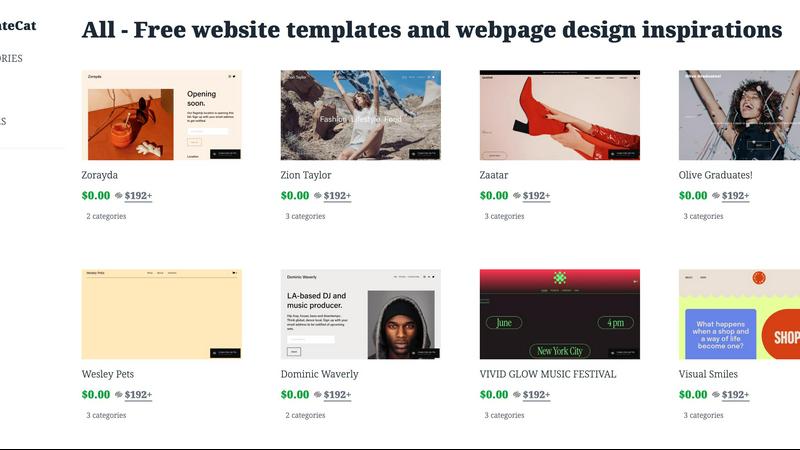
TemplateCat is a sophisticated, centralized discovery and comparison platform engineered for web design professionals, including freelancers, agencies, and developers. It addresses the critical industry pain point of fragmented, time-consuming template research by aggregating high-quality, professionally designed website templates from leading builders like Framer, Webflow, and Squarespace into a single, searchable interface. The core value proposition is significant workflow acceleration and enhanced decision-making efficiency. Instead of manually navigating multiple vendor sites, users can leverage TemplateCat's powerful, criteria-based search system. The platform organizes its extensive library using a detailed taxonomy of over 200 industry and niche categories, 27 distinct visual styles (e.g., minimalist, brutalist, corporate), and 38 functional features (e.g., e-commerce, blog, booking system). This enables precise filtering to match specific client requirements or project briefs. Each template listing provides immediate, interactive on-page previews with responsive device-view toggling for desktop, tablet, and mobile, alongside clear pricing information for the associated website builder. Designed as a meta-search engine for commercial-grade assets, TemplateCat transforms a chaotic, multi-tab research process into a streamlined, analytical operation. Its ongoing roadmap includes expanding the library to over 10,000 assets by incorporating additional sources like Figma Sites and Readymag, solidifying its position as the definitive professional resource for template discovery and comparison.
Features
Centralized Multi-Platform Aggregation
TemplateCat's foundational feature is its aggregation engine, which consolidates professionally designed website templates from disparate leading platforms such as Framer, Webflow, and Squarespace. This eliminates the need for users to conduct separate, parallel searches across each builder's ecosystem. The platform normalizes data from these sources, presenting a unified, comparable view of assets that would otherwise be siloed. This technical approach ensures designers have access to the broadest possible selection of commercial-grade templates from a single point of entry, dramatically reducing initial research overhead and providing a comprehensive market overview.
Advanced Taxonomic Filtering System
The platform employs a highly granular, multi-dimensional filtering system based on a structured taxonomy. Users can filter templates by over 200 specific business and industry categories, 27 defined visual design styles, and 38 functional features or components. This allows for precision targeting, such as finding a "minimalist" style template with "e-commerce" and "testimonial" features for a "photography" category. This technical specification moves discovery beyond basic keywords to a criteria-matching workflow, enabling professionals to quickly narrow thousands of options down to a highly relevant shortlist that meets exact project specifications.
Interactive On-Page Preview with Device Toggling
Each template listing on TemplateCat includes an integrated, interactive preview module that loads directly on the search results page. This module features a responsive device-view toggling system, allowing users to instantly visualize how the template adapts to desktop, tablet, and mobile screen sizes without navigating away. This technical capability provides immediate insight into the template's responsive design quality and user experience across devices, a critical evaluation step that is typically cumbersome when browsing native builder marketplaces.
Transparent Pricing and Platform Attribution
TemplateCat provides clear, upfront pricing information and direct platform attribution for every template in its database. Listings explicitly state if a template is free or has a cost, and prominently display the associated website builder (e.g., Framer, Webflow). This feature delivers immediate financial and technical context, allowing users to factor in both budget constraints and platform compatibility or preference from the outset. It streamlines the comparison process by surfacing key decision-making data that often requires additional clicks or research on external sites.
Use Cases
Agency Workflow Acceleration for Client Projects
Web design agencies can utilize TemplateCat to drastically speed up the initial phase of client projects. When presented with a new client brief specifying industry, style, and functional needs, a project lead can use the advanced filters to immediately generate a curated shortlist of candidate templates from multiple builders. This replaces hours of manual searching across separate platforms, enabling the agency to present professional, vetted options to the client within a much shorter timeframe, thereby improving project velocity and client satisfaction.
Freelancer Portfolio and Service Diversification
Freelance web designers and developers use TemplateCat to efficiently explore templates outside their primary platform expertise. A developer proficient in Webflow can quickly discover and evaluate high-quality Framer or Squarespace templates that match a potential client's request, allowing them to propose solutions across a wider ecosystem. This use case supports service diversification and competitive bidding, as the freelancer can confidently source and recommend optimal templates regardless of the underlying technology, all from a single trusted resource.
Side-by-Side Comparative Analysis for Builders
Professionals evaluating which website builder to adopt for a project or their practice can employ TemplateCat for a neutral, side-by-side comparative analysis. By filtering for a specific category and style, they can view comparable template offerings from Framer, Webflow, and Squarespace simultaneously. This allows for a direct comparison of design aesthetics, feature implementation, and pricing models across platforms on a level playing field, informing a more strategic and data-driven decision on tool selection.
Inspiration and Trend Identification for Designers
Designers seeking inspiration or aiming to identify prevailing visual trends within specific industries leverage TemplateCat's extensive categorized library. By browsing templates filtered by "style" (e.g., "brutalist," "3D elements") within a particular "category" (e.g., "portfolio," "startup"), they can efficiently analyze current design patterns, color schemes, and layout innovations. This use case turns the platform into a powerful research tool for staying current with web design trends and generating fresh creative ideas for custom projects.
Frequently Asked Questions
What website builders does TemplateCat currently support?
TemplateCat currently aggregates and indexes professionally designed templates from leading website builders including Framer, Webflow, and Squarespace. The platform is architected to integrate additional sources, and its public roadmap indicates planned expansions to include templates from platforms like Figma Sites and Readymag. This ongoing expansion is aimed at growing the library to over 10,000 assets, continually broadening the selection available for discovery and comparison.
How does the filtering by "styles" and "features" work?
The platform utilizes a manually curated and structured taxonomy. "Styles" refer to distinct visual design aesthetics, such as Minimalist, Brutalist, Retro, or Corporate—27 such styles are defined. "Features" refer to functional components or pages within a template, such as an e-commerce shopping cart, booking system, blog layout, or contact form—38 such features are categorized. Each template in the database is tagged according to this taxonomy, allowing the filter system to perform precise, multi-faceted searches based on both form and function.
Do I purchase the template directly on TemplateCat?
No, TemplateCat operates as a discovery and comparison meta-search engine. When you select a template, you are provided with clear attribution and a link to the original source on its native platform (e.g., the Framer or Webflow marketplace). All financial transactions, licensing, and final template downloads are handled directly on the website builder's platform. TemplateCat provides the critical service of helping you find, evaluate, and compare the right asset before you proceed to the point of purchase or use.
Is there a cost to use the TemplateCat search platform?
Based on the available information, the TemplateCat discovery platform itself appears to be a free service for users. The platform generates revenue by directing qualified traffic to the template creators and builder marketplaces. The costs associated are for the templates themselves, which are clearly displayed on each listing and are paid to the original provider, not to TemplateCat. Users can search, filter, and preview thousands of templates without a subscription or usage fee.