

X11.social
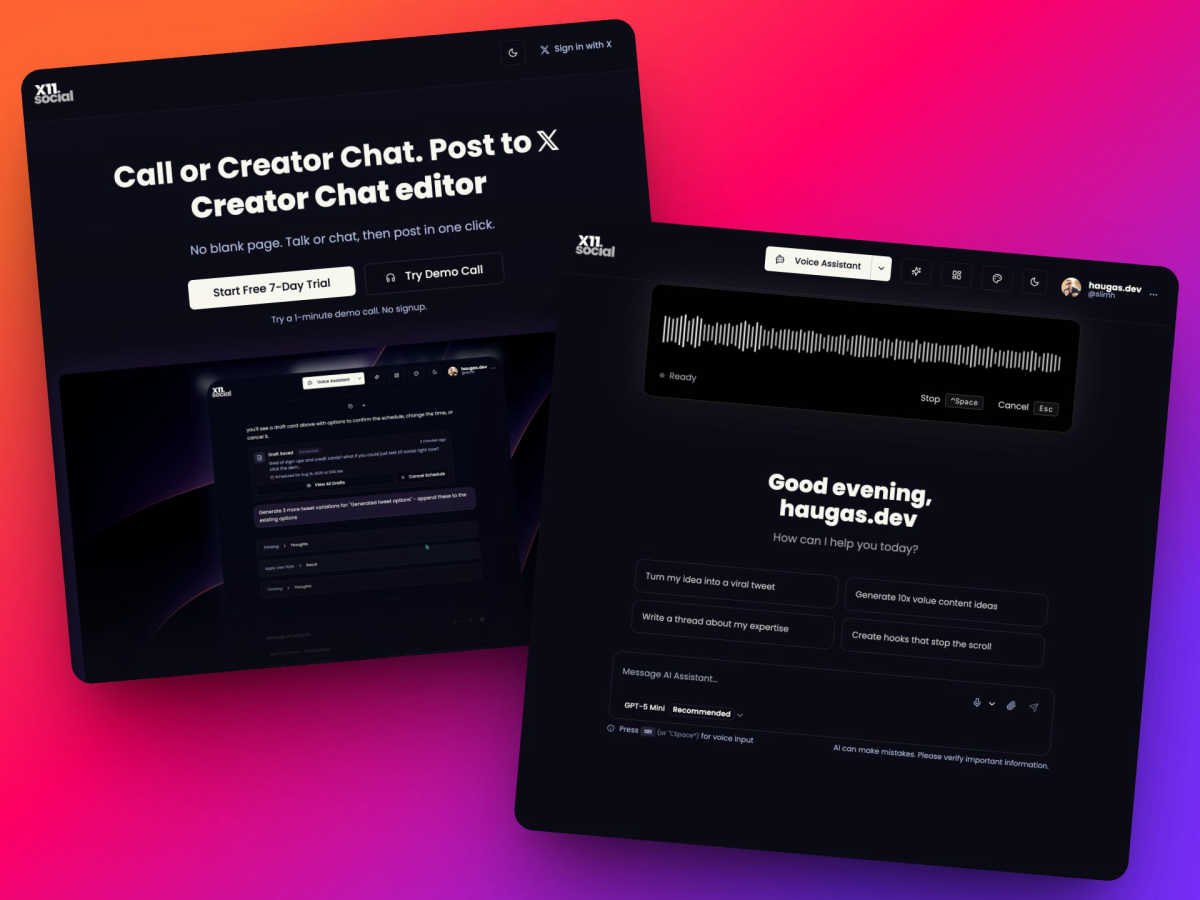
X11.social is a voice-first AI content creator that transforms ideas into engaging posts effortlessly across platforms.
About X11.social
X11.social is a cutting-edge AI-driven content creation and publishing platform tailored specifically for creators, influencers, and businesses operating on X (formerly Twitter). The platform's primary function is to transform spontaneous voice inputs or chat-based discussions into high-quality, ready-to-publish posts that resonate with the user's individual writing style and tone. Users can choose between two main input methods: a hands-free phone call feature that allows for idea capture while engaged in activities such as driving, and a web-based Creator Chat editor that provides precise control over the content. X11.social goes beyond basic transcription by seamlessly integrating with users' X accounts, offering intelligent action buttons, including Post, Schedule, Save Draft, and Attach, within the natural flow of conversation. Additionally, the platform is enhanced by a context-aware browser extension that empowers users to generate content directly from any webpage, video, or article. With features such as virality analytics, smart scheduling, and a flexible minutes-based subscription model, X11.social is designed to prevent content loss, enhance the creation-to-publication workflow, and ensure consistent, high-quality content output to foster audience growth.
Features
Call to Tweet
With the Call to Tweet feature, users can dial a local number and verbally share their thoughts, which are then converted into posts. This hands-free option allows users to capture ideas effortlessly while multitasking, ensuring no valuable insights are lost during busy moments.
Smart Actions
X11.social offers smart action buttons that appear contextually within the conversation, enabling users to easily post, schedule, adjust tone, or attach media. This intuitive design enhances the user experience by allowing immediate content management without switching contexts or navigating away from the conversation.
Context-Aware Browser Extension
The context-aware browser extension allows users to interact with any webpage, video, or article to create polished posts instantly. By simply requesting a summary or key takeaways, the AI generates content that can be directly shared on X, making it easier to leverage online inspiration in real-time.
Virality Analytics
The platform's virality analytics feature empowers users to assess the potential success of their posts before publication. By analyzing various metrics and offering actionable insights, X11.social helps creators refine their content to enhance engagement and reach.
Use Cases
On-the-Go Content Generation
For busy professionals or creators, X11.social allows for content creation during commutes or while performing daily tasks. By utilizing the Call to Tweet feature, users can verbally articulate their ideas hands-free, ensuring that inspiration is captured and transformed into posts with minimal effort.
Streamlined Content Curation
Content creators can leverage the context-aware browser extension to curate content from various sources. By summarizing articles or extracting key points from videos, they can generate compelling posts instantly, which saves time and increases productivity.
Enhanced Engagement Strategies
With virality analytics, users can analyze their posts' potential impact before they go live. This feature allows creators to make necessary adjustments to optimize engagement, ensuring their audience receives content that resonates and sparks interaction.
Consistent Posting Routines
X11.social facilitates consistent posting habits through smart scheduling features. Users can set up regular brain dump calls or schedule posts in advance, ensuring their X accounts remain active and engaging without the stress of last-minute content creation.
Frequently Asked Questions
How does X11.social capture voice inputs?
X11.social captures voice inputs through a dedicated phone line that users can call. During the call, users articulate their ideas, and the AI processes this input to create formatted posts that reflect their unique style.
Can X11.social integrate with my existing X account?
Yes, X11.social seamlessly integrates with users' X accounts, allowing for direct posting, scheduling, and management of content. This integration ensures a smooth workflow from idea generation to publication.
What is the purpose of virality analytics?
Virality analytics is designed to help users understand the potential success of their posts before they are published. By providing insights into engagement metrics and optimization suggestions, users can enhance their content's reach and effectiveness.
Are there different subscription plans available?
Yes, X11.social offers multiple subscription plans tailored to different user needs, ranging from basic voice-to-post capabilities to more comprehensive options for higher volume content generation, ensuring flexibility for various creators and businesses.
Similar to X11.social

TrackMedia
Your Social Media Content Engine That Drives Revenue. Distribute your content to every social media platform and track it in real time. Use Ai agents

Forms Plugin
The #1 Native Form Builder Plugin for Framer - No Code, No Embeds, No External Platforms.




BriefIQ
AI SEO platform for keyword research, content briefs, writing, grading, optimization and publishing.

ContextBolt SEO
Research keywords, competitors, backlinks and AI visibility inside Claude or Codex, with findings saved to your SEO dashboard.
