
AI Photo Template vs Hush Touch | Voice-to-Text for MacOS
Side-by-side comparison to help you choose the right tool.

AI Photo Template
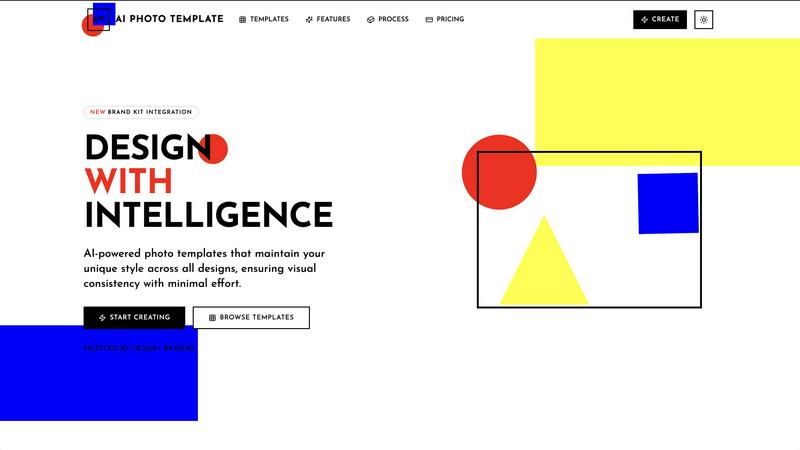
AI Photo Template generates branded, style-consistent photo templates using artificial intelligence for visual content.
Last updated: March 1, 2026

Hush Touch | Voice-to-Text for MacOS
Hush Touch offers offline voice-to-text dictation for Mac, learning your vocabulary with a one-time $20 license.
Last updated: February 26, 2026
Visual Comparison
AI Photo Template
Hush Touch | Voice-to-Text for MacOS

Feature Comparison
AI Photo Template
AI Style Analysis Engine
This proprietary engine utilizes convolutional neural networks to perform a granular analysis of uploaded brand assets and sample images. It identifies and quantifies key visual elements including color distribution, typographic patterns, compositional styles, and spatial relationships. The system creates a unique digital "style fingerprint" that is algorithmically enforced across all subsequently generated templates, ensuring absolute visual consistency that mirrors your established brand identity or personal aesthetic without manual oversight.
Smart Layout Engine with Design Principles
The platform integrates professional design theory directly into its automation pipeline. Every template is constructed using computational design principles, automatically aligning visual elements according to the golden ratio for balanced proportions and the rule of thirds for optimal focal point placement. This ensures that all outputs, regardless of user skill level, meet a baseline of professional compositional standards, elevating the quality of generated assets beyond simple element arrangement.
Brand Kit Integration & Management
Users can centrally store and manage core brand identity components within a dedicated digital Brand Kit. This repository securely houses logos in multiple formats, approved color palettes with HEX/RGB values, and licensed font families. During template generation or customization, these assets are instantly accessible and applied with one click, guaranteeing correct usage and eliminating the risk of brand guideline deviation across all marketing and content channels.
Responsive Template Architecture
Templates are built on a flexible, responsive framework that automatically adapts core design elements and layouts to various aspect ratios and dimensions. A single master template design can be instantly reconfigured for outputs ranging from Instagram Stories and Facebook covers to LinkedIn articles and website headers, all while maintaining design integrity, brand consistency, and visual hierarchy without requiring manual resizing or adjustment.
Hush Touch | Voice-to-Text for MacOS
Dual-Engine Recognition
Hush Touch utilizes a sophisticated dual-engine recognition system that combines the capabilities of DictationTranscriber and SFSpeechRecognizer. The former enhances natural flow and punctuation, while the latter boosts custom vocabulary recognition. This integration results in cleaner and more accurate transcriptions tailored to your specific needs.
Custom Vocabulary
The application allows users to store up to 500 custom terms, automatically learning from corrections made during dictation. Whether you frequently use technical jargon, brand names, or specialized medical terms, Hush Touch adapts to your unique vocabulary, ensuring that your dictations reflect your language accurately.
Smart Text Processing
Hush Touch features advanced smart text processing capabilities that remove filler words and auto-correct common misinterpretations. Additionally, it can format numbered lists and recognize voice snippets for frequently used phrases, all executed in real-time without cloud dependence, ensuring a smooth dictation experience.
Context Modes & Hands-Free Operation
With multiple context modes including General, Email, Code, and Notes, Hush Touch allows users to switch seamlessly based on their dictation needs. The hands-free operation, activated via Siri or hotkeys, enables users to dictate effortlessly, with automatic text insertion after a brief pause, enhancing productivity and workflow.
Use Cases
AI Photo Template
Scalable Social Media Content Production
Marketing teams and social media managers can leverage APT to rapidly produce a high volume of on-brand visual content for daily posts, stories, and campaigns. By defining a style guide once, the AI ensures every asset—from product highlights to promotional graphics—maintains a cohesive feed aesthetic. This enables the efficient management of content calendars across multiple platforms while eliminating the design bottleneck typically associated with frequent posting schedules.
Standardized Client Deliverables for Photographers
Photographers can use the platform to create consistent presentation templates for client galleries, portfolio showcases, and print packages. By applying a unified template system to all delivered work, photographers establish a professional, recognizable signature style. This streamlines post-production workflows, enhances brand perception, and provides clients with a polished, cohesive final product that reinforces the photographer's professional standards.
Brand Template Systems for Marketing Agencies
Agencies managing multiple client accounts can utilize APT to develop and maintain distinct, customized template systems for each brand. The Brand Kit feature allows for quick switching between client assets, enabling the rapid creation of campaign-specific materials like ad creatives, email headers, and presentation slides. This ensures visual consistency across all client touchpoints while drastically reducing the time spent on repetitive design tasks.
On-Demand Design for SMBs & Entrepreneurs
Small to medium-sized businesses and solo entrepreneurs without access to in-house design resources can use AI Photo Template as a cost-effective design department. The platform allows them to generate professional marketing materials, product images, website graphics, and sales presentations that align with their brand identity. This empowers them to compete visually with larger corporations without the ongoing expense of freelance designers or the learning curve of complex design software.
Hush Touch | Voice-to-Text for MacOS
Professional Communication
Hush Touch is perfect for professionals such as business executives and administrative staff who need to draft emails and reports quickly. The natural dictation flow allows for efficient communication without the hassle of manual typing.
Medical Documentation
Healthcare professionals can leverage Hush Touch to dictate medical notes swiftly. The app's ability to recognize medical terminology ensures that critical information is recorded accurately, saving time and reducing errors in patient records.
Creative Writing
Writers and content creators can utilize Hush Touch to brainstorm ideas and draft articles hands-free. The application's smart text processing and vocabulary learning capabilities help maintain the clarity and tone of creative pieces.
Coding and Technical Documentation
Software developers and technical writers benefit from Hush Touch's context modes and custom vocabulary features. The app can effectively transcribe coding commands and technical documentation, streamlining the development process and reducing the cognitive load.
Overview
About AI Photo Template
AI Photo Template (APT) is a sophisticated, AI-driven design automation platform engineered to standardize and accelerate the production of professional-grade visual assets. Its core functionality is the generation of fully customizable photo templates that adhere to strict brand guidelines and aesthetic principles. The platform utilizes advanced machine learning algorithms to perform deep style analysis on user-provided assets, such as logos, color palettes, and sample imagery. It then deconstructs and replicates the identified visual language, applying foundational design rules like the golden ratio and rule of thirds to ensure every generated layout is structurally sound. This process effectively replaces the manual, time-intensive workflows associated with traditional graphic design software or freelance services. The primary user demographic includes marketing departments requiring scalable, on-brand content for campaigns; small to medium-sized businesses lacking dedicated design resources; social media managers responsible for maintaining a cohesive cross-platform aesthetic; photographers needing consistent delivery formats for client work; and individual content creators. The fundamental value proposition is the democratization of high-fidelity design, enabling users to produce vast quantities of visually coherent, brand-aligned assets with minimal effort, zero prerequisite design expertise, and significant operational efficiency gains.
About Hush Touch | Voice-to-Text for MacOS
Hush Touch is an innovative voice-to-text application specifically designed for macOS users who seek a fast, natural, and secure dictation experience. Unlike traditional dictation tools that rely heavily on cloud processing, Hush Touch operates entirely on-device, ensuring that your data and voice recordings remain private. By leveraging two advanced Apple transcription engines along with an Apple Intelligence final pass, Hush Touch produces highly accurate text outputs, adapting to your unique vocabulary and speech patterns over time. This lightweight application, with a mere 5.5 MB footprint, integrates seamlessly into your daily writing tasks—be it drafting emails, writing notes, or creating documents—allowing you to dictate hands-free. With a simple activation via hotkeys or Siri, Hush Touch empowers users to communicate effectively and efficiently, making it an invaluable tool for professionals across various fields.
Frequently Asked Questions
AI Photo Template FAQ
How does the AI ensure my templates remain unique and not generic?
The AI does not simply apply pre-made filters. Its Style Analysis Engine performs a deep, data-driven deconstruction of your specific uploaded assets—analyzing your unique color combinations, spatial arrangements, and typographic choices. It builds a mathematical model of your style, which is then used as the foundational blueprint for all new template generation. This process replicates the nuances of your brand's visual language, ensuring outputs are distinct and tailored, not generic.
What file formats are supported for export?
AI Photo Template supports export in multiple industry-standard formats to suit various use cases. These include JPG and PNG for web and social media use, PDF for print-ready documents and presentations, and PSD (Adobe Photoshop) for users who require further advanced editing in external software. Higher-tier plans also offer batch export capabilities, allowing multiple assets to be downloaded in different formats simultaneously.
Can I collaborate with my team on template designs?
Yes, team collaboration is a core feature, particularly within the Business pricing tier. The platform provides shared workspaces where team members can co-edit templates in real-time, leave comments, manage version history, and control access permissions. All collaborators work from a centralized Brand Kit, ensuring everyone uses the correct, up-to-date logos, colors, and fonts, which is essential for maintaining brand consistency across departments.
Is there a limit to how many templates I can generate?
Template generation limits are defined by your subscription plan. The Basic plan allows for the creation of 20 templates per month. The Professional and Business plans offer unlimited template generation, providing the scalability needed for active marketing campaigns, large content calendars, or agencies serving multiple clients without restrictions on output volume.
Hush Touch | Voice-to-Text for MacOS FAQ
Is Hush Touch compatible with all MacOS versions?
Hush Touch is designed to work seamlessly with the latest versions of macOS. However, it is advisable to check the system requirements on the official website for compatibility with your specific version.
How does Hush Touch ensure my privacy?
Hush Touch processes all voice data entirely on-device without using cloud services. This means that your voice recordings and transcriptions are never stored or transmitted to external servers, ensuring maximum privacy and data security.
Can I customize the activation commands for dictation?
Yes, Hush Touch allows users to set customizable command phrases for sending messages or initiating dictation, providing a personalized experience that fits individual workflows.
What is the trial period for Hush Touch?
Hush Touch offers a 7-day free trial with no credit card required. Users can experience the full functionality of the app during this period to evaluate its effectiveness in meeting their dictation needs.
Alternatives
AI Photo Template Alternatives
AI Photo Template (APT) is an AI-powered design platform within the AI Assistants category, specifically engineered to automate the creation of brand-consistent photo templates. It utilizes machine learning to analyze a user's visual style and generate professional, customizable layouts based on design principles like the golden ratio, eliminating manual design work. Users may seek alternatives for various operational reasons. Common drivers include budget constraints, the need for different feature sets such as advanced manual editing tools or specific export formats, or a requirement for integration with other software platforms in their existing workflow. Platform compatibility, such as mobile versus desktop focus, is another key consideration. When evaluating an alternative solution, key criteria should include the core AI capability for style replication and automated layout, the degree of customization and control offered over generated templates, and the platform's scalability for producing high volumes of assets. Security protocols for handling uploaded brand assets and overall cost-effectiveness relative to the feature set are also critical factors for professional use.
Hush Touch | Voice-to-Text for MacOS Alternatives
Hush Touch | Voice-to-Text for MacOS is a specialized dictation application designed for seamless offline voice-to-text conversion on macOS devices. It utilizes dual Apple transcription engines and an Apple Intelligence final pass to ensure high accuracy and fluidity in transcription. This product falls under the AI Assistants category, catering to users seeking efficient and private dictation solutions without reliance on cloud services. Users may seek alternatives to Hush Touch for various reasons, including pricing concerns, differing feature sets, and specific platform requirements. When looking for a suitable alternative, it is essential to consider factors such as offline capability, transcription accuracy, ease of use, and any unique features that may enhance the dictation experience. Evaluating these aspects will help users find a voice-to-text solution that best fits their individual needs and workflows.