audiovideogenerator vs SeeDance Ai
Side-by-side comparison to help you choose the right tool.

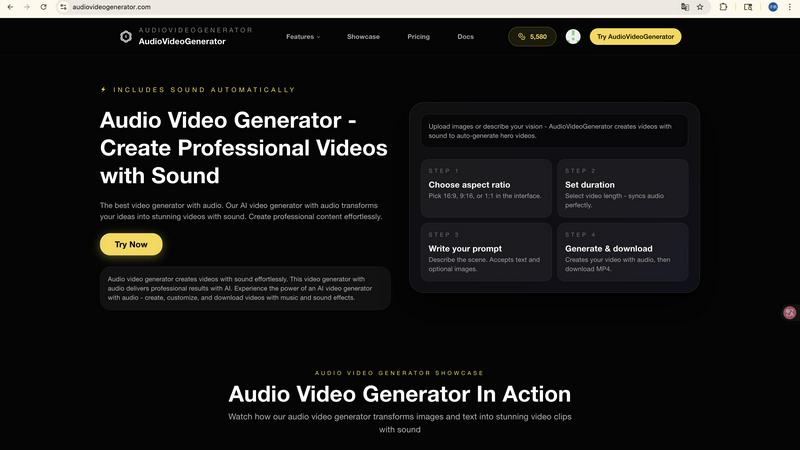
audiovideogenerator
AudioVideoGenerator creates professional AI videos with synchronized sound and music automatically.

Seedance AI transforms text, images, audio, and video into polished, synchronized multi-shot videos without the need for a studio.
Last updated: April 13, 2026
Visual Comparison
audiovideogenerator
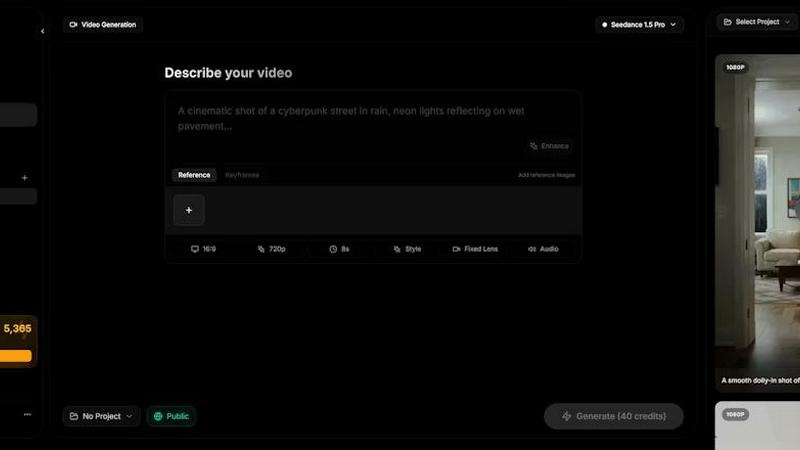
SeeDance Ai
Feature Comparison
audiovideogenerator
Multi-Model AI Video Generation
AudioVideoGenerator provides access to several cutting-edge AI video models, allowing users to select the optimal engine for their project based on quality, duration, and style. Supported models include OpenAI's Sora 2 for detailed, longer scenes (2-5 minutes), Google's Veo 3.1 for premium cinematic quality (3-8 minutes) and a faster variant for quicker renders, and Wan 2.5 for efficient generation from audio or images (1-3 minutes). This multi-model approach ensures flexibility and access to the latest advancements in generative video technology, enabling the creation of everything from photorealistic scenes to stylized animations.
Automatic and Synchronized Audio Integration
The platform's signature feature is its fully automated audio generation engine. Upon creating or uploading visual assets, the AI analyzes the content's context, mood, and pacing to automatically generate and integrate a complete audio track. This includes selecting genre-appropriate background music, adding precise sound effects for on-screen actions, and ensuring all auditory elements are perfectly synchronized with the video's visual cuts and transitions, creating a cohesive and professional final product without manual audio editing.
Text-to-Video with Audio Generation
This feature allows users to generate complete videos solely from descriptive text prompts. Users input a detailed description of their desired scene, characters, and actions, and the AI generates the corresponding visuals. Concurrently, the automatic audio system creates a matching soundtrack. This end-to-end automation is ideal for rapidly prototyping ideas, creating narrative content, or producing videos when no starting visual assets are available, streamlining the creative process from concept to final render.
Image-to-Video Animation with Audio
Transform static images into dynamic video sequences with this capability. Users upload a photograph, graphic, or artwork, and the AI animates elements within the image to create movement, such as flowing water, moving clouds, or camera pans. The system then generates a complementary audio track that aligns with the newly created motion, effectively bringing still images to life with both visual dynamism and immersive sound, perfect for enhancing product photos or creating engaging content from existing assets.
SeeDance Ai
Multimodal Input System
SeeDance Ai's multimodal input system allows users to upload up to 12 reference files, including images, videos, and audio clips. By tagging these assets directly within their prompts using the @ symbol, creators can provide precise instructions for their content, eliminating guesswork and enhancing creative control.
Synchronized Audio-Visual Production
Unlike traditional AI video generators that produce silent clips and layer audio post-production, SeeDance Ai generates both audio and video together in a single pass. This ensures exact timing, where sound effects, footsteps, and dialogue align perfectly with the visuals, resulting in a cohesive viewing experience.
Character Consistency Across Shots
SeeDance Ai addresses the common issue of character drift by implementing a cross-attention reference system that locks in facial geometry, clothing details, and stylistic elements across different scenes. This feature is particularly beneficial for serialized content and branded campaigns requiring consistent character representation.
Advanced Camera and Motion Control
With SeeDance Ai, users can upload reference videos to replicate intricate camera movements and human choreography accurately. Whether it's tracking shots, dolly zooms, or complex dance routines, this feature allows creators to achieve high fidelity in both camera work and character motion.
Use Cases
audiovideogenerator
Social Media Content Creation
Generate platform-optimized video content for Instagram Reels, TikTok, YouTube Shorts, and other social channels. The AI can produce videos in the correct aspect ratios with eye-catching visuals and trending, platform-specific audio tracks. This enables creators and brands to maintain a consistent posting schedule with high-quality, engaging content designed to boost viewer retention and engagement rates, all produced in minutes without video editing expertise.
Marketing and Promotional Videos
Create compelling promotional content for advertising campaigns, product launches, and brand awareness. The tool can generate professional product showcases, explainer videos, and advertisement clips complete with persuasive voiceovers (implied through text-to-video), uplifting background music, and impactful sound effects. This allows marketing teams to produce high-volume, cost-effective video assets for digital ads, website landing pages, and email marketing campaigns in-house.
Educational and Tutorial Content
Educators and trainers can transform lesson plans, presentations, and instructional guides into engaging video format. By inputting text-based learning material or using relevant images, the platform generates concise tutorial videos with clear visual demonstrations and a supporting audio track that enhances comprehension. This is ideal for creating online course modules, how-to guides, and corporate training materials that are more engaging than static text or slides.
Product Demonstration and Showcases
E-commerce businesses and sales teams can dynamically showcase product features and benefits. By animating product images or generating scenes that demonstrate use cases, the AI creates mini-commercials that highlight key selling points. The automatically added soundtracks and effects make the product appear more dynamic and desirable, providing a powerful tool for product pages, trade show displays, and sales presentations to drive conversion.
SeeDance Ai
Marketing and Promotional Videos
Marketers can leverage SeeDance Ai to create compelling promotional videos that capture attention and engage audiences. By utilizing the platform's multimodal capabilities, brands can showcase products or services in dynamic ways that resonate with their target audiences.
Social Media Content Creation
Content creators can transform their ideas into visually stunning social media clips quickly and efficiently. With SeeDance Ai, users can produce high-quality videos optimized for platforms like Instagram, TikTok, and YouTube, enhancing their online presence and engagement.
Dance and Performance Videos
Choreographers and dancers can utilize SeeDance Ai to create videos that highlight their performances with precision. By inputting reference choreography, they can generate videos that accurately reflect their artistic vision and showcase their skills effectively.
Storytelling and Narrative Films
Filmmakers can harness the power of SeeDance Ai to produce narrative films and storytelling pieces seamlessly. The platform's ability to maintain character consistency and synchronize audio with visuals allows creators to focus on narrative development without being bogged down by technical details.
Overview
About audiovideogenerator
AudioVideoGenerator is an advanced, AI-powered platform engineered for the automated creation of professional-grade videos with fully integrated, synchronized audio. The platform's core value proposition lies in its ability to eliminate the traditional complexities of video production by handling both visual and auditory elements through artificial intelligence. It is designed for a broad spectrum of users, including content creators, digital marketers, educators, social media managers, and businesses of all sizes who require high-quality video content without the need for extensive technical skills, production teams, or expensive software suites. The tool supports multiple generative pathways, allowing users to create videos from text prompts (Text to Video), animate static images (Image to Video), or even generate visuals directly from audio files (Audio to Video). A key differentiator is its automatic audio generation system, which intelligently adds contextually appropriate background music, sound effects, and ambient audio that is perfectly synchronized with the visual timeline. By leveraging state-of-the-art AI models such as Sora 2, Veo 3.1, and Wan 2.5, AudioVideoGenerator ensures cinematic quality, offering various output durations and styles tailored to specific use cases, from short-form social clips to longer narrative pieces.
About SeeDance Ai
SeeDance Ai is an innovative multimodal AI video generation platform designed to transform text prompts, images, audio, and video references into cinematic, multi-shot videos with director-level control. This powerful tool is tailored for content creators, marketers, filmmakers, and anyone in need of high-quality, engaging video content without the complexities of traditional production workflows. By utilizing advanced features such as seamless audio-visual synchronization, realistic motion, and strict adherence to user prompts, SeeDance Ai allows creators to produce stunning marketing clips, social media content, dance videos, and storytelling pieces. With various models available, including Seedance 2.0, Seedance 1.5 Pro, Seedance 1.0, and Seedance 1.0 Pro, users can expect consistent character representation and smooth physics, making this platform a game-changer in the realm of AI-driven cinematography.
Frequently Asked Questions
audiovideogenerator FAQ
What AI models does AudioVideoGenerator support?
AudioVideoGenerator supports a matrix of leading AI video generation models to cater to different needs. This includes Wan 2.5 for efficient audio-to-video and image-to-video tasks (1-3 min outputs), Google's Veo 3.1 in both a 'Fast' variant for quicker 1-3 minute videos and a premium 3-8 minute model for higher quality, and OpenAI's latest Sora 2 model for advanced, detailed video generation lasting 2-5 minutes. Users can select the model that best fits their project's required duration, quality, and style.
How does the automatic audio generation work?
The platform's AI analyzes the generated or uploaded visual content to understand its context, emotional tone, pacing, and on-screen actions. Based on this analysis, it selects appropriate music from a licensed library, generates or chooses synchronized sound effects (like swooshes for transitions or ambient noise for settings), and mixes these elements into a cohesive audio track. The system ensures the audio's rhythm, hits, and volume changes are perfectly timed with the visual edits, creating a professionally synchronized final video.
Can I use my own images or audio files as a starting point?
Yes, AudioVideoGenerator is designed to work with user-provided assets. The Image-to-Video feature allows you to upload static images (JPEG, PNG) to be animated into videos. Furthermore, the A2V (Audio to Video) model specifically enables you to upload an audio file (e.g., a song, podcast, or voiceover), and the AI will generate a video sequence that visually interprets and matches the provided audio's mood, rhythm, and content.
What are the typical output lengths for generated videos?
Output length is primarily determined by the selected AI model. The Wan 2.5 and Veo 3.1 Fast models typically generate videos between 1 to 3 minutes in duration, suitable for short-form content. The premium Veo 3.1 model can produce videos from 3 to 8 minutes long, while the Sora 2 model supports generation of videos between 2 to 5 minutes. The specific length can often be influenced by the detail of the input prompt and the complexity of the requested scene.
SeeDance Ai FAQ
What types of media can I input into SeeDance Ai?
SeeDance Ai supports a variety of media inputs, including text prompts, images, audio clips, and video references. Users can upload up to 12 reference files to enhance their video generation process.
How does SeeDance Ai achieve synchronized audio and video?
SeeDance Ai generates audio and video simultaneously during a single model pass. This integrated approach ensures that sound effects, dialogue, and music are perfectly timed with the visuals, creating a cohesive audio-visual experience.
Can I ensure character consistency across multiple scenes?
Yes, SeeDance Ai employs a cross-attention reference system that maintains character integrity, including facial features and clothing, across different shots, making it suitable for serialized content and branding.
Is there a need for post-production editing with SeeDance Ai?
While SeeDance Ai produces high-quality videos with integrated audio, post-production editing can be optional rather than mandatory. The platform is designed to handle audio-visual synchronization and motion control, reducing the need for extensive editing.