
Avif2Png vs Img Editor
Side-by-side comparison to help you choose the right tool.
Avif2Png
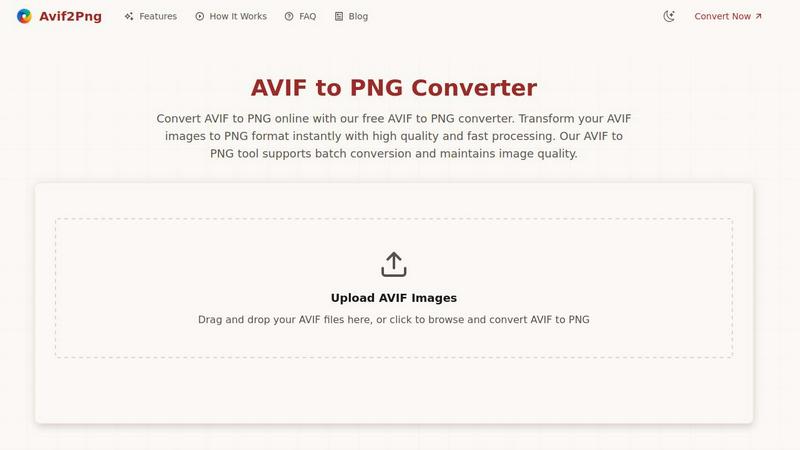
Avif2Png converts AVIF images to high-quality PNG format quickly and securely, ensuring broad compatibility and.
Last updated: March 1, 2026

Img Editor
Img Editor generates professional-grade AI images from text prompts using advanced machine learning technology.
Last updated: February 28, 2026
Visual Comparison
Avif2Png
Img Editor

Feature Comparison
Avif2Png
Free Online Conversion
Avif2Png offers a completely free online service for converting AVIF images to PNG format, with no registration required. Users can quickly access the tool and start converting their files without the hassle of creating an account or entering personal information.
Batch Conversion Support
One of the standout features of Avif2Png is its ability to handle batch conversions. Users can upload multiple AVIF files simultaneously, significantly speeding up the conversion process and enhancing productivity, especially for those managing large volumes of images.
High-Quality Output
The conversion process in Avif2Png ensures that the original quality of the AVIF images is preserved. The tool maintains the lossless characteristics of PNG, making it suitable for images that require high fidelity, such as graphics, logos, and detailed illustrations.
Secure Processing
Avif2Png prioritizes user privacy and data security. After the conversion process is complete, all uploaded files are automatically deleted from the server, ensuring that users can convert their images without worrying about unauthorized access or data retention.
Img Editor
Advanced Text-to-Image Generation
This core feature leverages cutting-edge AI models to convert detailed natural language descriptions into high-fidelity images. Users can specify complex scenes, subjects, styles, and moods through textual prompts. The system interprets these inputs with advanced understanding, allowing for the creation of everything from photorealistic landscapes to abstract digital art. The generation process includes configurable parameters for precise control over the final output's composition and aesthetic.
Granular Output Configuration
Users maintain precise control over their generated images through a detailed settings panel. This includes selecting from multiple aspect ratios such as Square (1:1), Landscape (16:9), and Portrait (9:16) to suit different platform requirements. Furthermore, the platform offers tiered image quality settings: Standard (1K), High Quality (2K Nano Photo), and Ultra Quality (4K Nano Photo). This allows for optimization based on intended use, from web graphics to high-resolution print assets.
Integrated Image Editing & Description Tools
Beyond generation, Img Editor provides tools for modifying existing images. This includes AI-powered image editing capabilities for inpainting, outpainting, and style transfer based on textual instructions. Additionally, the platform features a "Describe Your Image" tool, which uses AI to analyze an uploaded image and generate a descriptive text prompt, facilitating reverse-engineering of styles or creating variations.
Community Gallery and Prompt Generator
The platform hosts a dynamic community gallery where users can publish their creations. This gallery serves as both inspiration and a practical resource, as any public prompt can be clicked to automatically load and use for a new generation. The integrated Prompt Generator assists users in crafting effective, detailed prompts, streamlining the creative process and helping achieve more accurate and desirable results from the AI model.
Use Cases
Avif2Png
Web Development
Web developers frequently need to convert AVIF images to PNG to ensure compatibility across various browsers and devices. Although modern browsers support AVIF, many older browsers and platforms do not, making PNG a safer choice for widespread deployment.
Graphic Design
Graphic designers often convert AVIF files to PNG format when working with images that require transparency and high-quality output. PNG's lossless compression is ideal for projects involving logos and graphics that demand clarity and sharp edges.
Digital Content Management
Content managers and marketers may utilize Avif2Png to ensure that images are in a universally supported format. Converting AVIF to PNG allows for easier sharing and integration into various content management systems and marketing platforms.
Print Preparation
Print media professionals often require images in PNG format for high-resolution outputs. Converting AVIF images to PNG ensures that the files meet industry standards for print quality, preserving detail and color fidelity necessary for professional publications.
Img Editor
Digital Art and Concept Creation
Digital artists and illustrators use Img Editor to rapidly visualize concepts, brainstorm ideas, and create unique artwork. The AI can generate base images in specific styles—from cinematic photorealism to abstract expressionism—which artists can then use as references, incorporate into larger compositions, or refine further using the platform's editing tools, significantly accelerating the creative workflow.
Marketing and Social Media Content
Content marketers, social media managers, and bloggers utilize the platform to produce custom, royalty-free visual assets. By generating images tailored to specific blog topics, promotional campaigns, or social media posts, they can maintain brand consistency and visual appeal without the need for stock photography or extensive graphic design resources, all while controlling aspect ratios for different platforms.
Character and Scene Visualization
Writers, game developers, and role-playing enthusiasts employ Img Editor to bring characters and settings to life. By providing detailed descriptive prompts about a character's appearance, attire, and environment, users can generate visual references that aid in storytelling, game design documentation, and providing clear visual briefs for commissioned artists.
Professional Design Mockups
Graphic and UI/UX designers leverage the tool to quickly generate placeholder imagery, background textures, and thematic visual elements for website mockups, app interfaces, and presentation decks. The ability to specify precise aspect ratios and high-quality outputs ensures the generated assets are immediately usable in professional design software and prototypes.
Overview
About Avif2Png
Avif2Png is a robust, web-based utility designed specifically for converting AVIF (AV1 Image File Format) images to the widely accepted PNG (Portable Network Graphics) format. This tool is particularly beneficial for developers, graphic designers, content managers, and digital professionals who utilize the advanced AVIF compression standard but need the broad compatibility that PNG offers. The primary value proposition of Avif2Png lies in its ability to execute high-fidelity conversions that preserve the lossless characteristics of PNG from the original AVIF files. Accessible through any web browser, Avif2Png eliminates the need for software installation, providing a seamless user experience. It supports batch processing, enabling users to convert multiple files simultaneously, thereby streamlining digital workflows. By providing a secure, fast, and reliable solution for converting AVIF images to PNG, Avif2Png addresses the compatibility challenges posed by modern image formats, making it an essential tool for web deployment, graphic design, and print preparation.
About Img Editor
Img Editor is a sophisticated, web-based AI image generation and editing platform engineered to democratize high-quality digital art creation. It serves a broad user base, including digital artists, graphic designers, content marketers, and hobbyists, by providing a powerful suite of AI tools entirely free of charge. The platform's core value proposition is its elimination of financial barriers, offering 10 free image generations daily with a transparent system to earn unlimited additional credits through community engagement. At its foundation, Img Editor utilizes advanced AI models to interpret complex natural language prompts and execute detailed image modifications, transforming textual descriptions into professional-grade visual assets. The interface is designed for both simplicity and depth, allowing for rapid ideation while providing granular control over output specifications such as aspect ratio and quality tiers. The platform is powered by proprietary "Nano" AI technology, enabling users to generate images in standard 1K, high-quality 2K, and ultra-quality 4K resolutions. By integrating a public gallery, prompt generator, and community-driven credit system, Img Editor establishes a comprehensive ecosystem for AI-assisted visual creation.
Frequently Asked Questions
Avif2Png FAQ
What types of files can I convert using Avif2Png?
Avif2Png specifically converts AVIF image files to PNG format, allowing users to leverage the modern compression benefits of AVIF while ensuring compatibility with PNG.
Is there a limit to the number of files I can convert at once?
No, Avif2Png supports batch conversion, enabling users to upload and convert multiple AVIF files simultaneously, making it convenient for projects with numerous images.
How does Avif2Png ensure the security of my files?
Avif2Png automatically deletes all uploaded files from its servers after the conversion process is complete, ensuring user privacy and data security throughout the operation.
Can I use Avif2Png on mobile devices?
Yes, Avif2Png is a web-based tool that can be accessed through any browser, making it compatible with both desktop and mobile devices for convenient on-the-go image conversion.
Img Editor FAQ
How many free images can I generate per day?
Img Editor provides 10 free image generations per day to all users. This daily allowance refreshes, allowing consistent access to the core AI generation tools without any subscription fee. The platform operates on a credit system where each standard generation consumes one credit.
How can I earn more generation credits?
You can earn additional credits by actively participating in the Img Editor community. The primary method is by submitting your generated images to the public Gallery for review. Once a submission is approved by the platform, you are rewarded with 10 extra generation credits, enabling a pathway to effectively unlimited free usage through community engagement and content sharing.
What is Nano Photo quality?
Nano Photo refers to Img Editor's proprietary high-resolution AI rendering technology. It denotes the higher quality tiers available for image generation, specifically the 2K (High Quality) and 4K (Ultra Quality) options. Generating an image at these enhanced quality levels may require specific credits or conditions, as indicated on the generation panel, and yields images with significantly greater detail and resolution suitable for professional use.
Can I use the images I create for commercial purposes?
Yes, images generated using Img Editor are typically free for both personal and commercial use. Users retain the rights to the assets they create. However, it is always recommended to review the platform's specific Terms of Service for the most current and detailed information regarding licensing, usage rights, and any potential restrictions to ensure compliance.
Alternatives
Avif2Png Alternatives
Avif2Png is a specialized online tool that facilitates the conversion of AVIF images into the widely compatible PNG format. This tool falls within the realm of image processing utilities, catering to professionals such as developers, designers, and content managers who need to ensure their AVIF images can be used seamlessly across various platforms and applications. Users often seek alternatives due to various reasons, including the desire for different features, pricing structures, or specific platform compatibility needs. When searching for an alternative to Avif2Png, it is essential to consider several factors. Look for tools that maintain high fidelity in image conversion, support batch processing for efficiency, and ensure user data security. Additionally, evaluate the platform's ease of use, processing speed, and any additional features that may enhance your workflow and meet your specific requirements.
Img Editor Alternatives
Img Editor is a web-based AI image generation and editing platform within the image and photo software category. It utilizes advanced machine learning models to transform detailed text prompts into professional-grade visual assets, offering both text-to-image creation and text-based image editing functionalities. Users may seek alternatives for various reasons, including differing pricing models, such as subscription tiers versus pay-per-use credits. Specific feature requirements, like access to particular AI models, specialized editing tools, or integration capabilities with other software, also drive exploration. Platform needs, including desktop versus web-based access, processing speed, and output resolution limits, are further considerations. When evaluating alternatives, key factors to assess include the core AI model's capability and training data, the granularity of control over generation parameters like aspect ratio and quality, and the platform's overall cost structure and usage limits. The availability of advanced editing features beyond basic generation, such as inpainting or outpainting, and the transparency of data usage and privacy policies are also critical technical and operational criteria.