
Decode This Text vs Phishly
Side-by-side comparison to help you choose the right tool.

Decode This Text
Decode This Text provides instant, human-like analysis of confusing conversations in just 30 seconds.
Last updated: February 28, 2026

Phishly
Phishly is an AI-powered Chrome extension that instantly detects phishing emails in Gmail.
Visual Comparison
Decode This Text

Phishly
Feature Comparison
Decode This Text
Screenshot Upload & OCR Processing
This feature allows users to bypass manual text entry by directly uploading a photograph or screenshot of their chat conversation. The system employs Optical Character Recognition (OCR) technology to automatically extract and digitize all textual content from the image for analysis. This streamlines the input process, ensures accuracy in capturing the exact wording and formatting, and is particularly useful for analyzing long or complex message threads that would be cumbersome to copy and paste manually.
Multi-Dimensional Tone Analysis
The platform performs a granular, multi-faceted analysis of the emotional tone embedded within a message. It goes beyond simple sentiment to measure specific tonal qualities such as warmth, formality, sarcasm, or indifference. This analysis is presented through quantified metrics (e.g., Tone: 75%), providing an objective assessment of the emotional temperature. This technical breakdown helps users avoid personal bias in interpreting whether a sender is being friendly, passive-aggressive, genuinely busy, or emotionally distant.
Behavioral Pattern Detection
This advanced feature scans conversation history and contextual clues to identify recurring behavioral patterns that may not be immediately apparent. The algorithm analyzes factors like timing of messages (e.g., consistently late-night contact), response latency, avoidance of specific questions, and changes in message length or engagement level. By detecting these patterns, the tool provides insights into potential underlying motivations or shifts in interest, offering a longitudinal view of the communication dynamic.
AI-Generated Response Recommendations
Upon completing its analysis, the tool generates three contextually appropriate response options tailored to the user's desired communication style. These typically include a calm/neutral response, a direct/inquisitive response, and a firm/boundary-setting response. Each recommendation is crafted to align with the analyzed intent and tone of the original message, providing users with a strategic toolkit to reply with confidence and tactical awareness, thereby optimizing the outcome of the interaction.
Phishly
AI-Powered Multi-Indicator Detection Engine
The platform's core analytical capability is driven by an advanced AI engine that scans for a comprehensive array of phishing signatures. This includes technical indicators like domain spoofing, mismatched sender addresses, and suspicious URL structures. Furthermore, it performs semantic analysis to detect social engineering tactics such as urgent or threatening language, impersonation of authority figures, and offers that seem too good to be true. The model is continuously updated to recognize emerging phishing patterns and zero-day social engineering campaigns, providing a dynamic defense that improves over time.
Seamless Gmail Integration via Chrome Extension
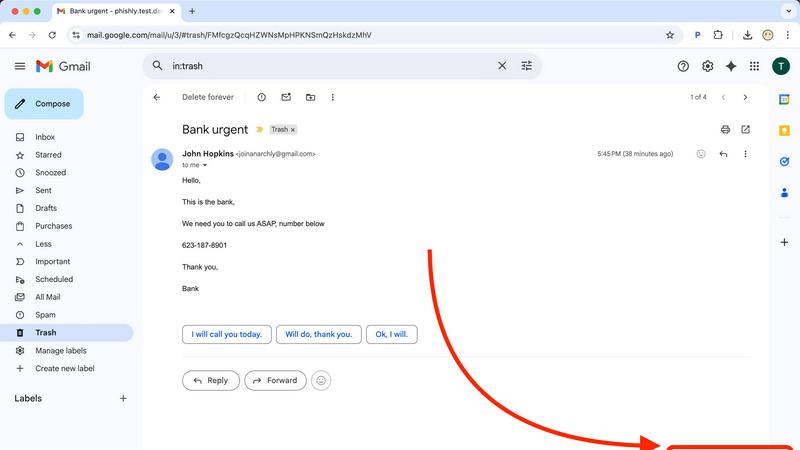
Phishly offers a native Chrome extension that adds a dedicated "Scan with Phishly" button directly within the Gmail web interface. This feature allows for one-click analysis of any open email thread without requiring the user to copy, paste, or leave their inbox. The extension maintains a minimal footprint, operating only upon explicit user activation. This integration streamlines the security check into the user's existing email workflow, eliminating friction and encouraging regular use for suspicious messages.
Privacy-First, On-Demand Scanning Protocol
A foundational feature of Phishly is its strict privacy-centric operational model. Unlike security suites that scan all incoming mail automatically, Phishly employs an explicit consent framework. The AI algorithms are activated solely when a user manually initiates a scan via the extension or web tool. This ensures complete user control over data sharing, with no passive monitoring, email storage, or analysis of correspondence beyond the single submitted message. This design addresses critical privacy concerns for professionals handling sensitive communications.
Clear, Actionable Risk Assessment Reports
Upon analysis, Phishly generates a detailed diagnostic report that transcends a simple pass/fail alert. Each scan result is categorized into a clear risk tier: Safe, Medium Risk, or High Risk. The report elaborates with specific, plain-language explanations for the verdict, pinpointing exact issues found, such as "The sender's domain 'paypa1-security.com' is a homoglyph attack impersonating 'paypal.com'" or "The message uses high-pressure language demanding immediate action." This educational component helps users understand the threat and learn to identify similar attempts in the future.
Use Cases
Decode This Text
Analyzing Romantic Interest & Dating App Conversations
Users can paste exchanges from dating apps or text conversations with potential romantic partners to decode mixed signals. The tool analyzes messages like "I'll let you know" or sudden drops in communication frequency to determine genuine interest level versus polite disengagement. It provides clarity on whether a person is truly busy, losing interest, or employing avoidant communication tactics, empowering the user to respond appropriately rather than over-investing or misreading the situation.
Interpreting Ambiguous Workplace Communication
This use case involves deciphering cryptic emails, brief Slack messages, or vague feedback from managers and colleagues. For example, analyzing a one-word email from a boss to assess if it signifies anger, simple acknowledgment, or haste. The tool evaluates professional tone, intent, and potential subtext, helping users understand the true meaning behind phrases like "we'll keep your resume on file" or a suddenly silent group chat after a contribution, enabling more effective and politically savvy professional responses.
Navigating Complex Family & Friend Dynamics
The platform assists in understanding sensitive communications within personal networks. This includes analyzing why a family group chat went silent after a specific message, interpreting a friend's increasingly short replies, or determining the emotional subtext behind a sibling's vague text. By providing an objective "reality check," it helps users navigate emotional undercurrents, perceived slights, and social tensions with greater empathy and clarity, reducing personal conflict and misunderstanding.
Preventing Regretful Communication Sent Prematurely
A critical use case is utilizing the tool as a final review layer before sending an emotionally charged or high-stakes message. Users can input their drafted response to a provocative text, email, or social media comment. The tool will analyze the draft's tone, predict its likely reception, and suggest calmer, more effective alternatives. This serves as a preventative measure against sending messages fueled by frustration that could damage relationships or professional reputations.
Phishly
Verification of Financial and Invoice Emails
Users frequently receive emails purporting to be from banks, payment processors like PayPal, or vendors with urgent invoice updates. These are prime targets for phishing. With Phishly, a user can instantly scan such an email to verify the legitimacy of the sender's domain, check for subtle misspellings in links, and assess whether the tone matches a genuine financial alert. This use case is critical for preventing business email compromise (BEC) and direct financial fraud.
Screening Potential Credential Theft Attempts
A common phishing vector involves fake login pages for services like Microsoft 365, Google, Dropbox, or social media. Phishly analyzes emails containing login prompts or password reset requests. It examines the embedded links for authenticity and checks if the email's headers and content align with the official communication patterns of the service being impersonated, helping users avoid surrendering their credentials to malicious actors.
Analyzing Unsolicited Job Offers or Prize Notifications
Suspicious job offers, grant opportunities, or prize win notifications are often used as lures. Individuals, especially freelancers and job seekers, can use Phishly to scrutinize these emails. The AI detects hallmarks of such scams, including poorly written content, requests for personal information upfront, and links to unverified domains, protecting users from advance-fee fraud and identity theft schemes.
Educational Tool for Security Awareness Training
For small business owners or team leads, Phishly serves as a practical, real-world training tool. When a suspicious email is received, teams can use the web tool to analyze it together. The detailed breakdown provided in the risk report educates employees on the specific tactics used by phishers, such as sender spoofing or deceptive link text, thereby building a more security-conscious organizational culture through hands-on experience.
Overview
About Decode This Text
Decode This Text is a sophisticated AI-powered communication analysis platform engineered to provide users with precise, data-driven insights into the subtext of digital conversations. The tool functions as an analytical engine, processing user-provided text, chat screenshots, or contextual descriptions to deliver a comprehensive breakdown of a message's underlying intent, emotional tone, and behavioral patterns. It is designed for individuals seeking to eliminate ambiguity in personal, professional, and social communications, thereby enhancing interpersonal effectiveness and reducing relational anxiety. The core value proposition lies in its ability to transform subjective interpretation into objective analysis within a 30-second processing window. The platform operates with a strict privacy protocol where no human ever reviews the submitted content, ensuring 100% anonymity. Target users include professionals navigating complex workplace correspondence, individuals deciphering romantic or social cues, and anyone aiming to improve their communicative clarity and response strategy without relying on biased external opinions.
About Phishly
Phishly is a specialized AI-powered cybersecurity platform engineered to provide real-time phishing detection and analysis. Its core architecture is built around a multi-layered machine learning model trained to identify sophisticated phishing indicators that often evade traditional spam filters. The platform is delivered through two primary interfaces: a lightweight Chrome browser extension that integrates directly with Gmail's web interface and a standalone web application for analyzing email content pasted from any source. This dual-access model ensures comprehensive coverage for users regardless of their email client or workflow. Phishly is specifically designed for individuals, remote workers, freelancers, and small to medium-sized businesses that require enterprise-grade security analysis without the associated complexity, cost, or IT overhead. Its fundamental value proposition lies in its on-demand, privacy-centric scanning model; the AI only processes emails that a user explicitly submits for review, ensuring no background data collection or unauthorized access to the inbox. The system delivers a clear, triage-based risk assessment (Safe, Medium Risk, High Risk) accompanied by a granular breakdown of detected threats, empowering users with actionable intelligence to make informed security decisions instantly.
Frequently Asked Questions
Decode This Text FAQ
How does Decode This Text ensure my privacy and anonymity?
Decode This Text operates on a strict no-human-review policy. All text analysis is performed entirely by automated AI algorithms. Submitted conversations, whether pasted text or uploaded screenshots, are processed without being stored or viewed by any human employee. The service is designed to be 100% anonymous, requiring no personal identification for use, ensuring your private communications remain confidential.
What is the difference between this tool and asking a friend for advice?
Unlike human friends who bring their own biases, emotional baggage, and limited perspectives, Decode This Text provides a consistent, objective, and data-driven analysis. It focuses solely on the textual and contextual evidence provided, ignoring external drama. It offers immediate availability, eliminates the social risk of over-sharing, and delivers reproducible analysis based on linguistic and behavioral patterns rather than subjective opinion.
Can the tool analyze messages in languages other than English?
The primary operational language as indicated by the provided content is Spanish, with the interface and analysis built for Spanish-language text. The technical specifications regarding additional language support are not explicitly detailed in the provided context. For accurate analysis, users should consult the platform's official documentation or support channels for the current list of supported languages and their respective processing capabilities.
What kind of input does the system accept for analysis?
The platform accepts three primary input modalities: 1) Direct text paste, where users copy and paste the message thread into a designated field. 2) Screenshot upload, utilizing OCR to extract text from an image of the conversation. 3) Contextual description, where users can narratively describe the situation and the communication in question. The system is engineered to parse and derive insights from all these structured and unstructured data formats.
Phishly FAQ
How does Phishly protect my privacy compared to other security tools?
Phishly is architected with a strict on-demand analysis model. The system has no access to your email account or inbox. Scanning is only performed on the specific email content you actively choose to submit, either by clicking the extension button in an open Gmail or by pasting text into the web tool. We do not store, log, or analyze any email you do not explicitly send for review. This ensures maximum user control and data privacy.
What specific indicators does the AI look for in an email?
The AI engine conducts a multi-faceted analysis. Technically, it examines email headers for spoofing (e.g., mismatched 'From' addresses), analyzes domain names for homoglyphs and typosquatting, and inspects URLs for redirects and suspicious registrations. Linguistically, it uses Natural Language Processing (NLP) to flag social engineering tactics, including urgency, fear, greed, impersonation of trusted entities, and grammatical inconsistencies atypical of legitimate corporate communications.
Is technical knowledge required to install and use Phishly?
No technical expertise is required. Installation involves adding the Phishly Chrome extension from the Chrome Web Store with a single click. Usage is equally straightforward: within Gmail, simply open any email and click the "Scan with Phishly" button. For emails outside Gmail, copy the full email text and paste it into the analysis field on the Phishly website. The interface and risk reports are designed for clarity for all user levels.
What is the difference between the 'Medium Risk' and 'High Risk' classifications?
A 'Medium Risk' classification indicates the email contains one or more suspicious characteristics but may not be a definitive phishing attempt. Examples include a slightly unusual sender domain, mildly urgent language, or a link to a newly registered but not overtly malicious site. A 'High Risk' classification is assigned when multiple, strong phishing indicators are conclusively identified, such as confirmed domain spoofing, links to known malicious infrastructure, or a clear replica of a legitimate service's login page. The detailed report explains the specific findings behind the rating.