DocuExtractor vs documentorium
Side-by-side comparison to help you choose the right tool.

DocuExtractor
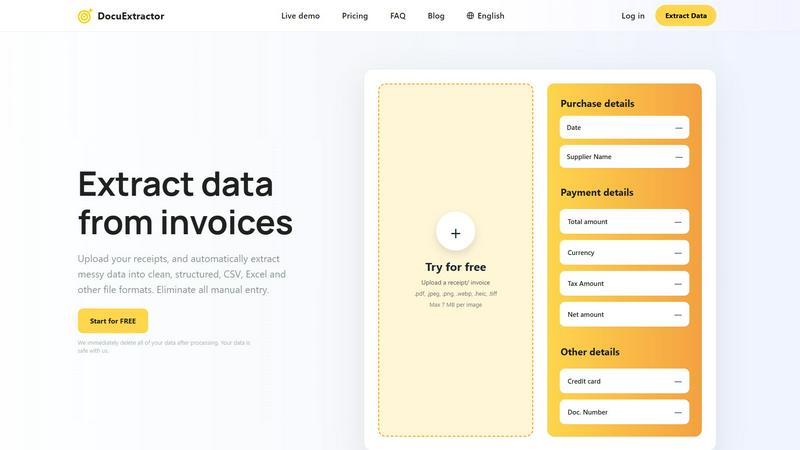
DocuExtractor uses AI to convert receipts and invoices into structured CSV or Excel files with 99.6% accuracy.
Last updated: February 28, 2026

documentorium
Documentorium generates professional contractor documents and PDFs using guided, trade-specific forms in seconds.
Last updated: March 26, 2026
Visual Comparison
DocuExtractor
documentorium

Feature Comparison
DocuExtractor
Advanced AI-Powered Extraction Engine
At the core of DocuExtractor is a proprietary engine that integrates Optical Character Recognition (OCR), Deep Learning (DL), and Large Language Models (LLM). This multi-technology approach ensures high-fidelity text recognition, intelligent understanding of diverse document layouts, and contextual interpretation of data. The system is trained on millions of financial documents, allowing it to accurately distinguish and extract specific fields like "Net Amount" versus "Total Amount" or "Invoice Date" versus "Due Date," achieving a documented accuracy rate of 99.6% for standard financial documents.
Batch Processing and Multi-Format Support
The platform is designed for high-volume operational efficiency. Users can upload documents in batches, processing dozens or hundreds of receipts, invoices, or statements simultaneously to maximize throughput. DocuExtractor supports a wide array of input file formats, including PDF, JPEG, PNG, WebP, HEIC, and TIFF, with individual files up to 7 MB. This flexibility ensures that documents captured via mobile cameras, scanned copies, or digital exports can all be processed seamlessly within the same workflow.
Customizable Output and Preset Templates
Users have full control over the extracted data's structure and format. The platform offers preset templates for common documents like receipts and invoices for one-click extraction. For specialized needs, users can define custom data fields to capture unique information. The extracted data can be exported in structured, analysis-ready formats, primarily CSV and Excel, which are configured for direct import into major accounting software, ERP systems, or internal databases, eliminating post-extraction manual cleanup.
Enterprise-Grade Security and Compliance
Security is paramount in financial data handling. DocuExtractor is built with enterprise-ready protocols. All document processing occurs in a secure, encrypted environment. Crucially, the platform implements an automatic data deletion policy, where all uploaded documents and extracted data are permanently purged from its servers immediately after processing is complete. This commitment ensures data privacy, reduces liability, and aligns with stringent data protection standards required by modern businesses.
documentorium
Trade-Specific Template Library
The platform hosts a comprehensive catalog of over 200 document templates meticulously organized into 26 distinct trade categories. Each template, whether for a quote, work order, service report, or proposal, is constructed with field labels and data entry points that are native to the specific trade. For instance, an electrical service report template will include fields for circuit breaker ratings and load calculations, while an HVAC proposal will have sections for SEER ratings and ductwork specifications. This eliminates the need for professionals to mentally translate their technical requirements into generic blank fields.
Guided Form Interface with Instant PDF Generation
Users interact with a structured, step-by-step form interface that logically presents all necessary fields for the selected document type. This guided process ensures no critical information is omitted. Upon form completion, the system's engine automatically formats the input data into a professionally designed layout. A clean, branded, and print-ready PDF document is generated for download or direct printing within seconds, removing all manual formatting, alignment, and design effort typically associated with document creation in word processors.
Complete Document History and Prefill Capability
Every document created within documentorium is permanently saved to the user's account in a searchable history log. This archive provides instant access to view, re-download, or reference past documents at any time. Furthermore, the system intelligently utilizes this historical data to prefill information in new documents. Client names, addresses, service details, and company information can be auto-populated from previous entries, dramatically accelerating the creation of follow-up quotes, invoices, or service reports for repeat customers.
Unified Annual Subscription Model
documentorium operates on a straightforward, all-access pricing structure. A single annual subscription fee grants unlimited access to the entire template library across all trade categories and document types. There are no tiered plans, per-document fees, or limitations on the number of documents created. This model provides cost predictability and ensures users have the full suite of tools available without needing to upgrade for specific forms or features.
Use Cases
DocuExtractor
Automated Accounts Payable Processing
Accounts Payable (AP) teams can leverage DocuExtractor to automate the ingestion of supplier invoices and receipts. Instead of manual keying, staff simply uploads batches of invoices. The AI extracts vendor details, invoice numbers, dates, line items, totals, and tax amounts into a structured CSV/Excel file. This data can be automatically validated and fed into the accounting system, accelerating the invoice-to-payment cycle, improving accuracy, and freeing AP specialists for higher-value tasks like exception handling and vendor management.
Streamlined Expense Reporting and Reconciliation
For businesses managing employee expense reports, DocuExtractor simplifies reconciliation. Employees or finance teams can upload a multitude of receipts in various formats. The software consistently extracts the merchant name, date, amount, and tax, organizing all data into a standardized report. This eliminates manual collation and data entry errors, ensuring faster reimbursement for employees and more efficient month-end closing and audit preparation for the finance department.
Financial Data Aggregation for Analysis
Financial analysts and controllers often need to aggregate data from disparate sources like bank statements, loan documents, and financial reports in PDF format. Manually compiling this data is time-consuming. DocuExtractor can process these documents at scale, pulling out key figures, dates, and transactional details into a consolidated spreadsheet. This creates a clean, unified dataset ready for trend analysis, forecasting, KPI tracking, and generating management reports with significantly reduced preparation time.
Bookkeeping and General Ledger Entry Automation
Bookkeepers and accountants can use DocuExtractor to transform piles of transactional documents—receipts, bills, sales invoices—into structured journal entry data. By automatically extracting the essential details (date, amount, account name, description), the software generates a pre-formatted file that can be reviewed and imported directly into accounting software like QuickBooks, Xero, or Sage. This automation drastically reduces manual data entry, minimizes transposition errors, and allows professionals to focus on advisory services and ensuring the books' integrity.
documentorium
Generating a Detailed Service Proposal for a Solar Installation
A solar installer can leverage documentorium to create a comprehensive, client-facing proposal. By selecting the solar-specific proposal template, the installer is guided through entering technical specifications (panel wattage, inverter type, estimated energy production), financial details (total cost, tax credits, financing options), and project timelines. The system outputs a polished PDF that presents complex technical and financial data in a clear, professional format, enhancing credibility and facilitating client approval.
Creating and Managing Work Orders for an HVAC Company
An HVAC service manager can rapidly generate precise work orders for technicians. Using the HVAC work order template, the manager inputs customer information, specific equipment models, diagnosed issues, required parts, and labor codes. The resulting PDF work order provides the technician with all necessary job-site information in a standardized format. Completed work orders are saved to the job history, creating a permanent record for warranty claims, future service, and internal operational tracking.
Issuing On-the-Spot Quotes and Invoices for Plumbing Services
A plumber on a service call can use documentorium on a mobile device to create a quote immediately after diagnosing a problem. The plumbing quote template includes fields for labor hours, pipe materials, fixture costs, and permit fees. Once the client approves, the plumber can convert the same form into a finalized invoice with a few clicks, generating a professional PDF for email delivery or printed copy before leaving the premises, ensuring prompt payment.
Drafting Legally-Sound Contracts for General Contractors
A general contractor can utilize the platform's contract templates tailored for construction services. These guided forms ensure inclusion of critical clauses such as scope of work, payment schedule, change order procedures, lien waivers, and warranty terms specific to construction law. This reduces legal risk by providing a more robust starting point than a generic agreement, and the instant PDF generation allows for quick review and signing at the project outset.
Overview
About DocuExtractor
DocuExtractor is a sophisticated, AI-powered document conversion and data extraction platform engineered specifically for financial workflows. It automates the labor-intensive process of transforming unstructured financial documents—such as invoices, receipts, bank statements, and PDF files—into clean, structured, and immediately usable data. The platform achieves this through a powerful, multi-layered technology stack combining Advanced Optical Character Recognition (OCR) for text detection, Deep Learning (DL) models for pattern and layout recognition, and Large Language Models (LLM) for contextual understanding and field classification. This synergy enables the software to accurately identify and capture key data fields including dates, supplier names, total amounts, tax details, currency, and document numbers with exceptional precision. The primary user base comprises accounting professionals, bookkeepers, accounts payable specialists, and operations managers who require efficient, error-free data processing for accounting, bookkeeping, reconciliation, and financial analysis. Its core value proposition lies in eliminating manual data entry, drastically reducing human error, and saving significant operational hours by delivering extracted data in ready-to-use formats like CSV and Excel within seconds. With support for over 45 languages, enterprise-grade security protocols, and automatic data deletion post-processing, DocuExtractor provides a reliable, scalable, and secure solution for businesses of all sizes to streamline their financial document operations.
About documentorium
documentorium is a specialized document generation engine engineered for skilled trades and service professionals. It eliminates the inefficiency of creating business documents from scratch or adapting generic templates. The platform serves electricians, plumbers, contractors, HVAC technicians, roofers, solar installers, and a wide range of other field service operators. Its core value proposition is the provision of over 200 guided, trade-specific templates across 26 categories, enabling users to produce polished, print-ready PDF documents in seconds. Unlike standard office software, every form field within documentorium is architected with the precise terminology and data requirements of the user's specific trade, ensuring accuracy and professionalism. The system maintains a complete history of all created documents, allowing for easy retrieval, re-download, and pre-filling of future forms, thereby streamlining repetitive administrative tasks. This focused approach transforms document creation from a time-consuming chore into a rapid, reliable, and integrated component of a service business's workflow.
Frequently Asked Questions
DocuExtractor FAQ
What types of documents can DocuExtractor process?
DocuExtractor is specifically optimized for financial and commercial documents. This includes, but is not limited to, invoices, purchase receipts, bank and credit card statements, utility bills, and general PDF reports. The system supports common image formats (JPEG, PNG, TIFF, WebP, HEIC) and PDF files. It is designed to handle the varied layouts and formats found in real-world business documents from different countries and industries.
How accurate is the data extraction?
DocuExtractor boasts a field-level accuracy rate of 99.6% for standard financial documents like invoices and receipts. This high accuracy is achieved through its combined use of OCR, Deep Learning, and LLM technologies, which allow it to understand context and layout beyond simple text reading. Accuracy may vary slightly with extremely poor-quality scans or highly non-standard document formats, but the system is continually trained on new data to improve performance.
Is my document data secure and private?
Yes, security and privacy are foundational principles. All data transfers are encrypted. Most importantly, DocuExtractor operates on a strict automatic deletion policy. Once your document has been processed and you have downloaded the results, the original file and all extracted data are permanently deleted from our servers. We do not store, sell, or use your data for any purpose other than providing the immediate extraction service.
What languages and currencies are supported?
The platform supports document processing in over 45 languages, with automatic language detection built into the AI engine. This makes it effective for global businesses dealing with international suppliers. Regarding currencies, the extraction engine is trained to recognize and accurately extract monetary amounts denoted by a vast array of global currency symbols and codes (e.g., $, €, £, ¥, INR, AUD), ensuring correct data capture for multi-currency accounting.
documentorium FAQ
Can I cancel my subscription at any time?
Yes, you retain full control over your subscription. Cancellation can be initiated directly from your account settings at any point. Upon cancellation, your access to create and edit new documents will remain active until the end of the current pre-paid billing period. There are no early termination fees or contractual lock-in periods, and the cancellation process is designed to be straightforward and penalty-free.
What happens to my data and documents when the free trial ends?
All documents you created during your free trial period are permanently retained within your account history. You will continue to have access to view, download, and print these existing documents indefinitely. To regain the ability to create new documents or edit existing ones after the trial expires, you will need to activate a paid subscription. No user data or document history is deleted upon trial expiration.
Do I lose access to my documents if I choose not to subscribe after the trial?
No, you do not lose access to your documents. Your document library and creation history are preserved within your account. You can log in at any time to view, download, and print any document you created during your active period (trial or subscription). A paid subscription is required solely to unlock the functionality for creating new documents and making edits to existing ones.
Does documentorium provide legal advice for its contracts and forms?
No, documentorium does not provide legal advice. The platform is a document generation tool designed to provide trade-specific templates and efficient PDF creation. While templates are crafted for common business scenarios, they are not a substitute for consultation with a qualified legal professional. Users are responsible for ensuring that any document created meets the specific legal and regulatory requirements of their jurisdiction and business circumstances.
Alternatives
DocuExtractor Alternatives
DocuExtractor is a specialized AI-powered document data extraction platform within the productivity and management software category. It is engineered to automate the conversion of unstructured financial documents like invoices and receipts into structured CSV or Excel data with high accuracy, primarily serving accounting and finance professionals. Users may explore alternatives for various operational reasons. Common factors include specific budget constraints and pricing model preferences, such as the need for a one-time purchase versus a subscription. Other considerations are platform compatibility requirements, like dedicated desktop software versus cloud-based access, or the necessity for niche features beyond core financial data extraction, such as integration with particular accounting packages or custom field training. When evaluating alternatives, key technical criteria should be assessed. These include the underlying extraction technology's accuracy rate, supported document formats and batch processing capabilities, language support for global operations, and enterprise-grade security protocols. The ideal solution should match the volume, complexity, and compliance needs of your specific financial document workflow without compromising on data integrity or processing speed.
documentorium Alternatives
documentorium is a specialized document generation platform within the contractor productivity and management software category. It provides trade-specific templates for creating professional business documents like quotes, invoices, and work orders, streamlining administrative tasks for service professionals. Users may explore alternatives for various reasons, including budget constraints, the need for integrated features like CRM or scheduling, platform compatibility (mobile vs. desktop), or a requirement for more extensive customization options beyond pre-built templates. The search often centers on finding a tool that aligns with specific business workflows and scale. When evaluating alternatives, key considerations should include the depth of trade-specific content, the quality and automation of PDF output, ease of use on job sites, data security practices, and overall value relative to pricing. The core objective remains finding a solution that reduces administrative time while enhancing professional credibility with clients.