Alertr: Inventory Management vs documentorium
Side-by-side comparison to help you choose the right tool.

Alertr: Inventory Management
Alertr is a Shopify app that predicts stockouts and sends smart reorder alerts via email or Slack.
Last updated: March 26, 2026

documentorium
Documentorium generates professional contractor documents and PDFs using guided, trade-specific forms in seconds.
Last updated: March 26, 2026
Visual Comparison
Alertr: Inventory Management
documentorium

Feature Comparison
Alertr: Inventory Management
Daily Inventory Sync & Sell Rate Calculation
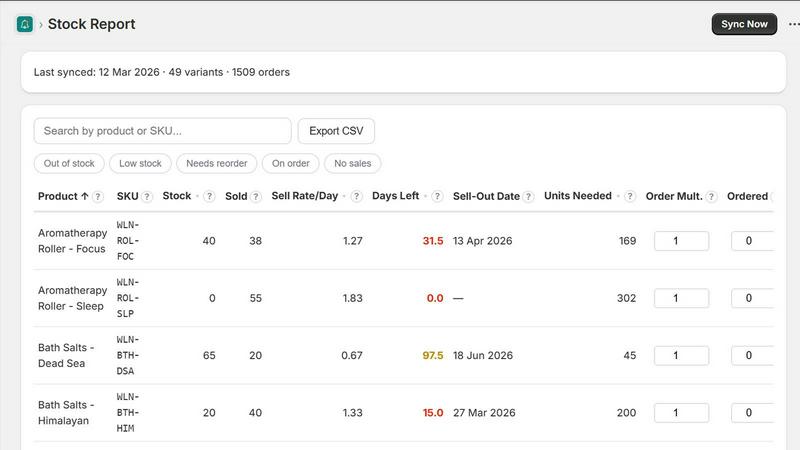
Alertr automatically connects to your Shopify store to perform a daily synchronization of all product data and recent order history. This process is foundational, as it continuously updates the inventory count for each SKU and, more importantly, calculates the precise daily and weekly sell rate. By analyzing historical sales velocity, the system moves beyond static stock levels to understand dynamic product movement, forming the basis for all predictive alerts and reorder recommendations. This automated data pull ensures your inventory dashboard is always reflecting near-real-time operational metrics without manual intervention.
Smart Reorder Alerts with Threshold Configuration
The application monitors your inventory levels against configurable, per-SKU thresholds that you define. When stock for an item falls below its designated reorder point, Alertr triggers an immediate notification. These alerts are delivered via your chosen channels, email or Slack, and contain specific, actionable data: the SKU, current stock level, calculated sell rate, and the exact recommended reorder quantity based on your preset lead time and desired safety stock. This feature replaces guesswork with a calculated procurement instruction.
Centralized Inventory Dashboard
All inventory intelligence is presented within a single, unified dashboard view. Merchants can see a comprehensive list of all SKUs, with key metrics displayed for each: current quantity, days of stock remaining (based on the calculated sell rate), and reorder status. The dashboard includes powerful filtering options to quickly surface items by status, such as "Low Stock," "Needs Reorder," or "Out of Stock." This provides an at-a-glance operational overview, enabling rapid prioritization and decision-making without navigating multiple reports or spreadsheets.
Data Export & Integration Capabilities
For reporting, auditing, or generating purchase orders, Alertr provides a one-click CSV export function. This allows you to download your complete, analyzed inventory data—including sell rates and recommended order quantities—for use in external systems or for sharing with suppliers. Furthermore, the native Slack integration pushes reorder alerts directly into designated team channels, embedding critical inventory tasks into existing team communication workflows and ensuring no alert is missed in an inbox.
documentorium
Trade-Specific Template Library
The platform hosts a comprehensive catalog of over 200 document templates meticulously organized into 26 distinct trade categories. Each template, whether for a quote, work order, service report, or proposal, is constructed with field labels and data entry points that are native to the specific trade. For instance, an electrical service report template will include fields for circuit breaker ratings and load calculations, while an HVAC proposal will have sections for SEER ratings and ductwork specifications. This eliminates the need for professionals to mentally translate their technical requirements into generic blank fields.
Guided Form Interface with Instant PDF Generation
Users interact with a structured, step-by-step form interface that logically presents all necessary fields for the selected document type. This guided process ensures no critical information is omitted. Upon form completion, the system's engine automatically formats the input data into a professionally designed layout. A clean, branded, and print-ready PDF document is generated for download or direct printing within seconds, removing all manual formatting, alignment, and design effort typically associated with document creation in word processors.
Complete Document History and Prefill Capability
Every document created within documentorium is permanently saved to the user's account in a searchable history log. This archive provides instant access to view, re-download, or reference past documents at any time. Furthermore, the system intelligently utilizes this historical data to prefill information in new documents. Client names, addresses, service details, and company information can be auto-populated from previous entries, dramatically accelerating the creation of follow-up quotes, invoices, or service reports for repeat customers.
Unified Annual Subscription Model
documentorium operates on a straightforward, all-access pricing structure. A single annual subscription fee grants unlimited access to the entire template library across all trade categories and document types. There are no tiered plans, per-document fees, or limitations on the number of documents created. This model provides cost predictability and ensures users have the full suite of tools available without needing to upgrade for specific forms or features.
Use Cases
Alertr: Inventory Management
Replacing Manual Spreadsheet Tracking
Merchants currently relying on error-prone, static spreadsheets for inventory management can use Alertr to fully automate data collection and analysis. The app eliminates the need for manual data entry, formula updates, and the constant risk of working with stale information. It transforms a hours-long weekly reconciliation task into a fully automated process, freeing up significant operational time for strategic business activities while providing far more accurate and timely insights.
Proactive Prevention of Stockouts
For growing brands where a single stockout can mean significant lost revenue and damage to customer trust, Alertr serves as an essential early-warning system. By calculating sell rates and predicting when an item will hit zero stock based on current velocity, the app provides advance notice—often days or weeks ahead—allowing ample time to place a replenishment order with suppliers and maintain continuous sales availability.
Transitioning from Shopify's Stocky App
With Shopify announcing the sunset of its native Stocky app, merchants require a direct alternative that handles the core inventory management workflow. Alertr is designed as a seamless replacement, offering analogous functionality for sell rate tracking, reorder alerts, and dashboard visibility. It provides a straightforward migration path for Stocky users seeking to maintain operational continuity without adopting a more complex or costly enterprise solution.
Streamlining Team Communication for Reordering
In businesses where inventory responsibility is shared across team members or departments, Alertr's Slack integration centralizes communication. Instead of alerts being siloed in an individual's email, reorder notifications are posted to a shared channel (e.g., #operations or #purchasing). This ensures transparency, enables collaborative discussion on order quantities, and creates an auditable trail of inventory decisions within the team's primary communication platform.
documentorium
Generating a Detailed Service Proposal for a Solar Installation
A solar installer can leverage documentorium to create a comprehensive, client-facing proposal. By selecting the solar-specific proposal template, the installer is guided through entering technical specifications (panel wattage, inverter type, estimated energy production), financial details (total cost, tax credits, financing options), and project timelines. The system outputs a polished PDF that presents complex technical and financial data in a clear, professional format, enhancing credibility and facilitating client approval.
Creating and Managing Work Orders for an HVAC Company
An HVAC service manager can rapidly generate precise work orders for technicians. Using the HVAC work order template, the manager inputs customer information, specific equipment models, diagnosed issues, required parts, and labor codes. The resulting PDF work order provides the technician with all necessary job-site information in a standardized format. Completed work orders are saved to the job history, creating a permanent record for warranty claims, future service, and internal operational tracking.
Issuing On-the-Spot Quotes and Invoices for Plumbing Services
A plumber on a service call can use documentorium on a mobile device to create a quote immediately after diagnosing a problem. The plumbing quote template includes fields for labor hours, pipe materials, fixture costs, and permit fees. Once the client approves, the plumber can convert the same form into a finalized invoice with a few clicks, generating a professional PDF for email delivery or printed copy before leaving the premises, ensuring prompt payment.
Drafting Legally-Sound Contracts for General Contractors
A general contractor can utilize the platform's contract templates tailored for construction services. These guided forms ensure inclusion of critical clauses such as scope of work, payment schedule, change order procedures, lien waivers, and warranty terms specific to construction law. This reduces legal risk by providing a more robust starting point than a generic agreement, and the instant PDF generation allows for quick review and signing at the project outset.
Pricing Comparison
Alertr: Inventory Management
Alertr operates on a simple, transparent subscription model with two primary tiers. All paid plans include a 14-day free trial with no credit card required for the Pro tier.
Free Plan:
Priced at $0 per month, this plan is intended for small stores or merchants evaluating the platform. It supports inventory management for up to 50 unique SKUs and includes core features such as the inventory dashboard and daily data synchronization.
Pro Plan:
This is the full-featured plan for growing businesses that require comprehensive, proactive inventory management. The standard launch price is $29 per month. However, during the beta period and for users who join the waitlist, a lifetime beta price of $19 per month is guaranteed. The Pro plan includes unlimited SKU tracking, smart reorder alerts via both email and Slack, full access to the inventory dashboard, CSV export functionality, and configurable thresholds.
documentorium
documentorium employs a simple, all-inclusive annual pricing model. A single subscription priced at $99 per year provides full, unrestricted access to the entire platform. This includes all 200+ templates across every trade category, unlimited document creation, PDF generation, and full use of the document history and prefill features. New users can start with a one-month free trial that requires no credit card information to begin, allowing full evaluation of the platform's capabilities before any financial commitment.
Overview
About Alertr: Inventory Management
Alertr: Inventory Management is a specialized Shopify application engineered to provide merchants with proactive, data-driven inventory control. It addresses the critical operational gap between reactive stock checks and proactive replenishment planning. The core function of the app is to automate the tracking of sell-through rates and predict potential stockouts before they occur, thereby preventing lost sales and optimizing inventory capital. It is designed for direct-to-consumer (DTC) brands and Shopify merchants of varying sizes who seek to eliminate the inefficiencies and inaccuracies of manual spreadsheet management or the high cost and complexity of enterprise-grade inventory applications. Alertr's primary value proposition lies in its operational simplicity and actionable intelligence; it offers a one-click setup, daily automated data synchronization from Shopify, and configurable alerting via email or Slack. The system calculates precise reorder quantities based on actual sell rates and user-defined lead times, transforming inventory management from a constant administrative task into a streamlined, automated workflow. Built from a proven real-world workflow that saves significant weekly operational hours, Alertr delivers essential inventory intelligence without requiring extensive training or a large financial investment.
About documentorium
documentorium is a specialized document generation engine engineered for skilled trades and service professionals. It eliminates the inefficiency of creating business documents from scratch or adapting generic templates. The platform serves electricians, plumbers, contractors, HVAC technicians, roofers, solar installers, and a wide range of other field service operators. Its core value proposition is the provision of over 200 guided, trade-specific templates across 26 categories, enabling users to produce polished, print-ready PDF documents in seconds. Unlike standard office software, every form field within documentorium is architected with the precise terminology and data requirements of the user's specific trade, ensuring accuracy and professionalism. The system maintains a complete history of all created documents, allowing for easy retrieval, re-download, and pre-filling of future forms, thereby streamlining repetitive administrative tasks. This focused approach transforms document creation from a time-consuming chore into a rapid, reliable, and integrated component of a service business's workflow.
Frequently Asked Questions
Alertr: Inventory Management FAQ
How does Alertr calculate the "Days of Stock Remaining" and reorder quantity?
Alertr performs a daily analysis of your sales history for each SKU to determine its average daily sell rate. The "Days of Stock Remaining" is a direct calculation: Current Stock Quantity divided by the Daily Sell Rate. The recommended reorder quantity is calculated using your configurable lead time (days from order to receipt) and a buffer for safety stock. The formula is: (Daily Sell Rate * Lead Time) + Safety Stock Buffer. This provides a data-driven order suggestion to cover the replenishment period.
What happens during the 14-day free trial for the Pro plan?
The 14-day free trial provides full, unrestricted access to all features of the Alertr Pro plan. This includes unlimited SKU tracking, daily syncs, smart reorder alerts via both email and Slack, access to the complete inventory dashboard, and CSV export capabilities. No credit card is required to start the trial. At the end of the 14-day period, you will be prompted to subscribe to the Pro plan to continue using the service.
Can I configure different alert thresholds for different products or variants?
Yes, Alertr is designed for granular control. You can set unique reorder points and safety stock parameters for each individual product variant (SKU). This is essential for managing items with vastly different sales velocities, costs, or supplier lead times. For example, a fast-moving bestseller can have a high reorder point, while a slow-moving, high-value item can have a lower one, ensuring capital is optimized across your entire inventory.
How does Alertr handle products with multiple variants (e.g., sizes, colors)?
Alertr syncs and tracks inventory at the variant level directly from Shopify. Each variant with a unique SKU is treated as a distinct item in the inventory dashboard. Sell rates are calculated per variant, and reorder alerts are triggered based on the stock level of the specific variant, not the aggregate stock of the parent product. This ensures precise management for every option you sell.
documentorium FAQ
Can I cancel my subscription at any time?
Yes, you retain full control over your subscription. Cancellation can be initiated directly from your account settings at any point. Upon cancellation, your access to create and edit new documents will remain active until the end of the current pre-paid billing period. There are no early termination fees or contractual lock-in periods, and the cancellation process is designed to be straightforward and penalty-free.
What happens to my data and documents when the free trial ends?
All documents you created during your free trial period are permanently retained within your account history. You will continue to have access to view, download, and print these existing documents indefinitely. To regain the ability to create new documents or edit existing ones after the trial expires, you will need to activate a paid subscription. No user data or document history is deleted upon trial expiration.
Do I lose access to my documents if I choose not to subscribe after the trial?
No, you do not lose access to your documents. Your document library and creation history are preserved within your account. You can log in at any time to view, download, and print any document you created during your active period (trial or subscription). A paid subscription is required solely to unlock the functionality for creating new documents and making edits to existing ones.
Does documentorium provide legal advice for its contracts and forms?
No, documentorium does not provide legal advice. The platform is a document generation tool designed to provide trade-specific templates and efficient PDF creation. While templates are crafted for common business scenarios, they are not a substitute for consultation with a qualified legal professional. Users are responsible for ensuring that any document created meets the specific legal and regulatory requirements of their jurisdiction and business circumstances.
Alternatives
Alertr: Inventory Management Alternatives
Alertr: Inventory Management is a specialized Shopify application within the inventory management and reorder automation category. Its core function is to proactively monitor stock levels, calculate product sell-through rates, and generate alerts when inventory falls below user-defined thresholds, facilitating timely reordering to prevent stockouts. Users may seek alternatives for various operational reasons. Common drivers include budget constraints, as some businesses require a free tier or different pricing model. Others may need more advanced feature sets, such as purchase order generation, multi-location management, or deeper integration with specific third-party logistics providers. Platform compatibility is also a key factor, as merchants operating outside of Shopify or on multiple sales channels require a different solution. When evaluating an alternative inventory management tool, key technical considerations should include the platform's integration capabilities with your e-commerce stack, the granularity and automation of its alerting logic, the availability of robust data export functions, and the overall total cost of ownership. The ideal system should eliminate manual stock checks and provide data-driven, proactive insights tailored to your specific business velocity.
documentorium Alternatives
documentorium is a specialized document generation platform within the contractor productivity and management software category. It provides trade-specific templates for creating professional business documents like quotes, invoices, and work orders, streamlining administrative tasks for service professionals. Users may explore alternatives for various reasons, including budget constraints, the need for integrated features like CRM or scheduling, platform compatibility (mobile vs. desktop), or a requirement for more extensive customization options beyond pre-built templates. The search often centers on finding a tool that aligns with specific business workflows and scale. When evaluating alternatives, key considerations should include the depth of trade-specific content, the quality and automation of PDF output, ease of use on job sites, data security practices, and overall value relative to pricing. The core objective remains finding a solution that reduces administrative time while enhancing professional credibility with clients.