documentorium vs Session Stacker
Side-by-side comparison to help you choose the right tool.

documentorium
Documentorium generates professional contractor documents and PDFs using guided, trade-specific forms in seconds.
Last updated: March 26, 2026

Session Stacker
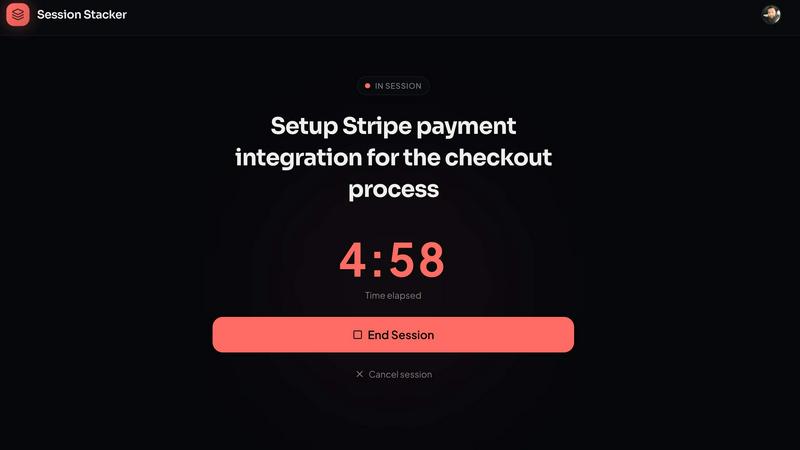
Session Stacker helps you define your next task, eliminating drift and maximizing productivity for evening side.
Last updated: February 26, 2026
Visual Comparison
documentorium

Session Stacker
Feature Comparison
documentorium
Trade-Specific Template Library
The platform hosts a comprehensive catalog of over 200 document templates meticulously organized into 26 distinct trade categories. Each template, whether for a quote, work order, service report, or proposal, is constructed with field labels and data entry points that are native to the specific trade. For instance, an electrical service report template will include fields for circuit breaker ratings and load calculations, while an HVAC proposal will have sections for SEER ratings and ductwork specifications. This eliminates the need for professionals to mentally translate their technical requirements into generic blank fields.
Guided Form Interface with Instant PDF Generation
Users interact with a structured, step-by-step form interface that logically presents all necessary fields for the selected document type. This guided process ensures no critical information is omitted. Upon form completion, the system's engine automatically formats the input data into a professionally designed layout. A clean, branded, and print-ready PDF document is generated for download or direct printing within seconds, removing all manual formatting, alignment, and design effort typically associated with document creation in word processors.
Complete Document History and Prefill Capability
Every document created within documentorium is permanently saved to the user's account in a searchable history log. This archive provides instant access to view, re-download, or reference past documents at any time. Furthermore, the system intelligently utilizes this historical data to prefill information in new documents. Client names, addresses, service details, and company information can be auto-populated from previous entries, dramatically accelerating the creation of follow-up quotes, invoices, or service reports for repeat customers.
Unified Annual Subscription Model
documentorium operates on a straightforward, all-access pricing structure. A single annual subscription fee grants unlimited access to the entire template library across all trade categories and document types. There are no tiered plans, per-document fees, or limitations on the number of documents created. This model provides cost predictability and ensures users have the full suite of tools available without needing to upgrade for specific forms or features.
Session Stacker
AI-Powered Task Review
Session Stacker utilizes artificial intelligence to review your tasks intelligently. This feature analyzes your previous sessions to suggest the most relevant next steps based on your past performance and priorities, ensuring you always know what action to take next.
Streak Tracking
To foster consistency, Session Stacker includes a streak tracking feature that monitors your progress over time. By visually displaying your completed sessions, it motivates users to maintain their momentum and encourages them to build a regular work habit.
Session History
With a comprehensive session history, users can easily revisit their past sessions to review what they accomplished. This feature helps in assessing productivity patterns and can be a valuable tool for learning from previous work sessions.
Detailed Stats
Session Stacker provides users with detailed statistics that show their progress over time. These insights include metrics such as total sessions completed, weekly targets, and session duration, offering tangible evidence of your productivity journey and boosting your confidence.
Use Cases
documentorium
Generating a Detailed Service Proposal for a Solar Installation
A solar installer can leverage documentorium to create a comprehensive, client-facing proposal. By selecting the solar-specific proposal template, the installer is guided through entering technical specifications (panel wattage, inverter type, estimated energy production), financial details (total cost, tax credits, financing options), and project timelines. The system outputs a polished PDF that presents complex technical and financial data in a clear, professional format, enhancing credibility and facilitating client approval.
Creating and Managing Work Orders for an HVAC Company
An HVAC service manager can rapidly generate precise work orders for technicians. Using the HVAC work order template, the manager inputs customer information, specific equipment models, diagnosed issues, required parts, and labor codes. The resulting PDF work order provides the technician with all necessary job-site information in a standardized format. Completed work orders are saved to the job history, creating a permanent record for warranty claims, future service, and internal operational tracking.
Issuing On-the-Spot Quotes and Invoices for Plumbing Services
A plumber on a service call can use documentorium on a mobile device to create a quote immediately after diagnosing a problem. The plumbing quote template includes fields for labor hours, pipe materials, fixture costs, and permit fees. Once the client approves, the plumber can convert the same form into a finalized invoice with a few clicks, generating a professional PDF for email delivery or printed copy before leaving the premises, ensuring prompt payment.
Drafting Legally-Sound Contracts for General Contractors
A general contractor can utilize the platform's contract templates tailored for construction services. These guided forms ensure inclusion of critical clauses such as scope of work, payment schedule, change order procedures, lien waivers, and warranty terms specific to construction law. This reduces legal risk by providing a more robust starting point than a generic agreement, and the instant PDF generation allows for quick review and signing at the project outset.
Session Stacker
Evening Side Hustlers
For individuals balancing a full-time job with their passion projects, Session Stacker provides the necessary clarity to make the most of limited evening hours. By defining the next task before ending a session, users can immediately resume work without wasting time reorienting themselves.
Freelancers
Freelancers can benefit from Session Stacker by organizing their client work more effectively. They can use the tool to define next steps for various projects, allowing them to shift focus quickly and efficiently between tasks while maintaining productivity.
Students and Researchers
Students and researchers can utilize Session Stacker to manage their projects more effectively. By setting clear next steps before ending study sessions, they can ensure a smooth transition back to their work, enhancing their overall efficiency and focus.
Hobbyists and Creatives
For hobbyists or creatives pursuing side projects, Session Stacker helps maintain engagement and progress. Whether it's writing, crafting, or coding, the tool allows users to track their creative sessions, ensuring they can pick up right where they left off, fostering a continuous flow of creativity.
Overview
About documentorium
documentorium is a specialized document generation engine engineered for skilled trades and service professionals. It eliminates the inefficiency of creating business documents from scratch or adapting generic templates. The platform serves electricians, plumbers, contractors, HVAC technicians, roofers, solar installers, and a wide range of other field service operators. Its core value proposition is the provision of over 200 guided, trade-specific templates across 26 categories, enabling users to produce polished, print-ready PDF documents in seconds. Unlike standard office software, every form field within documentorium is architected with the precise terminology and data requirements of the user's specific trade, ensuring accuracy and professionalism. The system maintains a complete history of all created documents, allowing for easy retrieval, re-download, and pre-filling of future forms, thereby streamlining repetitive administrative tasks. This focused approach transforms document creation from a time-consuming chore into a rapid, reliable, and integrated component of a service business's workflow.
About Session Stacker
Session Stacker is an innovative productivity tool designed specifically for side hustlers and builders with full-time jobs. It addresses the common challenge of losing momentum when transitioning between work sessions. Many aspiring entrepreneurs find themselves wasting precious time trying to remember their last task or re-evaluating priorities before they can start working again. Session Stacker eliminates this problem by encouraging users to establish their next action step before ending a work session. This ensures that when they return, they can dive straight into their work without any ramp-up time. The main value proposition of Session Stacker lies in its ability to provide clarity and structure, allowing users to maximize their limited time and energy effectively. Users can track their progress with detailed session history and statistics, making it easier to stay motivated and build consistency over time.
Frequently Asked Questions
documentorium FAQ
Can I cancel my subscription at any time?
Yes, you retain full control over your subscription. Cancellation can be initiated directly from your account settings at any point. Upon cancellation, your access to create and edit new documents will remain active until the end of the current pre-paid billing period. There are no early termination fees or contractual lock-in periods, and the cancellation process is designed to be straightforward and penalty-free.
What happens to my data and documents when the free trial ends?
All documents you created during your free trial period are permanently retained within your account history. You will continue to have access to view, download, and print these existing documents indefinitely. To regain the ability to create new documents or edit existing ones after the trial expires, you will need to activate a paid subscription. No user data or document history is deleted upon trial expiration.
Do I lose access to my documents if I choose not to subscribe after the trial?
No, you do not lose access to your documents. Your document library and creation history are preserved within your account. You can log in at any time to view, download, and print any document you created during your active period (trial or subscription). A paid subscription is required solely to unlock the functionality for creating new documents and making edits to existing ones.
Does documentorium provide legal advice for its contracts and forms?
No, documentorium does not provide legal advice. The platform is a document generation tool designed to provide trade-specific templates and efficient PDF creation. While templates are crafted for common business scenarios, they are not a substitute for consultation with a qualified legal professional. Users are responsible for ensuring that any document created meets the specific legal and regulatory requirements of their jurisdiction and business circumstances.
Session Stacker FAQ
How does Session Stacker improve productivity?
Session Stacker improves productivity by eliminating the time spent trying to remember previous tasks. By defining a clear next step at the end of each session, users can start working immediately upon returning.
Is Session Stacker suitable for large teams?
While Session Stacker is designed for individuals with side projects, it may not be suitable for larger teams requiring complex project management. It focuses on individual productivity rather than team collaboration.
Can I use Session Stacker on multiple devices?
Yes, Session Stacker operates as a Progressive Web App (PWA), which means it can be accessed on any device with an internet connection, providing flexibility to work wherever you are.
What happens after the free trial ends?
After the free 7-day trial, users can choose to continue using Session Stacker for $4.99 per month or make a one-time payment of $49 for lifetime access. There are no hidden fees, and users can cancel at any time.
Alternatives
documentorium Alternatives
documentorium is a specialized document generation platform within the contractor productivity and management software category. It provides trade-specific templates for creating professional business documents like quotes, invoices, and work orders, streamlining administrative tasks for service professionals. Users may explore alternatives for various reasons, including budget constraints, the need for integrated features like CRM or scheduling, platform compatibility (mobile vs. desktop), or a requirement for more extensive customization options beyond pre-built templates. The search often centers on finding a tool that aligns with specific business workflows and scale. When evaluating alternatives, key considerations should include the depth of trade-specific content, the quality and automation of PDF output, ease of use on job sites, data security practices, and overall value relative to pricing. The core objective remains finding a solution that reduces administrative time while enhancing professional credibility with clients.
Session Stacker Alternatives
Session Stacker is a productivity and management tool designed specifically for side hustlers, enabling them to maintain focus and efficiency by clarifying their next task before ending a work session. This innovative solution addresses a common productivity challenge: the time wasted trying to remember what one was working on. By implementing a simple habit of task-setting, users can seamlessly transition back into their workflow, eliminating the need for extensive planning or organizational tools. Users often seek alternatives to Session Stacker for various reasons, such as pricing, feature sets, or platform compatibility. When exploring alternatives, it is essential to consider factors like user interface, ease of integration with existing workflows, and the ability to meet specific productivity needs. Additionally, assessing customer support and the availability of trials can play a significant role in selecting the right tool for individual requirements.