
File Studio vs Yardyly
Side-by-side comparison to help you choose the right tool.

File Studio
File Studio provides powerful offline tools to convert, edit, and manage files and PDFs securely on your computer.
Last updated: February 26, 2026

Yardyly is a comprehensive software platform that centralizes and streamlines all operational, financial, and project.
Last updated: March 4, 2026
Visual Comparison
File Studio

Yardyly
Feature Comparison
File Studio
PDF Management Tools
File Studio provides a suite of five dedicated PDF tools that empower users to merge multiple PDFs, split documents into individual pages, reorder and rotate spreads, and remove passwords. This offline functionality ensures that full PDF management is possible without the need to upload any documents to the cloud.
Image Processing Capabilities
With ten image tools available, File Studio supports over 20 formats allowing users to convert, resize, compress, crop, and add watermarks to images. The application can handle files such as HEIC, WebP, and various RAW types, making it versatile for photographers and graphic designers alike.
Batch Processing Functionality
File Studio excels in batch processing, enabling users to convert, resize, or compress entire folders of files in one go. This feature maximizes efficiency, allowing users to save time and effort when dealing with numerous files simultaneously.
Offline Operation
One of the standout features of File Studio is its 100% offline operation. All processing occurs locally on the user’s Mac or Windows PC, ensuring that sensitive documents remain private and secure, as no uploads or user accounts are required for functionality.
Yardyly
Unified Operational Dashboard
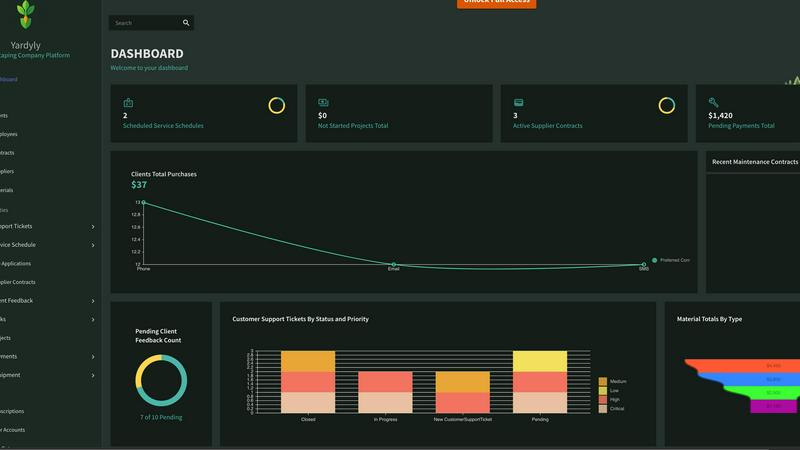
The platform provides a single-pane-of-glass dashboard that delivers a comprehensive, real-time overview of all business activities. This includes visual tracking of daily schedules, active job statuses, team member locations and assignments, pending invoices, and key performance indicators (KPIs). The interface is designed for intuitive drag-and-drop functionality, allowing managers to quickly reassign resources, reschedule appointments, and update job priorities without navigating through multiple menus, thereby optimizing daily operational decision-making.
Automated Scheduling & Dispatch
Yardyly features an intelligent scheduling engine that automates the assignment and routing of jobs. Managers can visually plot and optimize routes for their crews using the drag-and-drop calendar, minimizing travel time and fuel costs. The system automatically sends dispatch notifications and job details to field teams' mobile devices. This feature includes conflict detection to prevent double-booking and allows for recurring service scheduling, ensuring efficient resource allocation and predictable workflow management.
Integrated CRM & Client Portal
This feature consolidates all client interactions and data into a centralized customer relationship management (CRM) module. It maintains detailed client profiles, service history, notes, and preferences. The integrated client portal facilitates professional online booking, enables clients to view estimates and invoices, and provides a secure channel for communication and feedback submission. This direct integration of client feedback into the operational workflow allows for immediate issue resolution and service quality enhancement.
Financial Management & Invoicing Suite
Yardyly includes a robust financial toolkit that automates the billing cycle. It generates and sends professional, branded invoices directly from scheduled jobs or completed work orders. The system tracks all financial transactions, including client payments, supplier contract costs, and equipment expenses. It supports multiple payment gateways for online payments and provides detailed financial reporting for precise fiscal control, cash flow analysis, and simplified tax preparation.
Use Cases
File Studio
Freelance Document Management
Freelancers often handle a variety of sensitive documents, from contracts to invoices. File Studio offers robust tools for managing these files securely and efficiently, allowing users to ensure their documents are well-organized and protected.
Photography Workflow Optimization
Photographers can leverage File Studio to manage their images, converting RAW files to more accessible formats, resizing images for web use, and compressing files without losing quality. This helps streamline their workflow and maintain high standards in image quality.
Secure Personal Document Handling
Individuals needing to manage personal documents such as passports or IDs can do so securely with File Studio. The application allows users to edit and protect these sensitive files offline, ensuring their privacy while managing essential documents.
Educational Material Preparation
Teachers and educators can utilize File Studio to prepare educational materials. They can merge various PDFs into single documents, convert image files for presentations, and ensure that all materials are formatted correctly without relying on internet access.
Yardyly
Scaling a Solo Landscaping Operation
For a solo entrepreneur or a small start-up, Yardyly automates the administrative foundation of the business. The owner can manage online bookings, automatically schedule their own week, send digital estimates and invoices, and track all expenses from a single mobile device. This eliminates manual data entry and reduces time spent on paperwork, allowing the sole operator to focus entirely on service delivery and client acquisition while maintaining a professional, organized business front.
Managing a Multi-Crew Lawn Care Business
A growing business with several field crews utilizes Yardyly for centralized dispatch and real-time coordination. The manager can assign jobs, optimize daily routes for multiple teams, and track each crew's progress and location from the office dashboard. Field technicians receive job details digitally, update statuses upon completion, and can log materials used. This use case streamlines communication, reduces radio traffic, and provides management with instant visibility into field operations and productivity.
Streamlining Client Communication and Billing
Service businesses use Yardyly to professionalize client interactions and accelerate cash flow. The client portal allows customers to book services, view upcoming appointments, and access their service history. Automated invoicing triggered by job completion, coupled with integrated online payment options, significantly reduces the payment cycle. Centralized communication logs ensure all client requests and feedback are tracked and addressed, enhancing customer satisfaction and retention rates.
Overseeing Project-Based Landscape Installations
For companies handling complex, multi-phase projects like landscape installations, Yardyly provides project coordination tools. Managers can break down projects into tracked tasks, assign them to specific team members with deadlines, and monitor overall project status, budget adherence, and resource allocation. This use case ensures that large projects remain on schedule and within budget, while facilitating collaboration and accountability across the team.
Overview
About File Studio
File Studio is a powerful desktop application designed for the offline management of PDFs and images, catering specifically to users who prioritize their privacy and security. It serves a diverse range of professionals including photographers, freelancers, and remote workers who need to handle sensitive documents such as passports, IDs, and contracts without the risk of exposing them to cloud storage. The application's primary value proposition lies in its comprehensive set of tools that allow users to merge, split, reorder, rotate, and secure PDFs with password protection. Additionally, File Studio supports over 20 file formats, including HEIC, WebP, AVIF, and various RAW types, enabling seamless file conversions. With a straightforward one-time purchase model and compatibility across both Mac and Windows platforms, File Studio offers a reliable and powerful solution for file management without the burden of subscriptions or the need for user accounts.
About Yardyly
Yardyly is a comprehensive, cloud-based business management platform engineered specifically for the operational demands of the landscaping, lawn care, and outdoor service industries. It functions as a centralized digital hub, consolidating critical business functions that are typically fragmented across disparate systems. The platform is architected to replace inefficient manual processes involving spreadsheets, paper notes, and multiple disconnected applications. Its core value proposition lies in automating administrative tasks, enhancing operational clarity, and improving communication channels, thereby enabling business owners and managers to reallocate time from chaotic logistics to revenue-generating activities and business growth. Yardyly is designed with scalability in mind, serving solo operators establishing their business as effectively as it supports growing teams managing complex schedules and client portfolios. Its mobile-responsive design ensures full platform functionality is accessible from any device, providing real-time management capabilities from the field or the office. The software's integration of online booking, job scheduling, customer relationship management (CRM), invoicing, and team coordination tools creates a seamless workflow from client acquisition to job completion and payment.
Frequently Asked Questions
File Studio FAQ
Is my data ever uploaded?
No. File Studio processes everything locally on your device. Your files never leave your computer, ensuring 100% offline processing and maximum privacy.
Do you offer a free trial?
Yes. File Studio provides a free trial option, allowing users to explore its features before committing to a purchase, ensuring they can evaluate the software's capabilities.
Can I use File Studio on both Mac and Windows?
Absolutely. File Studio is compatible with both Mac and Windows operating systems, making it accessible for a wide range of users regardless of their device preference.
What file formats does File Studio support?
File Studio supports over 20 file formats, including popular image formats like HEIC, WebP, AVIF, and various RAW types, as well as providing comprehensive PDF management capabilities, making it versatile for many users.
Yardyly FAQ
What makes Yardyly different from generic business management software?
Yardyly is engineered from the ground up for the specific workflows and challenges of the green industry. Unlike generic software, it includes native features for job scheduling with geographic route optimization, client portals for service history and lawn care plans, equipment and material tracking, and integrated feedback loops specific to service quality. This industry-specific design reduces customization needs and ensures the platform aligns perfectly with standard landscaping and lawn care business processes.
Is my business data secure on the Yardyly platform?
Yes, Yardyly employs enterprise-grade security protocols to protect your data. This includes SSL (Secure Sockets Layer) encryption for all data transmitted between your device and our servers, ensuring that sensitive information like client details and financial data is secured in transit. The platform is hosted on reliable, secure cloud infrastructure with regular backups. Access is controlled through secure login credentials, and you maintain full ownership of all your business data entered into the system.
Can I use Yardyly on mobile devices in the field?
Absolutely. Yardyly is built with a fully responsive, mobile-friendly design. The entire platform, including the scheduling calendar, job details, client information, and time-tracking tools, is accessible and fully functional on smartphones and tablets. This allows field crews to view their assigned routes, update job statuses in real-time, log notes or photos, and communicate with the office without needing to return to a desktop computer, ensuring operational continuity from any location.
How does the onboarding and setup process work?
Yardyly offers a customizable setup process. After signing up, you can tailor the application to your specific business needs by configuring service types, pricing models, invoice templates, and user roles. The platform is designed for intuitive use, but comprehensive support resources are available. You can import existing client lists and begin scheduling jobs immediately. The drag-and-drop interface allows for a low-learning-curve adoption, enabling you to streamline operations quickly without extensive training.
Alternatives
File Studio Alternatives
File Studio is a versatile desktop application that falls within the productivity and management category, particularly focused on file handling and editing. Designed to operate entirely offline, it provides users with powerful tools for managing PDFs and images while ensuring their privacy and security. This makes it a preferred choice for those who need to work with sensitive documents without relying on internet connectivity. Users often seek alternatives to File Studio for various reasons, including pricing, feature sets, and compatibility with different operating systems. It is essential to assess the specific requirements and functionalities that matter most to you when exploring alternatives. Look for options that offer comprehensive file management capabilities, robust security features, and a user-friendly interface to ensure a seamless transition or enhancement of your current workflow.
Yardyly Alternatives
Yardyly is a comprehensive business management software platform designed specifically for landscaping, lawn care, and outdoor service companies. It falls into the category of industry-specific productivity and operations management software, integrating tools for scheduling, customer management, invoicing, and team coordination into a single cloud-based system. Users may explore alternatives to Yardyly for various operational reasons. Common drivers include budget constraints and specific pricing model requirements, the need for different feature sets or integrations not offered in the core platform, or a preference for a different user interface and workflow design. Platform-specific needs, such as a requirement for on-premise deployment versus cloud-only access, can also prompt evaluation of other solutions. When selecting an alternative business management platform, key evaluation criteria should include the depth of industry-specific functionality, the robustness of mobile capabilities for field crews, the flexibility of the pricing structure, and the quality of customer support. The core objective is to identify a system that centralizes operations, reduces administrative overhead through automation, and provides clear visibility into business performance from any location.