
Interactive Circle of Fifths vs PseudoRun
Side-by-side comparison to help you choose the right tool.

Interactive Circle of Fifths
Master music theory with an interactive Circle of Fifths for scales, chords, and instrument visualization.
Last updated: March 1, 2026

PseudoRun
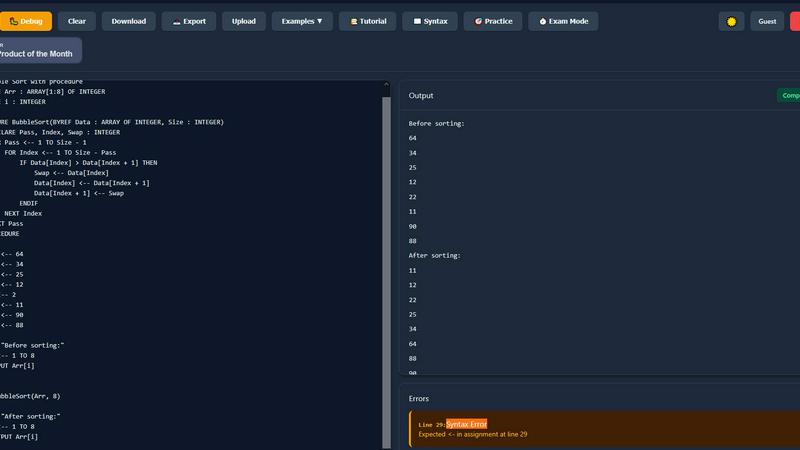
PseudoRun is a free IGCSE pseudocode editor for writing, testing, and mastering algorithms with real-time validation.
Last updated: March 1, 2026
Visual Comparison
Interactive Circle of Fifths

PseudoRun
Feature Comparison
Interactive Circle of Fifths
Dynamic Circle Interface
The central feature is a fully interactive, clickable Circle of Fifths diagram. Users can select any key as the tonic, and the entire interface updates in real-time to reflect all harmonic relationships originating from that tonal center. This includes the immediate display of the seven diatonic chords, their Roman numeral functions, and their parallel connections across the circle. The dynamic nature allows for instant transposition and visualization of key relationships, such as relative majors/minors and closely related keys, far surpassing the utility of a static image.
Integrated Scale & Chord Explorer
This feature provides detailed analysis of scale structures and their harmonized chords. Users can select from a comprehensive library of scales, including Diatonic, Pentatonic, Blues, and Diminished scales. Upon selection, the tool displays the precise notes of the scale and, crucially, automatically generates the complete set of chords that are built from each scale degree. This allows for deep study of scale harmonization principles and provides the foundational chords for composition and improvisation within that specific tonal color.
Visual Instrument Fingering Diagrams
To directly connect theory with physical execution, the tool incorporates precise, interactive fingering diagrams for both piano keyboard and guitar fretboard. When a chord or scale is selected, the corresponding finger positions are highlighted on these instrumental diagrams. This specification is critical for instrumentalists to translate theoretical chord symbols and scale notes into accurate, playable shapes on their instrument, facilitating efficient practice and performance application.
Chord Sequencer & Functional Analysis Panel
This advanced panel enables the construction and analysis of chord progressions. Users can sequence chords (e.g., C, Dm, Em, F) and the interface will display their functional Roman numeral analysis (I, ii, iii, IV) within the active key. Additional metadata for each chord, such as its scale degree and typical resolution target ("Resolves To"), is provided. This feature is essential for understanding cadential motion, composing logically flowing progressions, and studying the syntactic rules of functional harmony in a practical, hands-on environment.
PseudoRun
IGCSE Exam Focused
PseudoRun is 100% aligned with Cambridge IGCSE Computer Science pseudocode specifications and exam patterns. This focus ensures that students practice relevant material that directly prepares them for their exams, increasing their chances of success.
Real-Time Validation
The platform features instant syntax checking and error detection, allowing users to write perfect IGCSE pseudocode effortlessly. This real-time validation helps students identify and rectify mistakes as they code, fostering a more efficient learning process.
Step-by-Step Debugger
Students can master IGCSE algorithms using PseudoRun's line-by-line execution and variable tracking features. This step-by-step debugging capability provides deeper insights into how algorithms operate, enhancing understanding and retention of complex concepts.
Free Cloud Storage
PseudoRun offers free cloud storage, enabling users to save unlimited IGCSE pseudocode programs and access them from any device. This feature allows for seamless exam preparation, letting students work on their programs anytime and anywhere.
Use Cases
Interactive Circle of Fifths
Music Theory Education & Homework
Students can use the tool to visualize and verify complex theoretical concepts taught in class. Instead of manually drawing circles or calculating chords, they can instantly see the structure of any key, harmonize any scale, and check the functional analysis of progressions. This interactive verification accelerates comprehension and serves as a powerful aid for completing assignments on harmony, scale construction, and chord progression analysis with accurate, immediate feedback.
Songwriting & Chord Progression Development
Songwriters and composers can leverage the Chord Sequencer and interactive circle to break out of creative ruts. By experimenting with different tonal centers and viewing the available diatonic chords, they can construct novel progressions. The "Resolves To" functionality suggests conventional harmonic movements, which can be followed or subverted intentionally. This use case transforms the tool from a reference into an active brainstorming partner for harmonic development.
Instrumental Practice & Fretboard/Keyboard Mastery
Guitarists and pianists utilize the integrated fingering diagrams to learn chord voicings and scale patterns in all keys. A user can select a challenging chord, such as B° (B diminished), and instantly see its formation on their instrument across different positions. This is invaluable for systematic practice, memorizing the fretboard or keyboard geography, and applying new theoretical scales like the Diminished or Blues scale directly to their instrument in a musical context.
Analytical Reference for Arranging & Transcription
When arranging music or transcribing songs, musicians often need to quickly identify the key, analyze borrowed chords, or understand modal interchange. The Interactive Circle provides a central reference to identify non-diatonic chords by showing their relationship to the primary key and suggesting their possible origin from parallel modes or closely related keys, thereby clarifying the harmonic structure of complex pieces.
PseudoRun
Exam Preparation
Students can utilize PseudoRun to prepare for their IGCSE Computer Science exams by practicing pseudocode problems that mirror the actual exam format. With the platform's focused resources, users can enhance their skills and boost their confidence.
Algorithm Study
Educators can leverage PseudoRun as a teaching tool to illustrate algorithm concepts in a clear and interactive manner. The real-time feedback and debugging features allow students to grasp complex algorithms more effectively.
Independent Learning
Self-learners can take advantage of PseudoRun's extensive library of practice problems and examples. This flexibility allows individuals to progress at their own pace, mastering pseudocode without the constraints of classroom settings.
Collaborative Learning
Groups of students can collaborate on pseudocode projects using PseudoRun's cloud storage feature. By sharing their work and providing feedback to one another, they can deepen their understanding and foster a supportive learning environment.
Overview
About Interactive Circle of Fifths
The Interactive Circle of Fifths is a sophisticated digital music theory platform engineered to transform the foundational concepts of Western harmony into a dynamic, multi-sensory learning and composition tool. It transcends the limitations of static textbook diagrams by providing a fully interactive, clickable interface that visually and audibly maps the complex relationships between keys, chords, and scales in real-time. This tool is architected for serious musicians, including students, composers, songwriters, and instrumentalists, who require a deep, practical understanding of music theory applicable to their craft. Its core value proposition is the seamless integration of abstract theoretical knowledge with immediate auditory feedback and instrumental application. By centralizing critical concepts such as scale harmonization, chord function (I, ii, iii, IV, V, vi, vii°), modal interchange, and scale construction (Diatonic, Pentatonic, Blues, Diminished), it serves as both an accelerated learning system and an indispensable creative reference. Users can instantly visualize chord relationships within any key, hear their sonic character, and study precise fingerings on integrated piano and guitar fretboard diagrams, thereby effectively bridging the gap between theoretical study and practical performance or composition.
About PseudoRun
PseudoRun is the premier free online platform designed specifically for mastering IGCSE Computer Science pseudocode. This comprehensive tool serves as an editor, simulator, and learning environment meticulously aligned with the Cambridge IGCSE (0478 & 0984) pseudocode specifications. Users can effortlessly write, execute, and debug pseudocode algorithms in real-time, negating the necessity for complex local software installations. The primary value proposition of PseudoRun lies in its commitment to offering a distraction-free, ad-free, and entirely free learning tool that seamlessly connects theoretical algorithmic concepts with practical, exam-ready implementation. Tailored for IGCSE students, educators, and self-learners, PseudoRun provides instant feedback, step-by-step execution visualization, and a comprehensive suite of practice resources. By focusing on the precise syntax and logical patterns required for IGCSE exams, it transforms the abstract process of algorithm design into an interactive and effective learning experience, ultimately boosting confidence and success in exam settings.
Frequently Asked Questions
Interactive Circle of Fifths FAQ
What instruments does the Interactive Circle of Fifths support?
The tool provides dedicated visual fingering diagrams for two primary instruments: the piano (keyboard) and the guitar (fretboard). When any chord or scale is selected, the correct notes and recommended fingerings are displayed on clear, interactive diagrams for these instruments. This direct application helps bridge theory and practice for players of these instruments.
Can I use it to learn about modes and non-diatonic scales?
Yes. Beyond the standard major (Ionian) scale, the tool includes analysis for various scale structures. By selecting different scales from the inner ring, such as the Pentatonic or Blues scale, you can see their unique interval patterns and the chords derived from them. This functionality is fundamental for studying modes and understanding the harmonic flavor of non-diatonic scales in composition and improvisation.
How does the Chord Sequencer and "Resolves To" feature work?
The Chord Sequencer allows you to build a progression by selecting chords. The tool then analyzes each chord's function within the currently active key, displaying its Roman numeral (e.g., IV, V, vi). The "Resolves To" information indicates the chord's typical tendency tone resolution based on classical and common-practice harmony, such as the dominant (V) chord strongly resolving to the tonic (I). This guides users in creating progressions with strong cadential movement.
Is this tool suitable for complete beginners in music theory?
While the interface is designed for clarity, the tool is most effective for users with a basic foundational understanding of notes, chords, and what the Circle of Fifths represents. It is engineered to deepen theoretical knowledge and apply it practically. A true beginner might benefit from introductory resources first, but the interactive nature can significantly accelerate the learning curve for those already familiar with basic terminology.
PseudoRun FAQ
How do I get started with PseudoRun?
Getting started with PseudoRun is simple. Just visit the website, and you can start coding right away without any login required. No credit card information is needed, and you can begin your pseudocode journey in just 30 seconds.
Is PseudoRun really free, with no ads?
Yes, PseudoRun is completely free to use, and there are no ads interrupting your experience. Our commitment is to provide a distraction-free environment that prioritizes student learning and success.
Can I access my projects from different devices?
Absolutely! PseudoRun features free cloud storage, allowing you to save your pseudocode programs and access them from any device. This ensures that your work is always available, regardless of where you are.
What types of practice problems are available?
PseudoRun offers over 50 IGCSE-style examples and exercises covering essential topics such as loops, arrays, procedures, and other exam-related content. These resources are designed to help you gain a thorough understanding of IGCSE pseudocode.
Alternatives
Interactive Circle of Fifths Alternatives
The Interactive Circle of Fifths is a specialized digital music theory tool within the Education & Learning category. It functions as a dynamic, interactive reference designed to visualize harmonic relationships, chord progressions, and scale structures, integrating auditory feedback and instrumental visualizations for practical application. Users may seek alternatives for various technical and practical reasons. These include budget constraints, specific feature requirements not addressed by the core product, or compatibility needs with different operating systems and platforms. The search often extends to finding solutions that align with particular pedagogical approaches or workflow integrations. When evaluating an alternative, key considerations should include the depth of theoretical coverage, the quality and accuracy of auditory playback, the range of supported instrument visualizations, and the overall user interface design. The optimal tool should effectively bridge abstract music theory concepts with executable instrumental knowledge, matching the user's specific learning or compositional objectives.
PseudoRun Alternatives
PseudoRun is a free online platform specifically designed to help users master IGCSE Computer Science pseudocode. As a comprehensive editor, simulator, and learning environment, it serves students, educators, and self-learners by providing tools to write, test, and debug algorithms in real-time while adhering to the Cambridge IGCSE pseudocode specifications. Users often seek alternatives to PseudoRun for various reasons, including the need for additional features, specific platform compatibility, or preferences for different user interfaces. When choosing an alternative, it is essential to consider the platform's alignment with exam standards, the availability of features such as real-time validation, and the overall user experience to ensure effective learning and preparation for the IGCSE exams.