
5chat vs Interhubz
Side-by-side comparison to help you choose the right tool.

5chat
5chat is a lightweight, AI-powered live chat that boosts website performance and customer engagement.
Last updated: March 1, 2026

Interhubz
Interhubz seamlessly syncs Intercom chats to HubSpot as organized, single timeline entries with smart ticketing and.
Last updated: February 26, 2026
Visual Comparison
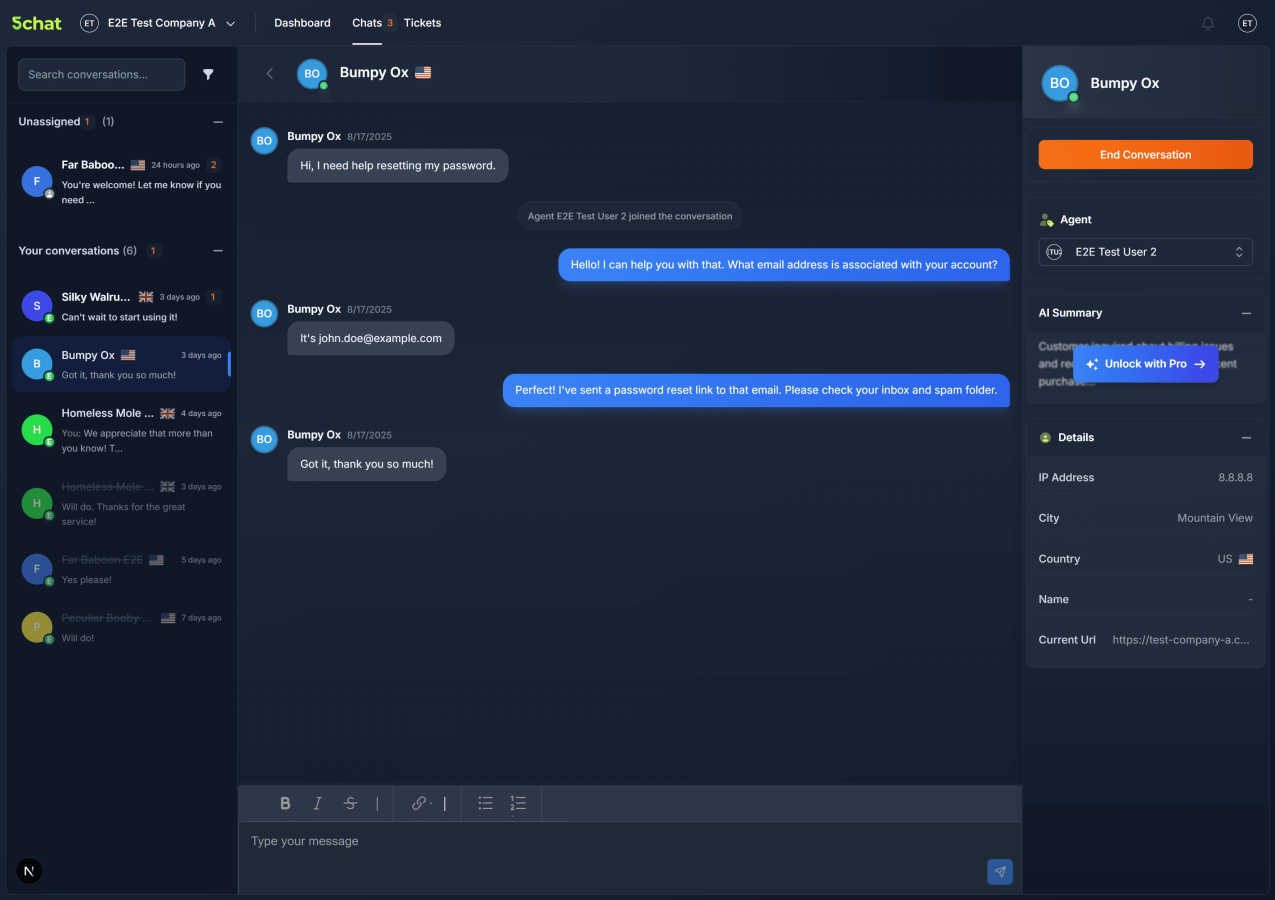
5chat
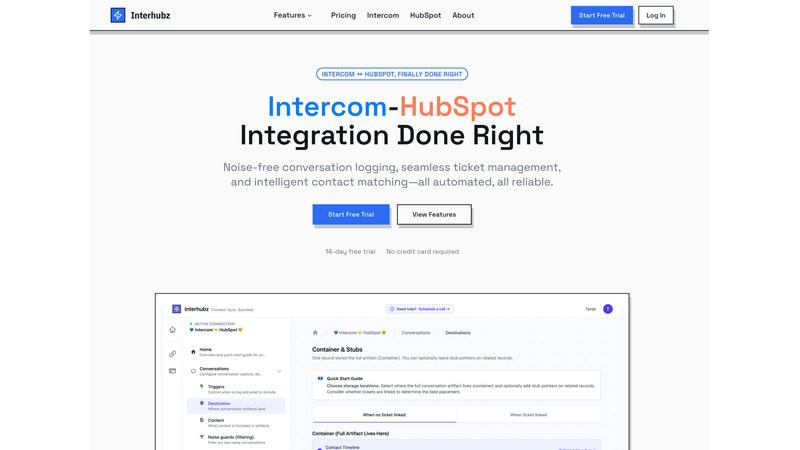
Interhubz
Feature Comparison
5chat
Blazing-Fast Performance Architecture
5chat is engineered with a foundational emphasis on minimizing performance overhead. Its optimized delivery mechanisms and ultra-lean JavaScript footprint, totaling under 15KB, ensure rapid loading times of less than 50 milliseconds. This architecture is specifically designed to preserve your site's Core Web Vitals, avoiding the negative impact on user experience, conversion rates, and SEO that is often associated with heavier third-party chat scripts, thereby maintaining optimal site speed during all visitor engagements.
AI-Powered Conversation Intelligence
The platform incorporates artificial intelligence that operates behind the scenes to handle administrative heavy lifting. Key functionalities include smart conversation tagging, where AI automatically categorizes discussions with relevant tags for effortless organization and search. Furthermore, it provides intelligent, real-time conversation summaries that capture the essence of each interaction as it evolves, allowing support agents to quickly grasp context without manually reviewing entire chat histories.
Comprehensive Visitor Insights & Context
5chat enables support teams to attach rich user context directly to conversations, eliminating repetitive questions and enabling personalized support. Agents can view key customer details, such as name, status, or custom metadata, within the chat interface. This context-aware support, facilitated by a simple API for setting metadata, allows for faster issue resolution and a smoother, more efficient customer experience by providing all necessary information at a glance.
Intuitive, Brandable Agent Interface
Featuring a fresh, mobile-ready UI that mimics familiar messaging applications, the agent interface feels instantly natural and requires minimal training. Teams can provide fast support from anywhere. The chat widget is fully customizable, allowing businesses to easily adjust colors, text, and profiles to match their site's branding perfectly, achieving a professional and cohesive appearance without requiring developer resources for implementation.
Interhubz
One Note Per Conversation
Interhubz transforms the way conversations are logged in HubSpot by creating a single, formatted note for each Intercom interaction. This eliminates the confusion of multiple timeline entries, ensuring that all relevant details—including full transcripts, summaries, and attachments—are documented in one place, enhancing readability and accessibility.
Intelligent Contact Matching
With advanced algorithms, Interhubz intelligently matches contacts and companies between Intercom and HubSpot using email, phone numbers, and custom properties. This smart matching process ensures that no duplicates are created, maintaining a clean and organized customer database that enhances operational efficiency.
One-Click Ticket Creation
Interhubz simplifies ticket management by allowing users to create HubSpot tickets directly from Intercom with just one click. This feature includes bi-directional status synchronization, ensuring that any updates or changes made to the ticket in either platform are reflected in real time, reducing the risk of manual errors and miscommunication.
Noise Guards
Interhubz incorporates advanced noise guards to filter out low-value interactions automatically. Configurable filters can block bot conversations, auto-closed tickets, and spam, ensuring that only meaningful interactions are synced to HubSpot. This keeps the CRM clean and focused on genuine customer engagements.
Use Cases
5chat
High-Growth SaaS Companies
For SaaS businesses where application performance and user retention are paramount, 5chat provides a critical support channel without degrading the user interface speed. The lightweight integration ensures dashboard and landing page performance remains uncompromised, while AI-powered summaries and tagging help scale customer support operations efficiently as user bases grow, maintaining high-quality service without technical debt.
Conversion-Critical E-commerce Stores
E-commerce sites operating in competitive markets rely on every millisecond of page load time to prevent cart abandonment. 5chat enables these stores to offer real-time sales and support chat to assist shoppers and boost conversion rates, all while protecting their Core Web Vitals scores. The visitor insights feature allows support agents to immediately understand a customer's browsing or purchase history, enabling personalized, effective assistance.
Performance-Obsessed Startups
Startups with limited technical resources need tools that are both powerful and unobtrusive. 5chat's one-line code snippet or one-click plugin deployment allows for integration in under two minutes, bypassing complex configurations. This enables startups to quickly activate a professional, brand-aligned communication channel that supports their growth without slowing down their carefully optimized website, a common pitfall with bulkier alternatives.
Mobile-First Support Teams
Businesses with support agents who are frequently on the move require a tool that is fully functional across all devices. 5chat's mobile-optimized agent interface allows teams to connect with customers from anywhere, providing the same full suite of features—including access to AI summaries and visitor context—on a smartphone or tablet as on a desktop, ensuring continuous and responsive customer service.
Interhubz
Streamlined Support Operations
Support teams using Intercom can effortlessly log conversations into HubSpot as rich notes, providing sales and customer success teams with complete context. This ensures that all stakeholders have access to the same information, facilitating smoother handoffs and improved customer experiences.
Enhanced Sales Collaboration
Sales teams can rely on Interhubz to maintain a clear view of customer interactions without the clutter of multiple timeline entries. With consolidated notes and real-time ticket updates, sales representatives can engage with customers more effectively, armed with a comprehensive understanding of past interactions.
Efficient Ticket Management
By enabling one-click ticket creation from Intercom, Interhubz allows support agents to manage customer issues without excessive tab-switching or manual data entry. This streamlined process enhances productivity and helps teams respond to customer inquiries faster.
Reduced Administrative Overhead
Interhubz significantly cuts down the time spent on managing integrations between Intercom and HubSpot. With automated synchronization and noise filtering, teams can focus on their core responsibilities rather than dealing with the chaos of fragmented data and timeline pollution.
Overview
About 5chat
5chat is a high-performance live chat software engineered for businesses where website speed and user experience are critical to conversion and revenue. It is architected from the ground up with a relentless focus on technical optimization, specifically to address the performance degradation caused by traditional live chat solutions that inject heavy, bloated JavaScript. Its core value proposition is delivering enterprise-grade customer support functionality—including AI-powered tools, smart ticketing, and visitor insights—without compromising the technical performance metrics that directly impact SEO and user engagement. The primary target audience includes performance-obsessed startups, SaaS companies, and e-commerce businesses that cannot afford the latency penalties associated with conventional tools. With an ultra-lean bundle size of under 15KB and a load time of less than 50 milliseconds, 5chat is designed to protect Core Web Vitals scores. Implementation is streamlined for maximum efficiency, offering one-click plugins for platforms like WordPress and Shopify or a simple one-line code snippet for custom sites, enabling deployment in under two minutes. This combination of technical excellence and an intuitive, mobile-ready agent interface provides a robust solution for effective visitor interaction and streamlined conversation management.
About Interhubz
Interhubz is a powerful integration tool designed to bridge the gap between Intercom and HubSpot, addressing the common challenges teams face when managing customer interactions across these platforms. By consolidating multiple conversation entries into a single, coherent note, Interhubz enhances the clarity and usability of customer communication histories. Ideal for organizations where customer support operates through Intercom and sales or customer success teams utilize HubSpot, Interhubz provides a seamless experience with features like intelligent contact matching and one-click ticket creation. The main value proposition lies in its ability to eliminate timeline pollution, reduce manual entry errors, and automate the synchronization of critical data, allowing teams to focus on building relationships rather than managing clutter.
Frequently Asked Questions
5chat FAQ
How does 5chat impact my website's loading speed?
5chat is specifically engineered to have a negligible impact on site performance. With a total bundle size of under 15KB and an average load time of less than 50 milliseconds, it is designed to protect your Core Web Vitals scores. Its optimized delivery and lean codebase prevent the significant slowdowns commonly associated with traditional, heavier live chat scripts, ensuring your site's speed and user experience remain optimal.
What is required to integrate 5chat on my website?
Integration is designed for maximum efficiency. For popular platforms like WordPress and Shopify, one-click plugins are available. For custom websites, you only need to insert a single, concise line of JavaScript code snippet into your site's header. This process bypasses complex configurations, enabling most deployments to be completed in under two minutes for instant activation of the chat functionality.
Can I customize the chat widget to match my brand?
Yes, 5chat offers extensive customization options for the chat widget that do not require developer intervention. Through an intuitive settings panel, you can easily modify colors, text, agent profiles, and other visual elements to ensure the chat experience perfectly aligns with your website's look and feel, maintaining a professional and cohesive brand identity for your visitors.
How does the AI conversation summary feature work?
The AI conversation summary feature works in real-time behind the scenes. As a chat conversation evolves between your agent and a visitor, the artificial intelligence continuously analyzes the dialogue. It automatically generates and updates a concise summary that captures the key points, issues, and resolutions discussed, allowing agents or managers to quickly understand the context without reading the entire transcript.
Interhubz FAQ
How does Interhubz ensure data accuracy between Intercom and HubSpot?
Interhubz uses intelligent contact matching algorithms to ensure that customer records are accurately synchronized between platforms. By matching contacts based on email, phone numbers, and custom properties, it prevents the creation of duplicates and maintains data integrity.
Can I customize the noise filters in Interhubz?
Yes, Interhubz allows users to configure noise guards according to their specific needs. You can set minimum message counts and duration thresholds to filter out low-value conversations, ensuring that only relevant interactions are logged in HubSpot.
How long does it take to set up Interhubz?
Setting up Interhubz is a quick and straightforward process. With a one-click OAuth connection for both Intercom and HubSpot, the entire setup can be completed in just a few minutes, allowing teams to start syncing conversations almost immediately.
Is there an API available for developers?
Yes, Interhubz provides a developer-friendly REST API that allows for programmatic conversation capture and custom workflow integrations. This feature empowers teams to create tailored solutions that fit their unique operational requirements.
Alternatives
5chat Alternatives
5chat is a high-performance live chat solution engineered for the customer support category, with a core focus on preserving website speed and user experience. Its defining characteristic is an ultra-lean architecture, boasting a sub-15KB footprint and sub-50ms load time to protect critical performance metrics like Core Web Vitals. Users may seek alternatives to 5chat for various reasons, including specific budget constraints, the need for integrated omnichannel support beyond live chat, or requirements for advanced CRM or help desk functionalities that extend beyond its streamlined, performance-first scope. Platform compatibility, such as a need for deep native integration with a particular e-commerce or service management stack, can also drive the evaluation of other tools. When assessing alternatives, key criteria should include the technical impact on site performance, specifically bundle size and load time. Equally important is evaluating the feature set against core business needs, such as AI automation capabilities, ticketing workflows, mobile agent support, and the ease of implementation on your specific technology stack without compromising site speed.
Interhubz Alternatives
Interhubz is a powerful integration tool designed to streamline the connection between Intercom and HubSpot, positioning itself within the customer support category. It addresses common pain points by consolidating multiple chat entries into a single, organized timeline entry, enhancing the efficiency of data management for support and sales teams. Users often seek alternatives to Interhubz due to various reasons, including pricing considerations, feature set discrepancies, or specific platform needs that may not align with their operational goals. When evaluating alternatives, it is essential to focus on several key factors. Firstly, examine the integration capabilities and whether they provide the same level of seamless synchronization between platforms. Additionally, consider the user experience, including the cleanliness of data presentation and any features that can mitigate common issues like duplicates and noise in the CRM. Finally, pricing and support options are crucial in ensuring that the chosen solution meets budget constraints while delivering the necessary functionality.