OGimagen vs Quickfix AI
Side-by-side comparison to help you choose the right tool.

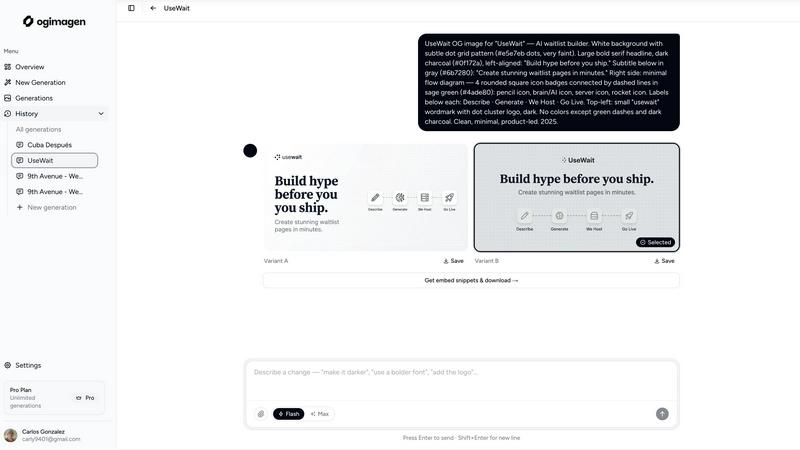
OGImagen is an AI-powered generator that creates and delivers optimized Open Graph, Twitter, and LinkedIn images with ready-to-use meta tags.
Last updated: March 11, 2026

Quickfix AI
Quickfix AI instantly diagnoses and explains your system's performance and health in plain English.
Last updated: February 28, 2026
Visual Comparison
OGimagen
Quickfix AI
Feature Comparison
OGimagen
AI-Powered Multi-Platform Generation
OGimagen's core engine uses artificial intelligence to generate two distinct visual variants (A & B) from user-provided titles, descriptions, and brand colors. The system is specifically tuned to create pixel-perfect images optimized for the precise specifications of each social platform. With a single generation action, it automatically produces three correctly sized assets: a standard Open Graph image, a Twitter Card, and a LinkedIn Card. This eliminates the need for manual resizing, reformatting, or maintaining multiple design templates.
Framework-Specific Meta Tag Snippets
Following image generation, OGimagen provides immediate access to copy-paste code snippets for embedding the generated images into a website's HTML <head> section. While free users receive a standard HTML snippet, Pro subscribers unlock framework-specific code for Next.js (App Router and Pages Router), Astro, SvelteKit, and Remix. These snippets include correctly formatted openGraph and twitter metadata objects, ensuring proper integration and immediate preview functionality upon deployment.
Model Context Protocol (MCP) Integration
For Pro users, OGimagen offers deep integration into the developer workflow via Model Context Protocol (MCP). This allows developers to generate, list, and manage OG images directly from within compatible code editors and AI agents like Claude Code, Cursor, and Windsurf. Users can attach brand logos as reference images and fetch meta tag snippets without leaving their coding environment, dramatically streamlining the content creation and deployment pipeline.
Global CDN Hosting & Management
All generated images are automatically uploaded and served from a global Cloudflare Content Delivery Network (CDN). This ensures high-performance image deliverability with low latency worldwide, which is critical for social platform crawlers that fetch preview images. Hosting duration varies by plan, from 45 days for Starter to permanent hosting for Pro. The platform manages the entire asset lifecycle, including storage, optimization, and global distribution.
Quickfix AI
Comprehensive One-Click System Scan
The agent performs a holistic scan of your entire system in under one minute. It audits key performance indicators across all major subsystems: CPU (usage per core, temperature, clock speed), RAM (utilization, pressure, available capacity), GPU (load, temperature), storage drives (health via S.M.A.R.T. data, used/free space, read/write speeds), network adapters (upload/download bandwidth, latency), battery health (maximum capacity, cycle count), and core security settings (firewall status, FileVault/Gatekeeper on macOS). This provides a unified, real-time snapshot of system status without requiring multiple disparate tools.
AI-Powered Analysis and Plain-English Reporting
Beyond data collection, Quickfix AI's proprietary AI engine analyzes the diagnostic report to identify anomalies, bottlenecks, and potential issues. It then generates an intelligible summary, explaining technical concepts in accessible language. For example, instead of merely stating "CPU at 89%," it identifies the specific processes responsible (e.g., "Chrome at 45%") and provides clear, actionable guidance such as recommending the closure of unnecessary browser tabs to alleviate immediate memory and CPU strain.
Secure Remote Diagnostics via Sharing Codes
This feature is engineered for IT support and helpdesk scenarios. A user can generate a unique, time-limited sharing code after a scan. This code can be securely provided to a technician, who can then view the full diagnostic report remotely without needing direct access to the physical machine. This facilitates rapid, accurate troubleshooting for distributed teams and remote employees, streamlining the support process and reducing resolution time significantly.
Interactive AI Chat for Detailed Inquiries
Users can engage directly with the AI using a conversational chat interface. By asking natural language questions about their system report—such as "Why is my Mac running slow?" or "Is my disk failing?"—the AI provides contextual, detailed answers drawn from the specific scan data. This interactive dialogue allows for deeper investigation and personalized recommendations, effectively acting as an on-demand system administrator for non-technical users.
Use Cases
OGimagen
Technical Blog and Documentation Sites
Developers maintaining technical blogs or documentation can use OGimagen to automatically generate relevant social cards for every new article or API reference page. By simply inputting the post title and a brief description, they receive a professional, code-themed image and the exact meta tags needed for their static site generator (like Next.js or Astro), ensuring every shared link presents a polished, credible preview.
SaaS Product Launch and Feature Updates
SaaS companies can maintain a consistent brand image across social media when announcing new features or product launches. Marketing teams can quickly generate on-brand social cards using company colors and logos, creating engaging previews for shared announcement links on LinkedIn, Twitter, and community platforms like Discord or Slack, thereby increasing engagement and click-through rates.
E-commerce and Product Marketing
E-commerce stores can automate the creation of social preview images for individual product pages. By pulling in product titles and descriptions, OGimagen can generate attractive card images that showcase the product contextually. This improves the visual appeal when products are shared on social platforms or messaging apps like WhatsApp, directly influencing potential customer clicks.
Content Agencies and Freelancers
Agencies and freelancers managing multiple client websites can standardize and scale their OG image production. OGimagen allows them to swiftly create client-specific images by adjusting brand colors and styles, then provide clients with the correct embed code for their specific web framework. This saves significant design and development time while delivering a high-value, consistent service.
Quickfix AI
Proactive System Health and Performance Monitoring
Tech enthusiasts, developers, and power users employ Quickfix AI to continuously monitor their system's vitals. This is crucial for maintaining optimal performance during resource-intensive tasks like gaming, video editing, software compilation, or running virtual machines. The tool provides granular insights into temperatures, component loads, and memory pressure, enabling users to preemptively address thermal throttling or resource constraints before they impact performance or system stability.
End-User Troubleshooting and Problem Diagnosis
For individual users experiencing system slowdowns, unexpected crashes, or unusual behavior, Quickfix AI serves as a first-line diagnostic tool. It autonomously identifies the root cause—whether it's a failing drive, a memory leak from a specific application, or a misconfigured security setting—and explains the issue in plain English. This empowers users to resolve common problems independently without requiring deep technical knowledge or resorting to extensive web searches.
IT Helpdesk and Remote Technical Support
IT support teams integrate Quickfix AI into their workflow to diagnose issues on employee machines efficiently. Instead of relying on user-described symptoms, technicians can request a sharing code to obtain an objective, comprehensive system report. This allows for accurate remote diagnosis of issues ranging from malware infections and driver conflicts to hardware failures, dramatically reducing the need for in-person visits or lengthy screen-sharing sessions and improving first-contact resolution rates.
Pre-Purchase Audits and Security Posture Checks
Users considering purchasing a used computer or evaluating a company machine can use Quickfix AI to conduct a thorough audit. The scan reveals critical information such as battery health (cycle count and maximum capacity), storage drive condition (including reallocated sector counts), installed RAM configuration, and the status of essential security features like firewall and disk encryption. This provides a data-driven assessment of the device's value and security readiness.
Overview
About OGimagen
OGimagen is an AI-powered platform engineered to automate and optimize the creation of Open Graph (OG) images and social media cards. It addresses the technical and design challenges developers and content creators face when generating platform-specific preview images for shared links. The core value proposition lies in its ability to transform simple text inputs—like a title and description—into production-ready, visually compelling social cards within seconds. The tool is built for developers, marketers, and website owners who require professional-looking link previews for platforms like Facebook, X (Twitter), and LinkedIn without needing design software or manual image editing. OGimagen ensures technical compliance by generating images in the exact pixel dimensions required by each major platform (1200x630 for OG, 1200x600 for Twitter, 1200x627 for LinkedIn) and delivers them via a global Cloudflare CDN for fast, reliable delivery. Furthermore, it streamlines the implementation workflow by providing ready-to-paste meta tag snippets for all major web frameworks, including Next.js, Astro, and SvelteKit. This end-to-end solution significantly improves click-through rates by guaranteeing that shared links display engaging, on-brand preview imagery with minimal effort and zero design skills required.
About Quickfix AI
Quickfix AI is an advanced, AI-powered system diagnostics tool engineered to deliver immediate, comprehensive analysis of computer performance, health, and security. It functions as a lightweight software agent capable of executing a full system scan in under 60 seconds, generating a detailed report on all critical hardware and software components. The core innovation of Quickfix AI is its sophisticated AI engine, which transcends simple data aggregation. It interprets complex technical metrics—including CPU utilization, memory pressure, disk health (S.M.A.R.T. status), network throughput, battery cycles, and security posture—and translates them into plain-English explanations. This process demystifies system diagnostics for users of all technical proficiencies, providing not just raw data but context-specific, actionable recommendations for optimization and troubleshooting. Designed for cross-platform compatibility, it supports both Windows and macOS operating systems, consolidating the functionality of multiple specialized utilities into a single, intuitive interface. Its primary user base encompasses individual users troubleshooting performance degradation, tech enthusiasts and gamers monitoring system vitals, and IT support professionals who utilize its secure sharing code feature for efficient remote diagnostics.
Frequently Asked Questions
OGimagen FAQ
What exactly is an OG image?
An OG (Open Graph) image is the preview picture that appears when a website link is shared on social media platforms, messaging apps, or other services that support the Open Graph protocol. It is defined by specific HTML meta tags (og:image, og:image:width, og:image:height) in your webpage's code. This image is crucial for engagement as it provides a visual context for your link, significantly impacting whether users decide to click.
How does AI generation work?
OGimagen's AI generation process analyzes the text inputs you provide—such as title, description, and selected style preset—to create a coherent visual representation. The AI is trained to combine typography, layout, color theory, and thematic elements to produce two unique, aesthetically balanced image variants optimized for readability and visual impact at social card dimensions. You do not need to provide image prompts; the system constructs the design based on your content.
What is MCP integration?
MCP (Model Context Protocol) integration allows OGimagen to connect directly with your code editor or AI-assisted development environment. For Pro users, this means you can invoke OGimagen's functionality—such as generating a new image or fetching an embed snippet—via commands within tools like Claude Code, Cursor, or Windsurf. This bridges the gap between content creation and development, enabling you to manage social images as part of your core coding workflow.
What happens when CDN hosting expires?
When the CDN hosting period for your generated image expires (e.g., after 45 days on the Starter plan), the image file is removed from the active CDN cache and will no longer be publicly accessible. If a social platform or user tries to load the preview after expiration, they will encounter a broken image link. To prevent this, you can extend hosting by purchasing additional generation packs, upgrading your plan, or downloading and self-hosting the image assets before the expiry date.
Quickfix AI FAQ
Is Quickfix AI free?
Quickfix AI offers a free version that includes the core one-click system scan, basic health reporting, and access to the AI explanation features for personal, non-commercial use. This allows individual users to diagnose and understand their system's performance. For advanced features, such as detailed historical trend analysis, priority support, and enterprise-level deployment with centralized management for IT teams, paid subscription plans are available.
Is my data secure?
Yes. Data security is a foundational principle. Diagnostic scans are processed locally on your machine to the greatest extent possible. Any data transmitted for cloud-based AI analysis is anonymized, encrypted in transit using TLS 1.3, and is never sold to third parties. The secure sharing codes provide temporary, read-only access to a specific report and do not grant ongoing access to your system. Detailed information is available in the product's Privacy Policy and Data Processing Agreement (DPA).
Do I need technical knowledge to use Quickfix AI?
No technical knowledge is required. Quickfix AI is specifically designed to demystify system diagnostics. The interface presents information clearly, and the integrated AI explains all findings and recommendations in plain, conversational English. You can simply run the scan and read the summary, or ask follow-up questions in the chat to get tailored advice without understanding underlying technical jargon.
What platforms are supported?
Quickfix AI is a cross-platform application with native support for both major desktop operating systems. It is available for Microsoft Windows (supporting versions 10 and 11, both 64-bit) and Apple macOS (supporting recent versions, typically from macOS Catalina 10.15 and newer). The functionality and feature set are consistent across both platforms, providing a unified diagnostic experience regardless of your system.
Alternatives
OGimagen Alternatives
OGimagen is an AI-powered Open Graph image generator, categorized as a developer tool. It enables the rapid creation of production-ready social card images to enhance link previews across social platforms, aiming to improve engagement and click-through rates with minimal developer effort. Users may seek alternatives to OGimagen for various reasons. Common factors include specific budget constraints or pricing models, the need for different feature sets such as advanced branding controls or integration capabilities, and platform-specific requirements like compatibility with certain frameworks or content management systems beyond the tool's native support. When evaluating an alternative, key considerations should include the tool's core technology and output quality, its integration and automation potential within your existing development workflow, and the overall cost structure relative to the value provided. The ideal solution should balance ease of use with the technical flexibility required for scalable, maintainable social image generation.
Quickfix AI Alternatives
Quickfix AI is a comprehensive system diagnostics and optimization tool within the productivity and management software category. It leverages an AI engine to perform rapid, full-system scans, delivering detailed health and performance reports with plain-English explanations and actionable advice. This tool is designed to demystify complex technical data for a broad user base. Users may seek alternatives to Quickfix AI for various reasons. Common considerations include specific budget constraints or pricing models, the need for different feature sets such as deeper hardware monitoring or integration with other IT management platforms, and compatibility requirements with specific operating systems beyond Windows and macOS. The desire for a different user interface or reporting style can also drive the search for other solutions. When evaluating an alternative system diagnostic tool, key criteria should include the scope and depth of the hardware and software analysis performed, the clarity and actionability of the generated reports, and the overall system resource footprint of the utility. Security and data privacy practices are paramount, as the tool requires deep system access. Finally, consider the target user expertise level, ensuring the tool's complexity aligns with your technical comfort.