
Hush Touch | Voice-to-Text for MacOS vs Sketch To
Side-by-side comparison to help you choose the right tool.

Hush Touch | Voice-to-Text for MacOS
Hush Touch offers offline voice-to-text dictation for Mac, learning your vocabulary with a one-time $20 license.
Last updated: February 26, 2026
Sketch To
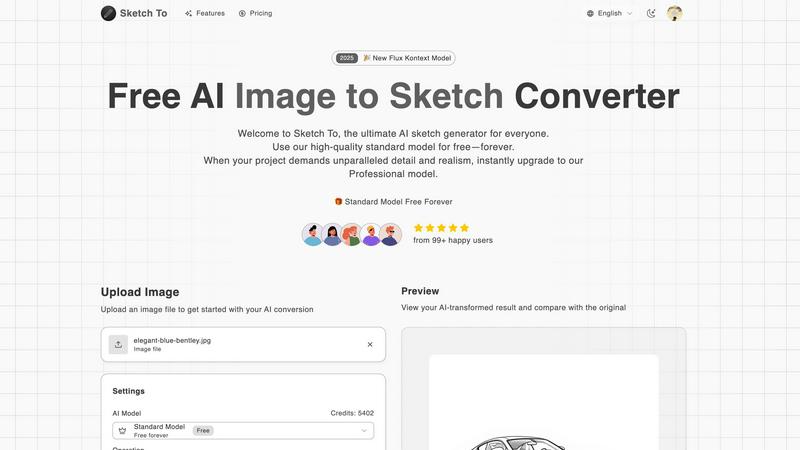
Sketch To instantly transforms images into stunning sketches and vice versa, perfect for both casual and professional.
Last updated: March 1, 2026
Visual Comparison
Hush Touch | Voice-to-Text for MacOS

Sketch To
Feature Comparison
Hush Touch | Voice-to-Text for MacOS
Dual-Engine Recognition
Hush Touch utilizes a sophisticated dual-engine recognition system that combines the capabilities of DictationTranscriber and SFSpeechRecognizer. The former enhances natural flow and punctuation, while the latter boosts custom vocabulary recognition. This integration results in cleaner and more accurate transcriptions tailored to your specific needs.
Custom Vocabulary
The application allows users to store up to 500 custom terms, automatically learning from corrections made during dictation. Whether you frequently use technical jargon, brand names, or specialized medical terms, Hush Touch adapts to your unique vocabulary, ensuring that your dictations reflect your language accurately.
Smart Text Processing
Hush Touch features advanced smart text processing capabilities that remove filler words and auto-correct common misinterpretations. Additionally, it can format numbered lists and recognize voice snippets for frequently used phrases, all executed in real-time without cloud dependence, ensuring a smooth dictation experience.
Context Modes & Hands-Free Operation
With multiple context modes including General, Email, Code, and Notes, Hush Touch allows users to switch seamlessly based on their dictation needs. The hands-free operation, activated via Siri or hotkeys, enables users to dictate effortlessly, with automatic text insertion after a brief pause, enhancing productivity and workflow.
Sketch To
Image to Sketch Conversion
Sketch To employs advanced AI algorithms to convert photos into beautiful pencil sketches effortlessly. This feature is particularly beneficial for artists and designers seeking to create artistic renditions of photographs, allowing for a range of sketch styles from pencil to ink.
Sketch to Image AI
Users can transform their hand-drawn sketches into realistic images with impressive detail and accuracy using the Professional Model. This feature is ideal for artists looking to digitize their work while maintaining high fidelity in texture and realism.
Instant Processing
Sketch To boasts a powerful AI processing engine that ensures users receive their results within seconds. This instant processing capability allows for a seamless creative workflow, enabling users to iterate quickly on their projects without delays.
High Resolution Output
All creations can be downloaded in high resolution, making them suitable for print and professional use. This high-quality output ensures that users can confidently present their work in various formats and media, from social media to gallery exhibitions.
Use Cases
Hush Touch | Voice-to-Text for MacOS
Professional Communication
Hush Touch is perfect for professionals such as business executives and administrative staff who need to draft emails and reports quickly. The natural dictation flow allows for efficient communication without the hassle of manual typing.
Medical Documentation
Healthcare professionals can leverage Hush Touch to dictate medical notes swiftly. The app's ability to recognize medical terminology ensures that critical information is recorded accurately, saving time and reducing errors in patient records.
Creative Writing
Writers and content creators can utilize Hush Touch to brainstorm ideas and draft articles hands-free. The application's smart text processing and vocabulary learning capabilities help maintain the clarity and tone of creative pieces.
Coding and Technical Documentation
Software developers and technical writers benefit from Hush Touch's context modes and custom vocabulary features. The app can effectively transcribe coding commands and technical documentation, streamlining the development process and reducing the cognitive load.
Sketch To
Social Media Content Creation
Sketch To is an excellent tool for enhancing social media content. Users can easily convert their images into stylized sketches, creating eye-catching visuals that stand out in crowded feeds, thus increasing engagement.
Educational Projects
Students can utilize Sketch To for school projects requiring visual aids. By converting standard photographs into artistic sketches or vice versa, students can produce unique presentations that showcase their creativity and understanding of the subject matter.
Professional Art Portfolios
Artists and designers can leverage the platform to build their portfolios. By transforming sketches into photorealistic images, they can demonstrate their range of skills and artistic versatility, appealing to potential clients and employers.
Marketing and Advertising
Businesses can harness Sketch To for marketing materials. Converting product images into compelling sketches allows for unique branding opportunities, making advertisements more memorable and visually appealing to target audiences.
Overview
About Hush Touch | Voice-to-Text for MacOS
Hush Touch is an innovative voice-to-text application specifically designed for macOS users who seek a fast, natural, and secure dictation experience. Unlike traditional dictation tools that rely heavily on cloud processing, Hush Touch operates entirely on-device, ensuring that your data and voice recordings remain private. By leveraging two advanced Apple transcription engines along with an Apple Intelligence final pass, Hush Touch produces highly accurate text outputs, adapting to your unique vocabulary and speech patterns over time. This lightweight application, with a mere 5.5 MB footprint, integrates seamlessly into your daily writing tasks—be it drafting emails, writing notes, or creating documents—allowing you to dictate hands-free. With a simple activation via hotkeys or Siri, Hush Touch empowers users to communicate effectively and efficiently, making it an invaluable tool for professionals across various fields.
About Sketch To
Sketch To is a cutting-edge, cloud-based AI platform designed to facilitate bidirectional artistic conversion between photographs and sketches. This innovative tool allows users to seamlessly transform any uploaded photo into a variety of intricate sketch styles, and conversely, convert hand-drawn sketches into stunning photorealistic images. The platform caters to a diverse range of users, including hobbyists, students, professional artists, designers, and commercial enterprises. Its primary value proposition lies in providing instant, high-fidelity artistic processing through a dual-model system. Users can begin with a robust, perpetually free Standard Model ideal for everyday creative tasks or opt for a premium Professional Model that offers industry-leading levels of detail, texture, and realism for commercial-grade outputs. The entire process is streamlined through an intuitive web interface, negating the need for software installation or mandatory subscriptions, and operates on a flexible credit-based system for accessing advanced features. Sketch To stands as an essential tool for anyone seeking to enhance their creative projects with professional-grade artistic conversions.
Frequently Asked Questions
Hush Touch | Voice-to-Text for MacOS FAQ
Is Hush Touch compatible with all MacOS versions?
Hush Touch is designed to work seamlessly with the latest versions of macOS. However, it is advisable to check the system requirements on the official website for compatibility with your specific version.
How does Hush Touch ensure my privacy?
Hush Touch processes all voice data entirely on-device without using cloud services. This means that your voice recordings and transcriptions are never stored or transmitted to external servers, ensuring maximum privacy and data security.
Can I customize the activation commands for dictation?
Yes, Hush Touch allows users to set customizable command phrases for sending messages or initiating dictation, providing a personalized experience that fits individual workflows.
What is the trial period for Hush Touch?
Hush Touch offers a 7-day free trial with no credit card required. Users can experience the full functionality of the app during this period to evaluate its effectiveness in meeting their dictation needs.
Sketch To FAQ
How do I get started with Sketch To?
To begin using Sketch To, simply visit the website and sign up for a free account. New users receive trial credits that allow them to explore the standard model features without any cost.
What types of files can I upload?
Sketch To supports multiple image formats for uploads, ensuring flexibility for users. You can drag and drop various file types directly onto the platform’s canvas for conversion.
Can I use Sketch To for commercial projects?
Yes, Sketch To offers a Professional Model specifically designed for commercial use. This model provides superior detail and quality, making it ideal for professional projects that require high-fidelity outputs.
Is there a limit to the number of images I can process?
While the Standard Model allows for unlimited use, advanced features may operate on a credit-based system. Users can manage their credits based on their project requirements, ensuring they can continue creating without interruptions.
Alternatives
Hush Touch | Voice-to-Text for MacOS Alternatives
Hush Touch | Voice-to-Text for MacOS is a specialized dictation application designed for seamless offline voice-to-text conversion on macOS devices. It utilizes dual Apple transcription engines and an Apple Intelligence final pass to ensure high accuracy and fluidity in transcription. This product falls under the AI Assistants category, catering to users seeking efficient and private dictation solutions without reliance on cloud services. Users may seek alternatives to Hush Touch for various reasons, including pricing concerns, differing feature sets, and specific platform requirements. When looking for a suitable alternative, it is essential to consider factors such as offline capability, transcription accuracy, ease of use, and any unique features that may enhance the dictation experience. Evaluating these aspects will help users find a voice-to-text solution that best fits their individual needs and workflows.
Sketch To Alternatives
Sketch To is an advanced AI tool that specializes in bidirectional artistic conversion, allowing users to transform images into sketches and vice versa. As a cloud-based platform, it caters to a wide array of users, including hobbyists, students, and professional artists, making it a versatile choice in the realm of AI-driven art applications. Users often seek alternatives to Sketch To for various reasons, such as pricing structures, specific feature sets, or compatibility with different platforms. When evaluating potential alternatives, it's crucial to consider factors like ease of use, the quality of output, available styles, and the flexibility of payment options to ensure that the selected tool meets both creative and practical needs.