

RedBison
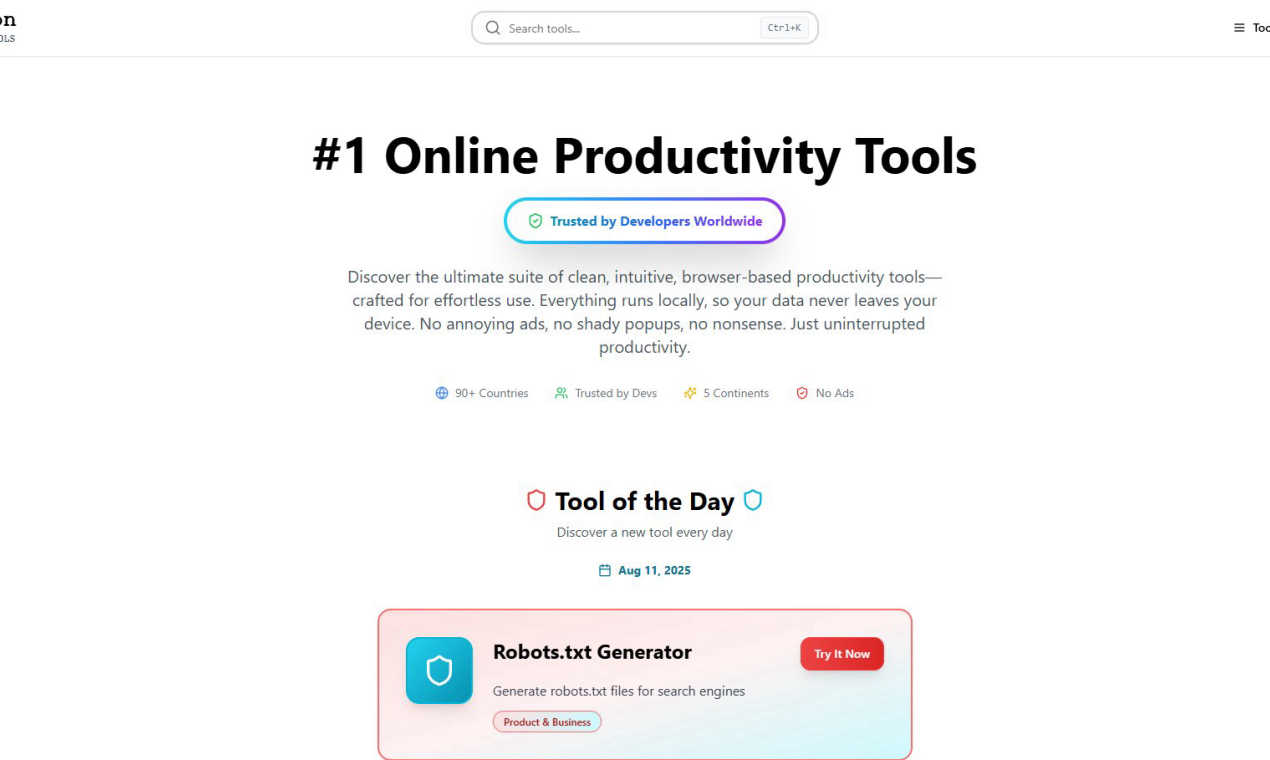
RedBison is a secure, browser-based productivity suite that processes all data locally on your device.
tool Details
About RedBison
RedBison is a comprehensive, browser-based productivity platform engineered specifically for technical professionals, including software developers, product managers, and startup founders. It functions as a unified digital workstation, consolidating over 200 specialized tools into a single, streamlined interface. This eliminates the inefficiency and cognitive load of navigating disparate websites, applications, and browser tabs for common technical and business tasks. The platform's core architectural principle and primary value proposition is its commitment to privacy, security, and an undistracted user experience. All tool operations are executed entirely within the user's local browser environment; no data is transmitted to external servers for processing. This ensures that sensitive information such as proprietary code, business models, financial data, and personal notes never leaves the user's device, providing a significant security advantage over conventional cloud-based SaaS tools. The interface is meticulously crafted to be clean, intuitive, and completely devoid of advertisements, pop-ups, or user tracking analytics. Trusted by developers across 90+ countries and 5 continents, RedBison serves as an essential toolkit for streamlining complex workflows, from code analysis, data formatting, and regex testing to business model planning, project management, and personal productivity.
Features
Local-Execution Architecture
All tools within the RedBison platform operate with a client-side execution model. Computational processes, data transformations, and analyses are performed directly within the user's web browser using JavaScript and WebAssembly, without requiring data uploads to remote servers. This architecture guarantees that sensitive input data, including code snippets, financial figures, and strategic documents, remains entirely on the user's local machine. It provides a fundamental layer of data privacy and security that is intrinsic to the platform's design, mitigating risks associated with data breaches, unauthorized cloud access, and compliance concerns.
Unified Tool Library of 200+ Utilities
RedBison aggregates a vast, curated collection of over 200 specialized productivity tools into one cohesive interface. This library is systematically organized into logical categories such as Tech Tools, Startup Tools, Work & Productivity, Creative & Design, and Personal Finance. By centralizing access to utilities like JSON formatters, password generators, lean canvas creators, diagram tools, and calculators, the platform drastically reduces context-switching and tool-searching overhead. Users can maintain a state of deep focus, moving seamlessly between related tasks without the disruption of managing multiple logins, subscriptions, or browser windows.
Distraction-Free, Ad-Free Interface
The user interface is engineered for maximum focus and minimal cognitive friction. It is completely free from advertisements, promotional pop-ups, sponsored content, and any form of behavioral tracking or analytics that monitor user activity. The design philosophy prioritizes clarity, intuitive navigation, and immediate access to functionality. This creates a premium, professional environment where users can engage with complex tools without visual or mental clutter, supporting prolonged periods of concentrated work essential for technical and strategic tasks.
Curated Discovery with "Tool of the Day"
To facilitate exploration of its extensive capabilities, RedBison incorporates a "Tool of the Day" feature. This system highlights a different utility from its library daily, such as a Random Number Generator or a specific analysis framework. This curated discovery mechanism helps users, especially new ones, efficiently learn about and integrate powerful but potentially overlooked tools into their regular workflows. It systematically exposes the platform's breadth, encouraging the adoption of new methods to solve common problems without requiring manual browsing of the entire toolset.
Use Cases
Secure Code and Data Preprocessing for Developers
Software developers can utilize RedBison's tech tools to securely format, validate, and manipulate code and data locally. Tasks like beautifying minified JSON, testing regular expressions, generating secure password hashes (MD5, SHA), or comparing data lists are performed entirely in-browser. This is critical when handling API responses, configuration files, or database dumps containing sensitive or proprietary information, as the data is never exposed to a third-party server, aligning with strict internal security protocols and developer peace of mind.
Startup Ideation and Business Model Validation
Startup founders and product managers can leverage RedBison's dedicated startup toolkit to conduct confidential early-stage planning. They can use the Lean Canvas Generator to draft business models, the TAM/SAM/SOM Calculator for market analysis, and the Idea Validation Framework to structure research—all within a private session. Since these tools run locally, sensitive strategic ideas, financial projections, and competitive analyses remain completely confidential on the user's device during the fragile ideation phase.
Streamlined Project Management and Personal Productivity
Project leads and individual contributors can manage workflows using integrated productivity tools. They can create visual project dashboards with Gantt charts, organize tasks on a drag-and-drop Kanban board, take structured notes, and perform SWOT analyses—all within the same platform. This consolidation turns RedBison into a personal command center, eliminating the need to switch between separate project management, note-taking, and strategic planning applications, thereby creating a more efficient and organized work process.
On-Demand Creative and Technical Asset Generation
Designers, marketers, and developers can quickly generate necessary assets without relying on external web services. The platform allows for the local generation of QR codes, website favicons, placeholder text and images, professional diagrams via Excalidraw, and structured data markups (JSON-LD). Generating these assets client-side ensures that the content of QR codes, diagram details, or site metadata is not logged or stored by an online service, which is particularly important for pre-launch materials or internal prototypes.
Frequently Asked Questions
How does RedBison ensure my data remains private?
RedBison ensures data privacy through its foundational local-execution architecture. When you use a tool on the platform, such as the JSON Formatter or Budget Planner, all processing occurs within your web browser using your device's own computational resources. Your input data is never transmitted over the internet to RedBison's servers or any third-party servers for processing. The connection to the website is solely for loading the application code; once loaded, the tools operate offline-capable within your browser session, ensuring your sensitive information never leaves your local machine.
Is RedBison completely free to use, and are there any hidden costs?
Based on the provided information, RedBison is presented as a free online toolkit. The platform emphasizes being free from advertisements and pop-ups, and there is no mention of subscription tiers, premium features, or paywalls in the given context. The value proposition is centered on providing unrestricted access to over 200 tools without monetary cost or the typical "freemium" limitations, supported by its ad-free, locally-executing model. Users should verify this on the official website for the most current policy.
Do I need to create an account or install software to use RedBison?
No, account creation or software installation is not required to use RedBison. It is a browser-based web application. You can access the entire suite of tools directly by visiting the RedBison website in a modern web browser. There is no login process, which further enhances privacy and reduces friction. The tools are ready to use immediately, with no setup or registration, although this also means your tool preferences or saved states are typically session-based unless stored locally in your browser.
What categories of tools are available on the RedBison platform?
RedBison offers a wide array of tools organized into several key categories. These include Tech Tools (e.g., JSON Formatter, Regex Tester, Hash Generator), Startup Tools (e.g., Lean Canvas Generator, LTV-CAC Calculator), Work & Productivity tools (e.g., Decision Maker, Kanban Board, Project Dashboard), Creative & Design tools (e.g., QR Code Generator, Diagram Tool), Quick Utilities (e.g., Unit Converter, UUID Generator), Personal Finance tools, and Health & Wellness tools. This categorization allows users to quickly navigate to the specialized utilities relevant to their immediate task.