3D AI Maker vs DigitalMagicWand
Side-by-side comparison to help you choose the right tool.

3D AI Maker
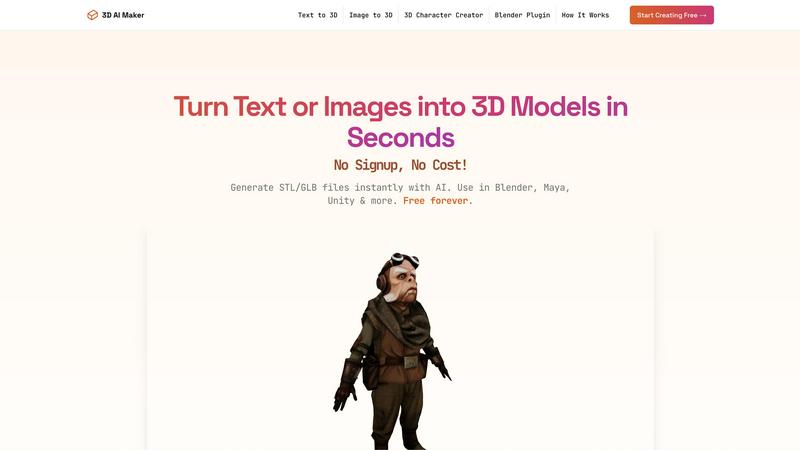
3D AI Maker transforms text or images into free, production-ready 3D models for seamless use in Blender and beyond.
Last updated: March 1, 2026

DigitalMagicWand
DigitalMagicWand is a comprehensive AI suite for generating and manipulating visuals, audio, video, and text with advanced technical precision.
Last updated: March 18, 2026
Visual Comparison
3D AI Maker
DigitalMagicWand

Feature Comparison
3D AI Maker
AI-Powered 3D Generation
Utilizing advanced AI algorithms, 3D AI Maker transforms text prompts or 2D images into detailed and fully textured 3D models. This feature allows users to quickly create assets that meet specific design requirements without needing extensive 3D modeling knowledge.
Direct Blender Integration
The dedicated plugin for Blender enables users to generate 3D models directly within the software, enhancing productivity for 3D artists. This integration streamlines the creative workflow, making it easier for users to incorporate AI-generated models into their projects seamlessly.
Export GLB & STL Files
3D AI Maker allows users to download generated models in both GLB format for animation and STL format for 3D printing. This versatility ensures that the models can be utilized across various applications, from game development to physical product creation, depending on user needs.
Free Forever, No Strings Attached
The platform operates with a commitment to accessibility, providing full functionality without requiring registration or payment. This model empowers users to explore and produce high-quality 3D content without financial constraints, fostering creativity and innovation.
DigitalMagicWand
Multi-Modal AI Processing Suite
The platform integrates distinct, specialized AI engines for text, audio, and image processing within a single interface. This includes a statistical pattern analysis engine for text humanization, a spectral analysis and machine learning model for audio stem separation and MIDI conversion, and a diffusion-based model for text-to-image and vector graphic generation. This architectural approach allows for optimized performance per task while maintaining a consistent user experience and centralized asset management across different content creation workflows.
Proprietary AI Detection and Humanization
DigitalMagicWand features a dual-system for text analysis. Its AI Detector utilizes a deep learning model trained on vast datasets of human and machine-generated text (including outputs from GPT, Claude, and Gemini) to provide a quantifiable confidence score for AI authorship. Complementing this, the Undetectable AI Humanizer employs proprietary linguistic algorithms that deconstruct AI-generated text, identifying and restructuring statistical patterns, syntactic predictability, and lexical choices to replicate the nuanced irregularities of authentic human writing without altering the core semantic message.
Studio-Grade Audio Stem Separation
The UnMixIt™ Pro tool provides advanced source separation capabilities using state-of-the-art neural networks. It can deconstruct a mastered stereo audio file into discrete, high-quality stems such as vocals, drums, bass, and other instruments with minimal artifacts. This process utilizes a complex model trained on extensive multi-track recordings to isolate frequency and temporal components, offering musicians and producers clean stems for remixing, sampling, and audio restoration with professional-grade precision.
Context-Aware Generative Image Editing
The AI Image Editor goes beyond simple filters, implementing an inpainting and outpainting diffusion model that understands user intent via text prompts. Users can perform complex, context-aware edits such as object removal, background replacement, or element addition by describing the change. The system analyzes the image's spatial and semantic context to generate new pixels that are photorealistic and coherent with the existing scene's lighting, texture, and perspective, enabling non-destructive, instruction-based manipulation.
Use Cases
3D AI Maker
Custom 3D Characters
Game developers and animators can use 3D AI Maker to create unique 3D characters tailored to their specific project needs. This capability accelerates the character design process and allows for rapid prototyping.
3D Printing Models
Hobbyists and professionals alike can convert JPG images into STL files ready for 3D printing. This function streamlines the workflow of turning digital designs into tangible products, making it ideal for personalized gifts or specialized projects.
Rapid Prototyping for VR/AR
VR and AR creators can benefit from the quick generation of 3D assets needed for immersive experiences. With 3D AI Maker, users can swiftly test concepts and iterate designs without the lengthy processes typically associated with 3D modeling.
Educational Purposes
Educators in design and technology can utilize 3D AI Maker to teach students about 3D modeling concepts. The tool's ease of use makes it suitable for beginners, allowing students to focus on creativity rather than technical complexities.
DigitalMagicWand
Academic Integrity and Content Verification
Educators, publishers, and hiring managers can utilize the Accurate AI Detector to screen submitted documents, research papers, and application materials for machine-generated content. The clear confidence scoring system provides an auditable metric to support decisions regarding content originality, facilitating the maintenance of academic and professional integrity standards without relying on subjective manual review.
Music Production and Audio Post-Production
Musicians and audio engineers can leverage Digital Ear™ Piano to transcribe complex piano recordings into editable MIDI data for scoring, rearrangement, or sound module triggering. Simultaneously, DJs and producers can use UnMixIt™ Pro to isolate acapella vocals or drum tracks from commercial songs to create legal, high-quality samples and remixes, streamlining the creative process in music production and live performance preparation.
Marketing and E-commerce Asset Creation
Marketing teams and online retailers can rapidly generate product visuals and promotional graphics. Using the text-to-image and vector art generators, they can create unique illustrations and logos from descriptive prompts. The AI Image Editor and Background Removal tool allow for the quick creation of clean, consistent product shots on white backgrounds or in custom settings, eliminating the need for costly photoshoots and extensive manual Photoshop work.
Digital Content Restoration and Enhancement
Archivists, photographers, and individuals can restore and enhance legacy media. The platform can be used to colorize black-and-white photos, remove scratches and noise from old scans, upscale low-resolution images, and even separate dialogue from background noise in old audio recordings using the audio isolation tools. This provides a powerful, accessible solution for preserving and improving the quality of historical digital assets.
Overview
About 3D AI Maker
3D AI Maker is an innovative, AI-driven software tool that revolutionizes the process of 3D content creation by enabling users to generate fully textured 3D models from simple text prompts or 2D image uploads. This completely free, web-based platform requires no signup or payment, thus removing the traditional barriers associated with 3D modeling. Users can convert their written descriptions or JPG/PNG images into production-ready 3D assets in approximately 20 seconds. The core outputs are available in the industry-standard GLB format, suitable for use in popular software such as Blender, Maya, and Unity, as well as STL format for immediate 3D printing. With its dedicated Blender plugin, 3D AI Maker seamlessly integrates AI model generation into the workflows of professional 3D artists. This tool caters to a diverse audience, including game developers, VR/AR creators, 3D printing enthusiasts, and novices, offering a robust, no-cost alternative to conventional paid 3D generation services.
About DigitalMagicWand
DigitalMagicWand is a comprehensive, cloud-based platform that provides a unified suite of professional-grade AI tools for processing and creating digital media across four core modalities: text, audio, image, and video. The platform is engineered to serve a diverse user base, including content creators, digital marketers, musicians, audio engineers, graphic designers, educators, and business professionals who require efficient, high-fidelity manipulation of digital assets. Its core value proposition lies in democratizing access to advanced artificial intelligence technology, eliminating the need for deep technical expertise or expensive, specialized software. By integrating multiple AI-powered applications into a single ecosystem, DigitalMagicWand streamlines complex workflows—from detecting AI-generated text and converting audio to MIDI, to generating vector art and performing non-destructive image editing—all through an intuitive, task-oriented interface. The platform leverages proprietary algorithms and cutting-edge models to ensure output quality that meets professional standards, enabling users to enhance, transform, and generate content with unprecedented speed and precision.
Frequently Asked Questions
3D AI Maker FAQ
Is 3D AI Maker really free?
Yes, 3D AI Maker is completely free to use. There are no hidden costs or signup requirements, allowing users to generate 3D models without any financial commitment.
How does this compare to Meshy or other tools?
3D AI Maker offers unlimited free exports, making it an attractive alternative to paid services like Meshy. Its dedicated Blender plugin provides seamless integration for professionals, enhancing the overall user experience.
Can I use models commercially?
Yes, users can utilize the models generated with 3D AI Maker for commercial purposes. However, it is advisable to review the terms of use to ensure compliance with any specific guidelines.
How do I install the Blender plugin?
To install the Blender plugin, users can download it directly from the 3D AI Maker website. Detailed installation instructions are provided to help users integrate it smoothly into their Blender software.
DigitalMagicWand FAQ
How accurate is the AI Detector for Text?
The AI Detector is built on a continuously updated model trained on a vast corpus of text from both human authors and multiple AI models. It provides a percentage-based confidence score indicating the likelihood of AI authorship. Accuracy is statistically high, especially for longer texts, but it should be used as a supportive tool rather than a sole determinant, as no detector can claim 100% infallibility due to the evolving nature of AI writing and human mimicry.
What audio formats are supported for MIDI conversion and stem separation?
The platform supports common lossless and lossy audio formats for input, including WAV, AIFF, MP3, and AAC. For MIDI conversion via Digital Ear™, the output is a standard MIDI file (.mid) compatible with all Digital Audio Workstations (DAWs). For stem separation with UnMixIt™ Pro, outputs are typically delivered as high-quality WAV or MP3 files, providing flexibility for use in professional mixing environments or casual playback.
Can the AI Image Editor handle complex edits like changing a person's pose or clothing?
The AI Image Editor is optimized for context-aware generation and removal based on text prompts and user-defined masks. While it can effectively add, remove, or replace objects and backgrounds, highly specific edits that require altering the fundamental structure of a subject (like a precise change in human pose or intricate clothing redesign) may be beyond its current deterministic capabilities. It excels at semantic edits where the new content can be plausibly inferred from the existing scene context.
Is the humanized text from the AI Humanizer guaranteed to pass all detectors?
While the Undetectable AI Humanizer is engineered using proprietary algorithms to eliminate statistical patterns common to AI generation, no tool can offer an absolute guarantee against all detectors. The landscape of AI detection software is diverse and constantly evolving. The humanizer is designed to significantly reduce detection scores, often to levels indistinguishable from human writing, but its effectiveness should be verified against the specific detector platform of concern by the user.
Alternatives
3D AI Maker Alternatives
3D AI Maker is an innovative AI-powered tool that falls under the category of 3D content creation software. It enables users to instantly generate production-ready 3D models from simple text descriptions or 2D image inputs. Given its free and user-friendly nature, it appeals to a diverse audience, including game developers, VR/AR creators, and those involved in 3D printing. Users often seek alternatives to 3D AI Maker for various reasons, including the need for specific features, compatibility with different platforms, or the desire for more advanced customization options. When exploring alternatives, it is essential to consider factors such as pricing, ease of use, the types of input supported, file export capabilities, and the overall quality of the generated 3D models.
DigitalMagicWand Alternatives
DigitalMagicWand is a comprehensive AI assistant platform specializing in multimodal content processing. It operates within the AI Assistants category, providing a unified suite of tools for generating and manipulating visual, audio, video, and text-based assets through artificial intelligence. Users may seek alternatives for various technical and operational reasons. Common drivers include specific budgetary constraints, the need for different pricing models, or requirements for specialized features not covered in the core suite. Platform compatibility, such as the necessity for dedicated desktop applications versus cloud-based APIs, and particular workflow integrations also influence the search for other solutions. When evaluating alternatives, key technical considerations include the scope of supported media modalities, the underlying AI model specifications for each task, and output quality benchmarks. Additionally, assess the platform's architecture for scalability, available API endpoints for developers, data privacy protocols, and the granularity of control offered over the AI's processing parameters.