

3D AI Maker
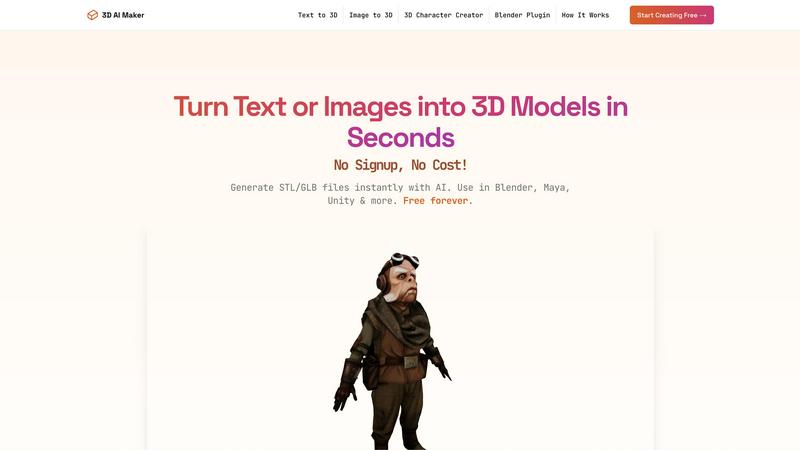
3D AI Maker transforms text or images into free, production-ready 3D models for seamless use in Blender and beyond.
About 3D AI Maker
3D AI Maker is an innovative, AI-driven software tool that revolutionizes the process of 3D content creation by enabling users to generate fully textured 3D models from simple text prompts or 2D image uploads. This completely free, web-based platform requires no signup or payment, thus removing the traditional barriers associated with 3D modeling. Users can convert their written descriptions or JPG/PNG images into production-ready 3D assets in approximately 20 seconds. The core outputs are available in the industry-standard GLB format, suitable for use in popular software such as Blender, Maya, and Unity, as well as STL format for immediate 3D printing. With its dedicated Blender plugin, 3D AI Maker seamlessly integrates AI model generation into the workflows of professional 3D artists. This tool caters to a diverse audience, including game developers, VR/AR creators, 3D printing enthusiasts, and novices, offering a robust, no-cost alternative to conventional paid 3D generation services.
Features
AI-Powered 3D Generation
Utilizing advanced AI algorithms, 3D AI Maker transforms text prompts or 2D images into detailed and fully textured 3D models. This feature allows users to quickly create assets that meet specific design requirements without needing extensive 3D modeling knowledge.
Direct Blender Integration
The dedicated plugin for Blender enables users to generate 3D models directly within the software, enhancing productivity for 3D artists. This integration streamlines the creative workflow, making it easier for users to incorporate AI-generated models into their projects seamlessly.
Export GLB & STL Files
3D AI Maker allows users to download generated models in both GLB format for animation and STL format for 3D printing. This versatility ensures that the models can be utilized across various applications, from game development to physical product creation, depending on user needs.
Free Forever, No Strings Attached
The platform operates with a commitment to accessibility, providing full functionality without requiring registration or payment. This model empowers users to explore and produce high-quality 3D content without financial constraints, fostering creativity and innovation.
Use Cases
Custom 3D Characters
Game developers and animators can use 3D AI Maker to create unique 3D characters tailored to their specific project needs. This capability accelerates the character design process and allows for rapid prototyping.
3D Printing Models
Hobbyists and professionals alike can convert JPG images into STL files ready for 3D printing. This function streamlines the workflow of turning digital designs into tangible products, making it ideal for personalized gifts or specialized projects.
Rapid Prototyping for VR/AR
VR and AR creators can benefit from the quick generation of 3D assets needed for immersive experiences. With 3D AI Maker, users can swiftly test concepts and iterate designs without the lengthy processes typically associated with 3D modeling.
Educational Purposes
Educators in design and technology can utilize 3D AI Maker to teach students about 3D modeling concepts. The tool's ease of use makes it suitable for beginners, allowing students to focus on creativity rather than technical complexities.
Frequently Asked Questions
Is 3D AI Maker really free?
Yes, 3D AI Maker is completely free to use. There are no hidden costs or signup requirements, allowing users to generate 3D models without any financial commitment.
How does this compare to Meshy or other tools?
3D AI Maker offers unlimited free exports, making it an attractive alternative to paid services like Meshy. Its dedicated Blender plugin provides seamless integration for professionals, enhancing the overall user experience.
Can I use models commercially?
Yes, users can utilize the models generated with 3D AI Maker for commercial purposes. However, it is advisable to review the terms of use to ensure compliance with any specific guidelines.
How do I install the Blender plugin?
To install the Blender plugin, users can download it directly from the 3D AI Maker website. Detailed installation instructions are provided to help users integrate it smoothly into their Blender software.
Similar to 3D AI Maker
layahost
Moderation, routing, intent and scoring for any text over one Jev-compatible API, hosted in the EU.


Cursive Text Generator
Cursive Text Generator is a free browser-based tool that converts regular text into beautiful cursive and stylish Unicode fonts. Users can instantly p

Hailuo AI
Create Hailuo AI videos from text or images with guided prompts, motion and camera controls, flexible settings, and downloadable results.

amaze.directory
A directory of AI tools where somebody actually used the tool.

Motiofy
Motiofy is an AI creative workspace that helps creators and teams turn ideas into polished visual stories.