AISeedance2 vs BlitzCut
Side-by-side comparison to help you choose the right tool.

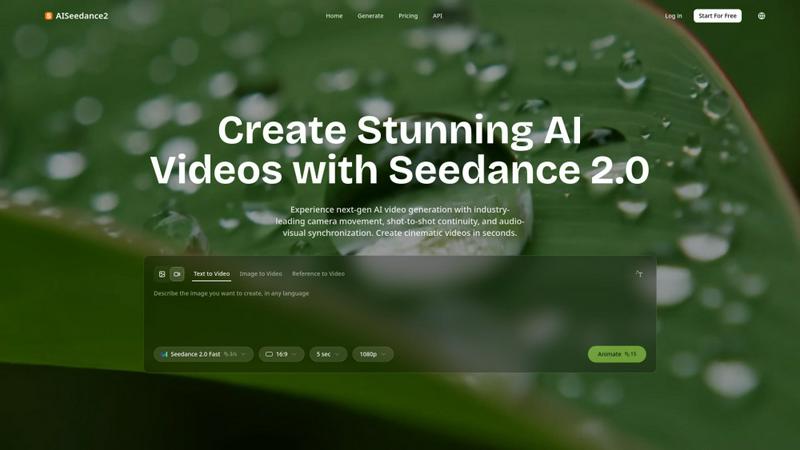
AISeedance2 is a web-based AI video generator creating cinematic videos with advanced camera movement and continuity.
Last updated: February 27, 2026

BlitzCut
BlitzCut is an AI video editor that swiftly removes silence, adds captions, and prepares clips for viral sharing in.
Last updated: February 26, 2026
Visual Comparison
AISeedance2
BlitzCut

Feature Comparison
AISeedance2
Wide-Range Cinematic Camera Movement
This feature provides the most advanced AI-powered camera control available, executing complex, fluid movements that emulate professional cinematography. The system can generate sweeping crane shots, orbital tracking around subjects, dynamic push-in/pull-out sequences, and drone-like aerial perspectives directly from a text prompt. It understands cinematic motion principles, creating smooth camera paths with accurate depth-of-field transitions and immersive perspectives, eliminating the static or simplistic camera work typical of other AI video generators.
Shot-to-Shot Continuity
AISeedance2 maintains perfect visual coherence across consecutive video scenes or shots. This technology ensures that elements like lighting, character appearance, environmental details, and spatial relationships remain consistent when generating a sequence. This breakthrough is crucial for creating believable multi-scene narratives, such as short films or complex marketing videos, where visual discontinuity can break immersion and professionalism.
Precision Audio-Visual Synchronization
The platform synchronizes generated video frames precisely with accompanying audio tracks. This means character movements, scene transitions, and visual effects can be timed to match beats, dialogue, or sound effects within the audio file. This capability is essential for creating music videos, animated explainers with voiceovers, and any content where the alignment of sight and sound is critical for impact and narrative clarity.
Character Identity Lock
This feature ensures that a specific character maintains a consistent appearance throughout a generated video sequence. It locks facial features, hairstyle, clothing, and body type across different shots, angles, and actions. This is vital for storytelling and branding, allowing creators to feature a recognizable protagonist or brand mascot without unintended alterations between scenes, even during complex action sequences.
BlitzCut
Automatic Silence Removal
BlitzCut's automatic silence removal feature leverages advanced AI technology to identify and eliminate pauses in video footage. This process occurs within seconds, dramatically reducing the time required for manual editing. By removing silent gaps, creators can maintain viewer engagement and deliver more dynamic content without the hassle of tedious cuts.
AI Captions
The AI captions feature provides creators with automatic captioning that boasts over 95 percent accuracy. This functionality not only enhances accessibility for viewers but also incorporates popular styling options that align with viral trends. This feature saves significant time, allowing users to focus on their creative vision rather than manual captioning logistics.
Text-Based Editing
BlitzCut introduces a revolutionary text-based editing approach, enabling users to edit video content directly from a transcription. By simply deleting sentences from the text, creators can make precise cuts in their videos. This intuitive method allows for quick adjustments and ensures that the final product aligns perfectly with the intended message.
2-Minute Workflow
The BlitzCut 2-minute workflow is a game-changer for content creators pressed for time. Users can import their video clips, utilize one-tap features for silence removal and captioning, and then export the final product in full quality. This seamless process ensures that creators can move from raw footage to posted content efficiently, making it ideal for those who need to publish regularly.
Use Cases
AISeedance2
Short Film and Narrative Production
Independent filmmakers and content studios can use AISeedance2 to rapidly prototype and produce short films. The shot-to-shot continuity and character identity lock allow for the creation of coherent scenes and story arcs, while the cinematic camera movement adds a professional production value that was previously difficult to achieve without extensive resources and equipment.
Marketing and Advertisement Creative
Marketing teams can generate high-impact video ads, product demos, and social media content quickly. The ability to produce 2K resolution videos with dynamic camera work and consistent branding (via character lock) enables the creation of polished, attention-grabbing creatives for campaigns, explainer videos, and brand storytelling without the need for full-scale video shoots.
Educational and Training Content
Educators and corporate trainers can create engaging instructional videos and simulations. The audio-visual sync is perfect for pairing animations with voice-over explanations, while complex concepts can be visualized with dynamic camera movements through 3D environments or historical recreations, making learning materials more immersive and effective.
Social Media and Content Creation
Content creators and influencers can produce a high volume of stylized, cinematic clips for platforms like TikTok, YouTube, and Instagram. The fast generation speed and ease of turning text ideas into visually compelling videos with trending audio tracks (thanks to audio sync) allow for rapid ideation and publishing to maintain audience engagement and growth.
BlitzCut
Social Media Influencers
For social media influencers, BlitzCut provides a rapid editing solution that allows them to produce high-quality videos for platforms like TikTok and Instagram Reels. With the ability to remove silence and add captions automatically, influencers can maintain a steady stream of engaging content without sacrificing creativity or time.
Vloggers
Vloggers can use BlitzCut to streamline their editing workflow, transforming lengthy recordings into concise, engaging videos. The text-based editing feature enables vloggers to focus on storytelling, making it easier to cut unnecessary segments based on the script, ultimately improving viewer retention.
Marketing Professionals
Marketing professionals can leverage BlitzCut to create compelling promotional videos quickly. By automating the editing process, they can produce polished content that highlights products or services, all while meeting tight deadlines and maintaining brand consistency across various platforms.
Educators
Educators can utilize BlitzCut to create instructional videos or online course content efficiently. With automated captioning and silence removal, they can produce clear and accessible educational materials that enhance learning experiences, all while minimizing the time spent on video editing.
Overview
About AISeedance2
AISeedance2, also known as Seedance 2.0, is a next-generation AI video generation platform developed by ByteDance. It represents a significant leap forward in AI filmmaking technology, designed to empower creators, marketing teams, educators, and production studios. The platform's core value proposition lies in its ability to generate high-fidelity, cinematic-quality videos from simple text prompts, images, or reference videos with unprecedented control and coherence. It specifically addresses critical challenges in AI video generation, such as jarring scene transitions and unnatural motion, by introducing three industry-first technical breakthroughs: wide-range cinematic camera movement, shot-to-shot continuity, and precision audio-visual synchronization. With support for 2K cinematic resolution and a robust character identity lock feature, AISeedance2 enables the rapid production of cohesive, multi-shot video narratives. This makes it an ideal tool for creating professional short films, dynamic marketing creatives, engaging educational content, and high-volume social media production, all while offering a reported 30% faster rendering speed compared to its predecessors.
About BlitzCut
BlitzCut is an innovative AI-powered video editing tool designed to streamline the video creation process for content creators. Targeted primarily at social media influencers, vloggers, and marketers, BlitzCut offers a mobile-first experience that allows users to edit videos efficiently on their iPhone, iPad, or Mac. The app focuses on automating tedious tasks such as silence removal and caption generation, enabling creators to produce polished content in minutes rather than hours. With its user-friendly interface and powerful AI capabilities, BlitzCut transforms raw footage into engaging TikToks, Instagram Reels, and YouTube Shorts. The main value proposition lies in its ability to reduce editing time to just two minutes per video, making daily posting feasible for creators looking to maintain a consistent online presence.
Frequently Asked Questions
AISeedance2 FAQ
What input methods does AISeedance2 support?
AISeedance2 supports multiple input modalities to generate video. You can create videos from a text description (Text to Video), from an uploaded image that the AI will animate (Image to Video), or by using an existing video as a style and motion reference (Reference to Video). This flexibility accommodates different creative workflows and starting points.
What is the maximum resolution and aspect ratio for generated videos?
The platform supports generation of videos in 2K cinematic resolution, providing high detail suitable for professional use. The standard aspect ratio is 16:9, which is the common widescreen format used for television, online video, and presentations, ensuring compatibility with most viewing platforms and devices.
How does the character identity lock feature work?
The character identity lock feature uses advanced AI models to recognize and consistently replicate a specific character's visual attributes across different scenes. Once a character is defined, either through an initial image or detailed text description, the system ensures that their facial features, hairstyle, attire, and physique remain stable throughout the generated video sequence, even with camera changes and movement.
Is AISeedance2 suitable for creating videos with complex action sequences?
Yes, AISeedance2 is specifically engineered to handle complex action sequences. The provided context highlights its capability in rendering dynamic boxing matches, multi-agent fight choreography, and large-scale vehicle scenes. The wide-range camera movement tracks the action fluidly, while shot continuity and character lock maintain visual coherence throughout fast-paced sequences.
BlitzCut FAQ
How does BlitzCut automate silence removal?
BlitzCut utilizes sophisticated AI algorithms to analyze video footage and detect silent gaps. Once identified, the app removes these pauses automatically, allowing for a smooth viewing experience without the need for manual cuts.
What platforms is BlitzCut available on?
BlitzCut is designed to be mobile-first and is available for download on iPhone, iPad, and Mac. This accessibility ensures that users can edit their videos on the go, making it convenient for busy content creators.
Can I edit videos of any length and format?
Yes, BlitzCut supports videos of various lengths and formats, ensuring that users can import their raw clips directly from their camera roll. This flexibility is crucial for accommodating different types of content and user preferences.
Is there a cost associated with using BlitzCut?
BlitzCut is free to download and does not require users to create an account. This approach lowers the barrier to entry for creators and allows them to start editing videos immediately without any financial commitment.
Alternatives
AISeedance2 Alternatives
AISeedance2 is a web-based AI video generator specializing in Seedance 2.0 technology for text-to-video and image-to-video creation. It operates within the rapidly evolving category of professional-grade AI video synthesis tools, distinguished by its focus on cinematic camera movement, multi-shot continuity, and precise audio-visual sync. Users often explore alternatives for various practical reasons. These can include budget constraints and specific pricing model needs, such as pay-per-use versus subscription. Others may seek different feature sets, like alternative video styles, more extensive asset libraries, or integration with specific creative platforms. The required output resolution, processing speed, and learning curve are also common decision factors. When evaluating an alternative, key technical criteria should be assessed. Prioritize the core video generation capabilities, including output resolution, frame rate support, and the quality of motion synthesis. Examine the tool's ability to maintain character and scene consistency across shots, which is crucial for narrative content. Also, consider the supported input modalities, such as text, image, or video prompts, and review the platform's security and data handling policies for professional use.
BlitzCut Alternatives
BlitzCut is an innovative AI-powered video editing tool designed specifically for content creators who need to produce engaging social media videos quickly and efficiently. By automating the labor-intensive tasks of silence removal, captioning, and transcription, BlitzCut enables users to streamline their editing processes, thereby allowing them to focus on their creative output rather than the technicalities of video production. This positions BlitzCut within the content creation category, appealing to those who seek to enhance their video content with minimal time investment. Users often seek alternatives to BlitzCut for various reasons, including pricing considerations, feature sets, or specific platform compatibility. With an array of video editing tools available, creators may look for options that better fit their unique needs, whether that involves advanced editing features, integration with other software, or support for different operating systems. When choosing an alternative, it is essential to consider factors such as ease of use, editing speed, and the level of automation offered, ensuring that the selected tool aligns with the user’s content creation workflow.