
AskFormulas vs Zovo
Side-by-side comparison to help you choose the right tool.

AskFormulas
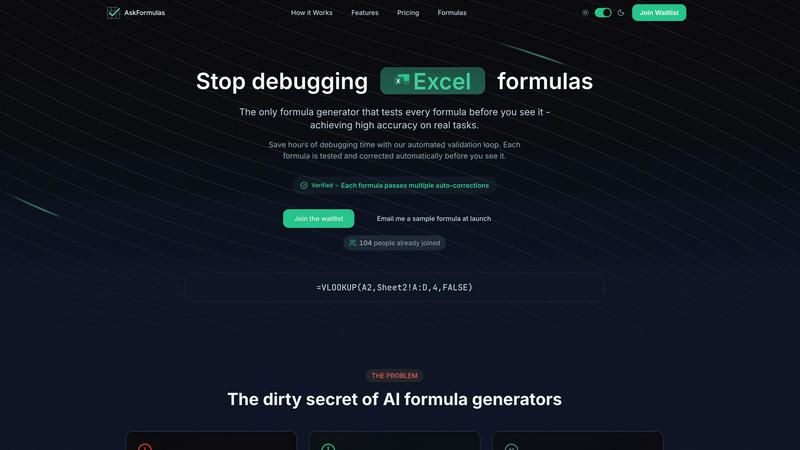
AskFormulas generates and automatically validates Excel and Google Sheets formulas for guaranteed accuracy.
Last updated: February 28, 2026

Zovo offers 20 privacy-first Chrome extensions for developers and writers, all accessible with a single subscription.
Last updated: February 26, 2026
Visual Comparison
AskFormulas
Zovo

Feature Comparison
AskFormulas
Proprietary Validation Loop
The core technological innovation of AskFormulas is its automated, three-step validation process. Every user request is first analyzed to convert natural language into formula intent. The generated formula then undergoes automated testing in a secure sandbox environment using synthetic test data. If errors like #REF! or #VALUE! are detected, the system initiates iterative auto-corrections until the formula passes all validation checks. This loop ensures each output is verified as functional before the user ever sees it, guaranteeing high accuracy.
Cross-Platform Syntax Toggle
AskFormulas provides full support for both Microsoft Excel and Google Sheets formula syntax through a simple, one-click toggle. The system automatically adjusts the generated formula's structure and function names to be natively compatible with the selected platform. This eliminates the need for manual translation between applications like VLOOKUP and ARRAYFORMULA, enabling seamless workflow integration for users who operate across different spreadsheet ecosystems.
Smart Error Detection and Correction
Beyond initial generation, the platform features intelligent error detection that identifies common formula mistakes. When an issue is found during the validation phase, such as an incorrect range reference or syntax error, the system does not simply return the broken formula. Instead, it automatically diagnoses the problem and applies corrections through multiple iterations until a working, validated formula is produced, effectively removing the debugging burden from the user.
Formula History and Management
AskFormulas includes a personal formula library that automatically saves a user's recently generated formulas. This history feature ensures that no previously created formula is ever lost, allowing for quick retrieval and reuse. It acts as a knowledge base, enabling users to build upon past work without needing to regenerate complex requests from scratch, thereby enhancing productivity and consistency.
Zovo
BeLikeNative
BeLikeNative is the flagship extension that enables users to rewrite text in a single keystroke, enhancing language proficiency. It supports 80 languages and is designed to help non-native speakers communicate more effectively and naturally, making it ideal for students, professionals, and anyone looking to improve their writing skills.
Tab Suspender Pro
Tab Suspender Pro automatically suspends inactive tabs to free up system memory, enhancing browser performance. It employs smart detection to identify unused tabs and suspends them without losing your session. This feature is particularly beneficial for users who work with multiple tabs open and need to manage resources efficiently.
JSON Formatter Pro
JSON Formatter Pro is a powerful tool for formatting, validating, and exploring JSON data directly in your browser. It offers features like beautification, minification, and a tree explorer for easy navigation of complex JSON structures. This extension is perfect for developers and data analysts who work with APIs and need to manipulate JSON data frequently.
Clipboard History Pro
Clipboard History Pro allows users to save and manage an extensive history of copied text, supporting up to 10,000 clips. It features instant search capabilities and smart paste functionality, which makes retrieving and using previously copied content quick and easy. This tool is invaluable for writers, researchers, and anyone who regularly copies and pastes information.
Use Cases
AskFormulas
Complex Financial Modeling
Financial analysts and revenue managers can utilize AskFormulas to rapidly construct and debug intricate financial models, forecasts, and automated reports. By describing logic in plain English, such as "calculate quarterly CAGR from this revenue table," they receive validated, complex formulas like XLOOKUP or SUMIFS arrays, saving hours otherwise spent on manual formula writing and error-checking, thus accelerating model deployment.
Automated Business Reporting
Small business owners and operations managers can automate repetitive reporting tasks. Instead of manually aggregating sales data or filtering customer lists, they can input requests like "sum all values in column B where column A contains 'Sales'" to instantly get a working =SUMIF formula. This enables the creation of dynamic dashboards and reports without requiring deep technical expertise in spreadsheet functions.
Data Cleaning and Transformation
Professionals dealing with messy datasets can use AskFormulas to generate formulas for standardizing and cleaning data. Requests such as "extract the domain from email addresses in column C" or "combine first and last name with a space" yield validated TEXTSPLIT or CONCATENATE formulas. This streamlines data preparation, ensuring accuracy and consistency for analysis or migration projects.
Educational and Training Purposes
Individuals learning spreadsheet software or teams undergoing training can use AskFormulas as an interactive learning aid. By experimenting with natural language descriptions and studying the validated, correct formulas returned, users can better understand proper syntax, function application, and logical construction, bridging the gap between conceptual understanding and practical implementation.
Zovo
Enhancing Language Skills
BeLikeNative is ideal for language learners who wish to improve their writing skills. By offering instant rewrites in multiple languages, users can learn contextually appropriate phrasing and grammar while communicating in foreign languages, enhancing their overall fluency.
Managing Browser Performance
Tab Suspender Pro is a must-have for users who often have numerous tabs open for research or multitasking. By automatically managing inactive tabs, it prevents system slowdowns, allowing users to maintain focus and productivity without worrying about memory overload.
Simplifying JSON Manipulation
Developers and data analysts can leverage JSON Formatter Pro to streamline their workflow when dealing with JSON data. Whether it is for API testing or data validation, this extension provides the tools necessary to handle JSON efficiently, saving time and reducing errors.
Improving Productivity with Clipboard Management
Clipboard History Pro is perfect for professionals who handle large volumes of text, such as writers or marketers. By keeping track of all copied content, users can easily retrieve and reuse information, making their work process faster and more efficient, reducing stress over lost data.
Overview
About AskFormulas
AskFormulas is an advanced AI-powered formula generator engineered to eliminate the inefficiency and frustration associated with broken spreadsheet formulas. The platform directly addresses the critical flaw in conventional AI formula tools, which have documented error rates of 40-60%, by implementing a proprietary, automated validation loop. This system ensures that every single formula is rigorously tested and corrected against real or synthetic data before being presented to the user. The core value proposition is delivering guaranteed, working formulas with a verified accuracy rate exceeding 95%, thereby saving professionals hours of manual debugging time each week. It supports both Microsoft Excel and Google Sheets syntax, allowing users to seamlessly switch between platforms with a single toggle. The tool is designed for a wide range of users, from financial analysts and revenue managers constructing complex models and automated reports, to small business owners and individuals who lack deep expertise in spreadsheet syntax but need reliable, powerful formulas to drive their work.
About Zovo
Zovo is a collection of 20 innovative Chrome extensions developed by Michael Lip, a solo developer with over a decade of experience in software development and a proven track record of $400K+ earned on Upwork, boasting a 100% success rate. Designed with user privacy as a cornerstone, Zovo's suite of tools ensures that your data remains local and never leaves your device, eliminating concerns about data harvesting or corporate influence. The flagship extension, BeLikeNative, helps over 3,300 users write like native speakers by providing one-keystroke rewrites in 80 languages. Zovo includes various other useful tools such as Tab Suspender Pro for memory management, JSON Formatter Pro for JSON data manipulation, and Clipboard History Pro to keep track of copied text. With a community-driven approach, users can request features that they need, shaping the future of the product. New extensions are released monthly, and many tools are also available for free at zovo.one.
Frequently Asked Questions
AskFormulas FAQ
How accurate are the generated formulas?
AskFormulas achieves a verified accuracy rate exceeding 95% for real-world tasks. This high reliability is a direct result of the proprietary validation loop, which automatically tests and corrects every formula against synthetic data before presentation. This process stands in contrast to conventional AI tools that have documented error rates of 40-60% because they lack such rigorous, automated testing protocols.
Does it work with both Excel and Google Sheets?
Yes, AskFormulas provides full, native support for both Microsoft Excel and Google Sheets. A dedicated one-click toggle allows users to switch between platforms instantly. The system automatically adjusts the generated formula's syntax and function names to be fully compatible with the selected application, handling platform-specific differences like function variations and array formula structures seamlessly.
How many formulas can I generate per month?
Formula generation limits are defined by your subscription plan. The Starter plan includes 500 formulas per month, the Pro plan offers 2,000 formulas per month, and the Team plan provides 6,000 formulas per month shared among up to 5 team members. This tiered structure is designed to accommodate the needs of individual users, power users, and small teams respectively.
What happens if my formula has an error?
If a potential error is detected during the automated validation phase, the system does not deliver a broken formula. Instead, its smart error detection identifies issues like incorrect range references or syntax problems. The validation loop then engages in iterative auto-corrections, running the formula through multiple tests and fixes until it produces a fully functional, validated output that is guaranteed to work.
Zovo FAQ
What privacy measures does Zovo implement?
Zovo is committed to user privacy, ensuring that all data stays on your device and is not harvested or shared with third parties. This privacy-first approach means no corporate investors influence how your data is used.
How can users request new features?
Users can submit feature requests directly to the developer, Michael Lip. Each request is reviewed, and the most requested features are prioritized for development, allowing the community to have a direct impact on the product's roadmap.
Are there any free tools available?
Yes, Zovo offers many tools for free, which can be accessed at zovo.one. This allows users to try out the product's functionality before committing to any paid options.
How often are new extensions released?
Zovo releases new extensions on a monthly basis, with members often receiving early access 1-2 weeks before the public release. This ensures that users are always getting the latest tools and features as soon as they are available.
Alternatives
AskFormulas Alternatives
AskFormulas is an advanced AI-powered productivity tool designed to generate and automatically validate spreadsheet formulas for Microsoft Excel and Google Sheets. It operates within the specialized category of formula generation and debugging software, targeting professionals who rely on accurate, complex spreadsheet models. Users may seek alternatives for various reasons, including budget constraints, specific feature requirements not met by a single platform, or a need for integration with other software ecosystems. Some may prioritize different aspects of the user experience or require support for less common spreadsheet applications. When evaluating alternatives, key criteria should include the tool's core accuracy rate and validation methodology, the range of supported spreadsheet platforms and functions, the depth of integration with existing workflows, and the overall cost relative to the value of time saved and error reduction. The fundamental differentiator in this category is the mechanism for ensuring formula correctness before delivery.
Zovo Alternatives
Zovo is a collection of 20 privacy-first Chrome extensions tailored for developers and writers. This comprehensive suite, crafted by a seasoned solo developer, encompasses tools designed to enhance productivity and streamline workflows. Users typically seek alternatives to Zovo for various reasons, including pricing structures, specific feature sets, or compatibility with different platforms. It is essential to evaluate alternatives based on their privacy policies, user experience, and the range of functionalities offered to ensure they meet your unique needs. When selecting an alternative, consider the privacy measures in place, especially if data security is a priority for you. Look for user reviews and community feedback to assess the reliability and effectiveness of the extensions. Additionally, evaluate the roadmap and update frequency, as a commitment to continuous improvement and user-driven development can greatly enhance your experience with any tool.