

Zovo
Zovo offers 20 privacy-first Chrome extensions for developers and writers, all accessible with a single subscription.
tool Details
Explore More
Alternatives

About Zovo
Zovo is a collection of 20 innovative Chrome extensions developed by Michael Lip, a solo developer with over a decade of experience in software development and a proven track record of $400K+ earned on Upwork, boasting a 100% success rate. Designed with user privacy as a cornerstone, Zovo's suite of tools ensures that your data remains local and never leaves your device, eliminating concerns about data harvesting or corporate influence. The flagship extension, BeLikeNative, helps over 3,300 users write like native speakers by providing one-keystroke rewrites in 80 languages. Zovo includes various other useful tools such as Tab Suspender Pro for memory management, JSON Formatter Pro for JSON data manipulation, and Clipboard History Pro to keep track of copied text. With a community-driven approach, users can request features that they need, shaping the future of the product. New extensions are released monthly, and many tools are also available for free at zovo.one.
Features
BeLikeNative
BeLikeNative is the flagship extension that enables users to rewrite text in a single keystroke, enhancing language proficiency. It supports 80 languages and is designed to help non-native speakers communicate more effectively and naturally, making it ideal for students, professionals, and anyone looking to improve their writing skills.
Tab Suspender Pro
Tab Suspender Pro automatically suspends inactive tabs to free up system memory, enhancing browser performance. It employs smart detection to identify unused tabs and suspends them without losing your session. This feature is particularly beneficial for users who work with multiple tabs open and need to manage resources efficiently.
JSON Formatter Pro
JSON Formatter Pro is a powerful tool for formatting, validating, and exploring JSON data directly in your browser. It offers features like beautification, minification, and a tree explorer for easy navigation of complex JSON structures. This extension is perfect for developers and data analysts who work with APIs and need to manipulate JSON data frequently.
Clipboard History Pro
Clipboard History Pro allows users to save and manage an extensive history of copied text, supporting up to 10,000 clips. It features instant search capabilities and smart paste functionality, which makes retrieving and using previously copied content quick and easy. This tool is invaluable for writers, researchers, and anyone who regularly copies and pastes information.
Use Cases
Enhancing Language Skills
BeLikeNative is ideal for language learners who wish to improve their writing skills. By offering instant rewrites in multiple languages, users can learn contextually appropriate phrasing and grammar while communicating in foreign languages, enhancing their overall fluency.
Managing Browser Performance
Tab Suspender Pro is a must-have for users who often have numerous tabs open for research or multitasking. By automatically managing inactive tabs, it prevents system slowdowns, allowing users to maintain focus and productivity without worrying about memory overload.
Simplifying JSON Manipulation
Developers and data analysts can leverage JSON Formatter Pro to streamline their workflow when dealing with JSON data. Whether it is for API testing or data validation, this extension provides the tools necessary to handle JSON efficiently, saving time and reducing errors.
Improving Productivity with Clipboard Management
Clipboard History Pro is perfect for professionals who handle large volumes of text, such as writers or marketers. By keeping track of all copied content, users can easily retrieve and reuse information, making their work process faster and more efficient, reducing stress over lost data.
Frequently Asked Questions
What privacy measures does Zovo implement?
Zovo is committed to user privacy, ensuring that all data stays on your device and is not harvested or shared with third parties. This privacy-first approach means no corporate investors influence how your data is used.
How can users request new features?
Users can submit feature requests directly to the developer, Michael Lip. Each request is reviewed, and the most requested features are prioritized for development, allowing the community to have a direct impact on the product's roadmap.
Are there any free tools available?
Yes, Zovo offers many tools for free, which can be accessed at zovo.one. This allows users to try out the product's functionality before committing to any paid options.
How often are new extensions released?
Zovo releases new extensions on a monthly basis, with members often receiving early access 1-2 weeks before the public release. This ensures that users are always getting the latest tools and features as soon as they are available.
Similar to Zovo
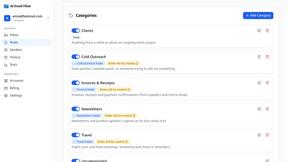
AI Email Filter
AI Email Filter sorts incoming mail into folders using plain-language prompts you write. Works with any IMAP mailbox; bring your own LLM if you want.

Egmatic
No-code 2D game editor: visual node logic, drag-and-drop scenes, live preview. Exports to Windows, macOS, Linux, Android, iOS, Web.

Kody Tools
Free collection of online developer utilities, code formatters, and digital converters designed to streamline your daily workflow.
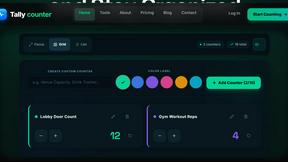
Tally Counter
Online tally counter for tracking attendance, workouts, inventory, visitors, sports scores, habits, and everyday counting tasks.
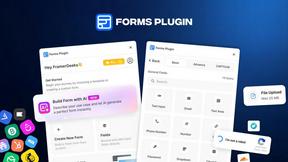
Forms Plugin
The #1 Native Form Builder Plugin for Framer - No Code, No Embeds, No External Platforms.

Product Launch Checklist
A free launch checklist for SaaS, apps, AI tools and more. Every step says why it matters and when you can skip it.

HomeAnswerBook
Practical, independent guides to home repairs, maintenance, costs, troubleshooting, and everyday fixes.

BlazePDF
Highlight faster. Study in flow with custom shortcuts and a workflow built around you. Print smarter, or turn any page into a tiled poster.