audiovideogenerator vs Magic Hour
Side-by-side comparison to help you choose the right tool.

audiovideogenerator
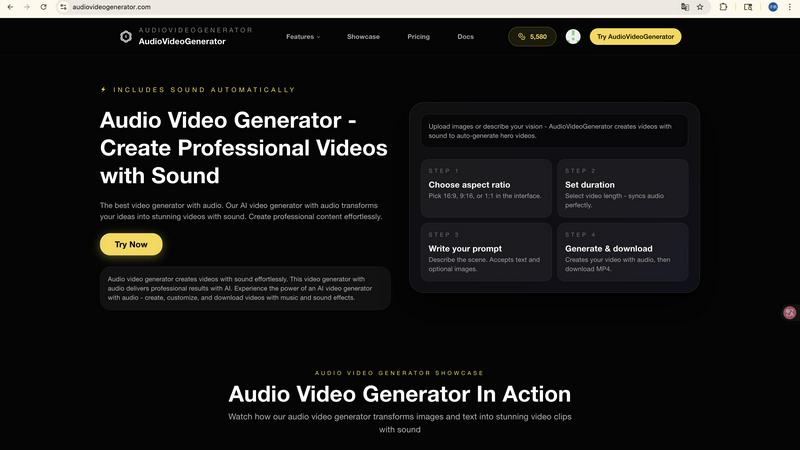
AudioVideoGenerator creates professional AI videos with synchronized sound and music automatically.

Magic Hour
Magic Hour is a unified AI studio offering 100+ free tools for professional video, image, and audio generation.
Last updated: March 4, 2026
Visual Comparison
audiovideogenerator
Magic Hour

Feature Comparison
audiovideogenerator
Multi-Model AI Video Generation
AudioVideoGenerator provides access to several cutting-edge AI video models, allowing users to select the optimal engine for their project based on quality, duration, and style. Supported models include OpenAI's Sora 2 for detailed, longer scenes (2-5 minutes), Google's Veo 3.1 for premium cinematic quality (3-8 minutes) and a faster variant for quicker renders, and Wan 2.5 for efficient generation from audio or images (1-3 minutes). This multi-model approach ensures flexibility and access to the latest advancements in generative video technology, enabling the creation of everything from photorealistic scenes to stylized animations.
Automatic and Synchronized Audio Integration
The platform's signature feature is its fully automated audio generation engine. Upon creating or uploading visual assets, the AI analyzes the content's context, mood, and pacing to automatically generate and integrate a complete audio track. This includes selecting genre-appropriate background music, adding precise sound effects for on-screen actions, and ensuring all auditory elements are perfectly synchronized with the video's visual cuts and transitions, creating a cohesive and professional final product without manual audio editing.
Text-to-Video with Audio Generation
This feature allows users to generate complete videos solely from descriptive text prompts. Users input a detailed description of their desired scene, characters, and actions, and the AI generates the corresponding visuals. Concurrently, the automatic audio system creates a matching soundtrack. This end-to-end automation is ideal for rapidly prototyping ideas, creating narrative content, or producing videos when no starting visual assets are available, streamlining the creative process from concept to final render.
Image-to-Video Animation with Audio
Transform static images into dynamic video sequences with this capability. Users upload a photograph, graphic, or artwork, and the AI animates elements within the image to create movement, such as flowing water, moving clouds, or camera pans. The system then generates a complementary audio track that aligns with the newly created motion, effectively bringing still images to life with both visual dynamism and immersive sound, perfect for enhancing product photos or creating engaging content from existing assets.
Magic Hour
Unified AI Studio Platform
Magic Hour integrates over 100 distinct AI tools for video, image, and audio manipulation into one cohesive, browser-accessible environment. This architecture removes the friction of switching between multiple applications, centralizing workflows for generation, editing, and enhancement. The platform supports a wide array of operations including text-to-media generation, style application, face swapping, and quality upscaling, all accessible through a standardized interface designed for both novice and professional users.
Advanced Video Generation & Editing
The platform provides sophisticated video synthesis and modification capabilities. Its text-to-video engine generates video scenes from descriptive prompts, while the video-to-video tool allows users to apply new artistic styles or visual effects to existing footage. Additional specialized tools include AI Face Swap for seamless identity replacement in videos, Lip Sync for accurate audio-visual synchronization, and Talking Photo for animating static portraits. These tools are capable of producing cinematic 4K outputs without requiring physical production equipment.
Comprehensive AI Image Suite
Magic Hour features a full spectrum of AI-powered image tools. This includes a prompt-based AI Image Generator, an AI Image Editor that allows for text-instruction-based edits, and an AI Image Upscaler to enhance resolution and detail. Specialized generators for professional AI Headshots, memes, and storyboards are also available. Tools like Face Swap Photo, Background Remover, and Photo Colorizer provide granular control for detailed image manipulation and customization directly within the web browser.
Developer-First API & SDKs
For integration and scalability, Magic Hour offers a robust API with client SDKs for Node.js, Python, Go, and Rust. This allows developers to programmatically access core AI features like image-to-video and text-to-video generation. The API is designed for rapid deployment, with claims of installation, authentication, and first generation in under 60 seconds. It supports usage-based scaling from low to high volume traffic (e.g., 10 to 10 million requests) backed by a 99.9% uptime SLA, making it suitable for live campaigns and personalized content at scale.
Use Cases
audiovideogenerator
Social Media Content Creation
Generate platform-optimized video content for Instagram Reels, TikTok, YouTube Shorts, and other social channels. The AI can produce videos in the correct aspect ratios with eye-catching visuals and trending, platform-specific audio tracks. This enables creators and brands to maintain a consistent posting schedule with high-quality, engaging content designed to boost viewer retention and engagement rates, all produced in minutes without video editing expertise.
Marketing and Promotional Videos
Create compelling promotional content for advertising campaigns, product launches, and brand awareness. The tool can generate professional product showcases, explainer videos, and advertisement clips complete with persuasive voiceovers (implied through text-to-video), uplifting background music, and impactful sound effects. This allows marketing teams to produce high-volume, cost-effective video assets for digital ads, website landing pages, and email marketing campaigns in-house.
Educational and Tutorial Content
Educators and trainers can transform lesson plans, presentations, and instructional guides into engaging video format. By inputting text-based learning material or using relevant images, the platform generates concise tutorial videos with clear visual demonstrations and a supporting audio track that enhances comprehension. This is ideal for creating online course modules, how-to guides, and corporate training materials that are more engaging than static text or slides.
Product Demonstration and Showcases
E-commerce businesses and sales teams can dynamically showcase product features and benefits. By animating product images or generating scenes that demonstrate use cases, the AI creates mini-commercials that highlight key selling points. The automatically added soundtracks and effects make the product appear more dynamic and desirable, providing a powerful tool for product pages, trade show displays, and sales presentations to drive conversion.
Magic Hour
Social Media & Digital Marketing Content Creation
Marketing teams and agencies utilize Magic Hour to rapidly produce high volumes of engaging, platform-optimized content. The toolset is ideal for creating promotional videos from scripts (text-to-video), generating unique branded imagery, personalizing ads with face-swap technology, and upscaling asset quality for professional presentation. The availability of 10,000+ templates accelerates the production of content perfectly sized for various social media channels, driving campaign efficiency and audience engagement.
Personalized Advertising & UGC Campaigns
Businesses leverage the API and AI UGC (User-Generated Content) generator to create personalized advertising at scale. This includes generating thousands of unique video and image assets for experiential and paid media campaigns. Features like virtual try-ons and AI face swaps enable hyper-personalized ad experiences that can be dynamically served to different audience segments, significantly increasing relevance and conversion rates without manual production for each variant.
Corporate Training & Internal Communications
Organizations employ Magic Hour to develop professional training materials, explainer videos, and internal communication clips efficiently. The ability to transform scripts or storyboards into video content (text-to-video, image-to-video) simplifies complex message delivery. Tools like the Subtitle Generator and Lip Sync ensure content is accessible and polished, while the browser-based platform facilitates easy collaboration and review among distributed teams.
Developer-Led Product Integrations
Developers and product teams integrate Magic Hour's AI capabilities directly into their own applications or services via its comprehensive API. Use cases include building custom features for face swapping in user apps, adding video generation from text descriptions within a SaaS platform, or enabling style transfer for user-uploaded videos. The drop-in SDKs and consistent API performance allow for quick prototyping and deployment of advanced media AI features without in-house machine learning expertise.
Overview
About audiovideogenerator
AudioVideoGenerator is an advanced, AI-powered platform engineered for the automated creation of professional-grade videos with fully integrated, synchronized audio. The platform's core value proposition lies in its ability to eliminate the traditional complexities of video production by handling both visual and auditory elements through artificial intelligence. It is designed for a broad spectrum of users, including content creators, digital marketers, educators, social media managers, and businesses of all sizes who require high-quality video content without the need for extensive technical skills, production teams, or expensive software suites. The tool supports multiple generative pathways, allowing users to create videos from text prompts (Text to Video), animate static images (Image to Video), or even generate visuals directly from audio files (Audio to Video). A key differentiator is its automatic audio generation system, which intelligently adds contextually appropriate background music, sound effects, and ambient audio that is perfectly synchronized with the visual timeline. By leveraging state-of-the-art AI models such as Sora 2, Veo 3.1, and Wan 2.5, AudioVideoGenerator ensures cinematic quality, offering various output durations and styles tailored to specific use cases, from short-form social clips to longer narrative pieces.
About Magic Hour
Magic Hour is a comprehensive, browser-based AI studio engineered to democratize professional-grade video and image creation. It consolidates a suite of over 100 specialized AI tools into a single, unified platform, eliminating the need for disparate software, expensive hardware, or extensive technical expertise. The platform is architected for a broad user base, including solo content creators, digital marketers operating under tight deadlines, and development teams requiring scalable, API-driven solutions. Its core value proposition lies in its ability to streamline the entire creative workflow—from initial asset generation to final enhancement—within an intuitive web interface. Users can initiate projects from multiple inputs: a text prompt, an existing image, or a video clip. The platform then facilitates transformation into polished media through functionalities like text-to-video generation, video-to-video style transfer, AI face swapping, and lip-syncing. Magic Hour supports rapid iteration and brand consistency, enabling the production of share-ready 4K content for social media, advertising, training materials, and more. With a free tier offering substantial access and a robust API for developers, it provides both accessibility for individuals and powerful scalability for businesses.
Frequently Asked Questions
audiovideogenerator FAQ
What AI models does AudioVideoGenerator support?
AudioVideoGenerator supports a matrix of leading AI video generation models to cater to different needs. This includes Wan 2.5 for efficient audio-to-video and image-to-video tasks (1-3 min outputs), Google's Veo 3.1 in both a 'Fast' variant for quicker 1-3 minute videos and a premium 3-8 minute model for higher quality, and OpenAI's latest Sora 2 model for advanced, detailed video generation lasting 2-5 minutes. Users can select the model that best fits their project's required duration, quality, and style.
How does the automatic audio generation work?
The platform's AI analyzes the generated or uploaded visual content to understand its context, emotional tone, pacing, and on-screen actions. Based on this analysis, it selects appropriate music from a licensed library, generates or chooses synchronized sound effects (like swooshes for transitions or ambient noise for settings), and mixes these elements into a cohesive audio track. The system ensures the audio's rhythm, hits, and volume changes are perfectly timed with the visual edits, creating a professionally synchronized final video.
Can I use my own images or audio files as a starting point?
Yes, AudioVideoGenerator is designed to work with user-provided assets. The Image-to-Video feature allows you to upload static images (JPEG, PNG) to be animated into videos. Furthermore, the A2V (Audio to Video) model specifically enables you to upload an audio file (e.g., a song, podcast, or voiceover), and the AI will generate a video sequence that visually interprets and matches the provided audio's mood, rhythm, and content.
What are the typical output lengths for generated videos?
Output length is primarily determined by the selected AI model. The Wan 2.5 and Veo 3.1 Fast models typically generate videos between 1 to 3 minutes in duration, suitable for short-form content. The premium Veo 3.1 model can produce videos from 3 to 8 minutes long, while the Sora 2 model supports generation of videos between 2 to 5 minutes. The specific length can often be influenced by the detail of the input prompt and the complexity of the requested scene.
Magic Hour FAQ
What is Magic Hour and how does it work?
Magic Hour is a cloud-based AI studio that provides over 100 tools for creating and editing videos, images, and audio through artificial intelligence. It operates entirely within a web browser. Users start by uploading an asset (image, video clip) or by entering a text prompt. The platform's AI models then process this input to generate new media or transform the existing media based on the selected tool, such as applying a new visual style, swapping faces, generating a video from text, or upscaling image resolution.
Is there a free version of Magic Hour available?
Yes, Magic Hour offers a free tier that provides access to a significant portion of its AI toolset. Users can start creating without providing credit card details. The free plan is designed to allow creators to explore core functionalities like face swap, basic video generation, and image editing. For advanced features, higher usage limits, API access, and commercial use, the platform offers paid plans with expanded capabilities and scalability.
What are the system requirements to use Magic Hour?
Since Magic Hour is a browser-based application, the primary system requirement is a stable internet connection and a modern web browser (such as Chrome, Firefox, Safari, or Edge). There is no need to download or install complex desktop software, and the platform does not require powerful local hardware (like high-end GPUs) as all AI processing is handled on Magic Hour's cloud servers. This makes it accessible from virtually any computer or tablet.
Can Magic Hour be integrated into my own application or workflow?
Absolutely. Magic Hour provides a comprehensive REST API with client SDKs for popular programming languages including Python, Node.js, Go, and Rust. This allows developers to integrate specific AI functionalities—such as image-to-video conversion, text-to-video generation, or face swapping—directly into their own applications, websites, or automated workflows. The API is built for scalability and features usage-based pricing, making it suitable for both small projects and large-scale enterprise deployments.