BRCKS vs TinyFast
Side-by-side comparison to help you choose the right tool.

BRCKS streamlines construction project management by integrating WhatsApp for seamless updates, tasks, and collaboration in one platform.
Last updated: April 4, 2026

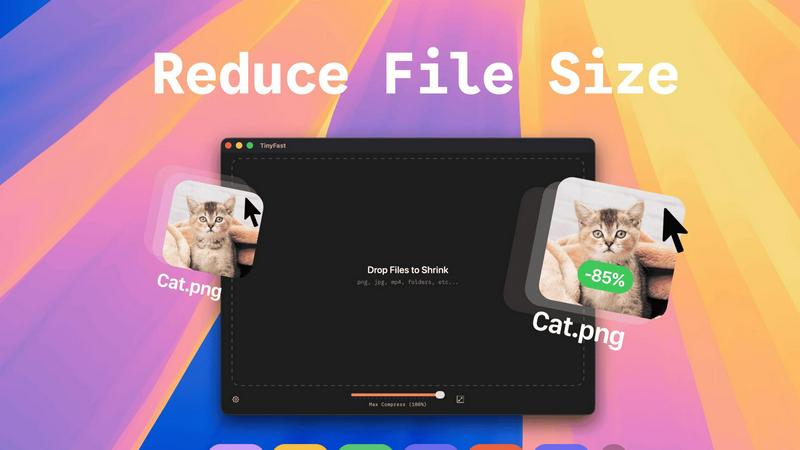
TinyFast is a native Mac app that compresses images, videos, and PDFs locally with drag and drop simplicity.
Last updated: February 28, 2026
Visual Comparison
BRCKS

TinyFast
Feature Comparison
BRCKS
Unified Communication Hub
BRCKS consolidates all project-related communications into one platform, allowing teams to manage updates, conversations, and documents seamlessly. This feature ensures that no critical information is lost, reducing reliance on multiple communication tools.
Free Subcontractor Access
With BRCKS, subcontractors can be invited to projects at no additional cost, providing them access to essential tools such as checklists, calendars, and files. This feature fosters collaboration and ensures that every team member can stay informed and engaged without extra expense.
Client Portal
The Client Portal feature allows homeowners and clients to view their project's progress through an intuitive interface. Clients receive updates, photos, and milestone information, keeping them informed while maintaining their distance from internal project management tools.
BRCKS Bot
The BRCKS Bot integrates with WhatsApp, allowing users to manage projects through simple text commands. This feature enables quick updates, task checking, and instant answers without the need to switch between applications, significantly enhancing user convenience and efficiency.
TinyFast
100% Local & Private Processing
TinyFast operates entirely on your local machine. All compression and optimization algorithms run natively on your Mac's hardware. This design guarantees that your files, including those under Non-Disclosure Agreements (NDAs) or containing confidential information, never leave your system. There is no upload to external servers, no cloud processing, and therefore zero risk of data interception, storage, or misuse by third parties. Privacy is a fundamental, non-negotiable feature built into the application's core architecture.
Blazing-Fast Batch Compression
The application utilizes highly optimized, native compression engines specifically built for macOS to deliver exceptional speed. It supports batch processing, allowing users to drag and drop entire folders containing multiple files. The software then processes these files sequentially at high speed, shrinking large video files or batches of images in a matter of seconds. This eliminates the waiting time associated with uploading files to an online service, queuing, and then downloading the results, dramatically accelerating asset preparation workflows.
Universal Multi-Format Support
TinyFast is engineered to be a universal compression tool, supporting a comprehensive range of common file types used in digital creation and development. This includes extensive image formats (PNG, JPG, WebP, GIF, SVG, HEIC, BMP, TIFF), video files (MP4, MOV, M4V), documents (PDF, DOCX), source code and data files (JS, CSS, JSON), and audio (MP3). This wide compatibility consolidates multiple specialized online tools into one local, efficient application, simplifying the user's toolkit.
Integrated Resolution Resizing
Beyond pure compression, TinyFast includes functionality for automatic image and video resolution resizing. Users can configure settings to reduce the pixel dimensions of their visual assets during the compression process. This dual-approach optimization—reducing both file size and physical dimensions—is crucial for preparing assets for web use, email attachments, or storage, ensuring they meet specific platform requirements without needing a separate editing application.
Use Cases
BRCKS
Streamlined Daily Operations
Construction teams can use BRCKS to organize daily tasks and communications effectively. By having all relevant information in one location, teams can manage their operations more efficiently, saving time and reducing errors.
Enhanced Client Communication
Homeowners can rely on the Client Portal to receive timely updates on their projects, promoting transparency. This enhances client satisfaction and allows project teams to focus on execution rather than constant client inquiries.
Efficient Task Management
The checklist feature within BRCKS allows project managers to create and assign specific tasks to team members. This structured approach ensures that everyone knows their responsibilities, improving accountability and workflow.
Real-Time Updates and Notifications
BRCKS provides real-time notifications regarding project progress, ensuring that all team members stay informed about important changes. This immediacy helps in addressing issues promptly and maintaining project timelines.
TinyFast
Preparing Web and Application Assets
Developers and web designers can efficiently optimize batches of images, icons (SVG), and code files (CSS, JS) for production websites or mobile applications. By compressing these assets locally, they reduce page load times and application bundle sizes without exposing proprietary design files or source code to online services, maintaining both performance and intellectual property security throughout the development cycle.
Securing Confidential Document Transfer
Professionals handling sensitive documents, such as legal contracts (PDF), financial reports, or pre-release product specifications, can use TinyFast to reduce file size for email or secure portal transfer. The guarantee of local-only processing ensures that confidential information remains completely private, complying with data protection regulations and client confidentiality agreements that prohibit the use of cloud-based tools.
Optimizing Creative Project Archives
Video editors, graphic designers, and photographers can compress large project files—such as raw video footage (MOV, MP4), high-resolution image exports, and presentation PDFs—for archiving or creating client review copies. The batch processing capability saves hours over manual online tools, and the local operation protects unreleased creative work from potential leaks associated with online file converters.
Streamlining Email and Messaging Workflows
Any user who needs to send files via email or messaging platforms that impose strict attachment size limits can use TinyFast. Quickly compressing a video from a smartphone (MOV, MP4), a series of screenshots (PNG, JPEG), or a scanned document (PDF) locally ensures the files are sendable without the delay, privacy concerns, and potential quality loss of using a public website for compression.
Overview
About BRCKS
BRCKS is a revolutionary construction project management and communication software specifically designed for residential builders, trades, and homeowners. Its main purpose is to streamline project conversations, checklists, tasks, files, photos, and meeting notes, bringing them all into a single, cohesive platform. This eliminates the chaos of scattered communications often found in emails, WhatsApp, or various documents. BRCKS is tailored for real construction teams, making it practical and user-friendly, enabling daily site communication, action tracking, client updates, and maintaining a clear record of project decisions. With BRCKS, construction professionals can save valuable time, reduce miscommunication, and enhance overall project efficiency. The platform also offers free access to subcontractors, ensuring that every trade involved in a project can participate without incurring additional costs.
About TinyFast
TinyFast is a high-performance, native macOS application engineered for local file compression and optimization. It is a desktop utility that processes a wide array of file formats—including images (PNG, JPEG, WebP, GIF, SVG, HEIC, BMP, TIFF), videos (MP4, MOV, M4V), documents (PDF, DOCX), code files (JS, CSS, JSON), and audio (MP3)—directly on the user's Mac hardware. The core operational principle is a streamlined drag-and-drop interface where users input a file or folder and receive a compressed, optimized output without any network transfer. This architecture ensures complete data privacy and sovereignty, as files never leave the local device, eliminating the security risks associated with uploading sensitive data to third-party cloud servers. Built with optimized native compression engines, the application prioritizes processing speed and efficiency to handle batch operations and large files within seconds. Its primary user base consists of developers, designers, and professional creators who regularly manage digital assets and require a tool that integrates seamlessly into their local workflow without compromising on security, speed, or output quality. The value proposition is a faster, safer, and more reliable alternative to online compression tools, providing instant file size reduction with guaranteed confidentiality.
Frequently Asked Questions
BRCKS FAQ
How does BRCKS improve project communication?
BRCKS centralizes all communications into one platform, reducing reliance on multiple channels. This leads to clearer, more efficient communication, minimizing misunderstandings and ensuring everyone is on the same page.
Is BRCKS easy to use for non-technical users?
Yes, BRCKS is designed with user-friendliness in mind. Its intuitive interface allows users, regardless of technical skill, to navigate the platform effortlessly and utilize its features without extensive training.
Can subcontractors access BRCKS for free?
Absolutely. BRCKS offers free access to subcontractors, allowing them to participate in project management without incurring any costs. This feature promotes better collaboration among all parties involved in the project.
What kind of support does BRCKS provide to its users?
BRCKS offers comprehensive support through various channels, including tutorials, FAQs, and responsive customer service. Users can easily access help and resources to maximize their use of the platform.
TinyFast FAQ
How does TinyFast ensure my files remain private?
TinyFast is architected as a native macOS application, meaning all processing occurs locally on your Mac's CPU and memory. The software does not contain any networking code to transmit your files to external servers. Your data never leaves your device during the compression process. This local-only approach is the fundamental technical mechanism that guarantees total privacy and security for your sensitive documents and assets.
What file formats does TinyFast support for compression?
TinyFast supports a comprehensive suite of common file formats. For images, it processes PNG, JPG (JPEG), TIFF, HEIC, WebP, GIF, BMP, and SVG files. For video, it supports MP4, MOV, and M4V containers. Document support includes PDF and DOCX files. It also handles code and data files like JS, CSS, and JSON, as well as MP3 audio files. This makes it a versatile, all-in-one local compression utility.
Can I compress multiple files or entire folders at once?
Yes, TinyFast features robust batch processing capabilities. You can drag and drop a folder containing multiple files, or select multiple files simultaneously, directly into the application interface. The optimized native engines will process the entire batch sequentially, outputting compressed versions of all supported files within the folder. This is designed to save significant time compared to processing files individually.
What is the difference between the Free and Paid plans?
The Free plan allows users to compress up to five files per day with access to all core compression features, providing a way to test the application's performance and workflow integration. The paid Lifetime Plan is a one-time purchase that unlocks unlimited compressions, includes all current and future features, guarantees lifetime updates, and directly supports ongoing development. A monthly subscription is also available after a 3-day trial.
Alternatives
BRCKS Alternatives
BRCKS is an innovative construction project management and communication software tailored specifically for residential builders, trades, and homeowners. It consolidates essential project elements like conversations, checklists, tasks, files, photos, and meeting notes into a single platform, ensuring that critical information is not lost amidst multiple communication channels such as WhatsApp or email. By streamlining site communication and tracking actions, BRCKS facilitates clear updates and decision records throughout the project lifecycle. Users may seek alternatives to BRCKS for various reasons, including pricing structures that better fit their budgets, feature sets that align more closely with their specific needs, or compatibility with different platforms. When considering alternatives, it's crucial to evaluate aspects such as ease of use, integration capabilities, customer support, and the overall scalability of the solution. These factors will help ensure that the chosen software effectively enhances productivity and meets the unique demands of construction projects.
TinyFast Alternatives
TinyFast is a specialized macOS application for local file compression, falling into the category of desktop optimization and productivity tools. It processes images, videos, and PDFs directly on a user's Mac, ensuring privacy and speed through its native, offline architecture. Users may seek alternatives for various reasons, including budget constraints, a need for cross-platform compatibility beyond macOS, or requirements for different feature sets such as integration with cloud storage, support for additional file formats, or more granular control over compression parameters. The search often stems from a need to balance core functionality with specific workflow or technical demands. When evaluating an alternative, key considerations should include the processing model (local versus cloud-based), supported file formats, batch processing capabilities, output quality controls, and overall integration into your existing digital asset workflow. Prioritizing these specifications ensures the selected tool effectively addresses your primary use case for file size reduction.