
claude-ide vs Hush Touch | Voice-to-Text for MacOS
Side-by-side comparison to help you choose the right tool.

claude-ide
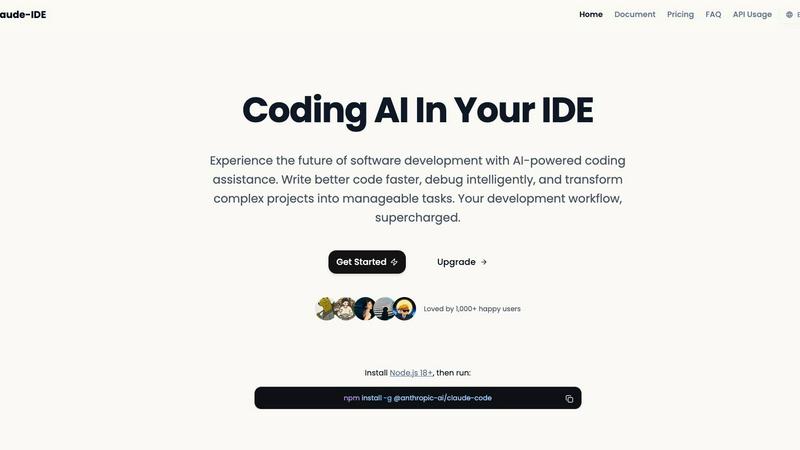
Claude IDE delivers intelligent AI coding assistance directly in your terminal and IDE, enhancing code quality and.
Last updated: March 1, 2026

Hush Touch | Voice-to-Text for MacOS
Hush Touch offers offline voice-to-text dictation for Mac, learning your vocabulary with a one-time $20 license.
Last updated: February 26, 2026
Visual Comparison
claude-ide
Hush Touch | Voice-to-Text for MacOS

Feature Comparison
claude-ide
Intelligent Code Understanding
Claude IDE's intelligent code understanding capability allows it to analyze your entire codebase rather than just isolated snippets. This feature enables the assistant to make coordinated changes across multiple files and provide suggestions that are highly relevant and tailored to the specific context of your project.
Seamless Integration
Designed to reside within your terminal and IDE, Claude IDE ensures that developers do not experience context switching. Its seamless integration with popular tools like Visual Studio Code and JetBrains means that the coding experience remains uninterrupted, allowing developers to focus on writing code efficiently.
Quick Code Familiarization
With its ability to analyze and explain entire codebases in seconds, Claude IDE simplifies the onboarding process for new developers or those unfamiliar with a given project. It quickly grasps the architecture and dependencies of a project, allowing users to become productive without extensive manual exploration.
From Issues to Pull Requests
Claude IDE manages the entire development workflow by integrating deeply with platforms like GitHub and GitLab. Developers can read issues, write code, execute tests, and submit pull requests directly within the terminal, eliminating the need to switch between different applications and improving overall efficiency.
Hush Touch | Voice-to-Text for MacOS
Dual-Engine Recognition
Hush Touch utilizes a sophisticated dual-engine recognition system that combines the capabilities of DictationTranscriber and SFSpeechRecognizer. The former enhances natural flow and punctuation, while the latter boosts custom vocabulary recognition. This integration results in cleaner and more accurate transcriptions tailored to your specific needs.
Custom Vocabulary
The application allows users to store up to 500 custom terms, automatically learning from corrections made during dictation. Whether you frequently use technical jargon, brand names, or specialized medical terms, Hush Touch adapts to your unique vocabulary, ensuring that your dictations reflect your language accurately.
Smart Text Processing
Hush Touch features advanced smart text processing capabilities that remove filler words and auto-correct common misinterpretations. Additionally, it can format numbered lists and recognize voice snippets for frequently used phrases, all executed in real-time without cloud dependence, ensuring a smooth dictation experience.
Context Modes & Hands-Free Operation
With multiple context modes including General, Email, Code, and Notes, Hush Touch allows users to switch seamlessly based on their dictation needs. The hands-free operation, activated via Siri or hotkeys, enables users to dictate effortlessly, with automatic text insertion after a brief pause, enhancing productivity and workflow.
Use Cases
claude-ide
Rapid Onboarding for New Developers
When onboarding new developers to a project, Claude IDE can provide comprehensive overviews of codebases, enabling them to understand project structures and components quickly. This feature significantly reduces the learning curve associated with new codebases.
Efficient Code Debugging
For developers facing bugs or issues within their code, Claude IDE offers intelligent debugging assistance that helps identify and resolve problems quickly. By understanding the context of the code, it can suggest fixes and optimizations, enhancing overall code quality.
Collaborative Development
In team environments, Claude IDE streamlines collaboration by integrating with version control systems. Developers can effectively manage tasks such as issue tracking, code reviews, and pull requests without leaving their development environment, thus promoting a more cohesive workflow.
Simplifying Complex Code Modifications
When a project requires significant changes across multiple files, Claude IDE's capability to perform powerful multi-file edits ensures that all modifications are accurate and functional. This feature reduces the risk of errors that can occur when managing changes manually.
Hush Touch | Voice-to-Text for MacOS
Professional Communication
Hush Touch is perfect for professionals such as business executives and administrative staff who need to draft emails and reports quickly. The natural dictation flow allows for efficient communication without the hassle of manual typing.
Medical Documentation
Healthcare professionals can leverage Hush Touch to dictate medical notes swiftly. The app's ability to recognize medical terminology ensures that critical information is recorded accurately, saving time and reducing errors in patient records.
Creative Writing
Writers and content creators can utilize Hush Touch to brainstorm ideas and draft articles hands-free. The application's smart text processing and vocabulary learning capabilities help maintain the clarity and tone of creative pieces.
Coding and Technical Documentation
Software developers and technical writers benefit from Hush Touch's context modes and custom vocabulary features. The app can effectively transcribe coding commands and technical documentation, streamlining the development process and reducing the cognitive load.
Overview
About claude-ide
Claude IDE is an advanced integrated development environment that harnesses the power of Anthropic's Claude Sonnet 4.5 model to provide intelligent AI coding assistance directly within your existing development workflow. Unlike standalone applications, Claude IDE integrates seamlessly into your terminal and popular IDEs such as Visual Studio Code and JetBrains. It is designed for developers across all skill levels, including professionals, students, and hobbyists, who seek to increase productivity and simplify their coding processes. The main value proposition of Claude IDE lies in its ability to deliver context-aware AI capabilities that enable users to understand complex codebases rapidly and implement sophisticated modifications without the need to switch between multiple tools. By operating within the developer's environment, Claude IDE offers intelligent suggestions, debugging assistance, and project-wide comprehension, revolutionizing the coding experience and streamlining software development.
About Hush Touch | Voice-to-Text for MacOS
Hush Touch is an innovative voice-to-text application specifically designed for macOS users who seek a fast, natural, and secure dictation experience. Unlike traditional dictation tools that rely heavily on cloud processing, Hush Touch operates entirely on-device, ensuring that your data and voice recordings remain private. By leveraging two advanced Apple transcription engines along with an Apple Intelligence final pass, Hush Touch produces highly accurate text outputs, adapting to your unique vocabulary and speech patterns over time. This lightweight application, with a mere 5.5 MB footprint, integrates seamlessly into your daily writing tasks—be it drafting emails, writing notes, or creating documents—allowing you to dictate hands-free. With a simple activation via hotkeys or Siri, Hush Touch empowers users to communicate effectively and efficiently, making it an invaluable tool for professionals across various fields.
Frequently Asked Questions
claude-ide FAQ
What platforms does claude-ide support?
Claude IDE supports integration with popular development environments, specifically Visual Studio Code and JetBrains IDEs. It operates seamlessly within your terminal for an uninterrupted coding experience.
How does claude-ide enhance developer productivity?
By providing context-aware AI suggestions and tools directly within the developer's workflow, Claude IDE minimizes context switching and allows developers to focus more on coding, thus enhancing overall productivity.
Is claude-ide suitable for beginners?
Yes, Claude IDE is designed for developers of all levels, including beginners. Its intelligent code understanding and quick code familiarization features make it an excellent tool for those learning to code or working on unfamiliar projects.
Can claude-ide integrate with version control systems?
Claude IDE integrates deeply with version control platforms like GitHub and GitLab, enabling developers to manage their entire workflow—from reading issues to submitting pull requests—directly within their development environment.
Hush Touch | Voice-to-Text for MacOS FAQ
Is Hush Touch compatible with all MacOS versions?
Hush Touch is designed to work seamlessly with the latest versions of macOS. However, it is advisable to check the system requirements on the official website for compatibility with your specific version.
How does Hush Touch ensure my privacy?
Hush Touch processes all voice data entirely on-device without using cloud services. This means that your voice recordings and transcriptions are never stored or transmitted to external servers, ensuring maximum privacy and data security.
Can I customize the activation commands for dictation?
Yes, Hush Touch allows users to set customizable command phrases for sending messages or initiating dictation, providing a personalized experience that fits individual workflows.
What is the trial period for Hush Touch?
Hush Touch offers a 7-day free trial with no credit card required. Users can experience the full functionality of the app during this period to evaluate its effectiveness in meeting their dictation needs.
Alternatives
claude-ide Alternatives
Claude IDE is an advanced integrated development environment that combines AI coding assistance with existing developer workflows. It falls under the category of AI Assistants, specifically designed to enhance productivity and streamline coding tasks by embedding itself within popular terminals and IDEs. Users often seek alternatives to Claude IDE due to various factors such as pricing, feature sets, and compatibility with specific platforms. When searching for an alternative, it is essential to consider the depth of AI integration, the range of supported programming languages, user interface intuitiveness, and overall effectiveness in improving coding efficiencies. When evaluating alternatives, developers should focus on the tool’s ability to understand complex codebases, the seamlessness of integration into their existing environments, and the quality of support and resources available. A comprehensive understanding of project architecture and intelligent suggestions can significantly impact a developer's productivity, so it is vital to assess how well any alternative meets these criteria.
Hush Touch | Voice-to-Text for MacOS Alternatives
Hush Touch | Voice-to-Text for MacOS is a specialized dictation application designed for seamless offline voice-to-text conversion on macOS devices. It utilizes dual Apple transcription engines and an Apple Intelligence final pass to ensure high accuracy and fluidity in transcription. This product falls under the AI Assistants category, catering to users seeking efficient and private dictation solutions without reliance on cloud services. Users may seek alternatives to Hush Touch for various reasons, including pricing concerns, differing feature sets, and specific platform requirements. When looking for a suitable alternative, it is essential to consider factors such as offline capability, transcription accuracy, ease of use, and any unique features that may enhance the dictation experience. Evaluating these aspects will help users find a voice-to-text solution that best fits their individual needs and workflows.