Clipt vs Kling 5
Side-by-side comparison to help you choose the right tool.

Clipt streamlines video editing by automating tasks like transcription and captioning, enabling teams to focus on.
Last updated: February 26, 2026

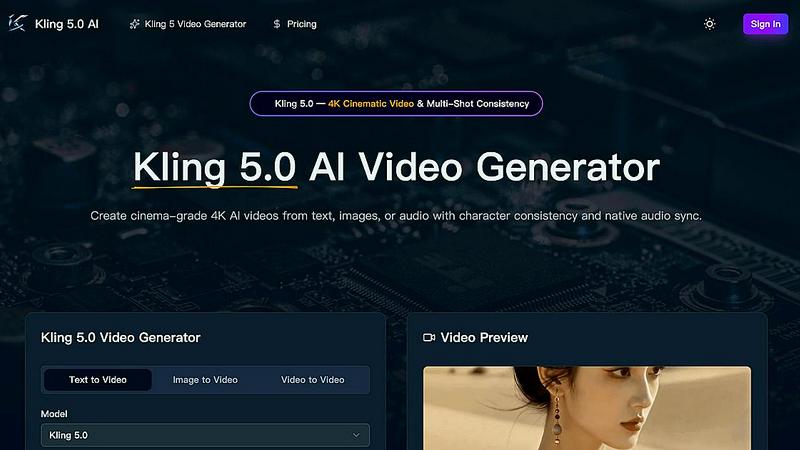
Kling 5.0 is an advanced AI video generator that creates stunning 4K cinematic videos from text, images, or audio with flawless character consistency.
Last updated: April 13, 2026
Visual Comparison
Clipt

Kling 5
Feature Comparison
Clipt
Video Ingestion and Captioning
Clipt supports seamless ingestion of videos from over 50 websites, alongside the option to upload raw files. It generates precise, word-accurate captions in various customizable styles, enhancing accessibility and viewer engagement.
Slideshow Maker
The Slideshow Maker feature empowers users to create viral carousel posts effortlessly. With AI-generated scripts, images, and voice narration, users can generate up to five slides from a single sentence request, streamlining the content creation process.
Talking Heads
Talking Heads eliminates the need for traditional video production setups by allowing users to create professional spokesperson videos. Users can type in their script, and Clipt’s AI will plan scenes, select delivery styles, and generate unique AI characters for the video.
Customizable AI Characters
Clipt enables the creation of unique AI-generated characters from textual descriptions. Users can customize characters by specifying traits like age and style, and the platform generates multiple variations, ensuring consistent brand representation across videos.
Kling 5
AI-Powered Video Generation
Kling 5.0 utilizes advanced AI algorithms to convert text prompts into high-quality videos in just seconds. This feature allows users to quickly generate content without needing prior video editing experience, making it an ideal solution for anyone looking to produce videos efficiently.
Cinematic Quality
With Kling 5.0, users can produce videos that possess a professional, cinematic look and feel. The platform is designed to ensure that all videos generated meet high visual standards, making them suitable for both personal and commercial use.
Easy to Use
The user interface of Kling 5.0 is intuitive and straightforward, allowing users to create videos with minimal effort. With just a few clicks, users can enter their prompts and adjust settings, making video creation accessible to everyone, regardless of their technical background.
Multi-Shot Consistency
Kling 5.0 features a unique Omni Subject Library, which locks facial features and proportions across different camera angles. This ensures that characters remain consistent throughout multi-shot projects, making it particularly beneficial for episodic content or brand campaigns.
Use Cases
Clipt
Marketing Campaigns
Clipt is ideal for marketers who want to create engaging promotional content quickly. With features like Talking Heads and customizable captions, users can produce high-quality videos that resonate with their target audience.
Social Media Content Creation
Content creators can leverage Clipt to generate viral clips for platforms like TikTok and Instagram. The Slideshow Maker and captioning features allow for quick, visually appealing posts that capture viewers' attention.
Brand Representation
Businesses can use Clipt to create reusable AI characters that embody their brand identity. These characters can appear consistently across multiple videos, strengthening brand recognition and creating a cohesive marketing strategy.
Educational Content
Educators and trainers can utilize Clipt to develop engaging instructional videos. The platform's captioning and narration capabilities make it easy to produce accessible content that enhances learning experiences.
Kling 5
Marketing Campaigns
Kling 5.0 is ideal for marketers looking to create engaging promotional videos that capture audience attention. By generating visually appealing content quickly, businesses can enhance their marketing strategies and boost engagement across various platforms.
Educational Content Creation
Educators can utilize Kling 5.0 to produce instructional videos that visually explain complex concepts. The ability to generate animated content allows for a more engaging learning experience, making it easier for students to grasp challenging material.
Social Media Content
With the growing demand for video content on social media, Kling 5.0 enables creators to produce captivating videos tailored for platforms like Instagram, TikTok, and YouTube. This allows users to maintain an active online presence while saving time on video production.
Prototyping and Storyboarding
Filmmakers and game developers can leverage Kling 5.0 to create prototypes and storyboards for their projects. The advanced physics simulations and character consistency features allow for realistic portrayals, aiding in the visualization of scenes and character interactions.
Overview
About Clipt
Clipt is an innovative AI-powered platform designed to simplify video creation and enhance content production for individuals and businesses alike. It enables users to ingest videos from popular platforms such as YouTube, X (formerly Twitter), LinkedIn, TikTok, and Instagram, or upload raw video files for processing. Clipt's advanced features allow for the generation of word-accurate captions with customizable fonts, colors, and animation presets, ensuring that content stands out. The platform also boasts parallelized cloud rendering, which optimizes processing efficiency and keeps video queues moving swiftly. With tools like the Slideshow Maker and Talking Heads, Clipt transforms ideas into engaging carousels and professional spokesperson videos, making it a versatile solution for marketers, content creators, and brands looking to produce high-quality video content effortlessly.
About Kling 5
Kling 5.0 is a state-of-the-art AI video generator that enables users to create stunning, high-quality videos using simple text prompts. Designed for creators of all skill levels, Kling 5.0 eliminates the complexities of traditional video production, making it accessible for marketers, educators, filmmakers, and social media enthusiasts. By leveraging advanced artificial intelligence, Kling 5.0 effortlessly transforms your ideas into cinematic videos, allowing for rapid content creation without the need for extensive technical knowledge. This innovative tool supports a variety of video styles, including cinematic, animated, and more, ensuring that every project can be customized to meet specific needs. With features like multi-shot consistency and native audio synchronization, Kling 5.0 not only produces visually engaging content but also ensures that the audio-visual experience is seamless and professional, positioning it as a preferred choice for content creators worldwide.
Frequently Asked Questions
Clipt FAQ
How many characters can I create?
Clipt allows you to create multiple AI characters, enabling you to customize and reuse them across all your video content for enhanced brand consistency.
Can I use characters across different video types?
Yes, the AI characters created in Clipt can be utilized across various video formats, including Talking Heads, UGC content, and more, ensuring a cohesive visual identity.
Are the characters unique to me?
While the characters are generated based on your descriptions, they are not exclusive. However, you can customize each character to align closely with your brand's identity.
Can I edit a character after creating it?
Yes, Clipt provides options to edit your AI characters after creation, allowing for adjustments in appearance or personality traits to better fit your evolving branding needs.
Kling 5 FAQ
How does Kling 5.0 generate videos from text prompts?
Kling 5.0 uses advanced AI algorithms to analyze text prompts and produce videos that match the described scenes, characters, and styles. This process involves a sophisticated understanding of natural language and visual representation.
Can I customize the videos created with Kling 5.0?
Yes, Kling 5.0 allows for extensive customization options, including the ability to add text, music, and effects to the generated videos. Users can fine-tune their projects to align with their creative vision.
What video resolutions does Kling 5.0 support?
Kling 5.0 generates videos in stunning 4K resolution, ensuring that the final output meets professional standards for visual quality. This is perfect for both online platforms and broadcasting.
Is there a limit to the video length I can create?
Kling 5.0 can generate videos up to 15 seconds long from text prompts. This duration is ideal for creating quick, engaging content suitable for various applications, including social media.
Alternatives
Clipt Alternatives
Clipt is an advanced automation tool designed to streamline video editing processes, primarily focusing on transcription, caption styling, resizing, and rendering tasks. It caters to professionals in marketing and content creation by allowing them to efficiently ingest videos from various platforms, including YouTube, X, LinkedIn, TikTok, and Instagram. Users often seek alternatives to Clipt for reasons such as pricing, specific feature sets, or compatibility with their preferred platforms and workflows. When evaluating alternatives, users should consider key factors such as ease of use, the range of supported file formats, customization options for captions and visuals, as well as the speed and efficiency of rendering capabilities. Additionally, features like AI-assisted content generation and the ability to create engaging visuals with minimal effort can significantly influence the decision-making process.
Kling 5 Alternatives
Kling 5 is an innovative AI video generator that falls within the realm of digital content creation tools. It allows users to produce high-quality videos by simply inputting text prompts, making it accessible even for those without technical expertise. As users explore video creation options, they often seek alternatives to Kling 5 due to factors such as pricing, feature sets, platform compatibility, or specific project needs. When choosing an alternative, it is essential to consider the ease of use, the range of styles available, customization options, and the overall quality of the output to ensure it meets your creative demands.