ConvertBankToExcel vs Vendor Space
Side-by-side comparison to help you choose the right tool.

ConvertBankToExcel
ConvertBankToExcel quickly transforms PDF bank statements to Excel, CSV, and more with 99% accuracy in under 30 seconds.
Last updated: February 26, 2026

Vendor Space
Vendor Space is a centralized platform that replaces spreadsheets to manage event vendors, sponsors, contracts, and payments.
Last updated: April 13, 2026
Visual Comparison
ConvertBankToExcel

Vendor Space
Feature Comparison
ConvertBankToExcel
99%+ Accuracy Rate
ConvertBankToExcel boasts a remarkable accuracy rate of over 99%, verified by CPAs. This high level of precision ensures that users receive reliable data extraction from their bank statements, minimizing errors and enhancing data integrity in financial reporting.
Fast Processing Time
The platform processes bank statements in under 30 seconds on average, allowing users to swiftly convert their documents without unnecessary delays. This efficiency is vital for accounting professionals who often work under tight deadlines and require quick access to accurate financial data.
Extensive Bank Support
With support for over 20 major US and Canadian banks, ConvertBankToExcel is versatile and user-friendly. This feature simplifies the conversion process, as users can easily upload statements from widely used banking institutions such as Chase, Wells Fargo, and TD Bank.
Multiple Export Formats
ConvertBankToExcel provides nine export formats, including QuickBooks (QBO/QFX/OFX/IIF), Excel, CSV, JSON, and XML. This extensive range of export options ensures that users can easily integrate the converted data into their preferred accounting software, facilitating a smoother workflow.
Vendor Space
Centralized Vendor & Sponsor Dashboard
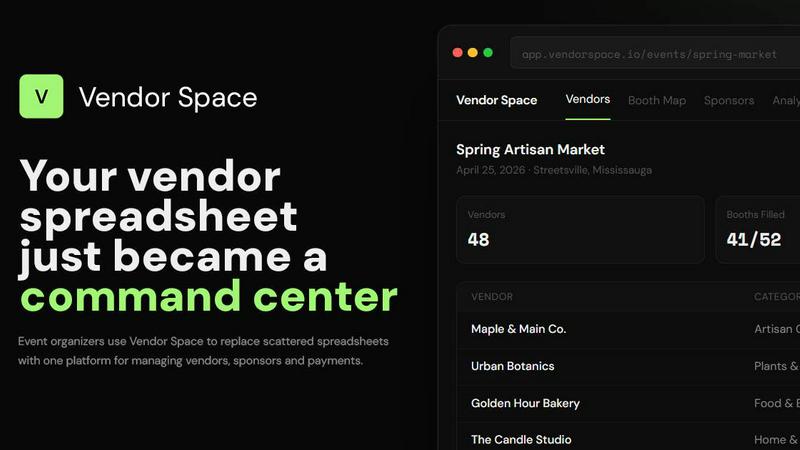
The platform provides a single, intuitive dashboard that serves as a command center for all event management activities. It displays real-time, at-a-glance metrics including total vendors, booths filled, and revenue collected. Organizers can manage vendor applications, statuses (Confirmed, Pending, Waitlist), categories, and booth assignments from one screen. Critically, sponsor management is fully integrated into this same dashboard, enabling the creation of tiered sponsorship packages and tracking of deliverables alongside standard vendor operations, eliminating the need to juggle separate systems.
Interactive Booth Mapping & Management
Vendor Space features a visual, interactive booth mapping tool that transforms floor plan management. Organizers can create digital layouts and assign vendors via drag-and-drop functionality. The map provides real-time visual indicators for booth status (Available, Reserved, Taken, Premium), automatically detects assignment conflicts, and shows overall fill rates. This feature replaces manual, error-prone methods like paper charts or static spreadsheets, ensuring accurate spatial planning and maximizing venue utilization.
Integrated Digital Contracts & Payments
This feature streamlines the legal and financial workflow by integrating digital agreements with Stripe-powered payment processing. Organizers can send custom contracts with built-in e-signature capabilities directly through the platform, tracking the status of each document (e.g., Signed, Pending). Payments can be collected instantly upon vendor registration or contract signing, with real-time tracking of all transactions. The system automatically calculates and applies the platform's 6% transaction fee, providing clear financial reporting.
Self-Service Vendor Portal & Analytics
Vendor Space includes a dedicated, branded portal where vendors can apply, submit information via custom forms, pay fees, sign contracts, and manage their participation details autonomously. This self-service model drastically reduces organizer administrative time. Complementing this, the platform offers a robust analytics module that provides real-time insights into key performance indicators such as revenue trends, vendor participation rates, booth fill percentages, and sponsor contribution metrics, enabling data-driven decision-making.
Use Cases
ConvertBankToExcel
Tax Preparation
Accountants and tax professionals can utilize ConvertBankToExcel to organize and convert bank statements for tax filing. The platform streamlines the preparation process by providing accurate and easily accessible financial data, ensuring compliance with IRS requirements.
Mortgage Applications
When preparing financial statements for mortgage applications, ConvertBankToExcel helps users present organized bank statements to lenders. This capability is crucial in expediting approval processes and meeting the financial documentation requirements of mortgage applications.
Visa Applications
Financial documentation is often a key requirement for visa and immigration processes. ConvertBankToExcel assists individuals in converting their bank statements to meet the necessary financial standards set by embassies and immigration authorities.
Accounting and Bookkeeping
For CPAs and bookkeepers, ConvertBankToExcel is an essential tool for converting various bank statements into usable formats. This functionality allows professionals to maintain organized records, improve financial analysis, and enhance client service through timely data access.
Vendor Space
Seasonal Craft Fairs and Artisan Markets
Organizers of recurring craft fairs utilize Vendor Space to manage high volumes of artisan applicants efficiently. The platform handles custom application forms for jurying, digital contract distribution for accepted vendors, and streamlined payment collection for booth fees. The visual booth map is essential for assigning spaces to different craft categories (e.g., pottery, textiles), while integrated sponsor management handles partnerships with local businesses, all from a single interface.
Large-Scale Food Festivals and Pop-Up Markets
For food-centric events with complex logistics, Vendor Space manages diverse vendor needs including health permit tracking, electrical requirements, and menu submissions through custom forms. The payment system handles varying booth pricing tiers, and the sponsor management module secures and tracks partnerships with beverage companies or equipment suppliers. The centralized dashboard provides a clear overview of vendor mix and financials critical for event success.
Professional Trade Shows and Job Fairs
Trade show organizers leverage the platform's professional tools to manage corporate exhibitors and sponsors. Features for tiered sponsorship packages (Gold, Silver, Bronze) with detailed deliverable tracking are crucial. Digital contracts formalize agreements, and the vendor portal allows exhibitors to upload logos, marketing materials, and manage representative passes. The analytics suite provides data on exhibitor ROI and attendee engagement metrics for post-event reporting.
Community Farmers Markets and Holiday Markets
Community event organizers benefit from the platform's simplicity and cost-effectiveness. The free-to-use model is ideal for non-profits or small organizations. They can quickly set up events, collect payments from local farmers and makers, and use the booth map to plan seasonal layouts. The system automates communication and reminders, saving volunteer hours, while the sponsor module helps manage partnerships with local banks or community groups supporting the event.
Overview
About ConvertBankToExcel
ConvertBankToExcel is a cutting-edge, AI-powered platform designed specifically for accounting professionals looking to streamline the process of bank statement conversion. This innovative tool automates the extraction of transaction data from PDF bank statements, significantly reducing the time and effort spent on manual data entry. With support for over 20 major banks in the US and Canada, ConvertBankToExcel ensures a seamless experience for users by providing data in multiple formats, including Excel, CSV, and QuickBooks. With a proven accuracy rate of over 99% verified by CPAs, this platform has garnered the trust of more than 50,000 accounting professionals who have collectively processed over 1 million bank statements. ConvertBankToExcel empowers users to focus on what truly matters—providing valuable insights to clients—by eliminating hours of tedious manual work. Additionally, the free tier allows users to convert seven pages daily without the need for a credit card, making it accessible for all professionals.
About Vendor Space
Vendor Space is a comprehensive, all-in-one vendor and sponsor management platform engineered specifically for event organizers. It is designed to eliminate the operational chaos associated with managing vendors by replacing disparate tools like spreadsheets, email threads, and manual payment trackers with a single, unified command center. The platform digitizes and consolidates the entire vendor lifecycle, from initial application and custom form creation to booth mapping, digital contract execution, and integrated payment processing. A key differentiator is its inclusion of sponsor management within the same ecosystem, allowing for seamless coordination between paid partnerships and vendor operations. Built by an event organizer, the interface prioritizes intuitive usability without sacrificing powerful functionality. Vendor Space operates on a transparent, pay-as-you-go model: the platform itself is completely free to use, with revenue generated solely through a flat 6% transaction fee applied to processed payments. This approach removes barriers like monthly subscriptions, hidden costs, and binding contracts. The core value proposition is to professionalize event operations, drastically reduce administrative overhead by an estimated 80%, and enhance the experience for both organizers and vendors through centralized, automated workflows.
Frequently Asked Questions
ConvertBankToExcel FAQ
How does ConvertBankToExcel ensure accuracy in data extraction?
ConvertBankToExcel employs advanced AI-powered OCR technology and rigorous testing, resulting in a CPA-verified accuracy rate of over 99%. This ensures that the extracted data is reliable and precise.
Can I convert scanned PDF bank statements?
Yes, ConvertBankToExcel is equipped to handle both digital and scanned PDF documents. The AI-powered OCR technology effectively extracts data from various types of bank statements, ensuring versatility in document handling.
What banks are supported by ConvertBankToExcel?
The platform supports over 20 major banks in the US and Canada, including well-known institutions like Chase, Bank of America, Wells Fargo, and TD Bank. This extensive support simplifies the conversion process for users across different banking services.
Is there a free trial available?
Yes, ConvertBankToExcel offers a free tier that allows users to convert seven pages daily without requiring a credit card. This makes it easy for professionals to try the service and experience its benefits before committing to a paid plan.
Vendor Space FAQ
How quickly can I set up my first event?
Most organizers can have their first event fully configured and live within 15 minutes. The process involves creating the event, configuring booth options and pricing tiers, and then immediately sharing the generated vendor registration page. The platform is designed for immediate usability without extensive training or complex setup procedures, allowing you to begin managing vendors almost instantly.
What is the cost structure for using Vendor Space?
Vendor Space operates on a completely free-to-use model with no monthly subscriptions, setup fees, or binding contracts. The platform generates revenue solely through a flat 6% transaction fee applied only when you successfully collect a payment from a vendor or sponsor. You pay nothing to create events, manage vendors, use contracts, or access any other feature until you start collecting revenue.
How does the integrated payment processing work?
Payments are powered by Stripe, a leading global payment processor, which is built directly into the Vendor Space platform. This integration allows vendors to pay securely via credit or debit card during the application process. Organizers see real-time tracking of all transactions, and funds, minus the 6% platform fee, are deposited directly into their connected Stripe account according to Stripe's standard payout schedule.
Can Vendor Space integrate with other tools I use?
Yes, Vendor Space offers robust integration capabilities. Stripe is natively built-in for payments. Furthermore, through a Zapier integration, the platform can connect with over 7,000 other applications. This allows you to automate workflows, such as pushing new vendor data to a CRM like HubSpot, syncing payment records to accounting software like QuickBooks, or triggering notifications in communication tools like Slack or Gmail.
Alternatives
ConvertBankToExcel Alternatives
ConvertBankToExcel is an AI-powered bank statement converter specifically designed for accounting professionals. This platform falls under the productivity and management category, streamlining the conversion of PDF bank statements into various formats like Excel, CSV, and QuickBooks in a matter of seconds. Users often seek alternatives to ConvertBankToExcel for several reasons, including pricing considerations, feature sets, or specific platform compatibilities that better suit their unique needs. When searching for an alternative, it is crucial to evaluate the accuracy rate of the conversion technology, the range of supported file formats, and the overall processing speed. Additionally, consider the user interface and ease of integration with existing accounting software, as well as the security measures in place to protect sensitive financial data.
Vendor Space Alternatives
Vendor Space is a specialized vendor and sponsor management platform within the business and finance software category. It is engineered to consolidate the entire vendor lifecycle for event organizers, replacing disparate tools like spreadsheets and email with a unified operational dashboard. Users may seek alternatives for several technical reasons. These include a requirement for different pricing structures beyond transaction-based models, a need for integration with existing enterprise resource planning or accounting systems, or a demand for feature sets that extend beyond event-specific vendor management into broader procurement or inventory control. When evaluating alternative solutions, key technical specifications to assess include the platform's core architecture for data centralization, its application programming interface for third-party software connectivity, the granularity of its user permission and role-based access controls, and the transparency of its total cost of ownership calculation, encompassing all subscription, transaction, and implementation fees.