
Daily vs Never Drop
Side-by-side comparison to help you choose the right tool.

Daily is a structured planner for thought organization and priority-driven task execution.

Never Drop
NeverDrop captures contacts instantly and drafts personalized follow-ups, ensuring you never lose a lead at events.
Last updated: February 28, 2026
Visual Comparison
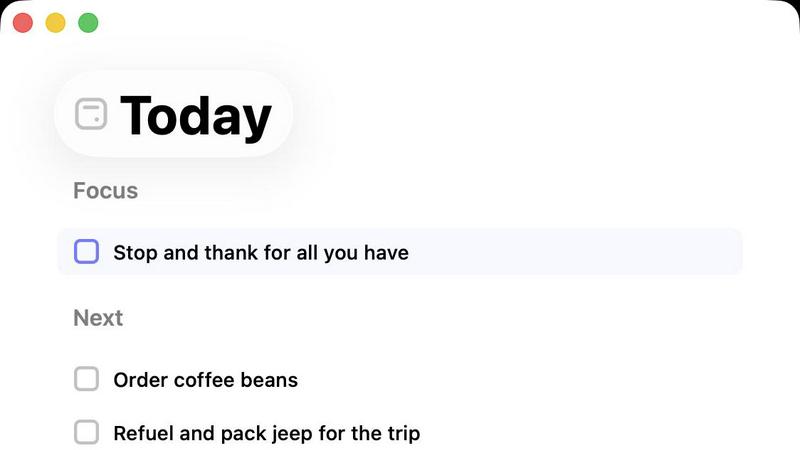
Daily
Never Drop

Feature Comparison
Daily
Rapid-Fire Capture Interface
The application features a persistently accessible and streamlined input field designed for near-zero friction capture. This allows users to instantly record tasks, ideas, or reminders as they arise, in any state of disorganization, without navigating through multiple screens or dialogs. The technical specification ensures input latency is minimized, and the save action is a single keystroke, facilitating true brain-dump functionality. This feature is foundational to preventing cognitive leakage and ensuring no actionable item is lost before it can be processed.
Contextually Isolated "Today" View
This is the core operational view of Daily, employing a time-based filtering algorithm to display only items tagged for the current date. It acts as a dynamic, self-contained workbench, deliberately hiding all future and past tasks to reduce visual noise and psychological overwhelm. The view's technical implementation involves a real-time query that sorts and presents items based on their assigned "do date," creating a singular, focused point of engagement for the user's daily execution phase.
Intentional Carry-Forward Protocol
Daily implements a non-punitive system for managing unfinished tasks. At a user-designated time (e.g., end of day), the application can automatically shift undated or overdue items to the next day's view, or present them for manual review. This protocol is configurable and operates on a logic that separates task existence from task urgency, ensuring important items remain visible without cluttering the immediate workspace. It systematically eliminates the need for manual re-entry and the associated guilt.
Minimalist Architecture & Persistent Simplicity
The application is built upon a principle of constrained functionality to prevent scope creep and user anxiety. Technical specifications deliberately exclude complex features like nested subtasks, elaborate tags, color-coding, or integrations that could complicate the user experience. The interface utilizes a clean typographic hierarchy, ample negative space, and a restrained interaction model. This architectural commitment ensures the tool remains a focused planner rather than evolving into a complex project management system, preserving its core value of clarity.
Never Drop
Instant Business Card Scanning
Never Drop allows users to scan business cards within seconds using their smartphones. The app's AI-powered Optical Character Recognition (OCR) technology extracts crucial contact details—name, company, title, phone number, and email—without requiring any manual input. This feature eliminates the hassle of typing and ensures that no information is lost due to misplaced cards.
Automatic Email Enrichment
Understanding that business cards often contain generic or incomplete email addresses, Never Drop enhances the captured profiles by automatically finding verified work emails based on the name and company. This feature removes guesswork and manual searches, ensuring that users have accurate contact information ready for follow-up.
AI-Generated Follow-Up Emails
With Never Drop, users can generate personalized follow-up emails in under two minutes. By utilizing the voice notes and conversation context provided by the user, the app drafts unique emails that reflect the tone and content of the interaction. This feature ensures that every follow-up feels personal and engaging, rather than being a generic template.
Team Collaboration and Management
Never Drop is designed for teamwork, allowing sales representatives to organize scanned leads by event and reassign contacts among team members. The dashboard provides an overview of activity, ensuring that everyone remains aligned and no leads fall through the cracks, even in high-pressure scenarios.
Use Cases
Daily
Managing ADHD & Executive Dysfunction
For individuals with ADHD or executive function challenges, the act of initiating task organization can be a significant barrier. Daily's rapid-capture feature allows for immediate offloading of distracting thoughts, reducing working memory load. The enforced simplicity of the Today view creates a non-overwhelming, single focus point, which is critical for maintaining attention and combating task paralysis. The gentle carry-forward mechanism also helps mitigate feelings of failure associated with unmet daily goals.
Preventing Burnout for Knowledge Workers
Professionals facing constant input from emails, messages, and meetings use Daily as a dedicated "interruption sink." By quickly capturing every new request or idea that arises during the workday into Daily, they can mentally dismiss it and return to their deep work. Later, during a dedicated planning session, they process the captured list to populate their Today view for the next day, creating a clear boundary between collection and execution, which is essential for sustainable productivity.
Streamlining Morning Routine Planning
Users establish a consistent ritual of reviewing their Daily list each morning. The Today view provides a clean slate, showing only what was previously decided as important for that day. This eliminates the stressful morning scramble of reviewing lengthy, complicated lists across multiple apps. The user can start their day with immediate clarity and direction, making a conscious choice to begin work rather than spending cognitive resources on planning.
Facilitating Stress-Free Personal Task Management
For managing personal life admin, household chores, and errands, Daily provides a single, quiet repository separate from high-pressure work tools. Users can capture "call plumber" or "buy groceries" as easily as work tasks. The ability to assign these to a specific future date (like the upcoming weekend) and then have them appear only on that day's Today view prevents personal tasks from creating background anxiety during the workweek.
Never Drop
Trade Shows and Conferences
Sales teams can use Never Drop at trade shows and conferences to capture leads efficiently. By scanning business cards on-site, enriching contact information, and sending personalized follow-ups before leaving the booth, teams can enhance their chances of converting leads into clients.
Networking Events
At networking events, where interactions are fast-paced, Never Drop enables users to quickly scan and manage multiple contacts. The ability to add context and generate immediate follow-ups ensures that connections made during the event are not forgotten.
Business Dinners and Meetings
During business dinners or meetings, sales professionals can utilize Never Drop to capture leads from informal settings. The app allows them to document conversations and follow up with personalized emails, making a lasting impression on potential clients.
Lead Management and Organization
Never Drop serves as a central hub for lead management across various events. Users can categorize leads by event, track interactions, and monitor team activities, ensuring a streamlined approach to nurturing relationships and closing deals.
Overview
About Daily
Daily is a minimalist digital task management and daily planning application engineered for individuals experiencing cognitive overload and seeking to reduce anxiety while maintaining productivity. Its core philosophy diverges from conventional productivity tools that emphasize optimization and relentless output. Instead, Daily provides a structured yet forgiving environment designed to facilitate mental offloading and intentional focus. The application serves as an external cognitive workspace where users can rapidly capture tasks, reminders, and nascent thoughts without the immediate pressure of categorization or prioritization. This capture functionality is decoupled from the organization phase, allowing for a stress-free initial dump of mental clutter. The primary operational interface is the "Today" view, a dynamically filtered list that surfaces only the items designated for the current day's attention. This creates a bounded, manageable workspace that combats the paralysis of overwhelming, long-term lists. Items not addressed are not treated as failures; the system incorporates a gentle carry-forward mechanism or allows for intentional deletion, reinforcing a non-judgmental approach to task management. Daily is architected for users who value clarity over complexity, offering just enough structure—such as task entry, date assignment, and a clean visual hierarchy—to provide support without introducing the feature bloat and associated pressure found in more complex project management suites. Its value proposition lies in its ability to restore a user's sense of control and present-moment focus by externalizing the mental load and providing a clear, daily starting point.
About Never Drop
Never Drop is a cutting-edge lead-capture application meticulously crafted for sales teams operating in dynamic environments such as trade shows, conferences, and networking events. It revolutionizes the lead management process by enabling users to effortlessly scan business cards using their smartphones. Once a card is scanned, users can enhance the captured data by adding voice notes or text context regarding their interactions, ensuring essential details about each lead are preserved. The app leverages advanced artificial intelligence to generate tailored follow-up emails within two minutes, significantly reducing the chances of leads being overlooked. With seamless integration into popular Customer Relationship Management (CRM) systems like HubSpot, Never Drop maintains a clean and organized sales pipeline, empowering teams to convert leads into successful deals. Say goodbye to lost opportunities and embrace efficient follow-up processes that foster meaningful relationships with potential clients.
Frequently Asked Questions
Daily FAQ
How does Daily handle tasks that don't get done?
Daily employs a configurable, gentle carry-forward system. Undated tasks or tasks assigned to a past date can be automatically moved to the current day's view, or they can be presented in a separate review list for manual reassessment. This process is intentional and non-judgmental. You have the option to reschedule them, delete them if they are no longer relevant, or leave them undated for future consideration, ensuring your list reflects current priorities.
Can I use Daily for long-term project planning?
Daily is architected specifically for daily action and short-term focus, not complex project management. It is optimal for breaking down projects into next-action steps that can be assigned to specific days. For the overarching project timeline, notes, and documents, it is recommended to use a dedicated project management or note-taking application in tandem with Daily, using Daily strictly for the "what do I do today?" aspect of each project.
Is my data synchronized across devices?
Based on its minimalist architecture, Daily's primary design focus is on simplicity and reducing cognitive load. A core, cloud-based synchronization service is a typical technical specification for modern productivity tools to enable access across smartphones, tablets, and desktop computers. This ensures your Today view and captured tasks are always up-to-date and accessible regardless of the device you are using at any given moment.
What platforms and operating systems does Daily support?
To provide a seamless and native user experience, Daily is typically developed as a cross-platform application. This entails dedicated native or optimized applications for major desktop and mobile operating systems, including iOS, Android, macOS, and Windows. A web-based client accessible through standard browsers is also a common technical implementation to ensure universal access without installation requirements.
Never Drop FAQ
What is Never Drop?
Never Drop is a lead-capture application designed for sales teams attending events. Users can scan business cards, add context, and generate personalized follow-up emails, all while integrating seamlessly with CRMs like HubSpot.
How does business card scanning work?
To scan a business card, users take a photo with the Never Drop mobile app. The app's AI-powered OCR technology quickly extracts essential contact information such as name, company, title, phone number, and email, simplifying the data entry process.
What types of events is Never Drop suitable for?
Never Drop is ideal for various events, including trade shows, conferences, networking events, meetups, and business dinners. It helps users capture and manage leads efficiently in any situation where new contacts are made.
Do I need the mobile app to use Never Drop?
Yes, the mobile app is essential for scanning business cards, recording voice notes, and triggering follow-ups on the go. Additionally, the web dashboard allows users to manage their team, review scans, and configure settings, providing a comprehensive solution for lead management.