
DreamFace vs Seedance 2.0
Side-by-side comparison to help you choose the right tool.

DreamFace clones voices in 19 languages and creates dynamic videos with customizable AI avatars.
Last updated: February 28, 2026

Seedance 2.0
Seedance 2.0 generates stunning high-quality videos from text or images with unmatched detail and fluid motion.
Last updated: February 26, 2026
Visual Comparison
DreamFace
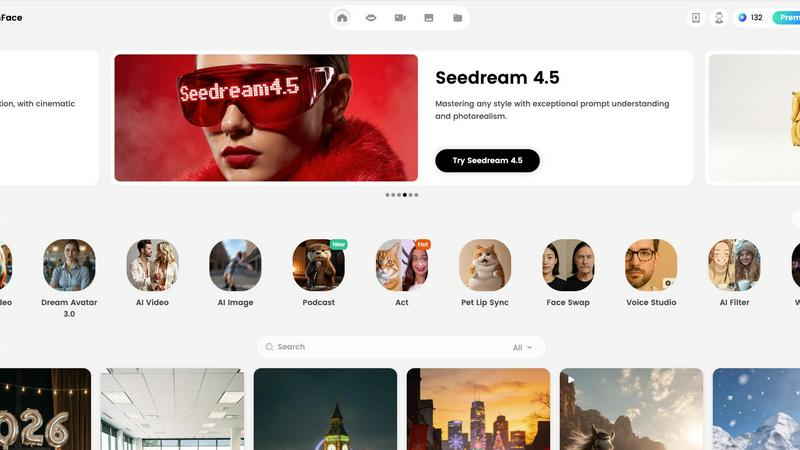
Seedance 2.0

Feature Comparison
DreamFace
Dream Avatar 3.0 & Video Lip Sync
This advanced feature utilizes sophisticated generative AI models to create hyper-realistic digital avatars from a single photo. The technology precisely animates the avatar's lip movements, facial expressions, and head gestures to synchronize perfectly with any uploaded audio track or text-to-speech output. It supports multiple languages and delivers high-definition video output, enabling the creation of professional spokesperson videos, personalized messages, and educational content without any filming required.
AI Video Generator (Text/Image to Video)
The platform's AI Video Generator is a multimodal system that converts textual descriptions or static images into dynamic, coherent video sequences. The engine analyzes the input to generate relevant scenes, apply appropriate motion, incorporate visual effects, and sync background music. This feature supports various aspect ratios and styles, allowing for the rapid production of marketing videos, social media clips, and conceptual animations directly from a written idea or a mood board image.
AI Photo Suite (Text to Image, AI Filter, Enhancer)
DreamFace integrates a robust suite of AI-powered image manipulation tools. The Text-to-Image module generates original, high-resolution photographs and artworks from descriptive text prompts. Complementary tools include an AI Filter for applying complex artistic styles, a Background Remover for instant subject isolation with pixel-level precision, and a Photo Enhancer that algorithmically upscales resolution, reduces noise, and restores detail in low-quality or old photographs.
Voice Studio & AI Sound Tools
This feature set provides comprehensive audio generation and editing capabilities. Voice Studio offers a library of lifelike, AI-generated voices in multiple languages and accents for seamless voiceovers. Integrated Text-to-Speech and AI Translator tools allow for the creation and localization of audio tracks. Additional AI Sound tools enable users to generate custom sound effects or music beds, creating a complete, in-platform audio production workflow for videos.
Seedance 2.0
Text-to-Video
Seedance 2.0 transforms a single sentence into a fully realized cinematic scene. This feature allows users to input a brief text prompt, which the AI interprets to create coherent motion, character actions, and a rich visual narrative. This capability is especially useful for scriptwriters and content creators who want to visualize concepts quickly.
Image-to-Video
This feature enables users to utilize reference images for video generation. By guiding the composition, identity, and visual style based on the provided images, creators can ensure that their videos maintain a consistent aesthetic and thematic coherence, making it ideal for branding and marketing purposes.
Integrated Audio Generation
The Pro version of Seedance 2.0 stands out by generating synchronized video and audio in a single pass. This includes realistic sound effects, background music, speech synthesis, and multilingual lip-syncing. This integration streamlines the production process, eliminating the need for separate audio editing and allowing for a more cohesive final product.
Physics-Aware Motion
Seedance 2.0 excels in understanding and simulating physical dynamics, enhancing the realism of generated videos. It accurately depicts phenomena such as cloth fluttering in the wind, realistic water splashes, and dynamic smoke and flame effects. This feature adds a layer of authenticity that is crucial for high-quality video production.
Use Cases
DreamFace
Marketing & Advertising Campaigns
Marketing teams leverage DreamFace to rapidly produce cost-effective, high-volume visual content. This includes creating avatar-based product explainer videos, generating promotional social media clips from text briefs, and designing branded imagery with AI filters. The platform's efficiency allows for A/B testing of different visual styles and messaging without significant production overhead or time delays.
Personalized Content & Social Media Engagement
Individual creators and influencers use the platform to generate unique, engaging content for platforms like TikTok, Instagram, and YouTube. Use cases include creating personalized video greetings with a user's avatar, animating pet photos for viral content, transforming selfies with artistic AI filters, and generating eye-catching thumbnails and story posts to boost audience interaction and growth.
E-learning & Corporate Training
Educational institutions and corporate training departments utilize DreamFace to develop engaging instructional materials. Instructors can create avatar-led tutorial videos in multiple languages, generate visual aids and diagrams from text descriptions, and restore or enhance historical images for presentations. This transforms standard training modules into dynamic, visually compelling experiences that improve knowledge retention.
Content Localization & Accessibility
Businesses operating in global markets use DreamFace's AI Translator and voice cloning tools to localize existing video content efficiently. A single video can be translated, have its script re-voiced by an AI in the target language, and have the avatar's lip movements re-synced, dramatically reducing the time and cost of manual dubbing and subtitling, while also creating content for hearing-impaired audiences via visual avatars.
Seedance 2.0
Marketing Campaigns
Businesses can leverage Seedance 2.0 to create engaging video content for marketing campaigns. By using text-to-video and image-to-video features, brands can produce promotional materials that align with their visual identity and messaging, enhancing audience engagement.
Educational Content
Educators can utilize Seedance 2.0 to generate instructional videos that simplify complex topics. The ability to convert scripts into professional-quality videos makes it easier to create visually appealing educational resources that can capture students' attention.
Social Media Content Creation
Content creators and influencers can use Seedance 2.0 to produce high-quality videos for social media platforms. The tool's rapid generation capabilities allow users to create eye-catching content that stands out in crowded feeds, helping them grow their audience.
Storytelling and Filmmaking
Filmmakers can harness Seedance 2.0 to visualize scripts and story concepts. With its advanced capabilities in motion coherence and physics-aware dynamics, the model can help filmmakers create storyboards and pitch videos that effectively convey their vision to stakeholders.
Overview
About DreamFace
DreamFace is a comprehensive, AI-powered multimedia creation platform engineered to democratize professional-grade content production. It serves a global user base exceeding 20 million, including over 200,000 paid subscribers, and has achieved a significant $10 million in Annual Recurring Revenue (ARR). The platform's core architecture is built around three primary generative pillars: Avatar Video, AI Video, and AI Photo. It enables users to synthesize high-quality visual content from simple inputs like text prompts, audio files, or static images. Designed for a broad spectrum of users, including individual creators, digital marketers, social media managers, and businesses of all sizes, DreamFace eliminates the traditional barriers to video and image production, such as the need for actors, specialized equipment, or advanced technical skills. Its value proposition lies in providing a unified, user-friendly suite of advanced AI tools that make rapid, efficient, and accessible content creation possible across web and mobile interfaces, thereby empowering users to transform creative concepts into polished, engaging multimedia assets.
About Seedance 2.0
Seedance 2.0 is an advanced AI video generation model developed by ByteDance's Seed research team, representing a significant evolution from its predecessor, Seedance 1.5. This cutting-edge tool is designed for creators, marketers, filmmakers, and businesses looking to produce high-quality video content efficiently. Seedance 2.0's primary value proposition lies in its ability to generate hyper-realistic videos that exhibit unmatched motion coherence, physical realism, and multimodal capabilities. It allows users to create videos from various inputs, including text prompts, images, and scripts, making it an all-in-one solution for video production. With integrated audio capabilities, Seedance 2.0 simplifies the creative process, enabling users to produce cinematic scenes that are rich in detail and visually captivating.
Frequently Asked Questions
DreamFace FAQ
What types of input does DreamFace accept for video generation?
DreamFace's AI Video Generator is designed for multimodal input. It primarily accepts detailed text descriptions, where users can outline scenes, actions, and styles. Additionally, it can accept image inputs, using a provided photo as a visual starting point or style reference to generate a coherent video sequence. For avatar videos, the input is typically a photo for the avatar source and an audio file or text script for lip-syncing.
How accurate is the lip-sync technology in Dream Avatar?
The lip-sync technology in Dream Avatar 3.0 employs advanced deep learning algorithms trained on extensive datasets of human speech and facial movements. It achieves high phonetic accuracy by mapping audio waveforms to precise viseme shapes (the visual equivalent of a phoneme). The result is a convincing synchronization where the avatar's mouth movements closely match the spoken words, including nuances for different languages and emotional tones in the audio.
Can I use DreamFace for commercial purposes?
Yes, content created using DreamFace can generally be used for commercial purposes, such as in advertising, on social media, or for client projects. However, users must adhere to the platform's Terms of Service, which typically prohibit the creation of content that is illegal, infringing, or misleading. It is the user's responsibility to ensure they have the necessary rights to any source images or audio they upload. Specific licensing details for generated assets are outlined in the service agreement.
What platforms is DreamFace available on?
DreamFace is a cross-platform service designed for maximum accessibility. It is available as a web application for use on desktop and laptop browsers. For mobile content creation, native applications can be downloaded from the Apple App Store for iOS devices and the Google Play Store for Android devices. The platform also offers an APK download option for direct installation on Android, ensuring wide device compatibility.
Seedance 2.0 FAQ
What is Seedance 2.0?
Seedance 2.0 is a state-of-the-art AI video generation model that allows users to create high-quality videos from text, images, and scripts. It features enhanced motion coherence, physical realism, and integrated audio generation capabilities.
How does the text-to-video feature work?
The text-to-video feature allows users to input a single sentence, which Seedance 2.0 interprets to generate a complete cinematic scene. The AI creates coherent motion and visual narratives based on the prompt, making it easy to visualize ideas.
Can I use my own images with Seedance 2.0?
Yes, Seedance 2.0 allows users to upload reference images for the image-to-video feature. This helps guide the composition and visual style of the generated video, ensuring that it aligns with the desired aesthetic.
What advantages does the integrated audio generation provide?
The integrated audio generation feature in the Pro version of Seedance 2.0 allows users to create synchronized audio and video in one pass, streamlining the workflow by eliminating the need for separate audio editing. This results in a more cohesive and efficient production process.
Alternatives
DreamFace Alternatives
DreamFace is an AI-powered video creation platform specializing in dynamic avatar generation and multilingual voice cloning. It enables users to produce professional-grade video content from text, audio, or images, catering primarily to creators, marketers, and businesses seeking efficient multimedia production. Users may explore alternatives for various reasons, including budget constraints, specific feature requirements not fully met, or the need for integration with different workflows or platforms. The search often hinges on comparing core capabilities like language support, avatar customization depth, output quality, and the overall cost-to-value ratio of the subscription. When evaluating an alternative, key considerations should include the range of supported languages and voice cloning fidelity, the flexibility and realism of avatar creation tools, the platform's content generation models and template library, and the transparency of its pricing structure relative to the provided feature set and usage limits.
Seedance 2.0 Alternatives
Seedance 2.0 is an advanced AI video generation model developed by ByteDance's Seed research team, falling under the category of video generation software. This innovative tool allows users to create high-quality videos from text or images, offering remarkable enhancements in motion coherence and physical realism. With features like text-to-video and image-to-video capabilities, Seedance 2.0 is designed to cater to a wide range of content creators, from marketers to filmmakers. Users often seek alternatives to Seedance 2.0 for various reasons, including pricing, specific feature sets, or platform compatibility. As the landscape of video generation continues to evolve, individuals may find that other solutions better fit their unique requirements or budget constraints. When choosing an alternative, it is crucial to consider factors such as ease of use, the versatility of features, output quality, and customer support to ensure that the selected tool meets their specific needs.