
Facejam vs poseup
Side-by-side comparison to help you choose the right tool.

Facejam
Transform selfies into professional headshots in minutes with Facejam's AI-powered photo generation tool.
Last updated: February 26, 2026

poseup
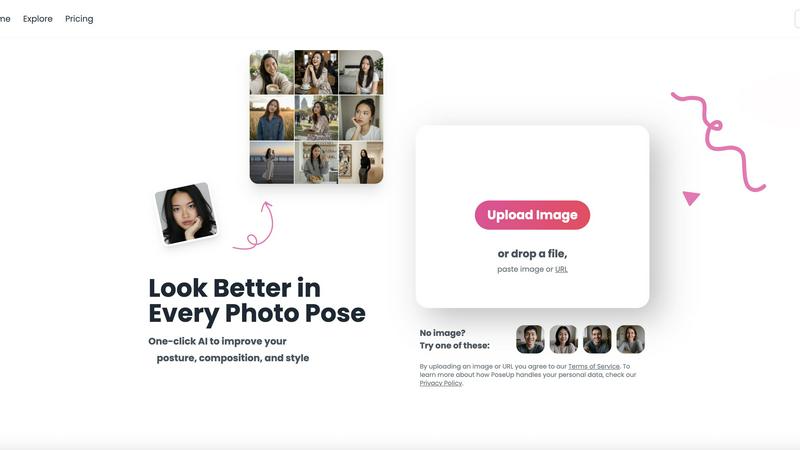
PoseUp.ai enhances your photos by correcting posture and optimizing composition with one-click AI technology.
Last updated: February 28, 2026
Visual Comparison
Facejam

poseup
Feature Comparison
Facejam
100+ Professional Styles
FaceJam boasts an extensive library of over 100 professional styles tailored to various industries. Users can quickly find the perfect look that aligns with their profession, whether it be corporate, creative, legal, or entrepreneurial.
Quick and Easy Process
The user-friendly interface allows individuals to generate headshots in just two simple steps: uploading selfies and selecting a preferred template. This streamlined process eliminates the need for scheduling or commuting, making it incredibly efficient.
High-Resolution Images
FaceJam produces high-resolution headshots that maintain a professional appearance, ensuring that every detail is captured. This quality is crucial for applications such as LinkedIn profiles, resumes, and corporate directories, where first impressions matter.
Ownership and Licensing
Users retain complete ownership of their generated headshots, which includes a full commercial license. This means that the images can be used freely for personal branding, marketing, and professional purposes without any restrictions.
poseup
One-Click Enhancement
PoseUp’s standout feature is its one-click enhancement functionality, which simplifies the photo correction process. Users can upload an image, and the AI swiftly analyzes the content, adjusting posture and composition instantly. This eliminates the need for extensive editing skills, allowing anyone to achieve professional-looking results with minimal effort.
Comprehensive Photo Analysis
The platform employs a robust AI analysis system that evaluates numerous aspects of an image. It examines body alignment, limb positioning, and spatial balance within the frame. By assessing these critical factors, PoseUp ensures that the final image not only looks aesthetically pleasing but also feels natural and dynamic.
Wide Format Support
PoseUp supports a variety of standard image formats, including JPG, PNG, WEBP, and HEIC. This flexibility allows users to work with their preferred file types, accommodating a broad range of photography needs. The platform also has a file size limit of 5MB, ensuring that users can quickly upload and enhance their images without lengthy processing times.
Community and Support
PoseUp fosters a vibrant community through its Discord channel, allowing users to connect, share tips, and receive support. Additionally, the platform offers 50 free credits upon sign-up, making it easy for new users to start enhancing their photos without any initial investment. This community-driven approach encourages collaboration and engagement among users.
Use Cases
Facejam
LinkedIn Profiles
Professionals can utilize FaceJam to create striking LinkedIn headshots that enhance their online presence. A polished image can significantly improve networking opportunities and attract potential employers.
Corporate Team Pages
Businesses can generate consistent and high-quality headshots for all team members, which are essential for corporate websites, pitch decks, and directories. This uniformity in presentation strengthens brand identity.
Personal Branding
Individuals looking to establish a strong personal brand can use FaceJam to create a cohesive visual identity across their websites and social media platforms. Consistency in branding helps in building trust and recognition.
Industry-Specific Applications
Realtors, consultants, and other industry professionals can leverage FaceJam to obtain tailored headshots that reflect the specific demands of their sectors. This customization ensures that the images resonate with target audiences.
poseup
Social Media Content Creation
Social media influencers and content creators can leverage PoseUp to enhance their photos before posting. By optimizing poses and compositions, users can create more engaging and visually appealing content that stands out in crowded feeds, leading to increased interaction and follower growth.
Professional Portrait Photography
Photographers seeking to refine their client portraits can use PoseUp to ensure optimal posing and composition. The AI-driven enhancements help deliver polished, high-quality images that meet professional standards, streamlining the editing process and saving valuable time.
Personal Photo Improvement
Individuals looking to enhance their personal photographs, such as family gatherings or vacations, can benefit from PoseUp’s user-friendly interface. The platform allows users to easily improve their images, ensuring that cherished memories are captured in the best possible light.
Fitness and Wellness Documentation
Fitness enthusiasts and wellness coaches can utilize PoseUp to improve their images for branding or promotional purposes. By correcting poses and enhancing visual appeal, users can create compelling visuals that effectively communicate their fitness journeys and inspire their audiences.
Overview
About Facejam
FaceJam is an innovative AI-driven tool that transforms your selfies into professional-grade headshots within minutes. Designed for individuals and businesses alike, FaceJam enables users to upload a selection of personal photos, choose from over 100 customizable styles, and generate high-quality images without the need for a traditional photographer or extensive editing. This platform is particularly valuable for professionals seeking polished images for LinkedIn profiles, resumes, and corporate branding. With FaceJam, users can bypass the hefty costs and time associated with photoshoots, making it an efficient solution for personal branding. The result is a suite of realistic, studio-quality headshots that cater to various industries, ensuring you always present your best self in any professional setting.
About poseup
PoseUp is an innovative AI-powered software platform designed to revolutionize the way users interact with digital photographs. By harnessing advanced machine learning algorithms, PoseUp automatically analyzes images to detect and correct posing, posture, and compositional flaws. This functionality is ideal for a diverse audience, including social media influencers, amateur photographers, and professional portraitists who seek to enhance their images without requiring in-depth technical expertise. The main value proposition of PoseUp lies in its ability to provide studio-quality corrections through an intuitive one-click workflow. Users can upload their images, and the AI assesses body alignment, limb positioning, and overall spatial balance, producing an optimized version of the original photo. With support for common image formats such as JPG, PNG, WEBP, and HEIC, and an upload limit of 5MB per file, PoseUp offers an accessible solution for enhancing photography in various contexts, from casual snapshots to professional-grade portraits.
Frequently Asked Questions
Facejam FAQ
How does your AI headshot generator work?
FaceJam operates through a straightforward two-step process. Users upload selfies to the platform and select their desired template, after which the AI generates realistic headshots based on the provided images.
What do you do with my uploaded photos?
The photos uploaded by users are strictly utilized to train the AI to replicate the individual’s likeness in the generated headshots. These images are not stored, shared, or used to enhance the AI model for other users.
How many good photos can I expect?
FaceJam guarantees at least one high-quality image in every pack. The number of excellent photos returned largely depends on the quality of the input selfies, with diligent users typically receiving 5-10 impressive images.
Who owns my AI photos?
Users retain complete ownership of their AI-generated headshots, including full commercial rights. This allows for unrestricted use in personal and professional settings, ensuring users can confidently utilize their photos as needed.
poseup FAQ
How does PoseUp improve photo poses?
PoseUp uses advanced AI algorithms to analyze uploaded images and automatically detect suboptimal poses and compositions. It then suggests corrections that enhance the overall aesthetic, ensuring a more visually appealing result.
What file formats does PoseUp support?
PoseUp supports various standard image formats, including JPG, PNG, WEBP, and HEIC. This allows users to upload images in their preferred formats for quick and effective enhancement.
Is there a limit on the file size for uploads?
Yes, PoseUp has a file size limit of 5MB per image. This ensures that users can upload and process their images efficiently without encountering lengthy loading times.
Can I use PoseUp for professional photography?
Absolutely. PoseUp is designed for both amateur and professional photographers. Its AI-driven enhancements provide studio-quality corrections, making it an excellent tool for refining client portraits and achieving professional results.
Alternatives
Facejam Alternatives
Facejam is an innovative AI-driven platform designed to transform ordinary selfies into professional studio-quality headshots. This product falls within the image and photo category, catering to individuals and businesses seeking high-quality visual representation with minimal effort. Users commonly explore alternatives to Facejam for various reasons, including pricing, specific feature sets, and compatibility with their preferred platforms. With the growing demand for personalized and professional imagery, it’s essential to find an alternative that not only meets budgetary constraints but also offers a range of styles and ease of use. When selecting an alternative to Facejam, consider factors such as the variety of styles available, the realism of the generated images, and the speed of the output. Additionally, look for options that prioritize user privacy and provide a secure environment for handling personal photos. Evaluating these criteria will help ensure that you choose a solution that best fits your individual or business needs.
poseup Alternatives
PoseUp is an advanced AI-powered software platform designed for the enhancement of photo poses and posture correction. Falling under the category of image and photo editing tools, it leverages sophisticated machine learning algorithms to automate the process of improving human subjects in digital photographs. Users often seek alternatives to PoseUp due to various factors, including pricing concerns, specific feature sets, or compatibility with different platforms. When searching for an alternative, it is important to consider aspects such as the quality of enhancements offered, ease of use, support for multiple image formats, and any additional functionalities that may cater to individual needs. Evaluating user reviews and trial options can also provide insights into the effectiveness and reliability of potential alternatives.