
File Studio vs Wipyly
Side-by-side comparison to help you choose the right tool.

File Studio
File Studio provides powerful offline tools to convert, edit, and manage files and PDFs securely on your computer.
Last updated: February 26, 2026

Wipyly is a comprehensive cleaning business management platform that centralizes scheduling, inventory, and team.
Last updated: March 4, 2026
Visual Comparison
File Studio

Wipyly
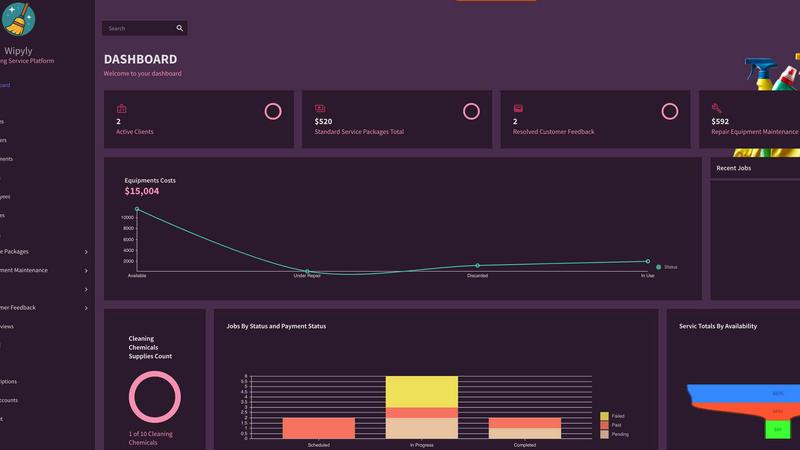
Feature Comparison
File Studio
PDF Management Tools
File Studio provides a suite of five dedicated PDF tools that empower users to merge multiple PDFs, split documents into individual pages, reorder and rotate spreads, and remove passwords. This offline functionality ensures that full PDF management is possible without the need to upload any documents to the cloud.
Image Processing Capabilities
With ten image tools available, File Studio supports over 20 formats allowing users to convert, resize, compress, crop, and add watermarks to images. The application can handle files such as HEIC, WebP, and various RAW types, making it versatile for photographers and graphic designers alike.
Batch Processing Functionality
File Studio excels in batch processing, enabling users to convert, resize, or compress entire folders of files in one go. This feature maximizes efficiency, allowing users to save time and effort when dealing with numerous files simultaneously.
Offline Operation
One of the standout features of File Studio is its 100% offline operation. All processing occurs locally on the user’s Mac or Windows PC, ensuring that sensitive documents remain private and secure, as no uploads or user accounts are required for functionality.
Wipyly
Intelligent Scheduling & Job Management
This core module provides a centralized calendar for managing all cleaning appointments. It enables drag-and-drop scheduling, automated assignment of teams to jobs based on availability and location, and real-time status updates. The system allows for the creation of custom, recurring service packages, ensuring consistent booking and execution. Managers gain full operational visibility, tracking job progress, duration, and completion from a single dashboard, which significantly enhances team productivity and on-time service delivery.
Integrated Customer & Feedback Management
Wipyly includes a robust Customer Relationship Management (CRM) system that consolidates client contact details, service history, preferences, and notes. Integrated with this is a structured feedback collection mechanism, allowing businesses to systematically gather, analyze, and act upon customer reviews and service reports. This data is leveraged for continuous service improvement, personalized client communication, and enhancing overall customer satisfaction and retention rates through informed, responsive actions.
Comprehensive Financial & Payroll Modules
The platform offers detailed financial tracking capabilities, encompassing cost management, invoicing, and payroll processing. Users can generate and send professional invoices directly through the system, track payments, and monitor accounts receivable. The payroll module is designed to calculate employee compensation accurately, factoring in hours worked, job rates, and other variables, ensuring compliance and transparent financial oversight for the business's profitability and labor costs.
Equipment & Inventory Management
This feature provides a systematic approach to managing physical assets and supplies. Businesses can catalog cleaning equipment, schedule preventive maintenance tasks, and log repair histories to minimize unexpected downtime. The inventory tracking component monitors supply levels for consumables, triggering alerts for low stock to ensure teams have the necessary resources available for every job, thereby preventing service disruptions and streamlining supplier coordination.
Use Cases
File Studio
Freelance Document Management
Freelancers often handle a variety of sensitive documents, from contracts to invoices. File Studio offers robust tools for managing these files securely and efficiently, allowing users to ensure their documents are well-organized and protected.
Photography Workflow Optimization
Photographers can leverage File Studio to manage their images, converting RAW files to more accessible formats, resizing images for web use, and compressing files without losing quality. This helps streamline their workflow and maintain high standards in image quality.
Secure Personal Document Handling
Individuals needing to manage personal documents such as passports or IDs can do so securely with File Studio. The application allows users to edit and protect these sensitive files offline, ensuring their privacy while managing essential documents.
Educational Material Preparation
Teachers and educators can utilize File Studio to prepare educational materials. They can merge various PDFs into single documents, convert image files for presentations, and ensure that all materials are formatted correctly without relying on internet access.
Wipyly
Scaling a Solo Cleaning Operation
A solo cleaner or a very small team can utilize Wipyly to transition from manual, ad-hoc booking methods to a professional, automated system. By implementing online booking, automated reminders, and digital invoicing, the owner reduces administrative time, presents a more polished brand image, and can manage a growing client base efficiently without becoming overwhelmed by paperwork, enabling structured growth.
Managing a Multi-Team Commercial Cleaning Franchise
For businesses managing several cleaning crews across different locations, Wipyly's operational view is critical. Dispatchers can assign jobs based on team proximity and skill set, track real-time progress, and ensure accountability. The centralized platform ensures all teams adhere to standardized service packages and procedures, while consolidated financial reporting provides the franchise owner with a clear overview of performance across all units.
Optimizing Equipment Lifespan and Operational Readiness
Cleaning companies reliant on specialized equipment, such as floor buffers or carpet cleaners, use the maintenance scheduling feature to plan and record routine servicing. This proactive approach prevents costly mid-job breakdowns, extends the usable life of capital assets, and ensures that all equipment is certified and ready for deployment, directly contributing to reliable service execution and controlled operational costs.
Implementing Data-Driven Service Improvements
Business owners leverage the integrated feedback and performance analytics tools to move beyond anecdotal evidence. By systematically analyzing customer satisfaction scores, common service issues, and team performance metrics, management can identify specific areas for training, refine service packages, and make strategic decisions to enhance quality, ultimately leading to higher client retention and more effective service offerings.
Overview
About File Studio
File Studio is a powerful desktop application designed for the offline management of PDFs and images, catering specifically to users who prioritize their privacy and security. It serves a diverse range of professionals including photographers, freelancers, and remote workers who need to handle sensitive documents such as passports, IDs, and contracts without the risk of exposing them to cloud storage. The application's primary value proposition lies in its comprehensive set of tools that allow users to merge, split, reorder, rotate, and secure PDFs with password protection. Additionally, File Studio supports over 20 file formats, including HEIC, WebP, AVIF, and various RAW types, enabling seamless file conversions. With a straightforward one-time purchase model and compatibility across both Mac and Windows platforms, File Studio offers a reliable and powerful solution for file management without the burden of subscriptions or the need for user accounts.
About Wipyly
Wipyly is a comprehensive, cloud-based command center engineered specifically for the operational management of residential and commercial cleaning service businesses. It functions as an all-in-one software platform designed to consolidate disparate administrative tasks--such as scheduling, customer relationship management (CRM), invoicing, inventory tracking, and performance analytics--into a single, unified system. The primary objective of Wipyly is to eliminate operational chaos stemming from manual processes like spreadsheets, paper notes, and disjointed applications, thereby enabling business owners and managers to achieve significant gains in efficiency and organization. Its architecture is built to scale, supporting solo operators, multi-team enterprises, and everyone in between. By providing tools for online booking, smart automated scheduling, detailed job management, equipment maintenance tracking, and insightful financial reporting, Wipyly empowers users to make data-driven decisions, reduce time-consuming administrative overhead, and enhance the service experience for both their cleaning teams and their clients. Ultimately, it serves as a strategic partner for cleaning businesses aiming to optimize workflows, ensure reliability, and facilitate sustainable growth.
Frequently Asked Questions
File Studio FAQ
Is my data ever uploaded?
No. File Studio processes everything locally on your device. Your files never leave your computer, ensuring 100% offline processing and maximum privacy.
Do you offer a free trial?
Yes. File Studio provides a free trial option, allowing users to explore its features before committing to a purchase, ensuring they can evaluate the software's capabilities.
Can I use File Studio on both Mac and Windows?
Absolutely. File Studio is compatible with both Mac and Windows operating systems, making it accessible for a wide range of users regardless of their device preference.
What file formats does File Studio support?
File Studio supports over 20 file formats, including popular image formats like HEIC, WebP, AVIF, and various RAW types, as well as providing comprehensive PDF management capabilities, making it versatile for many users.
Wipyly FAQ
What types of cleaning businesses is Wipyly designed for?
Wipyly is architected to serve a broad spectrum of cleaning service providers within the residential and commercial sectors. This includes solo entrepreneurs, small to medium-sized enterprises (SMEs), multi-team operations, and franchise models. Its scalable feature set, from basic scheduling to advanced payroll and inventory management, allows it to adapt to the specific complexity and size of the business, making it suitable for startups seeking structure and established companies aiming for optimization.
How does Wipyly ensure the security of my business and client data?
Wipyly employs industry-standard security protocols to protect all data within the platform. This includes the use of SSL (Secure Sockets Layer) encryption for all data transmissions between the user's device and Wipyly's servers, ensuring that sensitive information such as client details and financial records is securely encrypted. The platform is hosted on secure, reliable cloud infrastructure with measures in place to prevent unauthorized access and ensure data integrity and availability.
Can clients book and pay for services directly through Wipyly?
Yes, Wipyly facilitates direct client engagement through its online booking capabilities. Businesses can configure and publish their service packages, allowing clients to view availability, select services, and book appointments through a dedicated client portal or integrated website widget. Furthermore, the system supports integrated invoicing and can facilitate online payment processing, enabling clients to receive and settle invoices digitally, streamlining the entire booking-to-payment cycle.
Is there a contract or long-term commitment required to use Wipyly?
Based on the provided context, Wipyly offers a "SIGN UP FOR FREE" option, indicating the availability of a free tier or trial period without an upfront financial commitment. For detailed information on specific pricing plans, contract terms, and the features included in the free versus paid subscriptions, users are directed to consult the official Wipyly pricing page or contact their sales team directly for the most current and comprehensive terms of service.
Alternatives
File Studio Alternatives
File Studio is a versatile desktop application that falls within the productivity and management category, particularly focused on file handling and editing. Designed to operate entirely offline, it provides users with powerful tools for managing PDFs and images while ensuring their privacy and security. This makes it a preferred choice for those who need to work with sensitive documents without relying on internet connectivity. Users often seek alternatives to File Studio for various reasons, including pricing, feature sets, and compatibility with different operating systems. It is essential to assess the specific requirements and functionalities that matter most to you when exploring alternatives. Look for options that offer comprehensive file management capabilities, robust security features, and a user-friendly interface to ensure a seamless transition or enhancement of your current workflow.
Wipyly Alternatives
Wipyly is a comprehensive business management platform within the productivity and management software category, specifically engineered for residential and commercial cleaning services. It functions as a centralized cloud-based system to handle operations from scheduling to invoicing, aiming to replace disparate tools with a unified workflow solution. Users may seek alternatives to Wipyly for various reasons, including specific budgetary constraints, the need for different feature integrations, or platform compatibility requirements. Some businesses might require more advanced reporting, specialized industry modules, or a different pricing structure that aligns with their growth stage. When evaluating alternatives, key considerations should include core functional parity in scheduling and client management, scalability for team growth, the robustness of financial tools, and the quality of customer support. The ideal platform should offer a secure, intuitive interface that reduces administrative overhead while providing actionable business insights.