
Gomotion vs SimpleDraw
Side-by-side comparison to help you choose the right tool.

Gomotion
Gomotion is an AI-powered platform that instantly generates professional motion graphics and animated videos from text.
Last updated: February 28, 2026

SimpleDraw
SimpleDraw is a free online tool for creating precise floor plans and scale drawings without any software installation.
Last updated: March 1, 2026
Visual Comparison
Gomotion

SimpleDraw
Feature Comparison
Gomotion
AI-Powered Text-to-Motion Generation
This core feature allows users to generate cinematic animations from simple text prompts. By describing the desired motion in natural language, users can animate titles, captions, and logos without manually setting keyframes. The system interprets the prompt's intent to apply movements with professional flair, drastically simplifying the workflow for creating animated text elements commonly used in product demos and promotional content.
Narrative Mode for End-to-End Video Creation
Narrative Mode is a comprehensive workflow tool that transforms a written script into a complete, synchronized animated story. It automates the process of pairing script segments with relevant images, video clips, and animations, enabling the creation of ready-to-publish advertisements or short narrative videos in minutes. This feature is designed for producing cohesive visual stories with minimal manual editing and sequencing effort.
Multi-Platform Responsive Design Engine
Gomotion's rendering engine is specifically designed to create animations that are perfectly aligned for any display format. Users can design content with the confidence that it will render correctly across all screen sizes, from smartphone vertical feeds (Instagram Reels, TikTok) to tablet and desktop displays. This ensures brand consistency and visual integrity regardless of where the final content is published.
Advanced Data Visualization and Simulation
Beyond basic text and logo animation, Gomotion includes capabilities for creating complex animated charts and simulations directly from data inputs. This feature is engineered for explainer videos, business presentations, and educational content, transforming static data into engaging, dynamic visualizations that enhance comprehension and impact without requiring specialized data animation software.
SimpleDraw
Floor Plan Mode
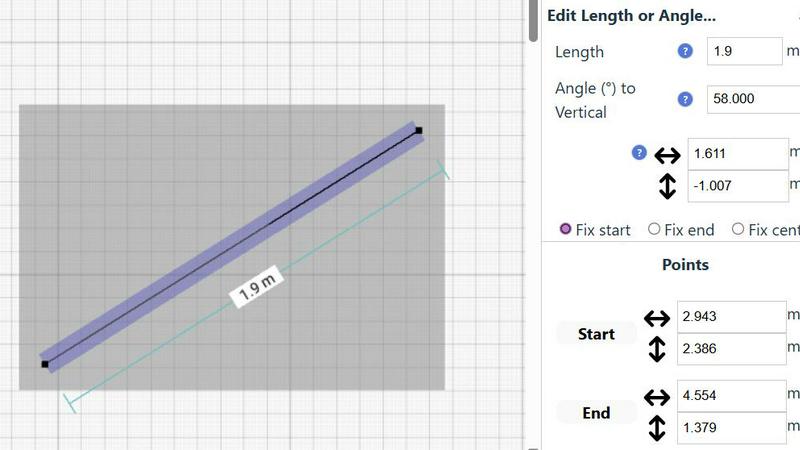
This specialized mode is tailored for creating detailed floor plans of rooms, apartments, and houses. Users can effortlessly draw walls, add doors and windows, and visualize measurements in real-time as they make adjustments to their designs. This feature simplifies the process of planning renovations or new constructions.
Smart Alignment System
The smart alignment system assists users in placing points and lines with remarkable accuracy. By simply pointing the mouse in the desired area, the system intelligently positions elements with clear visual cues. This feature enhances precision, enabling users to create intricate designs without the frustration of misalignment.
Comprehensive Measurement System
SimpleDraw boasts a comprehensive measurement system that allows users to display and control measurements dynamically. Users can choose between metric and standard US units, ensuring that their drawings reflect the exact dimensions required for their projects. Contextual measurements help maintain accuracy throughout the design process.
Non-Destructive Editing
With 100% non-destructive editing, every element within a drawing can be modified or adjusted at any time. Users can easily revert changes using undo and redo options, streamlining the design process. Grouping elements for simultaneous movement or duplication further enhances productivity, making it easier to manage complex projects.
Use Cases
Gomotion
Rapid Social Media Ad Production
Marketing teams and solo creators can use Gomotion to rapidly prototype and produce high-volume social media advertisements. By inputting ad copy and brand assets, users can generate multiple animated ad variants optimized for platforms like Instagram, TikTok, and Facebook in a fraction of the time required for manual design, allowing for agile campaign testing and deployment.
Brand Identity and Promotional Video Development
Businesses launching new products or reinforcing brand identity can leverage Gomotion to create consistent promotional videos. The one-click brand import feature allows for quick integration of logos, color palettes, and fonts, enabling the rapid generation of on-brand animations for product teasers, launch announcements, and corporate overviews without constant designer intervention.
Educational and Explainer Content Creation
Educators, trainers, and B2B companies can utilize Gomotion's data visualization and Narrative Mode to produce engaging explainer videos. Complex concepts, processes, or data sets can be transformed into clear, animated stories, making them more accessible and memorable for audiences in e-learning modules, sales presentations, or internal training materials.
Agency Workflow Augmentation
Creative and digital agencies can integrate Gomotion into their workflow to handle routine animation tasks or create initial motion graphic concepts for client presentations. This tool allows agencies to increase throughput on projects requiring motion design, allocate senior designer time to more complex tasks, and provide clients with quick turnarounds on animation-heavy projects like website banners or digital ad campaigns.
SimpleDraw
Home Renovation Planning
SimpleDraw is ideal for homeowners planning renovations, allowing them to create precise kitchen, bathroom, and living space layouts. Users can visualize their designs and make adjustments before physical work begins, saving time and resources.
Furniture Arrangement
For individuals looking to rearrange furniture or design new room layouts, SimpleDraw provides an intuitive platform to experiment with different configurations. This feature helps users determine if their desired furniture will fit in the intended space, facilitating better purchasing decisions.
Rental Property Listings
Landlords and real estate agents can utilize SimpleDraw to create comprehensive floor plans for rental listings. Accurately detailed diagrams enhance property presentations and help potential tenants envision their future living spaces.
Space Planning for Offices
Office planners can use SimpleDraw to design effective workspace layouts. By creating accurate floor plans, they can optimize space utilization, ensuring that each area meets the functional needs of employees and enhances productivity.
Overview
About Gomotion
Gomotion is a sophisticated AI-driven motion design platform engineered to automate and streamline the creation of professional-grade animations. It functions as an AI Motion Designer, leveraging advanced algorithms, including models like Claude Sonnet 4, to interpret user inputs and generate complex motion graphics. The core functionality revolves around transforming textual prompts or static images into fully animated sequences, effectively bypassing the traditional, labor-intensive keyframing process associated with software like Adobe After Effects. This tool is architected for a broad spectrum of users, from marketing professionals and content creators seeking rapid ad production to businesses and agencies requiring consistent, high-quality brand animations. Its primary value proposition is a significant reduction in production time and technical barrier to entry, enabling users to focus on creative direction and narrative. Gomotion supports multi-platform design, ensuring outputs are optimized for every screen from mobile to desktop, and incorporates specialized modes for creating data visualizations and end-to-end animated stories directly from scripts.
About SimpleDraw
SimpleDraw is a powerful, browser-based application designed specifically for creating precise, dimensionally accurate scale drawings and technical diagrams. It caters to a diverse audience, including casual users, DIY enthusiasts, homeowners, and professionals engaging in early-stage planning. The main value proposition of SimpleDraw lies in its unique combination of simplicity and precision, making it a user-friendly alternative to complex CAD software. Users can access the tool directly in their web browser without the need for software installation, account registration, or financial commitment. This accessibility empowers individuals to produce detailed floor plans, elevation drawings, and scaled layouts for various projects. With features like a dedicated Floor Plan Mode, smart alignment system, and comprehensive measurement controls, SimpleDraw enhances the drawing experience, allowing users to visualize and plan their spaces with confidence and accuracy.
Frequently Asked Questions
Gomotion FAQ
What is the primary technology behind Gomotion's animation generation?
Gomotion utilizes advanced AI algorithms, including large language and diffusion models, to interpret user prompts. Specifically, it employs systems like Claude Sonnet 4 to understand textual descriptions and generate corresponding motion paths, easing, and stylistic effects. This AI-driven approach automates the translation of creative intent into technical animation parameters.
Can I use my own brand assets within Gomotion?
Yes, Gomotion features a dedicated brand import function. Users can upload their logo, define brand colors, and select fonts in a centralized brand kit. Once imported, these assets can be automatically applied to new projects, ensuring all generated animations maintain consistent brand identity across social media, ads, and other promotional materials.
What output formats and resolutions does Gomotion support?
Gomotion is engineered for multi-platform use and supports standard video output formats suitable for web and social media distribution. It specifically offers a 16:9 aspect ratio as a primary format and is built with a responsive design engine that ensures animations scale and render correctly for various resolutions, from mobile device screens to desktop monitors.
Is Gomotion suitable for users with no prior animation experience?
Absolutely. Gomotion is designed to democratize motion design by removing the technical complexity of traditional animation software. Its intuitive, prompt-based interface allows novices to describe their vision in words and receive professional-looking animations. However, it also provides enough depth and control to appeal to seasoned designers looking to accelerate their workflow.
SimpleDraw FAQ
Is SimpleDraw free to use?
Yes, SimpleDraw is completely free to use, offering a wide range of features without any hidden costs or subscription fees.
Do I need to create an account to use SimpleDraw?
No, users can start drawing immediately without the need for account registration or software installation, making it highly accessible.
What types of projects can I create with SimpleDraw?
SimpleDraw is versatile and supports a variety of projects, including floor plans for homes, office layouts, furniture arrangements, and even technical diagrams for professional use.
Can I share my drawings with others?
Yes, once you create a drawing in SimpleDraw, you can easily share it with others by providing them with a link to your work, facilitating collaboration and feedback.
Alternatives
Gomotion Alternatives
Gomotion is an AI-powered motion design tool within the design software category. It specializes in generating professional-grade animations from text or image prompts, significantly streamlining the workflow for creators and marketers. This positions it as a solution for users seeking to produce high-quality motion graphics without extensive manual animation expertise. Users may explore alternatives to Gomotion for several practical reasons. Common considerations include budget constraints and specific pricing model requirements, such as subscription tiers versus one-time purchases. Other factors encompass the need for different feature sets, platform compatibility, advanced customization depth, or integration capabilities with existing software ecosystems. When evaluating an alternative motion design solution, key criteria should include the core AI generation capabilities, the quality and flexibility of the output formats, and the sophistication of real-time collaboration features. Additionally, assess the tool's template library scope, export options for various platforms, and the overall user interface complexity relative to the intended user's skill level.
SimpleDraw Alternatives
SimpleDraw is a free, web-based tool designed for creating precise scale drawings and floor plans, falling into the category of design tools. Users often seek alternatives to SimpleDraw due to various reasons, such as the need for advanced features, compatibility with different platforms, or specific project requirements that SimpleDraw may not fully address. Additionally, budget constraints or the desire for unique functionalities can drive users to explore other options. When choosing an alternative to SimpleDraw, it is crucial to consider features that align with your specific design needs, the ease of use of the interface, and the availability of essential tools for your projects. Compatibility with various operating systems and the ability to handle complex designs can also be significant factors in making an informed decision.