Looktara vs poseup
Side-by-side comparison to help you choose the right tool.

Looktara
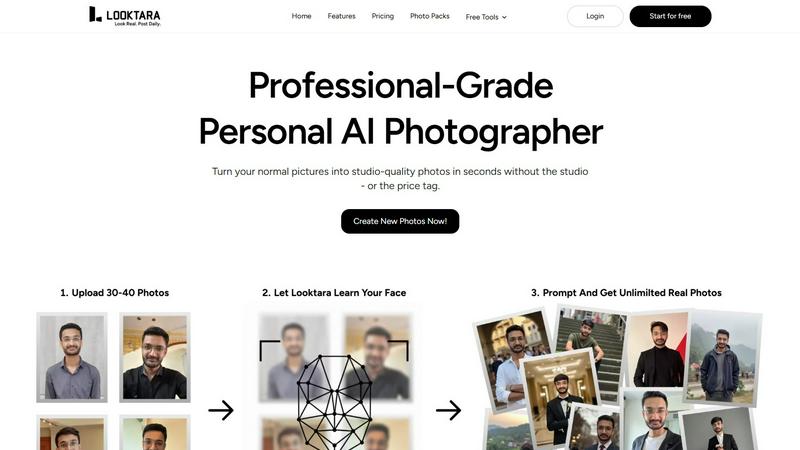
Looktara generates professional, context-aware headshots from your photos in minutes, tailored to enhance your unique.
Last updated: February 28, 2026

poseup
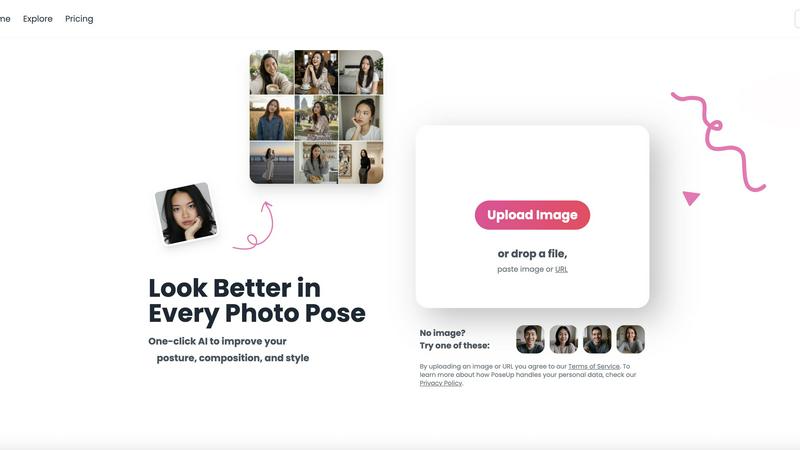
PoseUp.ai enhances your photos by correcting posture and optimizing composition with one-click AI technology.
Last updated: February 28, 2026
Visual Comparison
Looktara
poseup
Feature Comparison
Looktara
Personalized AI Model
Looktara creates a unique AI model tailored to your likeness, requiring just 30 personal photos for training. This ensures that every generated image captures your true appearance and essence, providing a genuine representation that is crucial for professional use.
Rapid Image Generation
Once your personalized model is ready, Looktara allows you to generate high-quality solo photographs in approximately 5 seconds. This rapid turnaround time means you can quickly produce images for various needs, from social media updates to professional presentations.
Contextual Styling Options
Looktara offers adjustable tonal qualities for your images, enabling you to customize the style to fit different contexts. Whether you need an authoritative look for a keynote poster or a warm vibe for social media, you can tailor the output to match the intended message and audience.
Quality Control Over Outputs
Unlike many AI photo generators that provide limited customization, Looktara empowers users with control over the final output. This feature ensures that the generated images align with your professional standards, avoiding issues like awkward poses or irrelevant backgrounds.
poseup
One-Click Enhancement
PoseUp’s standout feature is its one-click enhancement functionality, which simplifies the photo correction process. Users can upload an image, and the AI swiftly analyzes the content, adjusting posture and composition instantly. This eliminates the need for extensive editing skills, allowing anyone to achieve professional-looking results with minimal effort.
Comprehensive Photo Analysis
The platform employs a robust AI analysis system that evaluates numerous aspects of an image. It examines body alignment, limb positioning, and spatial balance within the frame. By assessing these critical factors, PoseUp ensures that the final image not only looks aesthetically pleasing but also feels natural and dynamic.
Wide Format Support
PoseUp supports a variety of standard image formats, including JPG, PNG, WEBP, and HEIC. This flexibility allows users to work with their preferred file types, accommodating a broad range of photography needs. The platform also has a file size limit of 5MB, ensuring that users can quickly upload and enhance their images without lengthy processing times.
Community and Support
PoseUp fosters a vibrant community through its Discord channel, allowing users to connect, share tips, and receive support. Additionally, the platform offers 50 free credits upon sign-up, making it easy for new users to start enhancing their photos without any initial investment. This community-driven approach encourages collaboration and engagement among users.
Use Cases
Looktara
Professional Networking
Looktara is ideal for professionals who need to maintain a polished image on platforms like LinkedIn. With personalized photos that reflect your brand, you can enhance your networking efforts and stand out in a competitive job market.
Content Creation for Social Media
Creators can leverage Looktara to produce high-quality images tailored for various social media platforms. The ability to quickly generate images that align with your branding allows for consistent and engaging content that attracts audience attention.
Marketing and Branding
Businesses can utilize Looktara to create personalized imagery for marketing materials. Whether for brochures, websites, or advertisements, Looktara ensures that the visuals resonate with target audiences while reflecting the brand's identity.
Event Promotion
For individuals or organizations promoting events, Looktara can generate stunning visuals that capture the essence of the occasion. From keynote speeches to informal gatherings, the platform provides the flexibility to create images that communicate the right vibe to potential attendees.
poseup
Social Media Content Creation
Social media influencers and content creators can leverage PoseUp to enhance their photos before posting. By optimizing poses and compositions, users can create more engaging and visually appealing content that stands out in crowded feeds, leading to increased interaction and follower growth.
Professional Portrait Photography
Photographers seeking to refine their client portraits can use PoseUp to ensure optimal posing and composition. The AI-driven enhancements help deliver polished, high-quality images that meet professional standards, streamlining the editing process and saving valuable time.
Personal Photo Improvement
Individuals looking to enhance their personal photographs, such as family gatherings or vacations, can benefit from PoseUp’s user-friendly interface. The platform allows users to easily improve their images, ensuring that cherished memories are captured in the best possible light.
Fitness and Wellness Documentation
Fitness enthusiasts and wellness coaches can utilize PoseUp to improve their images for branding or promotional purposes. By correcting poses and enhancing visual appeal, users can create compelling visuals that effectively communicate their fitness journeys and inspire their audiences.
Overview
About Looktara
Looktara is a cutting-edge AI-powered platform that acts as a personal, on-demand photographer tailored for professionals and creators. It utilizes advanced technology to create a unique generative AI model based on the user’s own likeness, requiring an initial upload of around 30 personal photographs. This personalized model is trained within approximately 10 minutes, allowing users to generate new, high-quality solo images in just about 5 seconds by simply inputting a text prompt. Looktara is specifically designed to address the common shortcomings of generic AI image generation, such as unrealistic skin textures, awkward facial expressions, and inconsistent styling. By providing highly customized outputs that are unmistakably the user, Looktara ensures that individuals maintain a cohesive and brand-aligned visual presence across various platforms, including LinkedIn, Instagram, and Twitter, without the logistical complications and costs associated with traditional photoshoots. This makes Looktara an invaluable tool for anyone who requires consistent, professional imagery that resonates with their personal brand.
About poseup
PoseUp is an innovative AI-powered software platform designed to revolutionize the way users interact with digital photographs. By harnessing advanced machine learning algorithms, PoseUp automatically analyzes images to detect and correct posing, posture, and compositional flaws. This functionality is ideal for a diverse audience, including social media influencers, amateur photographers, and professional portraitists who seek to enhance their images without requiring in-depth technical expertise. The main value proposition of PoseUp lies in its ability to provide studio-quality corrections through an intuitive one-click workflow. Users can upload their images, and the AI assesses body alignment, limb positioning, and overall spatial balance, producing an optimized version of the original photo. With support for common image formats such as JPG, PNG, WEBP, and HEIC, and an upload limit of 5MB per file, PoseUp offers an accessible solution for enhancing photography in various contexts, from casual snapshots to professional-grade portraits.
Frequently Asked Questions
Looktara FAQ
How does Looktara ensure the authenticity of generated images?
Looktara trains a personalized AI model based on your own likeness, utilizing your unique photographs. This process guarantees that the generated images closely resemble your actual appearance, making them authentic representations.
What types of images can I create with Looktara?
You can create a wide range of images, from professional headshots suitable for LinkedIn to casual photos for social media. The platform's customization options allow you to adjust the style and tone based on your specific needs.
How long does it take to generate a personalized model?
The initial training of your personalized AI model takes approximately 10 minutes after uploading around 30 personal photos. Once trained, you can start generating images almost instantly.
Can I use Looktara for different professional contexts?
Yes, Looktara is designed to cater to various professional contexts. Its adjustable tonal qualities and styling options allow you to create images suitable for formal presentations, casual social media posts, and everything in between.
poseup FAQ
How does PoseUp improve photo poses?
PoseUp uses advanced AI algorithms to analyze uploaded images and automatically detect suboptimal poses and compositions. It then suggests corrections that enhance the overall aesthetic, ensuring a more visually appealing result.
What file formats does PoseUp support?
PoseUp supports various standard image formats, including JPG, PNG, WEBP, and HEIC. This allows users to upload images in their preferred formats for quick and effective enhancement.
Is there a limit on the file size for uploads?
Yes, PoseUp has a file size limit of 5MB per image. This ensures that users can upload and process their images efficiently without encountering lengthy loading times.
Can I use PoseUp for professional photography?
Absolutely. PoseUp is designed for both amateur and professional photographers. Its AI-driven enhancements provide studio-quality corrections, making it an excellent tool for refining client portraits and achieving professional results.
Alternatives
Looktara Alternatives
Looktara is an innovative AI-powered platform that specializes in generating personalized, context-aware headshots for professionals and creators. By training a private AI model on users' own photographs, it provides a unique solution for those in need of high-quality, brand-aligned visual content without the hassle of traditional photography. Users often seek alternatives to Looktara for various reasons, including pricing, specific feature sets, or compatibility with different platforms. When searching for an alternative, it is essential to consider aspects such as model training privacy, image quality, customization options, and the ease of use of the platform. Finding the right alternative also hinges on understanding the unique needs of the user, such as whether they prioritize speed in image generation or require specific tonal qualities for their photographs. Evaluating the security measures in place for personal data and ensuring that the output aligns well with branding strategies are also crucial factors. Users should explore alternatives that not only meet their functional requirements but also provide a seamless and engaging user experience.
poseup Alternatives
PoseUp is an advanced AI-powered software platform designed for the enhancement of photo poses and posture correction. Falling under the category of image and photo editing tools, it leverages sophisticated machine learning algorithms to automate the process of improving human subjects in digital photographs. Users often seek alternatives to PoseUp due to various factors, including pricing concerns, specific feature sets, or compatibility with different platforms. When searching for an alternative, it is important to consider aspects such as the quality of enhancements offered, ease of use, support for multiple image formats, and any additional functionalities that may cater to individual needs. Evaluating user reviews and trial options can also provide insights into the effectiveness and reliability of potential alternatives.