
Nano Banana Pro vs SimpleDraw
Side-by-side comparison to help you choose the right tool.

Nano Banana Pro
Nano Banana Pro is an advanced AI image generator that creates stunning 4K visuals with fast, precise editing tools.
Last updated: February 28, 2026

SimpleDraw
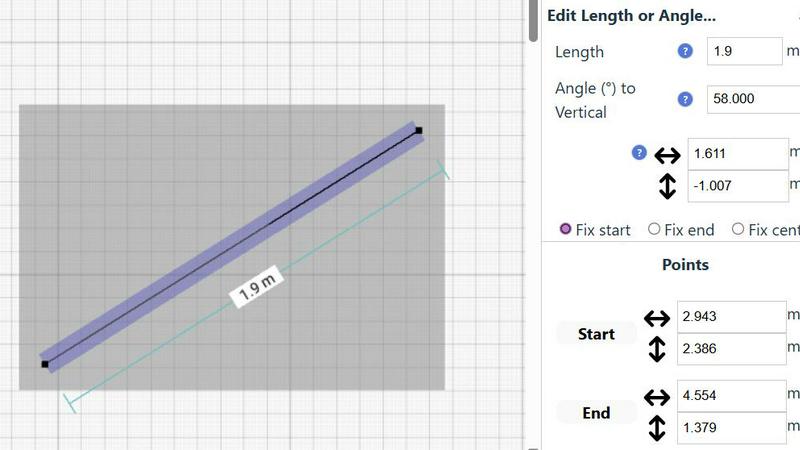
SimpleDraw is a free online tool for creating precise floor plans and scale drawings without any software installation.
Last updated: March 1, 2026
Visual Comparison
Nano Banana Pro

SimpleDraw
Feature Comparison
Nano Banana Pro
Character Consistency
Nano Banana Pro excels in maintaining character features across multiple images, making it an ideal choice for character design, storyboards, and series creation. This capability is powered by advanced multi-image understanding technology, ensuring that creators can produce cohesive visual narratives.
Lightning-Fast Generation
With a 15% increase in generation speed thanks to the Gemini 3 Pro image preview technology, users can create images faster than ever before. This feature is particularly advantageous for professionals who require quick turnaround times while maintaining high-quality outputs.
Enhanced Text Rendering
The platform's advanced text engine guarantees crystal-clear text in images, making it perfect for applications like posters, logos, and branding materials. Users can say goodbye to garbled letters and ensure that their typography stands out with high fidelity.
Versatile Aspect Ratios
Nano Banana Pro supports 11 different aspect ratios, ranging from square (1:1) to ultrawide (21:9). This flexibility allows users to tailor their images for various formats, making it suitable for social media posts, presentations, and banners.
SimpleDraw
Floor Plan Mode
This specialized mode is tailored for creating detailed floor plans of rooms, apartments, and houses. Users can effortlessly draw walls, add doors and windows, and visualize measurements in real-time as they make adjustments to their designs. This feature simplifies the process of planning renovations or new constructions.
Smart Alignment System
The smart alignment system assists users in placing points and lines with remarkable accuracy. By simply pointing the mouse in the desired area, the system intelligently positions elements with clear visual cues. This feature enhances precision, enabling users to create intricate designs without the frustration of misalignment.
Comprehensive Measurement System
SimpleDraw boasts a comprehensive measurement system that allows users to display and control measurements dynamically. Users can choose between metric and standard US units, ensuring that their drawings reflect the exact dimensions required for their projects. Contextual measurements help maintain accuracy throughout the design process.
Non-Destructive Editing
With 100% non-destructive editing, every element within a drawing can be modified or adjusted at any time. Users can easily revert changes using undo and redo options, streamlining the design process. Grouping elements for simultaneous movement or duplication further enhances productivity, making it easier to manage complex projects.
Use Cases
Nano Banana Pro
Character Design
Artists and designers can leverage Nano Banana Pro for character design projects, ensuring that their characters maintain consistent features across different images. This is particularly valuable for animation, comic books, and game design.
Marketing Materials
Marketing professionals can create visually striking materials using the platform's high-resolution outputs and enhanced text rendering capabilities. Whether designing ads, social media graphics, or promotional content, users can achieve professional results with ease.
Storyboarding
Filmmakers and animators can utilize Nano Banana Pro to create storyboards that require character continuity and visual coherence. The platform's features enable seamless transitions and visual storytelling that align with their narrative vision.
Personal Projects
Hobbyists and casual creators can explore their creativity by generating unique artwork for personal projects. The versatile editing tools and high-quality outputs make it easy for anyone to bring their imaginative concepts to life.
SimpleDraw
Home Renovation Planning
SimpleDraw is ideal for homeowners planning renovations, allowing them to create precise kitchen, bathroom, and living space layouts. Users can visualize their designs and make adjustments before physical work begins, saving time and resources.
Furniture Arrangement
For individuals looking to rearrange furniture or design new room layouts, SimpleDraw provides an intuitive platform to experiment with different configurations. This feature helps users determine if their desired furniture will fit in the intended space, facilitating better purchasing decisions.
Rental Property Listings
Landlords and real estate agents can utilize SimpleDraw to create comprehensive floor plans for rental listings. Accurately detailed diagrams enhance property presentations and help potential tenants envision their future living spaces.
Space Planning for Offices
Office planners can use SimpleDraw to design effective workspace layouts. By creating accurate floor plans, they can optimize space utilization, ensuring that each area meets the functional needs of employees and enhances productivity.
Overview
About Nano Banana Pro
Nano Banana Pro is a cutting-edge AI image generator that revolutionizes the way creators, designers, and developers approach image creation and editing. Built on the advanced Gemini 3 Pro image preview technology, this platform enables users to effortlessly generate stunning 4K-ready images in a matter of seconds. Its key value proposition lies in its exceptional character consistency, ensuring that visual elements remain coherent across multiple outputs. This feature is particularly beneficial for projects that involve character design, storytelling, and series creation. Nano Banana Pro caters to a diverse range of use cases, including professional artwork, marketing materials, and personal projects. With powerful functionalities such as Text-to-Image and Image-to-Image editing, users can manipulate images with precision and creativity. The platform also supports flexible aspect ratios and high-resolution outputs, making it an indispensable tool for anyone looking to create captivating visuals with ease and efficiency.
About SimpleDraw
SimpleDraw is a powerful, browser-based application designed specifically for creating precise, dimensionally accurate scale drawings and technical diagrams. It caters to a diverse audience, including casual users, DIY enthusiasts, homeowners, and professionals engaging in early-stage planning. The main value proposition of SimpleDraw lies in its unique combination of simplicity and precision, making it a user-friendly alternative to complex CAD software. Users can access the tool directly in their web browser without the need for software installation, account registration, or financial commitment. This accessibility empowers individuals to produce detailed floor plans, elevation drawings, and scaled layouts for various projects. With features like a dedicated Floor Plan Mode, smart alignment system, and comprehensive measurement controls, SimpleDraw enhances the drawing experience, allowing users to visualize and plan their spaces with confidence and accuracy.
Frequently Asked Questions
Nano Banana Pro FAQ
What types of images can I create with Nano Banana Pro?
You can create a wide range of images, including character designs, marketing materials, storyboards, and personal artwork. The platform supports both Text-to-Image and Image-to-Image editing, offering flexibility for various creative needs.
How does the character consistency feature work?
The character consistency feature uses advanced multi-image understanding technology to ensure that visual elements and character traits remain coherent across multiple images. This is crucial for projects involving storytelling and series creation.
Is there a limit to the number of images I can generate?
While there is no strict limit on the number of images you can generate, usage may be subject to credit consumption based on your plan. New users receive 8 free credits, which can be used to create images.
What are the available formats for image output?
Nano Banana Pro allows users to export images in PNG format. Additionally, the platform supports various aspect ratios, enabling you to tailor your images for different applications, including social media and print.
SimpleDraw FAQ
Is SimpleDraw free to use?
Yes, SimpleDraw is completely free to use, offering a wide range of features without any hidden costs or subscription fees.
Do I need to create an account to use SimpleDraw?
No, users can start drawing immediately without the need for account registration or software installation, making it highly accessible.
What types of projects can I create with SimpleDraw?
SimpleDraw is versatile and supports a variety of projects, including floor plans for homes, office layouts, furniture arrangements, and even technical diagrams for professional use.
Can I share my drawings with others?
Yes, once you create a drawing in SimpleDraw, you can easily share it with others by providing them with a link to your work, facilitating collaboration and feedback.
Alternatives
Nano Banana Pro Alternatives
Nano Banana Pro is a cutting-edge AI image generator that falls within the design tools category. It is specifically engineered to assist creators, designers, and developers in producing high-quality visuals with advanced editing capabilities. Users often seek alternatives to Nano Banana Pro for various reasons, including pricing considerations, feature sets that may better align with their specific needs, or compatibility with different platforms. When selecting an alternative, it is essential to evaluate factors such as image generation speed, the quality of output, ease of use, and the range of editing tools available. Additionally, consider whether the alternative offers features like character consistency and enhanced text rendering, which can significantly impact the effectiveness of visual storytelling and project execution.
SimpleDraw Alternatives
SimpleDraw is a free, web-based tool designed for creating precise scale drawings and floor plans, falling into the category of design tools. Users often seek alternatives to SimpleDraw due to various reasons, such as the need for advanced features, compatibility with different platforms, or specific project requirements that SimpleDraw may not fully address. Additionally, budget constraints or the desire for unique functionalities can drive users to explore other options. When choosing an alternative to SimpleDraw, it is crucial to consider features that align with your specific design needs, the ease of use of the interface, and the availability of essential tools for your projects. Compatibility with various operating systems and the ability to handle complex designs can also be significant factors in making an informed decision.