
Nano Photo vs YouTube to Transcript
Side-by-side comparison to help you choose the right tool.

Nano Photo simplifies AI-driven photo and video editing to transform your creative ideas into stunning visuals.
Last updated: March 1, 2026

YouTube to Transcript
Easily convert any YouTube video to accurate transcripts for free, instantly and without registration, in over 100.
Last updated: February 26, 2026
Visual Comparison
Nano Photo
YouTube to Transcript

Feature Comparison
Nano Photo
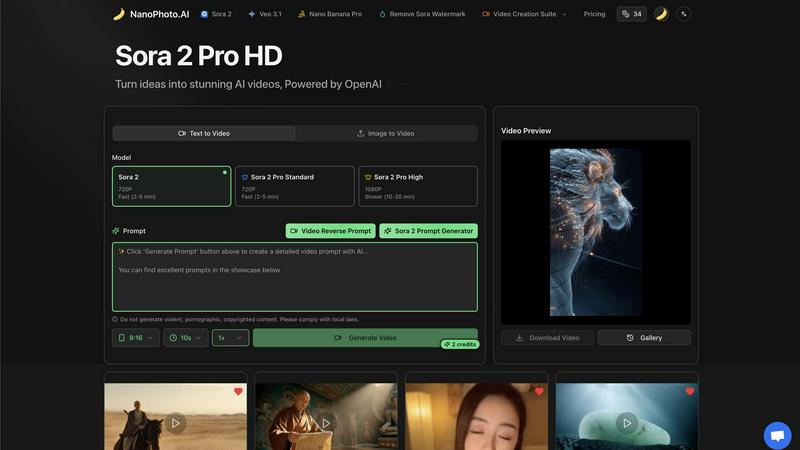
Sora 2 Pro HD Video Generation
This feature utilizes OpenAI's advanced Sora 2 model to transform textual descriptions into high-definition 1080p video content. It is engineered for scenarios requiring the highest visual fidelity, though it operates at a slower generation time of 10-20 minutes per video to process complex scene dynamics, lighting, and detailed textures. The system interprets natural language prompts to generate coherent, short-form videos ideal for professional presentations, concept visualization, and high-quality social media content.
Multi-Model Generation Suite
Nano Photo integrates multiple cutting-edge AI models, including Sora 2 for standard and high-definition video and Veo 3.1, providing users with a choice of tools based on their specific needs for speed, quality, and style. This suite allows for selection between different output resolutions (720p and 1080p) and generation speeds (Fast at 2-5 minutes or Slower for higher quality), offering technical flexibility to balance project deadlines with output quality requirements.
Advanced Prompt Engineering Tools
The platform includes specialized utilities such as the Sora 2 Prompt Generator and Video Reverse Prompt feature. These tools assist users in crafting effective, detailed textual descriptions that yield optimal results from the AI models. The Reverse Prompt function can analyze existing video content to suggest descriptive prompts, serving as a valuable aid for learning and refining prompt-crafting techniques to achieve more precise and intended visual outcomes.
Professional Video Creation Suite
Beyond core generation, Nano Photo offers a suite of post-generation tools designed for professional workflow integration. This includes the ability to remove proprietary watermarks (e.g., "Remove Sora Watermark"), a dedicated gallery for asset management, and direct download functionality. These features streamline the final steps of the content creation pipeline, ensuring generated media is ready for immediate use in various commercial and creative applications.
YouTube to Transcript
Completely Free
YouTube to Transcript offers its services without any hidden costs or premium tiers. Users can access the full functionality of the tool at no charge, ensuring that everyone can benefit from its powerful capabilities without financial constraints.
Multi-language Support
The tool supports translation into over 125 languages, enabling users from different linguistic backgrounds to generate transcripts in their preferred language. This feature enhances accessibility and broadens the tool's usability across a global audience.
No Restrictions on Usage
Users can transcribe videos of any length without limitations. Whether it is a short clip or a lengthy documentary, YouTube to Transcript efficiently handles all types of content. Additionally, there is no need for user registration, allowing immediate access.
Clean and Organized Formatting
The generated transcripts are formatted for easy readability and can be used for various purposes, such as SEO optimization, academic notes, or content repurposing. Users can easily copy the text to their clipboard or download it as a TXT file for further use.
Use Cases
Nano Photo
Social Media Content Production
Marketing teams and social media managers can leverage Nano Photo to rapidly produce a high volume of engaging, platform-specific video and image content. By inputting trend-based or campaign-specific text prompts, users can generate unique visuals for posts, stories, and advertisements, maintaining a consistent and fresh content calendar without the need for extensive filming, editing, or graphic design resources.
Concept Visualization and Storyboarding
Filmmakers, game developers, and product designers can use the text-to-video and image-to-video capabilities to quickly visualize concepts, characters, and environments. This allows for efficient iteration during pre-production phases, creating dynamic storyboards or mood videos that communicate creative ideas to stakeholders and team members long before committing to costly physical production or 3D rendering.
Educational and Explainer Video Creation
Educators, trainers, and corporate communicators can utilize the platform to transform complex information or procedural steps into clear, visual explainer videos. By describing a concept in text, they can generate supportive animations or scenes that enhance comprehension, making it an effective tool for creating e-learning modules, internal training materials, and public educational content.
Rapid Prototyping for Advertising Agencies
Advertising and creative agencies can employ Nano Photo for rapid prototyping of commercial concepts. Different creative directions for a client's campaign can be visualized as short video clips based on varying textual prompts. This enables faster client feedback cycles, A/B testing of visual themes, and pitching of ideas with tangible examples, significantly accelerating the initial stages of campaign development.
YouTube to Transcript
Content Creation
Content creators can utilize YouTube to Transcript to generate written versions of their video scripts, helping them streamline their workflow, enhance SEO efforts, and create supplementary content for their audience.
Academic Research
Students and researchers can quickly obtain transcripts from educational YouTube videos, making it easier to reference and analyze the material for projects, essays, or presentations without the need to watch the videos multiple times.
Accessibility Enhancement
This tool can improve accessibility for individuals with hearing impairments by providing them with text versions of spoken content in YouTube videos, ensuring that everyone has equal access to information.
Language Learning
Language learners can benefit from the multi-language support feature, allowing them to transcribe videos in their target language. This helps them improve their language comprehension and vocabulary through exposure to spoken content.
Overview
About Nano Photo
NanoPhoto.AI is a comprehensive, AI-powered creative platform engineered to facilitate the generation and editing of high-quality video and image content. The platform serves as an all-in-one solution for content creators, digital marketers, social media managers, filmmakers, and businesses, leveraging advanced machine learning models to translate textual prompts and source images into compelling visual media. Its core value proposition is the significant reduction in technical complexity and production time associated with traditional content creation, enabling users to focus on ideation and creative direction. By integrating state-of-the-art AI models like Sora 2 and Veo 3.1, Nano Photo provides a robust suite of tools that democratizes access to professional-grade visual generation. The platform is designed for efficiency and scalability, offering features such as text-to-video, image-to-video conversion, and specialized prompt engineering tools. This technical foundation ensures that users can produce content tailored for various formats and platforms, from social media snippets to high-definition promotional materials, with precise control over output specifications including resolution and generation speed.
About YouTube to Transcript
YouTube to Transcript is a powerful and intuitive online tool designed to convert any YouTube video into easily readable text. This utility caters to a broad audience, including content creators, students, researchers, and professionals who need accurate transcripts for various purposes. By simply pasting a YouTube video URL, users can generate high-quality transcripts instantly, making it an invaluable resource for those looking to extract valuable information from video content. The main value proposition of YouTube to Transcript lies in its commitment to providing a completely free service, with no registration required, allowing users to access transcripts without any barriers. With support for over 125 languages and no limits on video duration, this tool is designed to meet the diverse needs of its users, facilitating content repurposing, note-taking, and enhancing accessibility.
Frequently Asked Questions
Nano Photo FAQ
What AI models power Nano Photo's video generation?
Nano Photo's video generation is primarily powered by OpenAI's Sora 2 model, which is available in different tiers (Standard and High Definition). The platform also integrates other advanced models like Veo 3.1. The Sora 2 Pro HD tier specifically uses the high-fidelity version of Sora 2 to produce 1080p resolution videos, while other tiers offer faster 720p generation using optimized versions of the technology.
What are the differences between the Sora 2 Pro tiers?
The main differences are output resolution and generation speed. Sora 2 Pro Standard generates videos at 720p resolution with a fast processing time of 2-5 minutes. Sora 2 Pro High generates videos at a higher 1080p resolution but requires a longer processing time of 10-20 minutes to render the increased detail and complexity. Users select a tier based on their project's quality requirements and time constraints.
How does the Video Reverse Prompt feature work?
The Video Reverse Prompt feature is an analytical tool that examines an uploaded or existing video file. It uses AI to deconstruct the visual elements, scenes, and actions present in the video and then generates a descriptive textual prompt that could theoretically be used to create similar content. This is designed as a learning aid to help users understand how effective prompts are structured.
Can I use videos generated by Nano Photo for commercial purposes?
Yes, videos generated through the Nano Photo platform are intended for commercial use, provided they adhere to the platform's Terms of Service and acceptable use policies. The inclusion of features like watermark removal in the professional suite further facilitates the readiness of content for commercial distribution, advertising, and branding purposes. Users should ensure their input prompts and the resulting content do not infringe on copyrights or violate any laws.
YouTube to Transcript FAQ
Is YouTube to Transcript free to use?
Yes, YouTube to Transcript is completely free to use, with no hidden fees or premium features. Users can access the full functionality without any financial commitment.
How do I get a transcript of a YouTube video?
To obtain a transcript, simply copy the URL of the YouTube video you want to transcribe, paste it into the input field on the website, and click the generate button. The transcript will be extracted automatically.
How long does it take to generate the transcript?
The generation of the transcript is instantaneous. Once the URL is pasted and the button is clicked, users can expect to receive the full transcript in a matter of seconds.
Can I download the transcript?
Yes, users have the option to either copy the generated transcript to their clipboard or download it as a TXT file for offline use or further editing.
Alternatives
Nano Photo Alternatives
Nano Photo is an AI-powered creative platform specializing in video generation and editing. It operates within the competitive AI video production and editing software category, designed to transform text and images into dynamic visual content for creators and businesses. Users often seek alternatives to Nano Photo for various reasons, including budget constraints, specific feature requirements not covered by its toolset, or the need for integration with different operating systems and existing creative workflows. The search can also be driven by preferences for different user interface designs or output quality comparisons. When evaluating alternatives, key considerations should include the core AI model's capabilities for video generation, the range of supported input formats, output resolution and quality, pricing structure and transparency, as well as platform compatibility. Assessing the tool's focus—whether on rapid social media content, cinematic production, or detailed manual control—is crucial to finding a suitable match for your project needs.
YouTube to Transcript Alternatives
YouTube to Transcript is an innovative web-based tool designed to extract high-quality transcripts and subtitles from YouTube videos effortlessly. It falls under the categories of Education & Learning, Productivity & Management, and Video, making it a versatile resource for content creators, students, and researchers alike. Users often seek alternatives to YouTube to Transcript due to various reasons, including pricing structures, feature limitations, or specific platform requirements that better suit their needs. When selecting an alternative, it's essential to consider aspects such as cost, the number of languages supported, ease of use, and any unique features that may enhance the transcription process. Additionally, ensure that the alternative tool maintains a user-friendly interface and meets your specific transcription needs without imposing restrictions on video length or requiring complex registrations.