YouTube to Transcript
Easily convert any YouTube video to accurate transcripts for free, instantly and without registration, in over 100.
tool Details

About YouTube to Transcript
YouTube to Transcript is a powerful and intuitive online tool designed to convert any YouTube video into easily readable text. This utility caters to a broad audience, including content creators, students, researchers, and professionals who need accurate transcripts for various purposes. By simply pasting a YouTube video URL, users can generate high-quality transcripts instantly, making it an invaluable resource for those looking to extract valuable information from video content. The main value proposition of YouTube to Transcript lies in its commitment to providing a completely free service, with no registration required, allowing users to access transcripts without any barriers. With support for over 125 languages and no limits on video duration, this tool is designed to meet the diverse needs of its users, facilitating content repurposing, note-taking, and enhancing accessibility.
Features
Completely Free
YouTube to Transcript offers its services without any hidden costs or premium tiers. Users can access the full functionality of the tool at no charge, ensuring that everyone can benefit from its powerful capabilities without financial constraints.
Multi-language Support
The tool supports translation into over 125 languages, enabling users from different linguistic backgrounds to generate transcripts in their preferred language. This feature enhances accessibility and broadens the tool's usability across a global audience.
No Restrictions on Usage
Users can transcribe videos of any length without limitations. Whether it is a short clip or a lengthy documentary, YouTube to Transcript efficiently handles all types of content. Additionally, there is no need for user registration, allowing immediate access.
Clean and Organized Formatting
The generated transcripts are formatted for easy readability and can be used for various purposes, such as SEO optimization, academic notes, or content repurposing. Users can easily copy the text to their clipboard or download it as a TXT file for further use.
Use Cases
Content Creation
Content creators can utilize YouTube to Transcript to generate written versions of their video scripts, helping them streamline their workflow, enhance SEO efforts, and create supplementary content for their audience.
Academic Research
Students and researchers can quickly obtain transcripts from educational YouTube videos, making it easier to reference and analyze the material for projects, essays, or presentations without the need to watch the videos multiple times.
Accessibility Enhancement
This tool can improve accessibility for individuals with hearing impairments by providing them with text versions of spoken content in YouTube videos, ensuring that everyone has equal access to information.
Language Learning
Language learners can benefit from the multi-language support feature, allowing them to transcribe videos in their target language. This helps them improve their language comprehension and vocabulary through exposure to spoken content.
Frequently Asked Questions
Is YouTube to Transcript free to use?
Yes, YouTube to Transcript is completely free to use, with no hidden fees or premium features. Users can access the full functionality without any financial commitment.
How do I get a transcript of a YouTube video?
To obtain a transcript, simply copy the URL of the YouTube video you want to transcribe, paste it into the input field on the website, and click the generate button. The transcript will be extracted automatically.
How long does it take to generate the transcript?
The generation of the transcript is instantaneous. Once the URL is pasted and the button is clicked, users can expect to receive the full transcript in a matter of seconds.
Can I download the transcript?
Yes, users have the option to either copy the generated transcript to their clipboard or download it as a TXT file for offline use or further editing.
Similar to YouTube to Transcript

HomeAnswerBook
Practical, independent guides to home repairs, maintenance, costs, troubleshooting, and everyday fixes.
BlazePDF
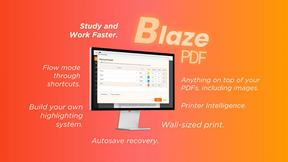
Highlight faster. Study in flow with custom shortcuts and a workflow built around you. Print smarter, or turn any page into a tiled poster.
Build Mode for Mac
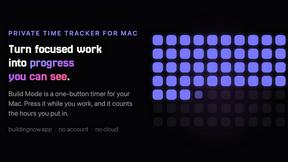
Build Mode is a Mac app that turns focused sessions into visible progress, so you can see the work adding up before the results arrive.

Motiofy
Motiofy is an AI creative workspace that helps creators and teams turn ideas into polished visual stories.