Outbid vs TinyFast
Side-by-side comparison to help you choose the right tool.

Outbid instantly alerts freelancers to new Upwork jobs via Telegram and provides AI-generated proposals to win work faster.
Last updated: March 19, 2026

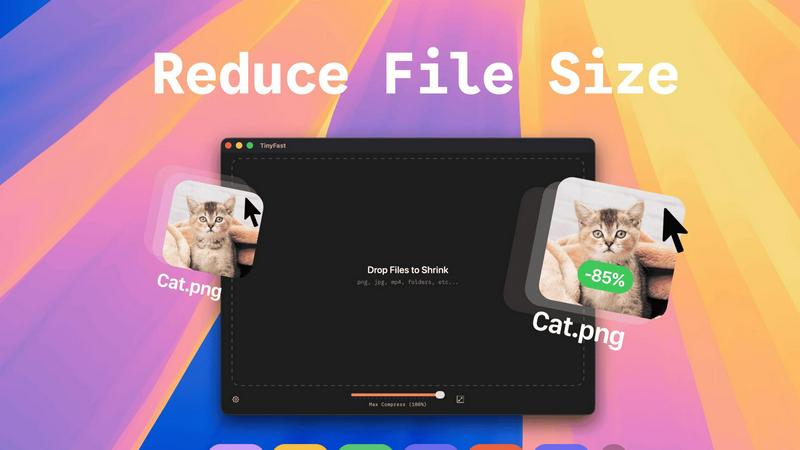
TinyFast is a native Mac app that compresses images, videos, and PDFs locally with drag and drop simplicity.
Last updated: February 28, 2026
Visual Comparison
Outbid

TinyFast
Feature Comparison
Outbid
24/7 Real-Time Job Monitoring
The platform's backend engine performs automated, uninterrupted scans of the Upwork job board every 60 seconds, 24 hours a day. This constant surveillance ensures no new posting goes undetected, capturing opportunities the moment they become publicly available. Alerts are pushed instantly via Telegram, creating a sub-one-minute notification pipeline from Upwork's servers to the freelancer's device. This technical specification is critical for beating the average application response time and securing early visibility with potential clients.
AI-Powered Proposal Generation
Upon detecting a new job, the system employs a proprietary AI model to generate a unique, personalized proposal draft. The AI synthesizes key data points: the specific requirements and keywords from the job description and the freelancer's predefined skill set, expertise, and professional biography. The output is a coherent, persuasive proposal draft that is directly relevant to the client's needs, formatted for easy copying and pasting. This feature transforms a time-consuming writing task into a simple review-and-edit process.
Advanced Smart Filtering System
To prevent alert fatigue and ensure relevance, Outbid provides a configurable filtering dashboard accessible via the Telegram bot. Users can define precise parameters including required skills (keyword matching), minimum and maximum project budgets, client history preferences, and desired experience level. Furthermore, the system supports "Quiet Hours" scheduling, allowing users to mute notifications during specific times to maintain focus or work-life balance without missing job data, which is logged for later review.
War Room Strategy Mode
This advanced operational mode is activated for highly competitive job categories or during peak bidding times. It allows the user to input custom strategic instructions for the AI, such as emphasizing specific portfolio pieces, adopting a particular tone, or including unique value propositions. In this mode, users can also command the AI to regenerate proposal drafts with different angles or structures, enabling A/B testing of approaches directly within the platform to stand out in crowded listings.
TinyFast
100% Local & Private Processing
TinyFast operates entirely on your local machine. All compression and optimization algorithms run natively on your Mac's hardware. This design guarantees that your files, including those under Non-Disclosure Agreements (NDAs) or containing confidential information, never leave your system. There is no upload to external servers, no cloud processing, and therefore zero risk of data interception, storage, or misuse by third parties. Privacy is a fundamental, non-negotiable feature built into the application's core architecture.
Blazing-Fast Batch Compression
The application utilizes highly optimized, native compression engines specifically built for macOS to deliver exceptional speed. It supports batch processing, allowing users to drag and drop entire folders containing multiple files. The software then processes these files sequentially at high speed, shrinking large video files or batches of images in a matter of seconds. This eliminates the waiting time associated with uploading files to an online service, queuing, and then downloading the results, dramatically accelerating asset preparation workflows.
Universal Multi-Format Support
TinyFast is engineered to be a universal compression tool, supporting a comprehensive range of common file types used in digital creation and development. This includes extensive image formats (PNG, JPG, WebP, GIF, SVG, HEIC, BMP, TIFF), video files (MP4, MOV, M4V), documents (PDF, DOCX), source code and data files (JS, CSS, JSON), and audio (MP3). This wide compatibility consolidates multiple specialized online tools into one local, efficient application, simplifying the user's toolkit.
Integrated Resolution Resizing
Beyond pure compression, TinyFast includes functionality for automatic image and video resolution resizing. Users can configure settings to reduce the pixel dimensions of their visual assets during the compression process. This dual-approach optimization—reducing both file size and physical dimensions—is crucial for preparing assets for web use, email attachments, or storage, ensuring they meet specific platform requirements without needing a separate editing application.
Use Cases
Outbid
The High-Volume Freelancer Seeking Efficiency
Experienced freelancers who regularly submit multiple proposals daily utilize Outbid to automate the initial discovery and drafting phases. By setting broad but precise filters, they receive only qualified leads. The AI-generated draft provides a high-quality foundation they can quickly refine based on nuanced experience, saving 10-15 hours per week otherwise spent on manual searching and repetitive writing, thereby increasing their capacity for billable work.
The Newcomer Building an Upwork Presence
New freelancers on Upwork often struggle with crafting winning proposals and understanding market timing. Outbid serves as an on-demand coach and alert system. It guarantees they see new jobs instantly and provides them with professionally structured proposal templates that teach effective communication. This helps them build initial momentum, secure first clients faster, and develop proposal-writing skills by analyzing the AI's output.
The Specialist in a Competitive Niche
For freelancers in saturated fields like web development or graphic design, being first to apply is a paramount strategy. They configure Outbid with narrow, niche-specific keywords and high budget thresholds. The sub-60-second alert system gives them a critical time advantage, allowing them to submit a tailored, AI-assisted proposal before the job posting receives dozens of competing bids, dramatically increasing their visibility and response rate.
The Busy Professional with Limited Platform Time
Freelancers who are juggling multiple clients or have other commitments cannot afford to refresh Upwork constantly. They rely on Outbid's 24/7 monitoring as their passive sentry. Coupled with Quiet Hours, the system works in the background, capturing all relevant opportunities and delivering them in a consolidated, actionable format via Telegram at a convenient time, ensuring they never miss a potential high-value project due to lack of manual checking.
TinyFast
Preparing Web and Application Assets
Developers and web designers can efficiently optimize batches of images, icons (SVG), and code files (CSS, JS) for production websites or mobile applications. By compressing these assets locally, they reduce page load times and application bundle sizes without exposing proprietary design files or source code to online services, maintaining both performance and intellectual property security throughout the development cycle.
Securing Confidential Document Transfer
Professionals handling sensitive documents, such as legal contracts (PDF), financial reports, or pre-release product specifications, can use TinyFast to reduce file size for email or secure portal transfer. The guarantee of local-only processing ensures that confidential information remains completely private, complying with data protection regulations and client confidentiality agreements that prohibit the use of cloud-based tools.
Optimizing Creative Project Archives
Video editors, graphic designers, and photographers can compress large project files—such as raw video footage (MOV, MP4), high-resolution image exports, and presentation PDFs—for archiving or creating client review copies. The batch processing capability saves hours over manual online tools, and the local operation protects unreleased creative work from potential leaks associated with online file converters.
Streamlining Email and Messaging Workflows
Any user who needs to send files via email or messaging platforms that impose strict attachment size limits can use TinyFast. Quickly compressing a video from a smartphone (MOV, MP4), a series of screenshots (PNG, JPEG), or a scanned document (PDF) locally ensures the files are sendable without the delay, privacy concerns, and potential quality loss of using a public website for compression.
Pricing Comparison
Outbid
Outbid operates on a freemium model with three distinct tiers designed to scale with a freelancer's needs. The Free Access tier is available at $0 and includes unlimited job alerts but with blurred proposal text and no direct job links, serving as a functional trial. The Monthly Pro plan, priced at $9.99 per month, is the professional standard, offering unlimited job reveals with full AI proposals, direct application links, access to War Room strategy mode, and priority support. The top-tier Elite plan costs $19.99 per month and includes all Pro features plus advanced AI job matching algorithms and "Sniper Mode," which only delivers alerts for jobs with a calculated 80% or higher fit to your profile, maximizing application efficiency. All paid plans are billed monthly, and the free tier requires no credit card to start.
TinyFast
TinyFast offers a tiered pricing model to accommodate different user needs. A Free plan is available forever, allowing compression of up to 5 files per day with full access to the application's features. For unlimited use, users can choose a Lifetime Plan for a one-time payment of €17.99, which provides unlimited local compressions, access to all features, lifetime updates, and supports future development. Alternatively, a subscription model is offered at €2.99 per month, which includes a 3-day free trial and provides unlimited compressions with access to all features. All plans are purchased and managed directly within the Mac application.
Overview
About Outbid
Outbid is a specialized automation and intelligence platform engineered for freelancers operating on the Upwork marketplace. Its core function is to provide a decisive competitive edge by solving two critical bottlenecks in the freelance workflow: job discovery speed and proposal quality. The system operates via a Telegram bot interface, conducting continuous, 24/7 surveillance of Upwork's job posting feed. It scans for new opportunities at 60-second intervals, delivering instant alerts directly to the user's Telegram app. This architecture ensures freelancers are notified and can apply within the crucial first minute a job is posted, a timeframe when client engagement is highest. Beyond speed, Outbid integrates generative AI to analyze each specific job description alongside the freelancer's pre-configured skills and biography. It then produces a tailored, context-aware proposal draft for every alert, eliminating the blank-page problem and significantly reducing application time. The platform is designed for a broad spectrum of users, from newcomers who need guidance on effective proposal writing to seasoned professionals who cannot afford to manually monitor the platform constantly. By combining real-time monitoring, AI-driven content generation, and granular filtering controls, Outbid's value proposition is quantifiable: it systematically increases application velocity, improves proposal relevance, and maximizes a freelancer's probability of winning projects and boosting their earnings.
About TinyFast
TinyFast is a high-performance, native macOS application engineered for local file compression and optimization. It is a desktop utility that processes a wide array of file formats—including images (PNG, JPEG, WebP, GIF, SVG, HEIC, BMP, TIFF), videos (MP4, MOV, M4V), documents (PDF, DOCX), code files (JS, CSS, JSON), and audio (MP3)—directly on the user's Mac hardware. The core operational principle is a streamlined drag-and-drop interface where users input a file or folder and receive a compressed, optimized output without any network transfer. This architecture ensures complete data privacy and sovereignty, as files never leave the local device, eliminating the security risks associated with uploading sensitive data to third-party cloud servers. Built with optimized native compression engines, the application prioritizes processing speed and efficiency to handle batch operations and large files within seconds. Its primary user base consists of developers, designers, and professional creators who regularly manage digital assets and require a tool that integrates seamlessly into their local workflow without compromising on security, speed, or output quality. The value proposition is a faster, safer, and more reliable alternative to online compression tools, providing instant file size reduction with guaranteed confidentiality.
Frequently Asked Questions
Outbid FAQ
How fast are the alerts after a job is posted?
Outbid's infrastructure is engineered for minimal latency. The system polls Upwork's public job feed at intervals of 60 seconds. Once a new job matching your filters is detected, the alert is processed and dispatched via the Telegram Bot API typically within 5-10 seconds. Therefore, the total maximum delay from job posting to notification on your device is approximately 70 seconds, with most alerts delivered faster.
Can I customize the AI-generated proposals?
Yes, customization is a core functionality. Initial customization is achieved by setting up your detailed skills and professional biography within the Telegram bot, which the AI uses as a baseline. For advanced control, the War Room Strategy Mode allows you to input specific instructions, tone guidelines, and key points to include. You can also command the AI to regenerate proposals with different emphases until the draft meets your exact requirements.
Is Outbid affiliated with or endorsed by Upwork?
No, Outbid is an independent third-party tool built by freelancers for freelancers. It is not affiliated with, endorsed by, or partnered with Upwork.com. The tool operates by monitoring publicly available data on the Upwork platform in accordance with its Terms of Service. Users must have their own active Upwork account to apply to jobs discovered through the service.
What happens if I receive an alert for a job that is not a good fit?
The Smart Filtering system is designed to minimize this occurrence. However, you can continuously refine your filters (skills, budget, client rating) based on alert quality. If you receive an irrelevant alert, you can simply ignore it. The platform does not penalize you for not applying. This feedback also helps you fine-tune your filter settings for higher precision in future alerts.
TinyFast FAQ
How does TinyFast ensure my files remain private?
TinyFast is architected as a native macOS application, meaning all processing occurs locally on your Mac's CPU and memory. The software does not contain any networking code to transmit your files to external servers. Your data never leaves your device during the compression process. This local-only approach is the fundamental technical mechanism that guarantees total privacy and security for your sensitive documents and assets.
What file formats does TinyFast support for compression?
TinyFast supports a comprehensive suite of common file formats. For images, it processes PNG, JPG (JPEG), TIFF, HEIC, WebP, GIF, BMP, and SVG files. For video, it supports MP4, MOV, and M4V containers. Document support includes PDF and DOCX files. It also handles code and data files like JS, CSS, and JSON, as well as MP3 audio files. This makes it a versatile, all-in-one local compression utility.
Can I compress multiple files or entire folders at once?
Yes, TinyFast features robust batch processing capabilities. You can drag and drop a folder containing multiple files, or select multiple files simultaneously, directly into the application interface. The optimized native engines will process the entire batch sequentially, outputting compressed versions of all supported files within the folder. This is designed to save significant time compared to processing files individually.
What is the difference between the Free and Paid plans?
The Free plan allows users to compress up to five files per day with access to all core compression features, providing a way to test the application's performance and workflow integration. The paid Lifetime Plan is a one-time purchase that unlocks unlimited compressions, includes all current and future features, guarantees lifetime updates, and directly supports ongoing development. A monthly subscription is also available after a 3-day trial.
Alternatives
Outbid Alternatives
Outbid is a productivity and management tool designed for freelancers operating on the Upwork platform. It functions as an automated job alert and proposal generation system, delivering real-time notifications and AI-drafted applications directly to users via Telegram. This category of software focuses on optimizing workflow and increasing application velocity in competitive freelance marketplaces. Users may seek alternatives to Outbid for various reasons, including specific budgetary constraints, a need for integration with different communication platforms beyond Telegram, or requirements for monitoring job boards other than Upwork. Some may prioritize different feature sets, such as more granular filtering controls, manual proposal drafting assistance over full automation, or compatibility with their existing project management stack. When evaluating an alternative solution, key considerations should include the scope of job board coverage, the method and reliability of alert delivery, the sophistication and customizability of any automated proposal features, and the overall cost structure relative to the value provided. The ideal tool should align precisely with a freelancer's technical stack, workflow preferences, and specific goals for client acquisition efficiency.
TinyFast Alternatives
TinyFast is a specialized macOS application for local file compression, falling into the category of desktop optimization and productivity tools. It processes images, videos, and PDFs directly on a user's Mac, ensuring privacy and speed through its native, offline architecture. Users may seek alternatives for various reasons, including budget constraints, a need for cross-platform compatibility beyond macOS, or requirements for different feature sets such as integration with cloud storage, support for additional file formats, or more granular control over compression parameters. The search often stems from a need to balance core functionality with specific workflow or technical demands. When evaluating an alternative, key considerations should include the processing model (local versus cloud-based), supported file formats, batch processing capabilities, output quality controls, and overall integration into your existing digital asset workflow. Prioritizing these specifications ensures the selected tool effectively addresses your primary use case for file size reduction.