Decode This Text vs PNG to Cursor
Side-by-side comparison to help you choose the right tool.

Decode This Text
Decode This Text provides instant, human-like analysis of confusing conversations in just 30 seconds.
Last updated: February 28, 2026

PNG to Cursor
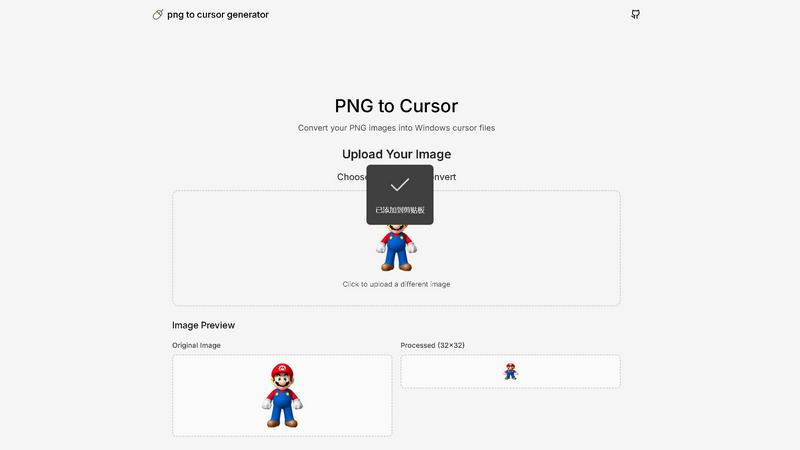
PNG to Cursor transforms images into interactive cursor designs, enhancing user engagement with personalized visuals.
Last updated: February 28, 2026
Visual Comparison
Decode This Text

PNG to Cursor
Feature Comparison
Decode This Text
Screenshot Upload & OCR Processing
This feature allows users to bypass manual text entry by directly uploading a photograph or screenshot of their chat conversation. The system employs Optical Character Recognition (OCR) technology to automatically extract and digitize all textual content from the image for analysis. This streamlines the input process, ensures accuracy in capturing the exact wording and formatting, and is particularly useful for analyzing long or complex message threads that would be cumbersome to copy and paste manually.
Multi-Dimensional Tone Analysis
The platform performs a granular, multi-faceted analysis of the emotional tone embedded within a message. It goes beyond simple sentiment to measure specific tonal qualities such as warmth, formality, sarcasm, or indifference. This analysis is presented through quantified metrics (e.g., Tone: 75%), providing an objective assessment of the emotional temperature. This technical breakdown helps users avoid personal bias in interpreting whether a sender is being friendly, passive-aggressive, genuinely busy, or emotionally distant.
Behavioral Pattern Detection
This advanced feature scans conversation history and contextual clues to identify recurring behavioral patterns that may not be immediately apparent. The algorithm analyzes factors like timing of messages (e.g., consistently late-night contact), response latency, avoidance of specific questions, and changes in message length or engagement level. By detecting these patterns, the tool provides insights into potential underlying motivations or shifts in interest, offering a longitudinal view of the communication dynamic.
AI-Generated Response Recommendations
Upon completing its analysis, the tool generates three contextually appropriate response options tailored to the user's desired communication style. These typically include a calm/neutral response, a direct/inquisitive response, and a firm/boundary-setting response. Each recommendation is crafted to align with the analyzed intent and tone of the original message, providing users with a strategic toolkit to reply with confidence and tactical awareness, thereby optimizing the outcome of the interaction.
PNG to Cursor
User-Friendly Interface
The intuitive design of PNG to Cursor makes it easy for users of all skill levels to navigate the tool. With straightforward upload and conversion steps, users can quickly create custom cursors without needing prior experience.
Automated Cursor Creation
This feature automates the tedious process of creating multiple cursor states. Users can upload a single image, and the software generates all necessary cursor variations, eliminating manual adjustments and saving time.
AI-Powered Optimization
PNG to Cursor employs advanced AI algorithms to enhance uploaded images, ensuring that the final cursor files are high quality and visually appealing. The AI analyzes images and applies effects that improve clarity and detail in the cursor file.
Support for Multiple Formats
The software supports both static (.cur) and animated (.ani) cursor formats, giving users flexibility in their customization options. Whether you want a simple pointer or a lively animated cursor, PNG to Cursor can accommodate your needs.
Use Cases
Decode This Text
Analyzing Romantic Interest & Dating App Conversations
Users can paste exchanges from dating apps or text conversations with potential romantic partners to decode mixed signals. The tool analyzes messages like "I'll let you know" or sudden drops in communication frequency to determine genuine interest level versus polite disengagement. It provides clarity on whether a person is truly busy, losing interest, or employing avoidant communication tactics, empowering the user to respond appropriately rather than over-investing or misreading the situation.
Interpreting Ambiguous Workplace Communication
This use case involves deciphering cryptic emails, brief Slack messages, or vague feedback from managers and colleagues. For example, analyzing a one-word email from a boss to assess if it signifies anger, simple acknowledgment, or haste. The tool evaluates professional tone, intent, and potential subtext, helping users understand the true meaning behind phrases like "we'll keep your resume on file" or a suddenly silent group chat after a contribution, enabling more effective and politically savvy professional responses.
Navigating Complex Family & Friend Dynamics
The platform assists in understanding sensitive communications within personal networks. This includes analyzing why a family group chat went silent after a specific message, interpreting a friend's increasingly short replies, or determining the emotional subtext behind a sibling's vague text. By providing an objective "reality check," it helps users navigate emotional undercurrents, perceived slights, and social tensions with greater empathy and clarity, reducing personal conflict and misunderstanding.
Preventing Regretful Communication Sent Prematurely
A critical use case is utilizing the tool as a final review layer before sending an emotionally charged or high-stakes message. Users can input their drafted response to a provocative text, email, or social media comment. The tool will analyze the draft's tone, predict its likely reception, and suggest calmer, more effective alternatives. This serves as a preventative measure against sending messages fueled by frustration that could damage relationships or professional reputations.
PNG to Cursor
Custom Desktop Themes
Users can easily create personalized cursors to match their desktop themes or wallpapers. By converting favorite images into cursors, they can add a unique touch to their computing environment.
Gaming Enhancements
Gamers can utilize PNG to Cursor to design custom cursors that enhance gameplay. Whether for personal use or to share with the gaming community, these custom cursors can improve the overall aesthetic of the game interface.
Digital Art Projects
Digital artists can leverage this tool to create cursors that reflect their artistic style. By turning their artwork into functional cursors, they can enhance their creative projects, making them more engaging and visually appealing.
Streamer Branding
For streamers and content creators, custom cursors can be a part of their brand identity. PNG to Cursor allows them to create unique cursors that align with their streaming themes, helping them stand out in a crowded market.
Overview
About Decode This Text
Decode This Text is a sophisticated AI-powered communication analysis platform engineered to provide users with precise, data-driven insights into the subtext of digital conversations. The tool functions as an analytical engine, processing user-provided text, chat screenshots, or contextual descriptions to deliver a comprehensive breakdown of a message's underlying intent, emotional tone, and behavioral patterns. It is designed for individuals seeking to eliminate ambiguity in personal, professional, and social communications, thereby enhancing interpersonal effectiveness and reducing relational anxiety. The core value proposition lies in its ability to transform subjective interpretation into objective analysis within a 30-second processing window. The platform operates with a strict privacy protocol where no human ever reviews the submitted content, ensuring 100% anonymity. Target users include professionals navigating complex workplace correspondence, individuals deciphering romantic or social cues, and anyone aiming to improve their communicative clarity and response strategy without relying on biased external opinions.
About PNG to Cursor
PNG to Cursor is a web-based software utility that specializes in converting standard PNG and JPEG images into fully functional Windows cursor files. This tool serves as a bridge between static graphic design and dynamic system customization, allowing users to create both static (.cur) and animated (.ani) cursor formats. It caters to a diverse audience, including desktop customizers, streamers, gamers, software developers, and digital artists who wish to personalize their computing interfaces without the need for complex icon editing software or manual pixel-by-pixel creation.
The main value proposition of PNG to Cursor lies in its ability to automate the entire cursor creation pipeline. Users can upload a single image and leverage integrated AI-powered effects for optimization, resulting in a complete and installation-ready cursor pack. This significantly lowers the technical barriers and time investment typically associated with custom cursor creation, making professional-grade personalization accessible to everyone. Whether you are a novice or an experienced designer, PNG to Cursor simplifies the customization process, allowing you to enhance your desktop or gaming experience effortlessly.
Frequently Asked Questions
Decode This Text FAQ
How does Decode This Text ensure my privacy and anonymity?
Decode This Text operates on a strict no-human-review policy. All text analysis is performed entirely by automated AI algorithms. Submitted conversations, whether pasted text or uploaded screenshots, are processed without being stored or viewed by any human employee. The service is designed to be 100% anonymous, requiring no personal identification for use, ensuring your private communications remain confidential.
What is the difference between this tool and asking a friend for advice?
Unlike human friends who bring their own biases, emotional baggage, and limited perspectives, Decode This Text provides a consistent, objective, and data-driven analysis. It focuses solely on the textual and contextual evidence provided, ignoring external drama. It offers immediate availability, eliminates the social risk of over-sharing, and delivers reproducible analysis based on linguistic and behavioral patterns rather than subjective opinion.
Can the tool analyze messages in languages other than English?
The primary operational language as indicated by the provided content is Spanish, with the interface and analysis built for Spanish-language text. The technical specifications regarding additional language support are not explicitly detailed in the provided context. For accurate analysis, users should consult the platform's official documentation or support channels for the current list of supported languages and their respective processing capabilities.
What kind of input does the system accept for analysis?
The platform accepts three primary input modalities: 1) Direct text paste, where users copy and paste the message thread into a designated field. 2) Screenshot upload, utilizing OCR to extract text from an image of the conversation. 3) Contextual description, where users can narratively describe the situation and the communication in question. The system is engineered to parse and derive insights from all these structured and unstructured data formats.
PNG to Cursor FAQ
What types of image files can I use with PNG to Cursor?
PNG to Cursor supports both PNG and JPEG image formats for conversion into cursor files, providing flexibility in the types of images you can use.
Is there a limit on the image size for uploads?
While specific size limitations may vary, it is generally recommended to use images that are optimal for cursor creation. Larger images may require resizing or optimization before conversion.
Can I create animated cursors with PNG to Cursor?
Yes, PNG to Cursor allows users to create animated cursors in .ani format, enabling you to add dynamic elements to your custom cursor designs.
Do I need advanced design skills to use PNG to Cursor?
No, PNG to Cursor is designed for users of all skill levels. The user-friendly interface and automated features make it easy for anyone to create custom cursors without technical expertise.
Alternatives
Decode This Text Alternatives
Decode This Text is a productivity and management tool designed to analyze and interpret ambiguous or confusing text-based communications. It provides users with rapid, human-like analysis of messages, delivering insights into underlying intentions, emotional tone, and suggested responses within a 30-second timeframe. Users may seek alternatives for various practical reasons. Common motivations include budget constraints, where the pricing model of a primary tool may not align with individual or organizational needs. Others may require specific feature sets not offered, such as integration with particular platforms, support for different communication channels, or more advanced analytical capabilities. Platform compatibility, including mobile app availability or browser extension support, is another frequent consideration. When evaluating an alternative solution, key criteria should include the core analytical engine's accuracy and depth, the range of supported input formats, and the speed of the analysis. Security and data privacy protocols are paramount, as sensitive communications are being processed. Additionally, the flexibility of the response framework and the tool's ability to provide actionable, context-aware advice should be assessed to ensure it meets the user's specific communication enhancement goals.
PNG to Cursor Alternatives
PNG to Cursor is a specialized web-based utility designed for transforming standard PNG and JPEG image files into functional Windows cursor files. It falls within the lifestyle and entertainment category, catering to users who want to enhance their desktop experience with personalized cursors. Many users seek alternatives due to various reasons, including pricing, specific feature requirements, or compatibility with different platforms and operating systems. When selecting an alternative, it is essential to consider factors such as ease of use, the range of supported file formats, automation capabilities, and the overall quality of the output. Optimal alternatives should also offer robust customization options, ensuring users can achieve their desired aesthetic without requiring extensive technical knowledge.