
Nano AI vs poseup
Side-by-side comparison to help you choose the right tool.

Nano AI
Nano AI is an all-in-one creative platform for ultra-fast AI image generation, editing, and transformation.
Last updated: February 28, 2026

poseup
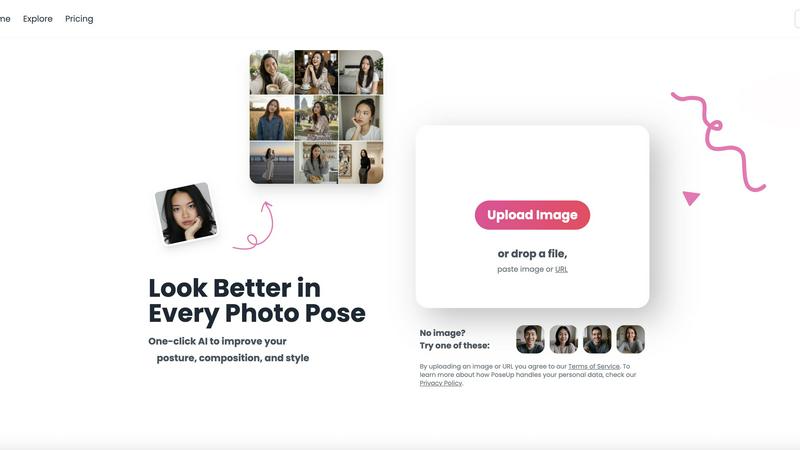
PoseUp.ai enhances your photos by correcting posture and optimizing composition with one-click AI technology.
Last updated: February 28, 2026
Visual Comparison
Nano AI

poseup
Feature Comparison
Nano AI
Flash-Speed Nano Banana Model
The proprietary Nano Banana AI model is the core engine of the platform, utilizing advanced orchestration for flash-speed inference. It enables sub-10-second generation times for both text-to-image and image-to-image tasks, ensuring concepts appear almost instantly. The model is designed to honor layered instructions and complex stylistic cues without requiring extensive prompt engineering, making advanced AI generation accessible and efficient for users of all skill levels directly within the unified workspace.
All-in-One Creative Workspace
Nano AI consolidates the entire creative pipeline into a single interface, combining text-to-image generation, image-to-image transformation, and a growing library of utility tools. This integrated flow allows users to generate, edit, and refine assets without losing momentum by jumping between different applications. The workspace is designed to keep every experiment, review, and export in one place, with upcoming components like Prompt Labs and Galleries further centralizing project management and team collaboration.
Magic Edit with Inpainting & Outpainting
The Magic Edit feature provides powerful, context-aware editing capabilities using natural language. Users can inpaint (modify specific regions), outpaint (expand the image canvas), or reimagine parts of an image simply by highlighting an area and typing instructions. This allows for non-destructive edits like changing clothing colors, adding accessories, or altering backgrounds without requiring complex manual editing software or skills, all processed within the platform's AI environment.
Deep Style Tuning & AI Effects
Moving beyond generic presets, Nano AI offers granular control over artistic output through its Deep Style Tuning. By pairing with the Nano Banana style model, users can exert precise influence over lighting, texture, and composition through descriptive prompts alone. This enables sophisticated style generation and transfer, such as applying Renaissance lighting to a cyberpunk scene. The platform also hosts a dedicated AI Effects library for specific transformations like converting photos to watercolor paintings, sketches, or manga art.
poseup
One-Click Enhancement
PoseUp’s standout feature is its one-click enhancement functionality, which simplifies the photo correction process. Users can upload an image, and the AI swiftly analyzes the content, adjusting posture and composition instantly. This eliminates the need for extensive editing skills, allowing anyone to achieve professional-looking results with minimal effort.
Comprehensive Photo Analysis
The platform employs a robust AI analysis system that evaluates numerous aspects of an image. It examines body alignment, limb positioning, and spatial balance within the frame. By assessing these critical factors, PoseUp ensures that the final image not only looks aesthetically pleasing but also feels natural and dynamic.
Wide Format Support
PoseUp supports a variety of standard image formats, including JPG, PNG, WEBP, and HEIC. This flexibility allows users to work with their preferred file types, accommodating a broad range of photography needs. The platform also has a file size limit of 5MB, ensuring that users can quickly upload and enhance their images without lengthy processing times.
Community and Support
PoseUp fosters a vibrant community through its Discord channel, allowing users to connect, share tips, and receive support. Additionally, the platform offers 50 free credits upon sign-up, making it easy for new users to start enhancing their photos without any initial investment. This community-driven approach encourages collaboration and engagement among users.
Use Cases
Nano AI
Marketing Campaign Asset Production
Marketing teams and agencies can use Nano AI to rapidly prototype and produce a high volume of visual assets for campaigns, social media, and advertisements. The sub-10-second generation speed and integrated editing tools allow for quick iteration on concepts based on stakeholder feedback. The ability to maintain consistent style tuning across multiple assets and the upcoming 4K upscaling feature ensure that drafts can be quickly turned into production-ready, billboard-quality images without leaving the platform.
Content Creation & Social Media Management
Content creators and social media managers can leverage Nano AI to generate unique, on-brand imagery daily. The platform's speed and ease of use facilitate the creation of engaging visuals for posts, stories, and blogs. Features like the AI Effects (e.g., Photo to Watercolor) provide quick stylistic variations, while tools like background removal and the image resizer enable assets to be formatted and optimized for different platforms rapidly within the same workflow.
Product Design & Mockup Iteration
Designers can utilize Nano AI to brainstorm and visualize product concepts, iterate on mockups, and present ideas to clients or teams. The image-to-image capability allows for refining existing sketches or photos, while inpainting/outpainting can be used to modify specific design elements like colors or materials. The shared galleries and collaborative workspace features streamline the review process, keeping all iterations and feedback centralized.
Conceptual Art & Creative Exploration
Artists and concept developers can employ Nano AI as a brainstorming partner to explore visual ideas and styles. The Deep Style Tuning allows for the creation of highly specific artistic mashups described in natural language, such as "vaporwave city" or "cyberpunk geometry with Renaissance lighting." The fast generation cycle encourages experimentation, allowing artists to explore numerous directions and refine their vision efficiently before committing to a final piece.
poseup
Social Media Content Creation
Social media influencers and content creators can leverage PoseUp to enhance their photos before posting. By optimizing poses and compositions, users can create more engaging and visually appealing content that stands out in crowded feeds, leading to increased interaction and follower growth.
Professional Portrait Photography
Photographers seeking to refine their client portraits can use PoseUp to ensure optimal posing and composition. The AI-driven enhancements help deliver polished, high-quality images that meet professional standards, streamlining the editing process and saving valuable time.
Personal Photo Improvement
Individuals looking to enhance their personal photographs, such as family gatherings or vacations, can benefit from PoseUp’s user-friendly interface. The platform allows users to easily improve their images, ensuring that cherished memories are captured in the best possible light.
Fitness and Wellness Documentation
Fitness enthusiasts and wellness coaches can utilize PoseUp to improve their images for branding or promotional purposes. By correcting poses and enhancing visual appeal, users can create compelling visuals that effectively communicate their fitness journeys and inspire their audiences.
Overview
About Nano AI
Nano AI is a comprehensive, all-in-one creative platform engineered to consolidate and streamline the entire visual asset production pipeline. It integrates AI-powered generation, advanced editing, and team collaboration tools into a single, unified workspace, eliminating the need to switch between disparate applications. The platform is built around its proprietary engine, the Nano Banana model, which utilizes flash-speed orchestration to deliver remarkably fast results, with core capabilities like sub-10-second text-to-image and image-to-image generation. Designed for marketing teams, content creators, designers, and agencies, Nano AI's primary value proposition is accelerating the creation of production-ready visual content. It maintains creative momentum by allowing users to rapidly iterate from an initial concept to a finalized, shareable asset within one environment. The platform also includes a suite of practical utilities like background removal, inpainting, outpainting, and granular style control, with features such as shared galleries, upcoming 4K neural upscaling, and API access enhancing its utility for professional workflows.
About poseup
PoseUp is an innovative AI-powered software platform designed to revolutionize the way users interact with digital photographs. By harnessing advanced machine learning algorithms, PoseUp automatically analyzes images to detect and correct posing, posture, and compositional flaws. This functionality is ideal for a diverse audience, including social media influencers, amateur photographers, and professional portraitists who seek to enhance their images without requiring in-depth technical expertise. The main value proposition of PoseUp lies in its ability to provide studio-quality corrections through an intuitive one-click workflow. Users can upload their images, and the AI assesses body alignment, limb positioning, and overall spatial balance, producing an optimized version of the original photo. With support for common image formats such as JPG, PNG, WEBP, and HEIC, and an upload limit of 5MB per file, PoseUp offers an accessible solution for enhancing photography in various contexts, from casual snapshots to professional-grade portraits.
Frequently Asked Questions
Nano AI FAQ
What is the Nano Banana model?
The Nano Banana model is Nano AI's proprietary AI engine specifically designed for fast, high-fidelity image generation and understanding. It utilizes a flash-speed inference architecture to deliver results in under ten seconds for most tasks. Its key differentiator is its ability to interpret and execute layered, complex instructions and stylistic cues from user prompts without requiring advanced prompt engineering techniques, making sophisticated AI image creation more accessible.
What file formats does Nano AI support?
While specific export formats are detailed within the platform's tools, Nano AI is built to handle standard image workflows. Dedicated utility tools like the Image Converter are included within the platform to facilitate format changes. Furthermore, the upcoming 4K Neural Upscaler is designed to process and output high-resolution assets suitable for both digital and print production, indicating support for professional-grade formats.
Does Nano AI offer commercial usage rights?
Yes, commercial usage rights for generated images are available. These rights are typically granted on the platform's higher-tier subscription plans. Users should consult the specific terms of service and licensing details associated with their chosen plan to understand the scope of commercial use, redistribution, and ownership of the assets they create using Nano AI's tools and models.
How does the Magic Edit feature work?
Magic Edit uses a combination of AI segmentation and inpainting/outpainting technology. Users first highlight or select a specific region of an image within the Nano AI editor. They then provide a natural language text instruction describing the desired change (e.g., "change shirt to blue," "add sunglasses," "extend the beach"). The AI model processes this request, understanding the context of the image and the instruction, and regenerates the selected area to match the command seamlessly.
poseup FAQ
How does PoseUp improve photo poses?
PoseUp uses advanced AI algorithms to analyze uploaded images and automatically detect suboptimal poses and compositions. It then suggests corrections that enhance the overall aesthetic, ensuring a more visually appealing result.
What file formats does PoseUp support?
PoseUp supports various standard image formats, including JPG, PNG, WEBP, and HEIC. This allows users to upload images in their preferred formats for quick and effective enhancement.
Is there a limit on the file size for uploads?
Yes, PoseUp has a file size limit of 5MB per image. This ensures that users can upload and process their images efficiently without encountering lengthy loading times.
Can I use PoseUp for professional photography?
Absolutely. PoseUp is designed for both amateur and professional photographers. Its AI-driven enhancements provide studio-quality corrections, making it an excellent tool for refining client portraits and achieving professional results.
Alternatives
Nano AI Alternatives
Nano AI is a comprehensive, all-in-one creative platform within the AI image generation and editing category. It is engineered to consolidate the entire visual production pipeline, from ultra-fast generation using its proprietary Nano Banana model to advanced editing and team collaboration tools, into a single unified workspace. Users may seek alternatives for various reasons, including budget constraints, specific feature requirements not covered by the platform, or a need for integration with different software ecosystems. The search often stems from a desire to compare core capabilities like generation speed, output quality, editing granularity, and commercial licensing terms. When evaluating alternatives, key considerations should include the underlying AI model's speed and fidelity, the depth of editing and transformation tools available, and the platform's suitability for professional, collaborative workflows. Assessing the total cost of ownership, including any usage-based pricing and commercial usage rights, is also critical for business applications.
poseup Alternatives
PoseUp is an advanced AI-powered software platform designed for the enhancement of photo poses and posture correction. Falling under the category of image and photo editing tools, it leverages sophisticated machine learning algorithms to automate the process of improving human subjects in digital photographs. Users often seek alternatives to PoseUp due to various factors, including pricing concerns, specific feature sets, or compatibility with different platforms. When searching for an alternative, it is important to consider aspects such as the quality of enhancements offered, ease of use, support for multiple image formats, and any additional functionalities that may cater to individual needs. Evaluating user reviews and trial options can also provide insights into the effectiveness and reliability of potential alternatives.