
poseup vs Shrinkpad
Side-by-side comparison to help you choose the right tool.

poseup
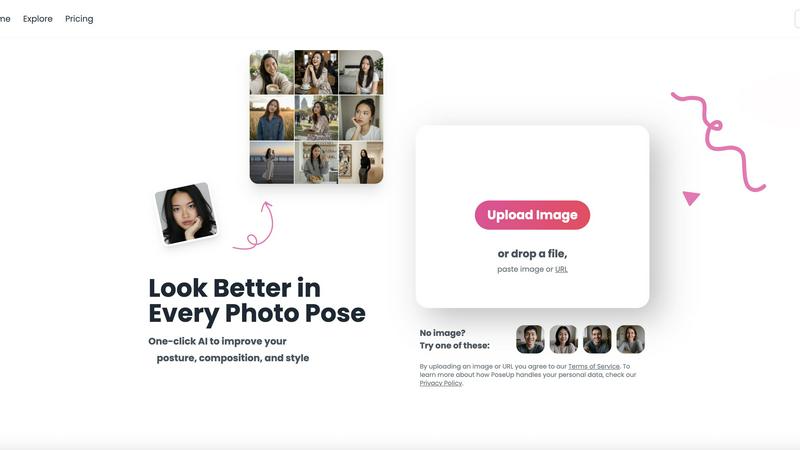
PoseUp.ai enhances your photos by correcting posture and optimizing composition with one-click AI technology.
Last updated: February 28, 2026

Shrinkpad
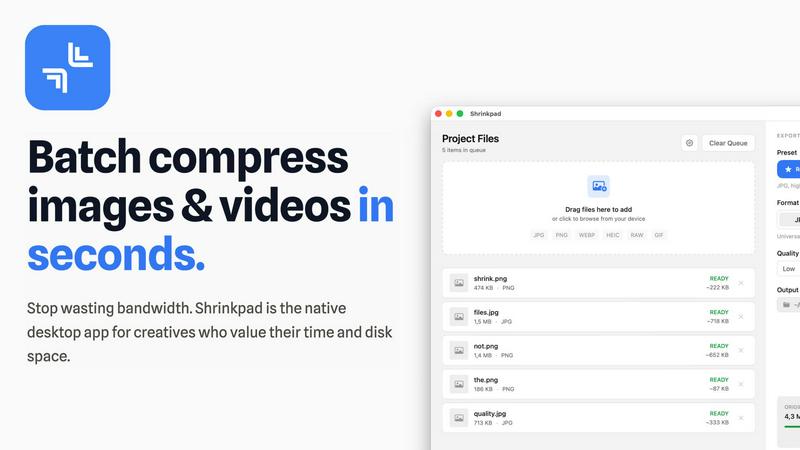
Shrinkpad is a native Mac app that batch compresses images and videos locally with automatic quality optimization.
Last updated: February 28, 2026
Visual Comparison
poseup
Shrinkpad
Feature Comparison
poseup
One-Click Enhancement
PoseUp’s standout feature is its one-click enhancement functionality, which simplifies the photo correction process. Users can upload an image, and the AI swiftly analyzes the content, adjusting posture and composition instantly. This eliminates the need for extensive editing skills, allowing anyone to achieve professional-looking results with minimal effort.
Comprehensive Photo Analysis
The platform employs a robust AI analysis system that evaluates numerous aspects of an image. It examines body alignment, limb positioning, and spatial balance within the frame. By assessing these critical factors, PoseUp ensures that the final image not only looks aesthetically pleasing but also feels natural and dynamic.
Wide Format Support
PoseUp supports a variety of standard image formats, including JPG, PNG, WEBP, and HEIC. This flexibility allows users to work with their preferred file types, accommodating a broad range of photography needs. The platform also has a file size limit of 5MB, ensuring that users can quickly upload and enhance their images without lengthy processing times.
Community and Support
PoseUp fosters a vibrant community through its Discord channel, allowing users to connect, share tips, and receive support. Additionally, the platform offers 50 free credits upon sign-up, making it easy for new users to start enhancing their photos without any initial investment. This community-driven approach encourages collaboration and engagement among users.
Shrinkpad
Lightning-Fast Batch Processing
Shrinkpad is architected for speed, leveraging multi-threaded compression and deep optimization for Apple Silicon (M1/M2/M3 chips) to process thousands of image and video files in minutes, not hours. Unlike web-based tools constrained by bandwidth, local processing ensures maximum throughput. The application maintains stability and performance even with massive queues, handling mixed-media batches containing both photos and videos without crashing or significant slowdowns, a common limitation in other utilities.
Intelligent Quality Optimization
The application employs an automatic analysis engine that evaluates the visual complexity of each image to apply a perfect, context-aware compression ratio. This intelligent system targets wasteful file data without introducing visible artifacts, balancing minimal file size with maximum perceptual quality. Users can also manually override this with granular control over compression settings, output formats (e.g., converting PNG to WebP), and selective metadata stripping for further size reduction.
Comprehensive Format Support
Shrinkpad supports over 50 media formats natively, eliminating conversion steps before compression. This includes professional RAW camera files (CR2, NEF, ARW), modern formats like HEIC, WebP, and AVIF, standard JPEGs and PNGs, and video files such as MP4, MOV, and more. Its smart detection system automatically identifies all supported files within a dropped folder, ignoring non-media files to streamline batch creation.
Privacy-First Local Processing
All compression and optimization tasks are executed entirely on the user's Mac. No media files are ever uploaded to external servers or cloud environments. This guarantees complete data privacy and security, which is crucial for professionals working with sensitive, unreleased, or client-owned assets. It also ensures processing speed is not limited by internet upload/download bandwidth.
Use Cases
poseup
Social Media Content Creation
Social media influencers and content creators can leverage PoseUp to enhance their photos before posting. By optimizing poses and compositions, users can create more engaging and visually appealing content that stands out in crowded feeds, leading to increased interaction and follower growth.
Professional Portrait Photography
Photographers seeking to refine their client portraits can use PoseUp to ensure optimal posing and composition. The AI-driven enhancements help deliver polished, high-quality images that meet professional standards, streamlining the editing process and saving valuable time.
Personal Photo Improvement
Individuals looking to enhance their personal photographs, such as family gatherings or vacations, can benefit from PoseUp’s user-friendly interface. The platform allows users to easily improve their images, ensuring that cherished memories are captured in the best possible light.
Fitness and Wellness Documentation
Fitness enthusiasts and wellness coaches can utilize PoseUp to improve their images for branding or promotional purposes. By correcting poses and enhancing visual appeal, users can create compelling visuals that effectively communicate their fitness journeys and inspire their audiences.
Shrinkpad
Web Development and Optimization
Developers and webmasters use Shrinkpad to batch-compress entire directories of website assets (hero images, product photos, icons, promotional videos) to reduce their overall footprint. This directly improves Core Web Vitals metrics like Largest Contentful Paint (LCP), with users reporting significantly faster load times. The ability to strip metadata and convert to modern formats like WebP/Avif in bulk is integral to modern web performance workflows.
Photographic Workflow Management
Photographers, especially those shooting in RAW formats, utilize Shrinkpad to create optimized, web-ready versions of their portfolios or client delivery galleries from hundreds of high-resolution originals. The batch processing saves hours over manual export in Lightroom or Photoshop, while the quality-preserving compression ensures images look pristine online without consuming excessive storage or bandwidth.
Application and Game Asset Preparation
Software and game developers employ Shrinkpad to minimize the size of application bundles and game asset packages. By compressing all textures, interface images, and video cutscenes in a single batch operation, they can reduce download sizes for end-users, decrease storage requirements, and potentially improve in-app loading performance, all while maintaining the necessary visual fidelity.
Content Creation and Social Media Management
Content creators, marketers, and social media managers process large volumes of screenshots, edited videos, and graphics for platforms like YouTube, Instagram, and TikTok. Shrinkpad allows them to quickly prepare batches of content to meet specific platform file size and format requirements without sacrificing quality, streamlining the publishing pipeline from editing software to final upload.
Overview
About poseup
PoseUp is an innovative AI-powered software platform designed to revolutionize the way users interact with digital photographs. By harnessing advanced machine learning algorithms, PoseUp automatically analyzes images to detect and correct posing, posture, and compositional flaws. This functionality is ideal for a diverse audience, including social media influencers, amateur photographers, and professional portraitists who seek to enhance their images without requiring in-depth technical expertise. The main value proposition of PoseUp lies in its ability to provide studio-quality corrections through an intuitive one-click workflow. Users can upload their images, and the AI assesses body alignment, limb positioning, and overall spatial balance, producing an optimized version of the original photo. With support for common image formats such as JPG, PNG, WEBP, and HEIC, and an upload limit of 5MB per file, PoseUp offers an accessible solution for enhancing photography in various contexts, from casual snapshots to professional-grade portraits.
About Shrinkpad
Shrinkpad is a native macOS application engineered for high-performance, batch compression of images and videos directly on your local machine. It is a definitive desktop solution for photographers, designers, content creators, and developers who require efficient media optimization without compromising privacy, control, or workflow speed. The core value proposition is built on three pillars: unparalleled processing speed through local execution and optimization for Apple Silicon, complete data privacy with no cloud uploads, and intelligent, robust batch handling for massive volumes of files. Utilizing native macOS frameworks, Shrinkpad can reduce media file sizes by up to 90% while meticulously preserving visual quality through intelligent, automatic analysis. It supports an extensive range of over 50 media formats, including professional RAW images, HEIC, WebP, AVIF, MP4, and MOV, eliminating the need for tedious pre-conversion. Users can drag and drop hundreds of files or entire folders for processing in seconds, maintaining granular control over compression parameters, output formats, metadata preservation, and file naming conventions. This tool is essential for reclaiming significant disk space, reducing application bundle sizes for development, and critically improving website load times through automated asset optimization.
Frequently Asked Questions
poseup FAQ
How does PoseUp improve photo poses?
PoseUp uses advanced AI algorithms to analyze uploaded images and automatically detect suboptimal poses and compositions. It then suggests corrections that enhance the overall aesthetic, ensuring a more visually appealing result.
What file formats does PoseUp support?
PoseUp supports various standard image formats, including JPG, PNG, WEBP, and HEIC. This allows users to upload images in their preferred formats for quick and effective enhancement.
Is there a limit on the file size for uploads?
Yes, PoseUp has a file size limit of 5MB per image. This ensures that users can upload and process their images efficiently without encountering lengthy loading times.
Can I use PoseUp for professional photography?
Absolutely. PoseUp is designed for both amateur and professional photographers. Its AI-driven enhancements provide studio-quality corrections, making it an excellent tool for refining client portraits and achieving professional results.
Shrinkpad FAQ
What file formats does Shrinkpad support?
Shrinkpad supports an extensive range of over 50 image and video formats natively. This includes common formats like JPEG, PNG, GIF, and BMP; modern formats like HEIC, WebP, and AVIF; professional RAW formats from Canon, Nikon, Sony, and others; and video formats including MP4, MOV, AVI, and more. A complete list is available on the official website.
Does Shrinkpad support video compression?
Yes, Shrinkpad provides robust batch compression for videos alongside images. You can mix video files (e.g., MP4, MOV) with image files in the same processing queue. The application applies optimal, efficient compression settings specifically tailored for video content, allowing for significant file size reduction while maintaining playback quality.
Are my files uploaded to the cloud during processing?
No. Shrinkpad operates on a strict privacy-first principle. All compression and optimization processes are executed 100% locally on your Mac. Your original files, processed files, and any metadata never leave your device, ensuring complete security and privacy, which is essential for sensitive or proprietary work.
How many files can I process at once?
Shrinkpad is designed for unlimited batch processing in its paid tiers. You can drag and drop hundreds or even thousands of files, or entire folders containing thousands of assets, into the application queue. It is engineered to handle these massive batches efficiently without crashing, a key advantage over many web-based or lighter desktop tools.
Alternatives
poseup Alternatives
PoseUp is an advanced AI-powered software platform designed for the enhancement of photo poses and posture correction. Falling under the category of image and photo editing tools, it leverages sophisticated machine learning algorithms to automate the process of improving human subjects in digital photographs. Users often seek alternatives to PoseUp due to various factors, including pricing concerns, specific feature sets, or compatibility with different platforms. When searching for an alternative, it is important to consider aspects such as the quality of enhancements offered, ease of use, support for multiple image formats, and any additional functionalities that may cater to individual needs. Evaluating user reviews and trial options can also provide insights into the effectiveness and reliability of potential alternatives.
Shrinkpad Alternatives
Shrinkpad is a native macOS application for high-performance, batch compression of images and videos. It belongs to the media optimization category, focusing on local processing to ensure data privacy and workflow speed. Users often seek alternatives for various reasons, including budget constraints, the need for cross-platform compatibility on Windows or Linux, or specific feature requirements not covered by a single tool. When evaluating alternatives, key criteria include the processing architecture—whether it's cloud-based or local for privacy—and the range of supported input and output formats. Performance metrics like batch handling capabilities, compression speed, and the degree of user control over quality settings are also critical differentiators. The ideal solution should align with your specific volume, format, and security needs. --- FAQ_SEPARATOR--- [
{"question": "What is Shrinkpad?", "answer": "Shrinkpad is a native macOS application engineered for high-performance, batch compression of images and videos directly on your local Mac, utilizing native frameworks for speed and privacy."},
{"question": "Who is Shrinkpad for?", "answer": "It is designed for photographers, designers, content creators, and developers who need to efficiently optimize large volumes of media files locally without using the cloud."},
{"question": "What are the main features of Shrinkpad?", "answer": "Core features include local privacy-first processing, intelligent batch compression with folder mode support, and multi-format compatibility for over 50 image and video types."},
{"question": "Why choose Shrinkpad?", "answer": "Shrinkpad is chosen for its unparalleled local processing speed, complete data privacy with no cloud uploads, and intelligent batch handling for massive file volumes."}
]