QRelix vs RemoveTexts
Side-by-side comparison to help you choose the right tool.

QRelix lets you create customizable, dynamic QR codes with real-time analytics and high-quality SVG output, all completely free.
Last updated: March 11, 2026

RemoveTexts
RemoveTexts is an AI-powered tool that effortlessly removes text and watermarks from images in under 30 seconds, no design skills needed.
Last updated: March 11, 2026
Visual Comparison
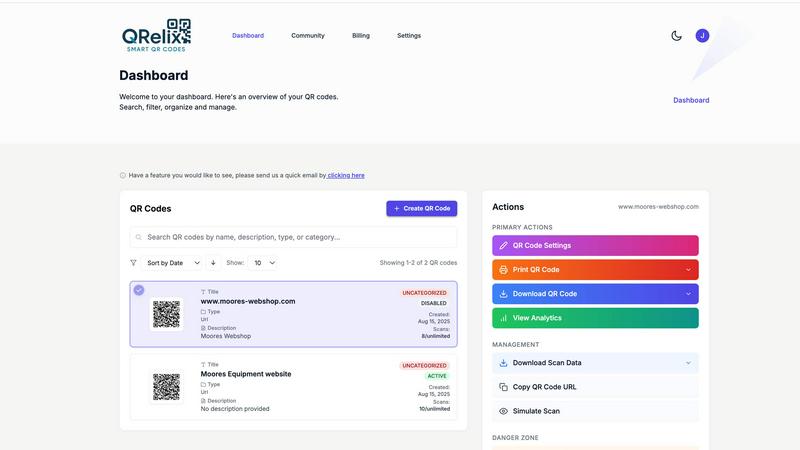
QRelix
RemoveTexts

Feature Comparison
QRelix
Dynamic QR Codes
QRelix provides dynamic QR codes that allow users to change the destination URL at any time without needing to reprint the code. This flexibility is ideal for time-sensitive campaigns and evolving content.
Real-Time Analytics
The platform offers comprehensive analytics that tracks every scan of a QR code. Users can view data such as location, device type, time of access, and total scan volume, enabling them to gauge the effectiveness of their campaigns.
Customization Options
Users can personalize their QR codes with unique colors, logos, and styles, ensuring that each code aligns with their branding. This feature enhances brand visibility and recognition across various print materials.
Mirrored QR Feature
The Mirrored QR feature allows users to copy existing QR codes and modify them with their branding elements. This function is particularly useful for businesses looking to rebrand or enhance pre-existing codes without starting from scratch.
RemoveTexts
Paint to Remove
This feature allows users to have precise control over the text removal process. By simply painting over the specific areas of text they wish to eliminate, users can effectively target unwanted elements without affecting the surrounding image, ensuring a clean and professional outcome.
Auto Remove All
For those looking for a quick and effortless solution, the Auto Remove All feature leverages AI to automatically detect and remove every instance of text in an image. This one-click solution is perfect for cleaning up large images or batch processing multiple files, saving significant time and effort.
Edit & Replace Text
RemoveTexts provides an Edit & Replace Text feature that allows users to change existing text in their images while maintaining the original style. This capability is particularly useful for modifying promotional graphics or correcting information without having to recreate the entire image.
Remove Objects
Beyond text removal, the Remove Objects feature enables users to erase unwanted visual elements, such as logos or people, from their images. This versatile tool broadens the editing capabilities, allowing for comprehensive cleaning and customization of images.
Use Cases
QRelix
Marketing Campaigns
Marketers can utilize QRelix to create trackable QR codes that link to promotional content, websites, or social media pages. The analytics help in measuring campaign effectiveness and customer engagement.
Restaurant Menus
Restaurants can generate QR codes linking to digital menus, allowing customers to view offerings without physical menus. This increases convenience and promotes contactless dining experiences.
Event Management
Event planners can create QR codes for ticketing or registration pages, streamlining the check-in process. Attendees can scan codes for schedules, maps, and important updates in real-time.
Retail Promotions
Retail businesses can use QRelix to provide product information, promotional offers, or even inventory tracking via QR codes. This enhances customer interaction and facilitates better shopping experiences.
RemoveTexts
E-commerce Product Images
Online sellers can use RemoveTexts to enhance their product images by removing watermarks or text overlays, ensuring that their listings appear professional and appealing to potential buyers. Clean images can significantly impact sales conversions.
Social Media Posts
Content creators and marketers can quickly remove unwanted text from images used in social media posts. This ensures that visuals are eye-catching and free of distractions, helping to engage audiences more effectively.
Academic and Legal Document Redaction
Legal professionals and researchers can leverage RemoveTexts to redact sensitive information or annotations from screenshots or scanned documents. This feature allows for the secure sharing of documents while maintaining confidentiality and professionalism.
Presentation and Marketing Materials
RemoveTexts is an excellent tool for designers preparing presentations or marketing materials. It allows for quick adjustments to visuals, removing any extraneous text that might detract from the overall message and clarity of the content.
Overview
About QRelix
QRelix is an innovative QR code generator designed to cater to the diverse needs of marketers, restaurants, event coordinators, and retail teams. With over 20 different QR code types available, users can create QR codes that link to URLs, files, Wi-Fi logins, vCards, maps, emails, phone numbers, surveys, custom content pages, and deep links for popular social media platforms like YouTube, Instagram, Facebook, TikTok, LinkedIn, Twitter, and app stores. The unique feature of QRelix is its ability to generate dynamic QR codes, allowing users to update the code's destination seamlessly without needing to reprint. Comprehensive real-time analytics provide insights into scan locations, device types, access times, and total scans, empowering users to track their engagement effectively. Furthermore, QRelix enables customization of QR codes with brand colors, logos, and designs, and exports them in high-quality 300 DPI SVG format, suitable for various print materials. The platform also offers a Mirrored QR feature for rebranding existing codes and includes password protection for sensitive content. With an organized dashboard for code management and a risk-free 48-hour trial, QRelix positions itself as a go-to solution for anyone looking to enhance their QR code strategy.
About RemoveTexts
RemoveTexts is an innovative AI-powered online tool designed to facilitate the effortless removal of unwanted text from images. By harnessing advanced deep learning inpainting technology, it allows users to eliminate watermarks, subtitles, captions, and any other text elements with a simple upload and a click. This tool is ideal for a wide range of users, including graphic designers, marketers, e-commerce sellers, and content creators, who often need to clean up images for professional use. The main value proposition of RemoveTexts lies in its ability to deliver high-quality, seamless results in under 30 seconds, eliminating the need for complex software like Photoshop or manual editing skills. With support for over 50 languages and a user-friendly interface, it democratizes image editing, making it accessible for anyone needing to enhance their visuals quickly and efficiently.
Frequently Asked Questions
QRelix FAQ
How do I create a QR code with QRelix?
Creating a QR code with QRelix is easy. Simply sign up for a free account, customize your QR code with colors and logos, then generate and download it in print-ready format.
Is there a cost to use QRelix?
QRelix is completely free to use with no hidden fees or credit card requirements. Users can generate, track, and manage QR codes without any financial commitment.
Can I track the performance of my QR codes?
Yes, QRelix provides real-time analytics for every QR code created. Users can monitor key metrics, including scan location, device type, and total scan volume.
What file formats are available for QR code exports?
QRelix allows users to export their QR codes in high-quality 300 DPI SVG format, making them suitable for various print applications such as business cards, menus, and posters.
RemoveTexts FAQ
How does RemoveTexts work?
RemoveTexts utilizes advanced deep learning inpainting technology to analyze surrounding pixels and reconstruct the background once text is removed. This ensures that the final image appears seamless and professional.
What file formats does RemoveTexts support?
RemoveTexts supports JPG, PNG, and WebP image formats, with a maximum file size limit of 10 MB. This ensures compatibility with most common image types used across various platforms.
Is there a limit to how many images I can process?
While specific limitations on the number of images processed at once may vary, RemoveTexts is designed for efficiency, allowing users to quickly edit multiple images in a short amount of time, especially with the Auto Remove All feature.
Can I use RemoveTexts for commercial purposes?
Yes, many users, including e-commerce sellers and marketers, utilize RemoveTexts for commercial projects. However, it is essential to ensure that any content modified adheres to copyright and trademark laws.
Alternatives
QRelix Alternatives
QRelix is a dynamic QR code generator designed for marketers, restaurants, events, and retail teams. It offers over 20 types of QR codes, allowing users to create customizable, trackable codes that can link to various content types, all while providing real-time analytics on their performance. This versatility makes QRelix a popular choice for businesses looking to effectively engage their audience and gather valuable data. Users often seek alternatives to QRelix due to factors such as pricing, desired features, specific platform compatibility, or the need for more advanced customization options. When selecting an alternative, it's essential to consider the range of QR code types offered, the level of analytics available, ease of use, and whether the platform can meet your specific business needs without unnecessary limitations.
RemoveTexts Alternatives
RemoveTexts is an AI-powered image editing tool designed to efficiently remove unwanted text from images, falling under the category of image and photo editing software. Users often seek alternatives for various reasons, including pricing, feature sets, platform compatibility, and specific use cases that may not be fully addressed by one tool. When searching for an alternative, it's crucial to consider aspects such as the ease of use, the quality of output, language support, and the range of features offered, ensuring they align with your editing needs.