SimpleDraw vs Supermachine
Side-by-side comparison to help you choose the right tool.

SimpleDraw
SimpleDraw is a free online tool for creating precise floor plans and scale drawings without any software installation.
Last updated: March 1, 2026

Supermachine
Supermachine empowers creators to swiftly produce stunning, commercial-ready AI images and videos using over 60 advanced models.
Last updated: March 18, 2026
Visual Comparison
SimpleDraw
Supermachine

Feature Comparison
SimpleDraw
Floor Plan Mode
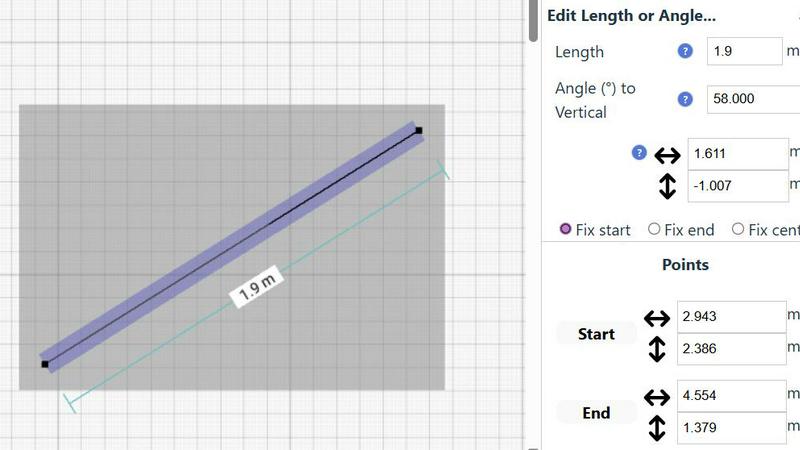
This specialized mode is tailored for creating detailed floor plans of rooms, apartments, and houses. Users can effortlessly draw walls, add doors and windows, and visualize measurements in real-time as they make adjustments to their designs. This feature simplifies the process of planning renovations or new constructions.
Smart Alignment System
The smart alignment system assists users in placing points and lines with remarkable accuracy. By simply pointing the mouse in the desired area, the system intelligently positions elements with clear visual cues. This feature enhances precision, enabling users to create intricate designs without the frustration of misalignment.
Comprehensive Measurement System
SimpleDraw boasts a comprehensive measurement system that allows users to display and control measurements dynamically. Users can choose between metric and standard US units, ensuring that their drawings reflect the exact dimensions required for their projects. Contextual measurements help maintain accuracy throughout the design process.
Non-Destructive Editing
With 100% non-destructive editing, every element within a drawing can be modified or adjusted at any time. Users can easily revert changes using undo and redo options, streamlining the design process. Grouping elements for simultaneous movement or duplication further enhances productivity, making it easier to manage complex projects.
Supermachine
ControlNet
ControlNet is a powerful feature that allows users to have granular control over the generation process. By incorporating additional conditions and constraints, creators can dictate how their images or videos are produced, ensuring that the final output meets specific artistic or marketing requirements.
Instruction Model
The Instruction Model is designed to interpret user prompts with high accuracy, translating textual instructions into actionable creative outputs. This feature enhances the user experience by reducing ambiguity and ensuring that the generated content aligns closely with the user's intentions.
API
Supermachine offers a robust API, enabling developers to integrate its powerful image and video generation capabilities into their own applications. This feature provides flexibility and scalability for businesses looking to leverage AI-driven content generation in their workflows.
Video Generation
The Video Generation feature allows users to create short-form videos quickly and easily. This capability is particularly beneficial for content creators who need to produce engaging video content for social media, marketing campaigns, or other digital platforms in a fraction of the time it would typically take.
Use Cases
SimpleDraw
Home Renovation Planning
SimpleDraw is ideal for homeowners planning renovations, allowing them to create precise kitchen, bathroom, and living space layouts. Users can visualize their designs and make adjustments before physical work begins, saving time and resources.
Furniture Arrangement
For individuals looking to rearrange furniture or design new room layouts, SimpleDraw provides an intuitive platform to experiment with different configurations. This feature helps users determine if their desired furniture will fit in the intended space, facilitating better purchasing decisions.
Rental Property Listings
Landlords and real estate agents can utilize SimpleDraw to create comprehensive floor plans for rental listings. Accurately detailed diagrams enhance property presentations and help potential tenants envision their future living spaces.
Space Planning for Offices
Office planners can use SimpleDraw to design effective workspace layouts. By creating accurate floor plans, they can optimize space utilization, ensuring that each area meets the functional needs of employees and enhances productivity.
Supermachine
Social Media Management
Social media managers can utilize Supermachine to generate a consistent flow of high-quality images and videos for their platforms. By streamlining content creation, they can focus more on strategy and engagement rather than being bogged down by the production process.
Marketing Campaigns
Marketers can leverage Supermachine to craft visually compelling materials for their campaigns. Whether it’s creating eye-catching ads or promotional content, the platform's quick output helps marketers stay agile and responsive to market demands.
Digital Art Exploration
Artists seeking to experiment with digital mediums can use Supermachine to explore various styles and techniques without the steep learning curve. This enables them to broaden their creative horizons and produce unique artworks efficiently.
Small Business Advertising
Small business owners can create professional-looking advertisements in no time using Supermachine. The platform allows them to generate content that attracts customers and increases visibility while minimizing the costs typically associated with hiring professional designers.
Overview
About SimpleDraw
SimpleDraw is a powerful, browser-based application designed specifically for creating precise, dimensionally accurate scale drawings and technical diagrams. It caters to a diverse audience, including casual users, DIY enthusiasts, homeowners, and professionals engaging in early-stage planning. The main value proposition of SimpleDraw lies in its unique combination of simplicity and precision, making it a user-friendly alternative to complex CAD software. Users can access the tool directly in their web browser without the need for software installation, account registration, or financial commitment. This accessibility empowers individuals to produce detailed floor plans, elevation drawings, and scaled layouts for various projects. With features like a dedicated Floor Plan Mode, smart alignment system, and comprehensive measurement controls, SimpleDraw enhances the drawing experience, allowing users to visualize and plan their spaces with confidence and accuracy.
About Supermachine
Supermachine is an innovative, all-in-one creative studio powered by advanced artificial intelligence, designed to cater to creators across various skill levels. This platform simplifies the intricate process of generating professional-quality images and videos, making it accessible for everyone from social media managers in need of consistent daily content to marketers crafting engaging campaign visuals. Artists exploring digital mediums and small business owners creating eye-catching advertisements can also leverage Supermachine's robust capabilities. The platform's core value proposition lies in its speed and simplicity, allowing users to produce stunning stock photos, illustrations, thumbnails, NFTs, and short-form videos in less than 15 seconds. There is no requirement for expertise in complex prompt engineering, which democratizes access to high-quality creative production. Trusted by more than 100,000 creators who collectively generate a million images weekly, Supermachine distinguishes itself by offering a curated selection of over 60 high-performing AI models. Rather than pursuing every new release, the platform selectively incorporates models that demonstrate genuine utility, ensuring reliability and consistently top-tier results for all projects.
Frequently Asked Questions
SimpleDraw FAQ
Is SimpleDraw free to use?
Yes, SimpleDraw is completely free to use, offering a wide range of features without any hidden costs or subscription fees.
Do I need to create an account to use SimpleDraw?
No, users can start drawing immediately without the need for account registration or software installation, making it highly accessible.
What types of projects can I create with SimpleDraw?
SimpleDraw is versatile and supports a variety of projects, including floor plans for homes, office layouts, furniture arrangements, and even technical diagrams for professional use.
Can I share my drawings with others?
Yes, once you create a drawing in SimpleDraw, you can easily share it with others by providing them with a link to your work, facilitating collaboration and feedback.
Supermachine FAQ
How long does it take to create content using Supermachine?
Content generation with Supermachine typically takes less than 15 seconds, allowing for rapid production of images and videos without compromising quality.
What types of media can I create with Supermachine?
Supermachine enables users to create a wide range of media, including stock photos, illustrations, thumbnails, NFTs, and short-form videos, making it a versatile tool for various creative needs.
Do I need to have technical skills to use Supermachine?
No, Supermachine is designed for users of all skill levels. The platform simplifies the creation process, eliminating the need for expertise in complex prompt engineering.
Is there a trial period for new users?
Yes, new users can get started with a 5-day trial package available for just $5, allowing them to explore the platform's capabilities before committing to a subscription.
Alternatives
SimpleDraw Alternatives
SimpleDraw is a free, web-based tool designed for creating precise scale drawings and floor plans, falling into the category of design tools. Users often seek alternatives to SimpleDraw due to various reasons, such as the need for advanced features, compatibility with different platforms, or specific project requirements that SimpleDraw may not fully address. Additionally, budget constraints or the desire for unique functionalities can drive users to explore other options. When choosing an alternative to SimpleDraw, it is crucial to consider features that align with your specific design needs, the ease of use of the interface, and the availability of essential tools for your projects. Compatibility with various operating systems and the ability to handle complex designs can also be significant factors in making an informed decision.
Supermachine Alternatives
Supermachine is an innovative design tool that leverages artificial intelligence to assist creators in producing high-quality images and videos swiftly and efficiently. With a user-friendly interface, it caters to a diverse audience, including social media managers, marketers, artists, and small business owners, eliminating the need for advanced technical skills. Users often seek alternatives to Supermachine for various reasons, including price sensitivity, specific feature requirements, or the need for compatibility with other platforms. When exploring alternatives, it is crucial to consider factors such as the range of features offered, ease of use, the quality of output, and the reliability of the AI models available. A thorough evaluation of these aspects will help ensure that the chosen tool aligns well with individual or business needs.