ScopeSnap vs SupaSidebar
Side-by-side comparison to help you choose the right tool.

ScopeSnap
ScopeSnap uses AI to transform discovery notes into structured project scopes and client-ready proposals.
Last updated: March 18, 2026

SupaSidebar
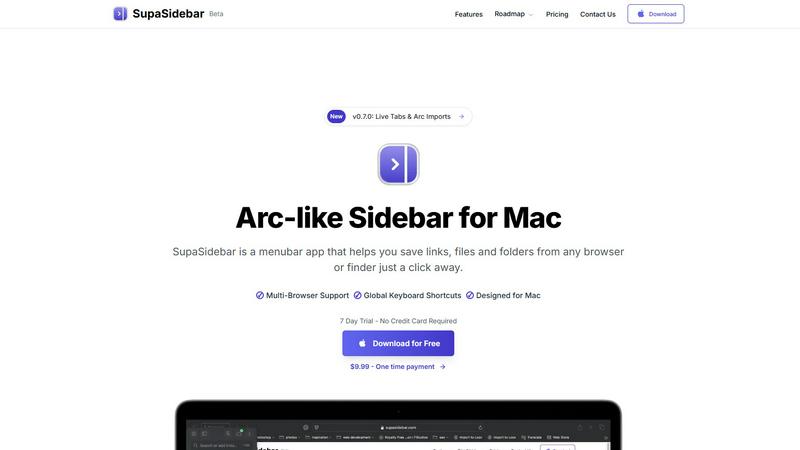
SupaSidebar is a Mac menubar app for instant keyboard access to your saved links, files, and folders, enhancing.
Last updated: February 28, 2026
Visual Comparison
ScopeSnap

SupaSidebar
Feature Comparison
ScopeSnap
AI-Powered Scope Decomposition
This core feature processes unstructured discovery artifacts like call transcripts and notes to automatically generate a structured project backlog. The AI identifies key themes and user stories, grouping them into logical epics. It critically analyzes the input to flag ambiguous requirements, underlying assumptions, and open questions that require client clarification, ensuring the foundational scope is comprehensive and well-understood before estimation begins.
Interactive Scope Refinement & Estimation Board
The generated scope is presented within an interactive, kanban-style board where users can review, edit, and organize all scope items. This interface allows for the assignment of roles (e.g., front-end, back-end), the application of story points or hourly estimates to each task, and the direct resolution of AI-identified questions. This feature facilitates collaborative and iterative refinement, turning the initial AI output into a precise, agreed-upon project specification.
Automated Proposal & SOW Generation
Upon finalizing the scope and estimates, ScopeSnap automatically compiles all structured data into a professionally formatted client proposal or Statement of Work. This document includes a detailed breakdown of features, timelines, cost estimates, payment terms, and project assumptions. The automation ensures consistency, eliminates manual copy-pasting errors, and saves hours of document preparation time, delivering a polished deliverable instantly.
Centralized Project Context Repository
ScopeSnap acts as a single source of truth for pre-project discovery. Users can upload and store all relevant context—meeting recordings, transcripts, email chains, and briefs—directly linked to the project scope. This centralized repository ensures that all decisions and scope items are traceable back to original client conversations, providing crucial auditability and reference during both the sales process and subsequent project execution.
SupaSidebar
Quick Access to Resources
SupaSidebar provides users with the ability to save links, files, and folders from any browser or Finder. With just one click, users can store their most important digital resources, ensuring they are always just a shortcut away.
Global Keyboard Shortcuts
Designed with efficiency in mind, SupaSidebar supports global keyboard shortcuts. Users can save URLs with CMD CTRL S and copy current website links using CMD CTRL C, enhancing speed and productivity by eliminating unnecessary mouse clicks.
Recents Tracking
The application features a "Recents" section that automatically tracks and displays every website the user has accessed in the last 48 hours. This ensures that important sites are readily available without needing to search through browser history.
Fast Search Functionality
SupaSidebar includes a fast search feature that allows users to locate any file, folder, website, or application instantly. By pressing CMD CTRL K and typing their query, users can quickly find what they need, significantly speeding up their workflow.
Use Cases
ScopeSnap
For Freelance Developers Scoping Solo Projects
Independent developers can use ScopeSnap to efficiently manage client discovery. After a discovery call, they paste their notes or transcript into the platform. The AI creates a first-draft scope, helping the freelancer ensure no critical feature is overlooked. They then refine estimates and quickly generate a professional proposal, allowing them to compete with larger agencies on professionalism while saving valuable time otherwise spent on administrative tasks.
For Software Agencies Standardizing Sales Processes
Development agencies can implement ScopeSnap to create a consistent, scalable workflow for their sales and pre-sales teams. It ensures every project estimate follows the same rigorous decomposition process, improving accuracy and reducing risk. The automated SOW generation enforces brand consistency and legal compliance across all client proposals, making the sales pipeline more efficient and reliable.
For Technical Consultants Defining Project Requirements
Consultants hired to define project specifications for a client's internal team or for another agency can utilize ScopeSnap to structure their findings. The tool helps systematically break down complex business needs into technical requirements, user stories, and acceptance criteria. The final output is a clear, actionable specification document or RFP supplement that accurately communicates project scope.
For Refining and Re-scoping Existing Project Ideas
When a client returns with an existing, vague project idea or a failed previous estimate, ScopeSnap provides a structured method for re-analysis. By inputting the available information, the AI can help deconstruct the problem anew, identify gaps in the previous scope, and build a more solid, estimatable foundation, facilitating a more successful project restart or rescue.
SupaSidebar
Efficient Research Management
Researchers can utilize SupaSidebar to organize and access various academic articles, links to studies, and important files effortlessly. The ability to save resources with keyboard shortcuts streamlines the process of gathering information for projects.
Enhanced Study Sessions for Students
Students can benefit from SupaSidebar by keeping all their study materials, including lecture notes, reference websites, and documents, in one place. With quick access to their most-used resources, they can focus more on learning and less on searching.
Streamlined Workflow for Professionals
Professionals who work on multiple projects simultaneously can use SupaSidebar to keep track of essential links, files, and applications. This reduces the time spent switching between tabs and applications, allowing for more efficient task management.
Simplified Content Creation
Content creators can utilize SupaSidebar to manage their research, inspiration links, and files in one accessible location. The fast search and organization capabilities help them gather materials quickly, allowing for a smoother creative process.
Overview
About ScopeSnap
ScopeSnap is an AI-powered platform engineered to transform the initial, often chaotic phase of software project discovery into a structured, actionable, and client-ready deliverable. It is specifically designed for freelance developers, technical consultants, and software development agencies who engage in scoping and estimating custom software projects. The core value proposition of ScopeSnap lies in its systematic elimination of manual, error-prone processes associated with project definition. By ingesting raw inputs such as meeting transcripts, email threads, and handwritten notes, its AI engine performs an intelligent breakdown of high-level ideas into discrete, estimatable tasks organized into epics and a clear backlog. This structured approach forces clarity, surfaces implicit assumptions, and identifies open questions early in the cycle. Users can then iteratively refine this scope, assign roles, and attach time or cost estimates with confidence. Finally, the platform automates the generation of professional proposals or Statements of Work (SOW), compiling the refined scope, estimates, and project terms into a polished document ready for client presentation. ScopeSnap directly addresses the critical pain points of missed requirements, scope vagueness, and the extensive time investment required for proposal creation, thereby reducing commercial risk and accelerating the sales cycle for service providers.
About SupaSidebar
SupaSidebar is a native macOS menubar application designed to serve as a universal productivity sidebar, inspired by modern design principles. It functions as a centralized command hub for macOS, offering immediate access and organizational capabilities for links, files, folders, and applications. This tool is particularly valuable for professionals, researchers, students, and power users who frequently juggle multiple tasks across various web browsers and local file systems. By minimizing context-switching and reducing the clutter of numerous tabs, SupaSidebar enhances digital workflows significantly. It operates seamlessly within the macOS ecosystem, ensuring high performance and a user-friendly experience. Emphasizing data privacy, it stores all information locally on the user's Mac. SupaSidebar is compatible with all major web browsers, including Safari, Chrome, Arc, Firefox, and Brave, making it a versatile solution for users with diverse browsing habits. With its architecture built around global keyboard shortcuts and a powerful command panel, users can swiftly capture, retrieve, and manage their digital assets without interrupting their flow.
Frequently Asked Questions
ScopeSnap FAQ
What types of input does ScopeSnap accept for analysis?
ScopeSnap is designed to process textual input from a variety of discovery sources. This includes direct text entry, pasted content from meeting transcripts (e.g., from Otter.ai or Rev), email correspondence, notes from tools like Notion or Google Docs, and bullet-point lists of client requirements. The system extracts key concepts and requirements from this unstructured data to build the initial scope structure.
How accurate are the AI-generated estimates and scope items?
The AI-generated scope and tasks are a starting point for human refinement, not a final estimate. Accuracy is highly dependent on the quality and detail of the input context provided. The AI's primary role is to ensure comprehensiveness and structure, surfacing potential tasks and questions a human might miss. The final, responsible estimation must be performed by the user within the refinement board, applying their own expertise to adjust story points, hours, and resource assignments.
Can I customize the generated proposal documents?
Yes, the automated Proposal and Statement of Work generation feature is built with customization in mind. Users can typically define company details, standard terms and conditions, payment schedules, and branding elements (like logos and colors) in settings or templates. The content pulled from the refined scope board (features, estimates, assumptions) populates these templates to create a client-ready document that aligns with your professional standards.
Is ScopeSnap suitable for very large or complex enterprise projects?
ScopeSnap is optimized for the workflow of freelancers, small to mid-sized agencies, and consultants. While it can handle substantial projects by breaking them into phases or multiple epics, extremely large enterprise projects with deeply interdependent systems may require more specialized enterprise architecture tools. However, for defining clear scope and deliverables for a specific module, MVP, or well-bounded project within a larger program, ScopeSnap remains highly effective.
SupaSidebar FAQ
Is SupaSidebar a browser extension?
No, SupaSidebar is a standalone macOS menubar application that operates independently of web browsers. It integrates with various browsers to provide a centralized location for all digital assets.
Which browsers does SupaSidebar work with?
SupaSidebar is compatible with all major browsers, including Safari, Chrome, Arc, Firefox, and Brave. This versatility makes it suitable for users who utilize multiple browsers.
What macOS version do I need?
SupaSidebar requires macOS 13 or higher to function correctly. This ensures compatibility with the latest macOS features and optimizations.
Where is my data stored?
All data managed by SupaSidebar is stored locally on the user’s Mac. This approach prioritizes user privacy and ensures that sensitive information remains secure and accessible only to the user.
Alternatives
ScopeSnap Alternatives
ScopeSnap is a project scoping and proposal generation tool within the productivity and management software category. It leverages artificial intelligence to help freelance developers and software agencies transform unstructured discovery notes into detailed project scopes, accurate estimates, and professional client proposals. Users may explore alternatives to ScopeSnap for various reasons, including budget constraints, specific feature requirements not met by the platform, or integration needs with their existing tech stack. The search for a different solution often stems from a need for more granular control, different pricing models, or platform compatibility issues. When evaluating an alternative, key considerations should include the tool's core methodology for scope decomposition and estimation, the quality and customizability of its output documents, and the overall efficiency it brings to the pre-sales workflow. The ideal solution should demonstrably reduce the time and risk associated with defining software project requirements and communicating them to clients.
SupaSidebar Alternatives
SupaSidebar is a macOS menubar application designed to enhance productivity by providing instant access to saved links, files, folders, and applications. As a universal command hub, it allows users to efficiently manage digital assets without the distractions of multiple open tabs or applications. This category of software targets professionals, students, and power users who thrive on multitasking and seek streamlined workflows. Users often search for alternatives to SupaSidebar for various reasons, including pricing, specific feature sets, or compatibility with different operating systems. When selecting an alternative, it is essential to consider factors such as ease of use, integration capabilities with other tools, and the ability to customize features to suit individual workflow preferences. Evaluating the user experience and performance across different platforms can also help ensure that the chosen solution meets specific productivity needs.