BarBrain vs TinyFast
Side-by-side comparison to help you choose the right tool.

BarBrain
BarBrain is an inventory software that reduces counting time by over 75% for hospitality businesses using multi-device support and an extensive.
Last updated: April 4, 2026

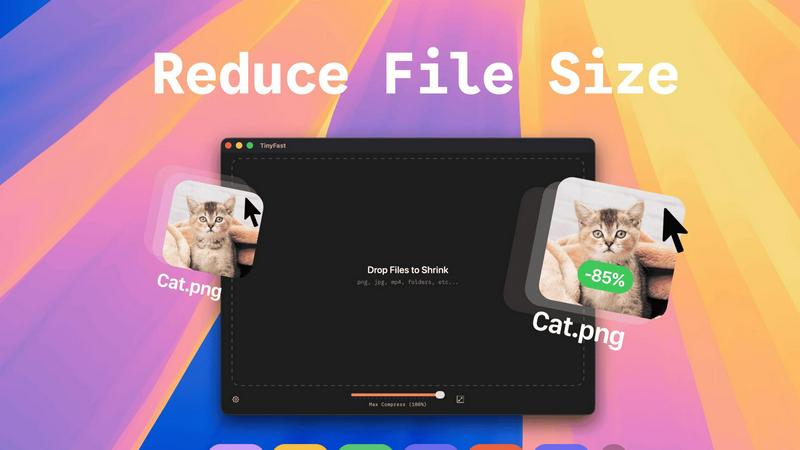
TinyFast is a native Mac app that compresses images, videos, and PDFs locally with drag and drop simplicity.
Last updated: February 28, 2026
Visual Comparison
BarBrain

TinyFast
Feature Comparison
BarBrain
Parallel Multi-Device Counting
BarBrain's architecture allows simultaneous inventory counting across multiple iOS and Android devices. This feature enables staff teams to split up and count different stock areas or categories concurrently, drastically reducing the total time required to complete a full inventory. The data from all devices syncs in real-time to a centralized report, ensuring cohesion and eliminating the need to manually consolidate multiple spreadsheets or clipboards.
Extensive Pre-Loaded Product Catalog
The software includes an integrated catalog of over 30,000 hospitality-specific products, spanning spirits, wines, AFGs (alcohol-free beverages), food items, and housekeeping consumables. This vast database accelerates setup and ongoing use, as many items are already available for quick addition to a venue's inventory list. The BarBrain team also offers direct assistance in customizing and building a venue's unique product catalog for complete coverage.
Automated Inventory Reporting
Upon completion of a count, BarBrain automatically generates a comprehensive, finalized inventory report. This feature completely eliminates the post-count administrative work of transcribing data, creating summaries, and calculating totals. Operators receive an immediate, accurate overview of stock levels, values, and usage, enabling swift analysis and decision-making without any manual data processing.
Fill-Level Slider for Open Items
Specifically designed for perishable and open beverage inventory, this feature allows for precise tracking of partial units. Instead of estimating or rounding, staff can use a simple slider interface within the app to record the exact fill level of open bottles, food containers, or other bulk items. This granular data capture is crucial for accurate cost-of-goods-sold (COGS) calculations and identifying portioning inconsistencies.
TinyFast
100% Local & Private Processing
TinyFast operates entirely on your local machine. All compression and optimization algorithms run natively on your Mac's hardware. This design guarantees that your files, including those under Non-Disclosure Agreements (NDAs) or containing confidential information, never leave your system. There is no upload to external servers, no cloud processing, and therefore zero risk of data interception, storage, or misuse by third parties. Privacy is a fundamental, non-negotiable feature built into the application's core architecture.
Blazing-Fast Batch Compression
The application utilizes highly optimized, native compression engines specifically built for macOS to deliver exceptional speed. It supports batch processing, allowing users to drag and drop entire folders containing multiple files. The software then processes these files sequentially at high speed, shrinking large video files or batches of images in a matter of seconds. This eliminates the waiting time associated with uploading files to an online service, queuing, and then downloading the results, dramatically accelerating asset preparation workflows.
Universal Multi-Format Support
TinyFast is engineered to be a universal compression tool, supporting a comprehensive range of common file types used in digital creation and development. This includes extensive image formats (PNG, JPG, WebP, GIF, SVG, HEIC, BMP, TIFF), video files (MP4, MOV, M4V), documents (PDF, DOCX), source code and data files (JS, CSS, JSON), and audio (MP3). This wide compatibility consolidates multiple specialized online tools into one local, efficient application, simplifying the user's toolkit.
Integrated Resolution Resizing
Beyond pure compression, TinyFast includes functionality for automatic image and video resolution resizing. Users can configure settings to reduce the pixel dimensions of their visual assets during the compression process. This dual-approach optimization—reducing both file size and physical dimensions—is crucial for preparing assets for web use, email attachments, or storage, ensuring they meet specific platform requirements without needing a separate editing application.
Use Cases
BarBrain
Independent Single-Location Bars and Restaurants
For owner-operated establishments, BarBrain provides a professional, affordable system to gain control over inventory without complex infrastructure. It enables precise tracking of high-cost spirits and wines, identifies spillage or over-pouring, and automates supplier order lists. This use case focuses on maximizing margin protection and operational efficiency with minimal managerial overhead.
Multi-Venue Restaurant and Bar Groups
BarBrain offers a unified platform for standardizing inventory procedures across all locations within a group. Management gains a holistic, real-time view of stock levels, costs, and performance metrics company-wide. This enables centralized purchasing leverage, consistent reporting for financial analysis, and the ability to quickly benchmark and compare performance between different sites.
Full-Service Hotels and Resorts
In the hotel sector, BarBrain manages the extensive and varied inventory needs across multiple outlets like restaurants, bars, banqueting, minibars, and room service. It tracks everything from fine wines and kitchen ingredients to housekeeping amenities. The software supports complex operations by providing detailed usage data per outlet, crucial for accurate departmental P&L reporting and minimizing inter-departmental shrinkage.
High-Volume Nightclubs and Event Spaces
For venues with fast-paced service and high product turnover, speed and accuracy are paramount. BarBrain's parallel counting feature allows for rapid closing inventories after major events. The system efficiently manages large volumes of bottled beers, premix spirits, and non-alcoholic beverages, providing clear data on sales versus usage to control loss and optimize stock levels for peak periods.
TinyFast
Preparing Web and Application Assets
Developers and web designers can efficiently optimize batches of images, icons (SVG), and code files (CSS, JS) for production websites or mobile applications. By compressing these assets locally, they reduce page load times and application bundle sizes without exposing proprietary design files or source code to online services, maintaining both performance and intellectual property security throughout the development cycle.
Securing Confidential Document Transfer
Professionals handling sensitive documents, such as legal contracts (PDF), financial reports, or pre-release product specifications, can use TinyFast to reduce file size for email or secure portal transfer. The guarantee of local-only processing ensures that confidential information remains completely private, complying with data protection regulations and client confidentiality agreements that prohibit the use of cloud-based tools.
Optimizing Creative Project Archives
Video editors, graphic designers, and photographers can compress large project files—such as raw video footage (MOV, MP4), high-resolution image exports, and presentation PDFs—for archiving or creating client review copies. The batch processing capability saves hours over manual online tools, and the local operation protects unreleased creative work from potential leaks associated with online file converters.
Streamlining Email and Messaging Workflows
Any user who needs to send files via email or messaging platforms that impose strict attachment size limits can use TinyFast. Quickly compressing a video from a smartphone (MOV, MP4), a series of screenshots (PNG, JPEG), or a scanned document (PDF) locally ensures the files are sendable without the delay, privacy concerns, and potential quality loss of using a public website for compression.
Overview
About BarBrain
BarBrain is a specialized inventory management software engineered exclusively for the hospitality industry, including bars, restaurants, nightclubs, and hotels. It addresses the critical inefficiencies of manual stocktaking and generic warehouse software by providing a platform built around the operational realities of food and beverage service. The core value proposition is delivering precise, actionable financial data to protect profit margins. BarBrain enables operators to conduct inventory counts in minutes instead of hours by digitizing the entire process. It goes beyond simple counting to calculate exact costs per drink and dish, identify waste and shrinkage in real-time, and centralize supplier ordering. Designed for usability without extensive training, it supports operations ranging from single independent venues to multi-location restaurant groups. The system provides reliable, error-free inventory results, eliminating estimation and manual data entry mistakes, thereby giving business owners the confidence to make data-driven decisions for their bottom line.
About TinyFast
TinyFast is a high-performance, native macOS application engineered for local file compression and optimization. It is a desktop utility that processes a wide array of file formats—including images (PNG, JPEG, WebP, GIF, SVG, HEIC, BMP, TIFF), videos (MP4, MOV, M4V), documents (PDF, DOCX), code files (JS, CSS, JSON), and audio (MP3)—directly on the user's Mac hardware. The core operational principle is a streamlined drag-and-drop interface where users input a file or folder and receive a compressed, optimized output without any network transfer. This architecture ensures complete data privacy and sovereignty, as files never leave the local device, eliminating the security risks associated with uploading sensitive data to third-party cloud servers. Built with optimized native compression engines, the application prioritizes processing speed and efficiency to handle batch operations and large files within seconds. Its primary user base consists of developers, designers, and professional creators who regularly manage digital assets and require a tool that integrates seamlessly into their local workflow without compromising on security, speed, or output quality. The value proposition is a faster, safer, and more reliable alternative to online compression tools, providing instant file size reduction with guaranteed confidentiality.
Frequently Asked Questions
BarBrain FAQ
How does BarBrain achieve a 75% reduction in inventory time?
BarBrain digitizes the entire counting process, eliminating paper lists and manual spreadsheet entry. The combination of a searchable product catalog, barcode scanning capability, intuitive mobile interface, and parallel multi-device counting allows staff to record stock levels significantly faster. Post-count, the automatic report generation removes hours of administrative calculation and data consolidation, contributing to the overall time savings.
Can BarBrain integrate with my existing Point of Sale (POS) or accounting systems?
While the provided content does not specify direct integrations, BarBrain's core function is to provide accurate, exportable inventory data. The automated reports generated (including stock levels, usage, and cost values) are designed to supply the clean data necessary for manual or potentially automated import into other business systems for accounting, purchasing, and sales analysis.
What kind of support and setup does BarBrain offer for new customers?
BarBrain provides a comprehensive onboarding process. It begins with a personalized demo to tailor the solution to the specific business. Following sign-up, the BarBrain team offers assistance with the initial account and inventory setup, including helping to build the product catalog from their extensive database. Ongoing support is available to ensure smooth operation.
Is BarBrain suitable for tracking both food and beverage inventory?
Yes, BarBrain is designed as a full F&B (Food and Beverage) inventory solution. Its catalog includes thousands of food items, and the fill-level slider feature is specifically useful for tracking open, perishable food goods in kitchens. It provides a unified system to manage all consumable stock, from premium spirits and wines to kitchen ingredients and dry goods.
TinyFast FAQ
How does TinyFast ensure my files remain private?
TinyFast is architected as a native macOS application, meaning all processing occurs locally on your Mac's CPU and memory. The software does not contain any networking code to transmit your files to external servers. Your data never leaves your device during the compression process. This local-only approach is the fundamental technical mechanism that guarantees total privacy and security for your sensitive documents and assets.
What file formats does TinyFast support for compression?
TinyFast supports a comprehensive suite of common file formats. For images, it processes PNG, JPG (JPEG), TIFF, HEIC, WebP, GIF, BMP, and SVG files. For video, it supports MP4, MOV, and M4V containers. Document support includes PDF and DOCX files. It also handles code and data files like JS, CSS, and JSON, as well as MP3 audio files. This makes it a versatile, all-in-one local compression utility.
Can I compress multiple files or entire folders at once?
Yes, TinyFast features robust batch processing capabilities. You can drag and drop a folder containing multiple files, or select multiple files simultaneously, directly into the application interface. The optimized native engines will process the entire batch sequentially, outputting compressed versions of all supported files within the folder. This is designed to save significant time compared to processing files individually.
What is the difference between the Free and Paid plans?
The Free plan allows users to compress up to five files per day with access to all core compression features, providing a way to test the application's performance and workflow integration. The paid Lifetime Plan is a one-time purchase that unlocks unlimited compressions, includes all current and future features, guarantees lifetime updates, and directly supports ongoing development. A monthly subscription is also available after a 3-day trial.
Alternatives
BarBrain Alternatives
BarBrain is a specialized inventory management platform within the hospitality productivity software category. It is engineered to replace manual counting and generic warehouse systems with a solution tailored for bars and restaurants, focusing on pour tracking, recipe costing, and real-time waste analysis. Users may evaluate alternatives to BarBrain for several operational reasons. These include budget constraints requiring different pricing tiers, the need for specific integrations with existing point-of-sale or accounting systems, or a requirement for platform compatibility such as a dedicated mobile app or offline functionality. The scale of operations, from a single venue to a large franchise, also dictates different software capabilities. When assessing an alternative hospitality inventory system, key criteria include its core methodology for tracking liquid inventory and calculating portion costs, the granularity of its reporting on shrinkage and margin per menu item, and the efficiency of its counting procedures. The platform's ability to automate supplier ordering and provide actionable, real-time data without extensive training is paramount for operational viability.
TinyFast Alternatives
TinyFast is a specialized macOS application for local file compression, falling into the category of desktop optimization and productivity tools. It processes images, videos, and PDFs directly on a user's Mac, ensuring privacy and speed through its native, offline architecture. Users may seek alternatives for various reasons, including budget constraints, a need for cross-platform compatibility beyond macOS, or requirements for different feature sets such as integration with cloud storage, support for additional file formats, or more granular control over compression parameters. The search often stems from a need to balance core functionality with specific workflow or technical demands. When evaluating an alternative, key considerations should include the processing model (local versus cloud-based), supported file formats, batch processing capabilities, output quality controls, and overall integration into your existing digital asset workflow. Prioritizing these specifications ensures the selected tool effectively addresses your primary use case for file size reduction.