Clinic Comply vs TinyFast
Side-by-side comparison to help you choose the right tool.

Clinic Comply
ClinicComply is an all-in-one platform that centralizes RACGP accreditation and vendor management for Australian healthcare practices.
Last updated: March 19, 2026

TinyFast is a native Mac app that compresses images, videos, and PDFs locally with drag and drop simplicity.
Last updated: February 28, 2026
Visual Comparison
Clinic Comply
TinyFast
Feature Comparison
Clinic Comply
RACGP Accreditation Module
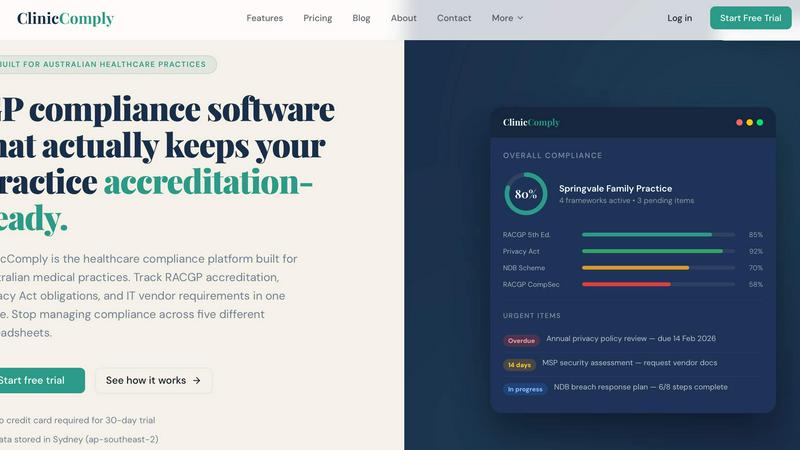
This feature provides a fully mapped digital checklist for the RACGP 5th Edition Standards. Each criterion is broken down into actionable items with clear guidance. Users can upload evidentiary documents—such as policies, registers, and meeting minutes—and link them directly to the specific checklist criteria they satisfy. The module dynamically calculates a live compliance score and enables the one-click generation of a structured, assessor-ready evidence pack, eliminating last-minute scrambling before an accreditation visit.
Integrated IT Vendor Portal
Clinic Comply includes a secure portal functionality to streamline compliance documentation collection from third-party IT vendors and Managed Service Providers (MSPs). Instead of protracted email exchanges, users can generate and send a secure upload link directly to their vendor. Documents, such as Data Processing Agreements or Security Policies, are uploaded by the vendor directly into the platform, where they are automatically catalogued in the practice's evidence library and linked to the relevant compliance criteria.
Multi-Framework Compliance Dashboard
The platform offers a unified dashboard that aggregates compliance status across all active frameworks relevant to an Australian practice. This includes RACGP Standards, Privacy Act, NDB Scheme, state-based health records acts, and more. The dashboard presents an overall compliance percentage, highlights pending or overdue action items, and provides framework-specific progress tracking. This gives practice managers a real-time, holistic view of their compliance posture at a glance.
Automated Deadline and Task Management
Clinic Comply transforms static compliance requirements into an active workflow. The system automatically identifies and surfaces upcoming deadlines for recurring tasks, such as annual policy reviews or staff training. It allows for the assignment of tasks to specific team members, tracks completion status, and sends reminders for overdue items. This proactive feature ensures continuous compliance maintenance and prevents critical items from being overlooked.
TinyFast
100% Local & Private Processing
TinyFast operates entirely on your local machine. All compression and optimization algorithms run natively on your Mac's hardware. This design guarantees that your files, including those under Non-Disclosure Agreements (NDAs) or containing confidential information, never leave your system. There is no upload to external servers, no cloud processing, and therefore zero risk of data interception, storage, or misuse by third parties. Privacy is a fundamental, non-negotiable feature built into the application's core architecture.
Blazing-Fast Batch Compression
The application utilizes highly optimized, native compression engines specifically built for macOS to deliver exceptional speed. It supports batch processing, allowing users to drag and drop entire folders containing multiple files. The software then processes these files sequentially at high speed, shrinking large video files or batches of images in a matter of seconds. This eliminates the waiting time associated with uploading files to an online service, queuing, and then downloading the results, dramatically accelerating asset preparation workflows.
Universal Multi-Format Support
TinyFast is engineered to be a universal compression tool, supporting a comprehensive range of common file types used in digital creation and development. This includes extensive image formats (PNG, JPG, WebP, GIF, SVG, HEIC, BMP, TIFF), video files (MP4, MOV, M4V), documents (PDF, DOCX), source code and data files (JS, CSS, JSON), and audio (MP3). This wide compatibility consolidates multiple specialized online tools into one local, efficient application, simplifying the user's toolkit.
Integrated Resolution Resizing
Beyond pure compression, TinyFast includes functionality for automatic image and video resolution resizing. Users can configure settings to reduce the pixel dimensions of their visual assets during the compression process. This dual-approach optimization—reducing both file size and physical dimensions—is crucial for preparing assets for web use, email attachments, or storage, ensuring they meet specific platform requirements without needing a separate editing application.
Use Cases
Clinic Comply
Preparing for RACGP Accreditation Assessment
A general practice utilizes Clinic Comply to manage its triennial RACGP 5th Edition accreditation cycle. The team works through the pre-built checklist, uploading and linking evidence as they progress. As the assessment date approaches, the practice manager uses the platform to identify any gaps, assign final tasks, and ultimately download a complete, organized digital evidence pack to present to the surveyor, ensuring a smooth and confident assessment process.
Managing Privacy Act and Data Breach Obligations
A medical clinic employs Clinic Comply to maintain adherence to the Privacy Act 1988 and the Notifiable Data Breaches (NDB) Scheme. The platform guides them in maintaining and reviewing their privacy policy, data breach response plan, and staff training records. It provides a clear framework for documenting any data incidents and tracking the mandatory response steps, thereby ensuring legal obligations are met systematically and reducing regulatory risk.
Coordinating Compliance Evidence from IT Vendors
A practice needs to collect security documentation from its external IT provider to satisfy RACGP CompSec and privacy requirements. Instead of manual follow-ups, the practice manager sends a secure upload request via Clinic Comply's Vendor Portal. The MSP uploads the required documents directly, which are then automatically filed against the correct compliance criteria within the practice's evidence library, saving weeks of coordination effort.
Centralizing Compliance for Multi-Location Practices
A healthcare organization operating several clinics uses Clinic Comply to standardize and oversee compliance across all its locations. Each site manages its own evidence and progress within the platform, while head office administrators can use the dashboard to monitor the overall compliance status, identify common issues, and ensure consistent application of policies and procedures group-wide.
TinyFast
Preparing Web and Application Assets
Developers and web designers can efficiently optimize batches of images, icons (SVG), and code files (CSS, JS) for production websites or mobile applications. By compressing these assets locally, they reduce page load times and application bundle sizes without exposing proprietary design files or source code to online services, maintaining both performance and intellectual property security throughout the development cycle.
Securing Confidential Document Transfer
Professionals handling sensitive documents, such as legal contracts (PDF), financial reports, or pre-release product specifications, can use TinyFast to reduce file size for email or secure portal transfer. The guarantee of local-only processing ensures that confidential information remains completely private, complying with data protection regulations and client confidentiality agreements that prohibit the use of cloud-based tools.
Optimizing Creative Project Archives
Video editors, graphic designers, and photographers can compress large project files—such as raw video footage (MOV, MP4), high-resolution image exports, and presentation PDFs—for archiving or creating client review copies. The batch processing capability saves hours over manual online tools, and the local operation protects unreleased creative work from potential leaks associated with online file converters.
Streamlining Email and Messaging Workflows
Any user who needs to send files via email or messaging platforms that impose strict attachment size limits can use TinyFast. Quickly compressing a video from a smartphone (MOV, MP4), a series of screenshots (PNG, JPEG), or a scanned document (PDF) locally ensures the files are sendable without the delay, privacy concerns, and potential quality loss of using a public website for compression.
Overview
About Clinic Comply
Clinic Comply is a specialized healthcare compliance management platform engineered exclusively for Australian medical practices. It functions as a centralized, authoritative system designed to replace the fragmented and error-prone methods of managing compliance, such as disparate spreadsheets, shared drives, and email threads. The platform's core value proposition is to streamline and de-risk the entire compliance lifecycle, ensuring practices remain perpetually prepared for accreditation assessments and regulatory audits. It achieves this by providing a single source of truth where all compliance obligations, evidence documentation, and task progress are consolidated and actively managed.
The software is purpose-built against the specific requirements of Australian healthcare frameworks, including the RACGP 5th Edition Standards for general practice, the Privacy Act 1988 (including the Australian Privacy Principles and Notifiable Data Breaches Scheme), RACGP Computer and Information Security Standards (CompSec), and various state-based health records acts. It is tailored for general practitioners, practice managers, healthcare administrators, and accreditation officers within medical and dental practices. By automating tracking, evidence collation, and vendor coordination, Clinic Comply significantly reduces administrative burden, mitigates compliance risk, and saves valuable time, allowing healthcare providers to refocus their efforts on patient care while maintaining continuous accreditation readiness.
About TinyFast
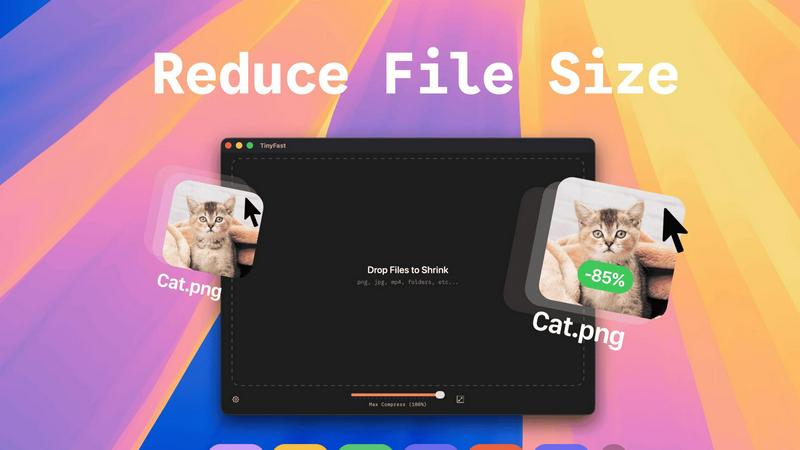
TinyFast is a high-performance, native macOS application engineered for local file compression and optimization. It is a desktop utility that processes a wide array of file formats—including images (PNG, JPEG, WebP, GIF, SVG, HEIC, BMP, TIFF), videos (MP4, MOV, M4V), documents (PDF, DOCX), code files (JS, CSS, JSON), and audio (MP3)—directly on the user's Mac hardware. The core operational principle is a streamlined drag-and-drop interface where users input a file or folder and receive a compressed, optimized output without any network transfer. This architecture ensures complete data privacy and sovereignty, as files never leave the local device, eliminating the security risks associated with uploading sensitive data to third-party cloud servers. Built with optimized native compression engines, the application prioritizes processing speed and efficiency to handle batch operations and large files within seconds. Its primary user base consists of developers, designers, and professional creators who regularly manage digital assets and require a tool that integrates seamlessly into their local workflow without compromising on security, speed, or output quality. The value proposition is a faster, safer, and more reliable alternative to online compression tools, providing instant file size reduction with guaranteed confidentiality.
Frequently Asked Questions
Clinic Comply FAQ
What specific Australian compliance frameworks does Clinic Comply support?
Clinic Comply is pre-configured with over ten Australian healthcare compliance frameworks. These include the RACGP 5th Edition Standards for general practice, the Privacy Act 1988 (APPs), the Notifiable Data Breaches (NDB) Scheme, RACGP Computer and Information Security Standards (CompSec), My Health Record Framework, HDAA Standards for dental practices, AGPAL standards, NDIS Practice Standards, and state-specific legislation like the Victorian Health Records Act and NSW HRIP Act. The platform is updated as standards evolve.
How does the platform handle document storage and security?
All practice data and evidentiary documents within Clinic Comply are stored on secure servers located in Sydney, Australia (within the ap-southeast-2 AWS region). This ensures data residency complies with Australian privacy expectations. The platform employs enterprise-grade security measures for data encryption both in transit and at rest, and access is controlled through secure user authentication and role-based permissions.
Can Clinic Comply generate reports for our accreditation assessor?
Yes, a core functionality of Clinic Comply is its one-click evidence pack generation. The platform allows users to compile and export a structured, organized digital pack containing all documented evidence, neatly linked to the corresponding RACGP criteria or other framework requirements. This eliminates the need for manual collation and provides a professional, easily navigable submission for your assessor.
Is there a limit to the number of users or practice locations?
The provided context does not specify detailed plan limitations on users or locations. The platform is designed to support both single practices and multi-location groups. For specific details on user seats, practice locations, and feature availability across different subscription tiers, it is recommended to consult the Clinic Comply "Pricing" page or contact their sales team directly through their website.
TinyFast FAQ
How does TinyFast ensure my files remain private?
TinyFast is architected as a native macOS application, meaning all processing occurs locally on your Mac's CPU and memory. The software does not contain any networking code to transmit your files to external servers. Your data never leaves your device during the compression process. This local-only approach is the fundamental technical mechanism that guarantees total privacy and security for your sensitive documents and assets.
What file formats does TinyFast support for compression?
TinyFast supports a comprehensive suite of common file formats. For images, it processes PNG, JPG (JPEG), TIFF, HEIC, WebP, GIF, BMP, and SVG files. For video, it supports MP4, MOV, and M4V containers. Document support includes PDF and DOCX files. It also handles code and data files like JS, CSS, and JSON, as well as MP3 audio files. This makes it a versatile, all-in-one local compression utility.
Can I compress multiple files or entire folders at once?
Yes, TinyFast features robust batch processing capabilities. You can drag and drop a folder containing multiple files, or select multiple files simultaneously, directly into the application interface. The optimized native engines will process the entire batch sequentially, outputting compressed versions of all supported files within the folder. This is designed to save significant time compared to processing files individually.
What is the difference between the Free and Paid plans?
The Free plan allows users to compress up to five files per day with access to all core compression features, providing a way to test the application's performance and workflow integration. The paid Lifetime Plan is a one-time purchase that unlocks unlimited compressions, includes all current and future features, guarantees lifetime updates, and directly supports ongoing development. A monthly subscription is also available after a 3-day trial.
Alternatives
Clinic Comply Alternatives
Clinic Comply is a specialized productivity and management platform designed to streamline healthcare compliance for Australian medical practices. It operates within the category of practice management software, focusing specifically on the centralization and tracking of accreditation standards, privacy obligations, and vendor specifications. Users may investigate alternatives to Clinic Comply for several reasons, including budgetary constraints, specific feature requirements not met by the platform, or a need for integration with existing practice management systems. The search often stems from a desire to compare functionality, pricing models, and user experience within the niche healthcare compliance software market. When evaluating an alternative solution, key considerations should include its specific applicability to Australian healthcare frameworks like RACGP accreditation, the depth of its compliance tracking capabilities, data security protocols, and the overall efficiency gains it offers for administrative staff. The ideal platform should demonstrably reduce manual effort and consolidate disparate compliance tasks into a single, auditable system.
TinyFast Alternatives
TinyFast is a specialized macOS application for local file compression, falling into the category of desktop optimization and productivity tools. It processes images, videos, and PDFs directly on a user's Mac, ensuring privacy and speed through its native, offline architecture. Users may seek alternatives for various reasons, including budget constraints, a need for cross-platform compatibility beyond macOS, or requirements for different feature sets such as integration with cloud storage, support for additional file formats, or more granular control over compression parameters. The search often stems from a need to balance core functionality with specific workflow or technical demands. When evaluating an alternative, key considerations should include the processing model (local versus cloud-based), supported file formats, batch processing capabilities, output quality controls, and overall integration into your existing digital asset workflow. Prioritizing these specifications ensures the selected tool effectively addresses your primary use case for file size reduction.