

AI Photo Online
AI Photo Online provides a comprehensive suite of AI-powered tools for effortless photo enhancement and background.
tool Details
Explore More
Alternatives
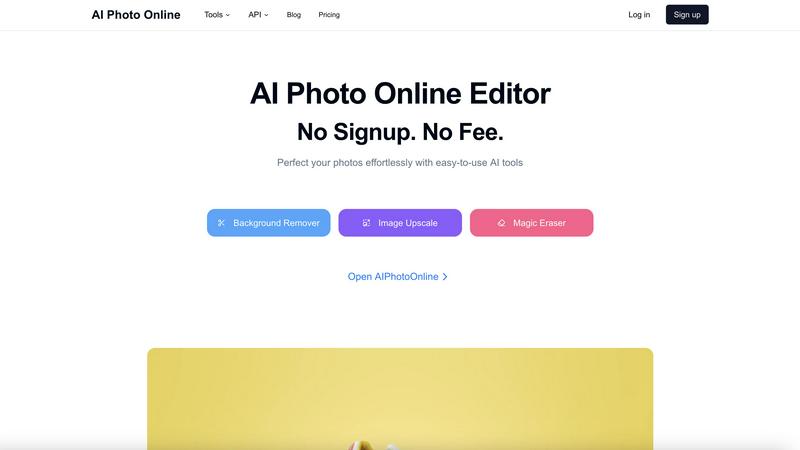
About AI Photo Online
AI Photo Online is a comprehensive, cloud-based platform that functions as a virtual photo studio, providing a suite of specialized artificial intelligence tools for automated photo editing and enhancement. It is engineered to enable complex image manipulations without the need for professional desktop software like Adobe Photoshop or extensive technical expertise. The platform serves a broad user base, including e-commerce entrepreneurs, digital marketers, social media managers, graphic designers, and individual content creators who require efficient production of high-quality visual assets. Its core technical value proposition lies in its browser-accessible architecture, offering granular AI editing capabilities with no mandatory sign-up or immediate fees for basic access, thereby removing traditional barriers to professional-grade editing. For scalable business integration, AI Photo Online provides a dedicated API, allowing developers to embed specific AI functionalities such as background removal and image upscaling directly into custom applications, workflows, or e-commerce platforms for automated, high-volume processing.
Features
Background Remover
This feature utilizes advanced AI segmentation algorithms to automatically and precisely isolate the primary subject of an image from its background. It detects complex edges, such as hair and transparent materials, to produce clean cutouts with a transparent background or allow for seamless background replacement. The tool is designed for batch processing capabilities, enabling users to edit multiple product photos simultaneously, which is critical for e-commerce catalog management.
Image Upscaler
The AI-powered Image Upscaler employs deep learning models to increase the resolution of low-quality images without a significant loss of detail or the introduction of excessive blur. It intelligently reconstructs pixel data to enhance clarity, sharpness, and overall visual fidelity, making it suitable for enlarging product images for high-definition displays or restoring old photographs. This feature supports various upscaling ratios to meet different output requirements.
Magic Eraser
The Magic Eraser tool provides precise object removal capabilities, allowing users to select and erase unwanted elements from any photograph. The underlying AI inpainting technology analyzes the surrounding pixels and texture to seamlessly fill the removed area with contextually appropriate content, maintaining the visual integrity of the background. This is essential for cleaning up product shots, removing photobombers, or eliminating logos and watermarks.
AI Mockup Generator
This feature enables the creation of photorealistic product mockups by intelligently wrapping user-uploaded designs onto template images. The AI accurately handles lighting, shadows, perspective, and material textures to simulate how a product would appear in a real-world setting, such as a t-shirt on a model or a logo on a storefront. It eliminates the need for physical samples and complex 3D rendering software for rapid prototyping and marketing.
Use Cases
E-commerce Product Photography
Online retailers and marketplace sellers can use the platform to rapidly create uniform, professional product images. By utilizing the Background Remover to establish a consistent white background, the Image Upscaler to enhance photo quality, and the AI Mockup Generator for lifestyle shots, businesses can scale their visual content production without the logistical costs and time associated with traditional photo studios.
Social Media Content Creation
Digital marketers and social media managers leverage the suite of tools to produce engaging, high-quality graphics quickly. The Magic Eraser cleans up images, the Background Remover allows for the creation of branded visuals with custom backgrounds, and access to curated templates facilitates the rapid assembly of posts and stories that are optimized for conversion and audience engagement across various platforms.
Graphic Design and Prototyping
Graphic designers and entrepreneurs use the platform for rapid design iteration and client presentations. The ability to remove backgrounds, erase elements, and generate realistic mockups allows for quick visualization of concepts for logos, packaging, and merchandise. This streamlines the feedback loop and enables the presentation of polished concepts without intermediate, time-consuming manual editing steps.
Automated Business Workflow Integration
Developers and IT departments integrate specific AI Photo Online tools via its RESTful API into custom business applications. This allows for the automation of image processing tasks at scale, such as automatically removing backgrounds from user-uploaded images on a marketplace, upscaling profile pictures on a social platform, or generating mockups within a custom design tool, thereby improving operational efficiency.
Frequently Asked Questions
What is AI Photo Online and how does it work?
AI Photo Online is a cloud-based platform that provides a suite of AI-powered photo editing tools accessible via a web browser. It works by processing uploaded images through specialized neural network models hosted on its servers. For example, its Background Remover uses computer vision algorithms to segment the foreground subject from the background. Users simply upload an image, select the desired tool, and the AI processes the task, returning the edited image for download, all within the browser interface without requiring software installation.
Is there a free plan or trial available?
Yes, AI Photo Online operates on a freemium model. Basic access to its core tools, including the Background Remover, Magic Eraser, and Image Upscaler, is available directly through the website with no mandatory account sign-up or immediate payment required. This allows users to test fundamental functionalities and process a limited number of images. For high-volume usage, advanced features, API access, and batch processing, the platform offers paid subscription plans with higher limits and additional capabilities.
Can I use AI Photo Online for commercial purposes?
Yes, the images processed and generated using AI Photo Online can typically be used for commercial purposes, including in e-commerce, advertising, and marketing materials. However, users must ensure they hold the necessary rights or licenses to the original images they upload for editing. It is advisable to review the platform's specific Terms of Service for detailed licensing information, usage rights, and any restrictions related to the commercial use of output images, especially when using stock photo integrations or template assets.
What is the AI Photo Online API and who is it for?
The AI Photo Online API is a developer-facing interface that allows for the programmatic integration of its AI tools into third-party applications, websites, or automated workflows. It is designed for businesses, developers, and IT teams that require scalable, automated image processing. For instance, an e-commerce platform can use the Background Remover API to automatically clean product images as sellers upload them, or a design app can integrate the Upscaler API to enhance user-generated content. Access typically requires a paid plan and provides dedicated endpoints, documentation, and usage credits.
Similar to AI Photo Online
Sprite Sheet Maker
A free browser-based toolkit for creating, cutting, converting, and previewing sprite sheet animations.
FaceCoda
Free AI attractiveness test and face analysis with private, on-device photo processing.

Try This Skill
One-click AI photo stylization for e-commerce & portraits

Magic Eraser
AI-powered photo editor for removing objects, replacing backgrounds, enhancing images, and creating visuals.

AI Image Editor
Free AI image editor that edits, retouches, and transforms photos with natural-language text prompts.

GPT Image 2 API
Generate and edit production-ready images with GPT Image 2 API, detailed prompts, reference images, clear text, and developer-friendly workflows.
AI Image combinder
Create professional product images with AI. Upload your product photo and transform it into stunning marketing visuals, lifestyle scenes, and e-commer
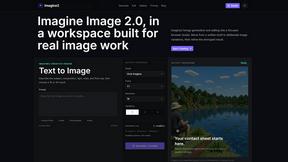
Imagine2
Private browser-based AI image generation and editing with text-to-image, targeted edits, and multi-image references.