

CustomTattoo AI
CustomTattoo AI generates tattoo designs from your description, previews them on your uploaded skin photo, and outputs artist-ready directions for.
tool Details
Explore More
Alternatives
About CustomTattoo AI
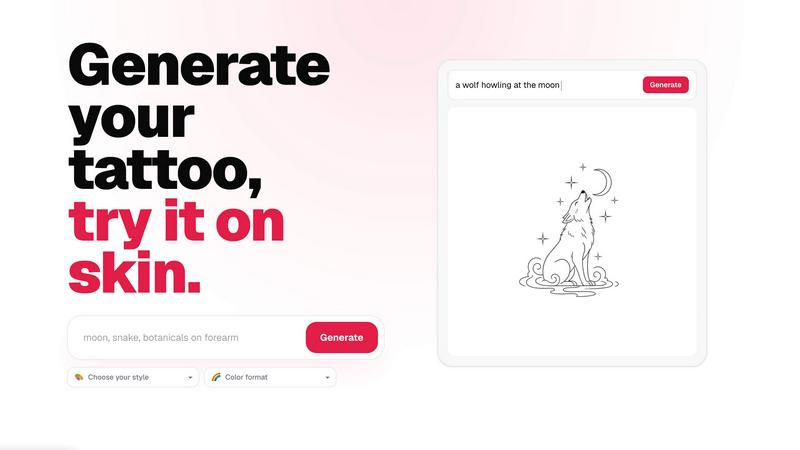
CustomTattoo AI is a specialized artificial intelligence platform designed to generate custom tattoo concepts and enable users to preview those designs on their own skin before committing to a permanent tattoo. The platform serves as a comprehensive pre-booking tool for individuals planning their next tattoo, providing a structured workflow from idea conception to artist-ready reference material. The product is built around a credit-based system, where new users receive three free credits upon signup to test the generator and preview their first tattoo idea without any upfront payment or credit card requirement. The core functionality allows users to describe their tattoo idea using natural language, specifying the subject, placement, and mood, then selecting from a range of predefined tattoo styles and color formats such as black and grey. The platform generates multiple design variations, which users can save to a personal library for comparison. The critical differentiator is the on-skin preview feature, which overlays the generated design onto a user-uploaded photo of their own body, allowing them to visualize placement, scale, and aesthetic fit. This capability is particularly valuable for first-time tattoo clients who lack experience in visualizing designs, tattoo enthusiasts exploring multiple style directions, and anyone seeking greater confidence before making a permanent decision. The platform also provides a curated gallery of tattoo ideas and styles, a tattoo placement guide, and tools for comparing different AI tattoo generators. By offering a risk-free trial with three credits, CustomTattoo AI lowers the barrier to entry for users who are curious but hesitant about using AI for tattoo design. The platform emphasizes user control over the creative process, ensuring that the final design direction is clear, refined, and actionable for professional tattoo artists. The product is accessible via web browser with a responsive interface that guides users through a four-step workflow: describing the idea, selecting style and color, generating designs, and previewing on skin. CustomTattoo AI positions itself as a practical, no-subscription tool for tattoo planning, with a focus on clarity, customization, and confidence-building before the studio visit.
Features
AI-Powered Tattoo Generator
The core generation engine accepts natural language descriptions of tattoo ideas, allowing users to specify subject matter, placement, and mood. Users input a text prompt such as "gothic dragon with wide wings" and the AI interprets the request to produce multiple unique design concepts. The generator supports a wide range of artistic styles, including but not limited to Gothic blackwork, traditional, neo-traditional, watercolor, geometric, and minimalist. Users can further refine output by selecting color format options such as black and grey, full color, or monochrome. The system generates high-resolution concept art suitable for direct use as artist references.
On-Skin Preview Tool
This feature allows users to upload a photograph of their own body and overlay generated tattoo designs onto the specific placement area. The preview tool uses computer vision to map the design onto the body contour, accounting for curvature and perspective. Users can adjust the size, rotation, and position of the tattoo within the preview to simulate different placement options. This capability provides a realistic visual representation of how the tattoo will look on the user's actual skin, helping to assess scale, proportion, and aesthetic harmony before any permanent application.
Personal Design Library
Users can save their generated tattoo concepts to a private, account-based library for later review and comparison. The library organizes designs by creation date and allows users to tag favorites, delete unwanted concepts, and export high-resolution images. This feature supports iterative exploration, enabling users to generate multiple style variations of the same idea and compare them side by side. The library persists across sessions, providing a centralized repository for all design exploration work leading up to the booking decision.
Artist-Ready Reference Output
Each generated design is formatted to be directly usable as a reference for professional tattoo artists. The output includes the design itself, the original text prompt, the selected style and color format, and any placement notes derived from the on-skin preview. This structured reference package reduces ambiguity in communication between the client and the artist, ensuring the artist understands the client's visual direction, preferred style, and intended placement. The platform explicitly states that users retain full control of the idea and the final decision.
Use Cases
First-Time Tattoo Client Exploration
Individuals who have never gotten a tattoo often struggle to articulate their vision or visualize how a design will look on their body. CustomTattoo AI provides a low-risk environment where first-time clients can experiment with different ideas, styles, and placements without pressure. The three free credits allow them to test the generator and preview tool before any financial commitment. By generating multiple concepts and previewing them on their own skin, first-time clients build confidence and arrive at their artist consultation with a clear, well-researched direction.
Tattoo Enthusiast Style Comparison
Experienced tattoo collectors frequently explore multiple style directions for a single concept before deciding on the final approach. CustomTattoo AI enables these users to generate the same idea across different artistic styles such as traditional, neo-traditional, watercolor, geometric, or blackwork. The personal library feature allows side-by-side comparison of these variations, and the on-skin preview tool helps assess how each style interacts with the body's natural curves and existing tattoos. This systematic comparison leads to more informed artistic choices.
Placement and Scale Testing
Choosing the correct placement and size for a tattoo is critical for long-term satisfaction. Users can upload photos of different body parts and preview the same design on arms, legs, chest, back, or other areas. The tool allows users to adjust the scale of the design within the preview to test how a small, medium, or large version fits the chosen placement. This use case is particularly valuable for designs that wrap around limbs or follow muscle contours, where visualizing the final result is otherwise difficult.
Artist Consultation Preparation
Professional tattoo artists benefit when clients arrive with clear, specific references rather than vague descriptions. CustomTattoo AI allows users to compile a complete reference package including the generated design, style specification, color format, and placement preview. The client can share this package with their chosen artist via export or screenshot. This preparation reduces back-and-forth communication, minimizes misinterpretation, and speeds up the consultation process. The artist receives actionable visual direction that respects their artistic expertise while clearly communicating the client's vision.
Frequently Asked Questions
Is CustomTattoo AI free to try?
Yes, CustomTattoo AI offers a free trial that includes three credits upon signup. No credit card is required to create an account and claim these credits. Each credit can be used to generate a tattoo design and preview it on skin. This allows new users to test the generator, explore the on-skin preview tool, and evaluate the platform's output quality before deciding to purchase additional credits. The free trial is designed to give users a risk-free introduction to the product's capabilities.
How does the on-skin preview work?
The on-skin preview feature requires users to upload a clear photograph of the body area where they want the tattoo placed. The platform uses image processing to map the generated design onto the uploaded photo, adjusting for body curvature and perspective. Users can then manually adjust the design's size, rotation, and position within the preview area. The result is a realistic simulation that shows how the tattoo would appear on the user's actual skin, helping to assess visual fit before any permanent application.
Will there be hidden subscriptions?
No, CustomTattoo AI operates on a straightforward credit-based model without recurring subscriptions. Users purchase credits as needed, and there are no automatic renewals or hidden fees. The platform explicitly states that users keep control of the idea, the preview, and the final decision. Pricing information is transparently displayed, and users can stop using the platform at any time without penalty. The three free credits at signup provide a clear, no-obligation starting point.
Can I take the design to my tattoo artist?
Yes, generated designs are formatted to serve as artist-ready references. Each output includes the design itself along with the original text prompt, selected style, and color format. Users can export the design as a high-resolution image and share it directly with their tattoo artist. The platform emphasizes that the final design decision remains with the user and their artist. The generated concepts are intended to clarify the visual direction, not to replace the artist's professional input and customization.
Similar to CustomTattoo AI
Cursive Text Generator
Cursive Text Generator is a free browser-based tool that converts regular text into beautiful cursive and stylish Unicode fonts. Users can instantly p
Presentation Intelligence
AI-native presentation and visual content platform that turns prompts, documents, images, videos, and data into polished, shareable decks.

Try This Skill
One-click AI photo stylization for e-commerce & portraits

Magic Eraser
AI-powered photo editor for removing objects, replacing backgrounds, enhancing images, and creating visuals.

Seedance 2.5 Free
Create cinematic AI videos from text or images with Seedance 2.5 Free.

