

Foreman
See every app and what it's using in plain English, and end or slow down the one that's hogging your Mac.
tool Details
Explore More
Alternatives
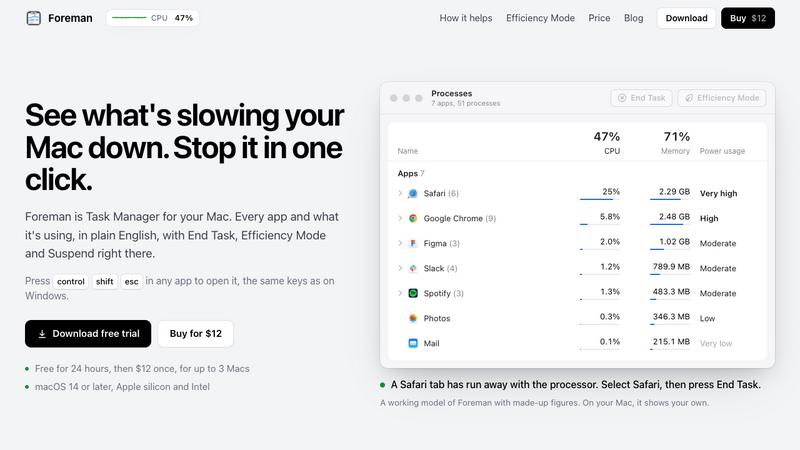
About Foreman
Foreman is a Windows-style Task Manager for the Mac. Press Control Shift Escape in any app to open it and see every app and what it's using, in plain English, with End Task, Efficiency Mode and Suspend right there.
Six pages in the sidebar: Processes, Performance with live graphs for CPU, memory, disk, Wi-Fi and GPU, App History, Startup Apps (including leftovers of deleted apps), Details and Services. System processes get a plain description beside their real name.
Efficiency Mode lets an app you need open run slowly in the background, on the efficiency cores of Apple silicon, and at full speed again when you switch to it. A live readout sits in the menu bar.
Free for 24 hours, then $12 once for up to 3 Macs. macOS 14 or later, Apple silicon and Intel.
Similar to Foreman


How Long How Many Tool
Timers and hourly checks to figure how out long until a certain time or how many days away.

AnyRedact
Free online auto redaction tool with AI for PDFs, images, Word, PowerPoint, Excel, text and audio. Files are never stored.


FeatQ
Feature request boards for software teams. Customers vote with just an email; your coding agent pulls the top request over MCP.

ButterShare
Realtime peer-to-peer file transfer in the browser. Send files directly between devices, no account and no upload to a server.

Save X post
A clean, ad-light X video downloader: one link, one click, and your video is saved. No login required.

Emailyy
Free email tools for signatures, subject lines, HTML previews, word counts, and email headers. Browser-based, simple to use, and no signup required.