

HeyVid
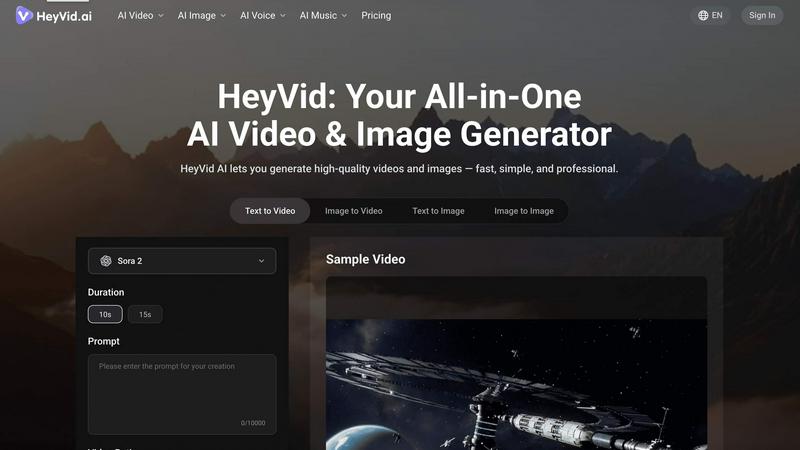
HeyVid is an all-in-one AI tool that rapidly generates high-quality videos and images from text or images for professional creators.
tool Details
Explore More
Alternatives
About HeyVid
HeyVid is a comprehensive AI-powered video and image generator that caters to the needs of content creators, marketers, educators, and businesses alike. With its advanced technology, HeyVid enables users to quickly and effortlessly produce high-quality videos and images tailored to their specific requirements. The platform supports various creative processes including text-to-video, image-to-video, text-to-image, and image-to-image transformations, ensuring a versatile solution for various creative demands. Its intuitive interface allows both novices and experienced professionals to navigate with ease. HeyVid's main value proposition lies in its ability to streamline the entire content creation workflow, from ideation to production, thereby saving users precious time while maintaining high standards of quality.
Features
Text to Video
This feature allows users to transform written content into engaging videos effortlessly. By inputting a script or text prompt, users can generate dynamic video content that includes animations, visuals, and voiceovers, making it ideal for storytelling and presentations.
Image to Video
The image-to-video functionality enables users to animate static images, bringing them to life through motion graphics and transitions. This feature is perfect for creating promotional content, social media posts, or any visual storytelling that requires enhanced engagement.
AI Image Refiner & Stylizer
This feature allows users to refine and stylize images using advanced AI algorithms. Users can enhance their visuals by adjusting parameters such as color, contrast, and style, ensuring that the final output aligns with their creative vision and branding requirements.
One-Click AI Video Maker
Designed for efficiency, this feature empowers users to generate videos with just a click. By selecting an AI model and providing a prompt, the platform automatically produces professional-quality videos, simplifying the content creation process for users with varying skill levels.
Use Cases
Pitch Videos
Entrepreneurs can use HeyVid to create compelling pitch videos that effectively showcase their business ideas. The platform allows users to customize visuals and narratives, ensuring that the final product resonates with potential investors and stakeholders.
Social Media Content
Marketers can leverage HeyVid to produce eye-catching videos and images for social media campaigns. With options like short-form videos and thumbnails, users can enhance their online presence and engagement rates significantly.
Educational Tutorials
Educators can utilize HeyVid to develop informative video tutorials and presentations. The platform's easy-to-use features enable the creation of engaging educational content that can be shared with students or used in online courses.
Corporate Communication
Businesses can harness HeyVid to generate professional corporate videos for internal communications, training materials, and client presentations. The platform ensures that all communication is visually appealing and effectively conveys important information.
Frequently Asked Questions
What types of content can I create with HeyVid?
HeyVid allows users to create a variety of content including videos from text and images, as well as images from text and other images, catering to diverse creative needs.
Is HeyVid suitable for beginners?
Yes, HeyVid is designed with an intuitive interface that caters to users of all skill levels, making it accessible for beginners while still offering advanced features for seasoned professionals.
Can I customize the videos generated by HeyVid?
Absolutely. Users can customize aspects such as text, visuals, audio, and overall style, ensuring that each video aligns with their specific brand identity and messaging.
What AI models are available on HeyVid?
HeyVid provides access to leading AI models for both video and image generation, including Veo 3.1, Sora 2, Midjourney, and Dall-E, among others, offering a wide range of creative options for users.
Similar to HeyVid

AI Email Filter
AI Email Filter sorts incoming mail into folders using plain-language prompts you write. Works with any IMAP mailbox; bring your own LLM if you want.

Egmatic
No-code 2D game editor: visual node logic, drag-and-drop scenes, live preview. Exports to Windows, macOS, Linux, Android, iOS, Web.

Kody Tools
Free collection of online developer utilities, code formatters, and digital converters designed to streamline your daily workflow.

Tally Counter
Online tally counter for tracking attendance, workouts, inventory, visitors, sports scores, habits, and everyday counting tasks.

Forms Plugin
The #1 Native Form Builder Plugin for Framer - No Code, No Embeds, No External Platforms.

Product Launch Checklist
A free launch checklist for SaaS, apps, AI tools and more. Every step says why it matters and when you can skip it.

HomeAnswerBook
Practical, independent guides to home repairs, maintenance, costs, troubleshooting, and everyday fixes.
BlazePDF
Highlight faster. Study in flow with custom shortcuts and a workflow built around you. Print smarter, or turn any page into a tiled poster.