

HuntingPad
HuntingPad simplifies your job search by capturing listings, matching resumes, and providing AI insights—all from your.
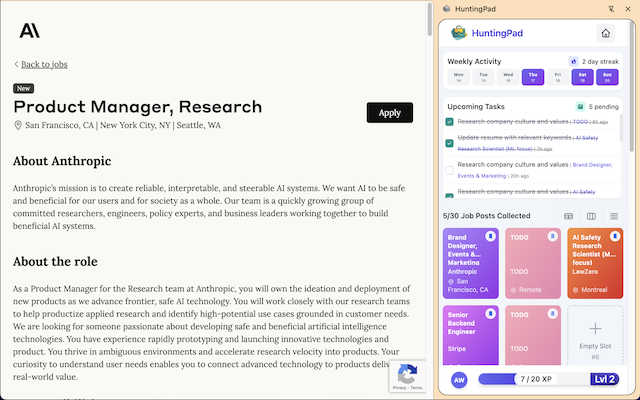
About HuntingPad
HuntingPad is a specialized Chrome browser extension designed to streamline and enhance the contemporary job search experience for ambitious professionals. This innovative tool addresses the common challenges faced by job seekers, such as managing a high volume of applications and reducing administrative burdens. By transforming disorganized application tracking into an efficient, data-driven process, HuntingPad ensures that users can focus on strategic job searching rather than on tedious administrative tasks. With its seamless integration into the user's existing workflow, the extension allows for a smooth experience without the need for switching between various applications, spreadsheets, or browser tabs. Its key value proposition includes automating manual data entry, providing AI-driven insights, and ensuring that sensitive job search data remains securely stored on the user's device. Tailored for developers, managers, and senior professionals, HuntingPad effectively replaces outdated methods like spreadsheets and bookmarks, thus maximizing organizational effort and creating a competitive edge in the job market.
Features
One-Click Job Post Capture
HuntingPad allows users to save job postings from any website with a single click. This feature eliminates the need for manual entry and offers a streamlined process for tracking potential opportunities, making it easy to focus on applications rather than administrative overhead.
Smart Reminders
With built-in smart reminders, HuntingPad ensures users never miss important deadlines. This feature sends notifications for application due dates and follow-up reminders, allowing job seekers to stay organized and proactive in their job search.
AI-Powered Insights
The extension provides AI-enhanced insights that guide users on when to follow up after submitting applications. By analyzing patterns and trends, HuntingPad helps users make informed decisions, increasing their chances of securing interviews and job offers.
Resume Customization Integration
HuntingPad automatically matches job posts with the user's resume, suggesting personalized tweaks and adjustments for each application. This feature enhances the likelihood of standing out among the competition by ensuring that each submission is tailored to the specific role.
Use Cases
Efficient Application Tracking
Professionals managing 50 to 150+ job applications can use HuntingPad to keep all relevant information organized. The one-click capture feature allows users to focus on finding the right opportunities while keeping track of their applications effortlessly.
Enhanced Networking Opportunities
Job seekers can leverage AI insights to determine the best times to follow up with recruiters or hiring managers. This feature enables users to maintain meaningful connections, potentially leading to more interview opportunities.
Custom Resume Management
HuntingPad aids users in customizing their resumes for each application. By suggesting specific enhancements based on job descriptions, it ensures that applicants present themselves in the best light, tailored to each potential employer's needs.
Time Management Optimization
With smart reminders and an organized interface, HuntingPad significantly reduces the time spent on administrative tasks. This allows users to dedicate more time to networking, interview preparation, and enhancing their professional skills.
Frequently Asked Questions
How does HuntingPad ensure my data privacy?
HuntingPad maintains all sensitive job search data locally on the user's device. This approach guarantees maximum privacy and security, eliminating concerns about storing personal data on external servers.
Is there a learning curve associated with using HuntingPad?
Not at all. HuntingPad is designed to integrate seamlessly into your existing workflow as a Chrome extension. Users can set it up in just 30 seconds without the need for extensive training or learning new applications.
Can I use HuntingPad on various job search websites?
Yes, HuntingPad is versatile and can capture job postings from virtually any job search website. This flexibility enables users to streamline their job search across multiple platforms without hassle.
Is HuntingPad free to use?
Yes, HuntingPad is available for free with no credit card required for installation. Users can start organizing their job search immediately without any financial commitment, making it accessible for all job seekers.
Similar to HuntingPad
AI Email Filter
AI Email Filter sorts incoming mail into folders using plain-language prompts you write. Works with any IMAP mailbox; bring your own LLM if you want.
Egmatic
No-code 2D game editor: visual node logic, drag-and-drop scenes, live preview. Exports to Windows, macOS, Linux, Android, iOS, Web.

Kody Tools
Free collection of online developer utilities, code formatters, and digital converters designed to streamline your daily workflow.

Tally Counter
Online tally counter for tracking attendance, workouts, inventory, visitors, sports scores, habits, and everyday counting tasks.
Forms Plugin
The #1 Native Form Builder Plugin for Framer - No Code, No Embeds, No External Platforms.

Product Launch Checklist
A free launch checklist for SaaS, apps, AI tools and more. Every step says why it matters and when you can skip it.

HomeAnswerBook
Practical, independent guides to home repairs, maintenance, costs, troubleshooting, and everyday fixes.
BlazePDF
Highlight faster. Study in flow with custom shortcuts and a workflow built around you. Print smarter, or turn any page into a tiled poster.