

JustPDF
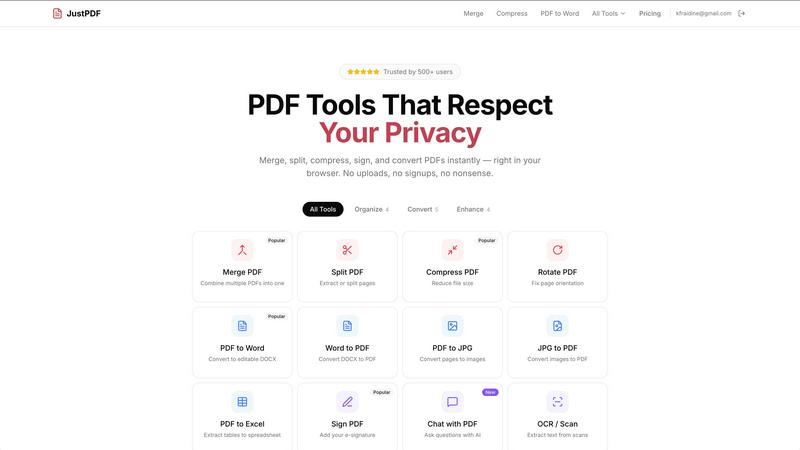
JustPDF is a privacy-focused PDF toolkit with 17 free tools for merging, compressing, converting, and signing files directly in your browser.
tool Details
Explore More
Alternatives
About JustPDF
JustPDF is a comprehensive, browser-based PDF tool suite that provides users with 17 robust features designed for seamless PDF management. This platform stands out from competitors like Smallpdf and iLovePDF by ensuring that all processing occurs locally on the user's device, leveraging the power of JavaScript and WebAssembly. This means files never leave the browser, enhancing privacy and security, which is particularly crucial for sensitive documents. JustPDF is suited for various users, including students, educators, and professionals who require reliable PDF manipulation without the hassle of uploads or registrations. The main value proposition lies in its fast, free, and private service, with a user-friendly interface that allows for operations such as merging, splitting, converting, and compressing PDFs. With a free tier offering three operations per day, users can easily explore the platform's capabilities before opting for the Pro plan, which provides unlimited access at an affordable rate of $4 per month.
Features
Merge PDF
This feature allows users to combine multiple PDF documents into a single file effortlessly. By simply dragging and dropping files, users can create a cohesive document that is easier to manage and share. This process is quick and efficient, making it ideal for consolidating reports, presentations, and other multi-page documents.
Split PDF
With the Split PDF feature, users can extract specific pages or sections from a larger document. This is particularly useful for individuals who only need to share or review a portion of a PDF without distributing the entire file. The splitting process is straightforward, enhancing user experience and document management efficiency.
Compress PDF
The Compress PDF tool enables users to reduce the file size of their PDF documents without sacrificing quality. This feature is essential for optimizing files for email attachments or online uploads, where size constraints may apply. The compression occurs instantly in the browser, ensuring a swift and convenient user experience.
Chat with PDF (AI)
This innovative feature allows users to interact with their PDF documents through AI-driven chat. Users can ask questions about the content of their PDFs, facilitating a deeper understanding and enhancing productivity. This capability is especially beneficial for students and professionals who need to extract specific information quickly.
Use Cases
Educational Use
Students and educators can utilize JustPDF for a variety of academic purposes. Whether it's merging lecture notes, splitting chapters for easier study, or converting PDFs to editable formats for assignments, JustPDF streamlines the process, making academic tasks more manageable.
Professional Documentation
Professionals can leverage JustPDF to handle business documents efficiently. Merging reports, compressing files for easy emailing, and signing contracts electronically are just a few examples of how this tool can enhance workplace productivity and collaboration.
Personal Document Management
Individuals managing personal documents can benefit from JustPDF's features to organize important files. Whether it's compressing family photos into a PDF album or converting financial statements into editable formats, the tool provides versatile options for personal use.
Creative Projects
Creative professionals can use JustPDF for various design projects, such as compiling portfolios or converting image files into PDFs. The ability to convert JPG and HEIC images to PDF makes it easy to present visual content in a professional format.
Frequently Asked Questions
Is JustPDF free to use?
Yes, JustPDF offers a free tier that allows users to perform three operations per day without signing up or uploading files to servers. This is an excellent way to explore the tool's capabilities.
How does JustPDF ensure my files are secure?
JustPDF processes all files locally within the user's browser, meaning that files never leave the device. This approach guarantees a high level of privacy and security for sensitive documents.
What types of files can I convert using JustPDF?
JustPDF supports various file conversions, including PDF to Word, Word to PDF, PDF to JPG, JPG to PDF, PDF to Excel, WebP to PDF, and HEIC to PDF. This versatility makes it easy to work with different document formats.
What is the cost of the Pro plan?
The Pro plan starts at $4 per month, providing users with unlimited access to all features. This plan is ideal for those needing to perform extensive PDF operations regularly.
Similar to JustPDF

Panzoe
Panzoe is an all-in-one AI platform for personal productivity, business automation, AI assistants, content creation, and custom AI solutions.
FontGenerate
Stylish Font Generator: 150+ Stylish Fonts to Copy & Paste (Free)
Stefan Supply
Ready-to-use Notion templates for personal planning and small business workflows, with realistic example data.
AI Email Filter
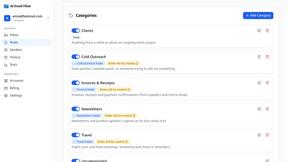
AI Email Filter sorts incoming mail into folders using plain-language prompts you write. Works with any IMAP mailbox; bring your own LLM if you want.
Egmatic
No-code 2D game editor: visual node logic, drag-and-drop scenes, live preview. Exports to Windows, macOS, Linux, Android, iOS, Web.

Kody Tools
Free collection of online developer utilities, code formatters, and digital converters designed to streamline your daily workflow.

Tally Counter
Online tally counter for tracking attendance, workouts, inventory, visitors, sports scores, habits, and everyday counting tasks.
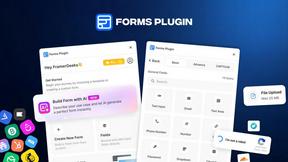
Forms Plugin
The #1 Native Form Builder Plugin for Framer - No Code, No Embeds, No External Platforms.