

MacBrightness
MacBrightness unlocks your Mac's hidden HDR range to deliver sustained 1,600 nits of brightness for every app using your existing keys.
tool Details
Explore More
Alternatives

About MacBrightness
MacBrightness is a system utility application designed to unlock the full brightness potential of MacBook Pro displays, specifically those equipped with mini-LED panels. The application addresses a fundamental limitation imposed by macOS, which caps the standard brightness range at approximately 50 percent of what the display hardware can actually sustain. MacBrightness exposes the hidden HDR brightness range, allowing users to achieve up to 1,600 nits of sustained brightness system-wide, across every application, not just during HDR video playback. The product targets professionals and users who frequently work in bright environments such as direct sunlight, patios, airplanes, or near windows. Its primary value proposition is the ability to double screen brightness using the existing keyboard brightness keys, requiring no new shortcuts, menu bar hunting, or complex configuration. The application operates with negligible CPU overhead and does not rely on low-level system hacks, instead leveraging the HDR brightness range that the display already supports. MacBrightness is compatible with MacBook Pro 14-inch and 16-inch models featuring M-series Pro or Max chips, as well as the Pro Display XDR. It requires macOS 13 or later and offers a free trial in Splitscreen Mode, where half the screen demonstrates the full brightness difference. A one-time purchase unlocks the full-screen capability with no subscription fees.
Features
System-Wide Brightness Extension Beyond macOS Limits
MacBrightness unlocks the full brightness range of supported displays, enabling up to 1,600 nits of sustained brightness system-wide. This is approximately twice the brightness that macOS normally allows for standard content. The feature works across all applications, including web browsers, document editors, design tools, and code editors, not just HDR video content. The extended brightness range is achieved by accessing the HDR luminance capabilities that the display hardware already possesses but that macOS reserves exclusively for HDR media playback. This means every pixel on the screen benefits from the full panel brightness, making the display readable in direct sunlight and other high-ambient-light conditions.
Native Brightness Key Integration
MacBrightness integrates seamlessly with the existing brightness keys on the MacBook Pro keyboard, extending their range rather than requiring new shortcuts or control interfaces. Users simply press the brightness up key past the previous macOS limit, and the display continues to increase in brightness across the newly unlocked range. This intuitive approach eliminates the learning curve associated with third-party brightness tools, as there are no menu bar icons to hunt for, no slider adjustments to make, and no configuration panels to navigate. The extension is transparent to the user, making the extra brightness feel like a natural expansion of the built-in control.
Splitscreen Mode for Free Trial and Side-by-Side Comparison
The application opens in Splitscreen Mode by default, where one half of the display operates at full brightness while the other half remains at the standard macOS brightness level. This configuration allows users to see the exact difference the application makes in real time, on their own screen, under their current lighting conditions. Splitscreen Mode is permanently free, requiring no payment or account creation, and provides an honest demonstration of the product's capabilities before any purchase decision. The side-by-side comparison is particularly effective for understanding the impact of the extra brightness range, as it eliminates guesswork about whether the improvement is noticeable.
Minimal System Resource Usage
MacBrightness operates with negligible CPU overhead, consuming less than one percent of processing resources during normal use. The application does not use low-level system hacks, kernel extensions, or any methods that could compromise system stability or security. Instead, it directly accesses the display's HDR brightness capabilities through standard macOS display APIs, making it a lightweight and reliable solution. The minimal resource footprint ensures that the application does not impact battery life, system performance, or the operation of other applications, even during extended use in demanding workflows such as video editing, software development, or graphic design.
Use Cases
Working Outdoors in Direct Sunlight
Professionals who need to work from patios, terraces, park benches, or outdoor café tables frequently encounter screens that become unreadable mirrors in sunlight. MacBrightness addresses this by providing the full 1,600-nit brightness range, which is sufficient to overcome ambient light and maintain readability. This use case is particularly relevant for remote workers, digital nomads, and travelers who prefer outdoor workspaces. The system-wide nature of the brightness extension ensures that every application, from email clients to code editors, remains visible and usable, eliminating the need to hunt for shade or adjust work locations based on screen visibility.
Productivity in Bright Indoor Environments
Large windows, glass-walled conference rooms, and sunlit offices create challenging lighting conditions where standard display brightness is insufficient. MacBrightness allows users to work comfortably next to bright windows or in rooms with significant natural light without squinting or adjusting their seating position. This use case applies to architects, designers, and executives who work in modern office spaces with extensive glass surfaces. The extended brightness range also helps reduce eye strain by providing adequate contrast between the display and the ambient environment, improving overall comfort during extended work sessions.
Travel and Mobile Work on Airplanes
Airplane cabins often have bright ambient lighting, particularly during daytime flights, which can wash out standard display brightness. MacBrightness enables travelers to use their MacBook Pro effectively in these conditions, whether for productivity tasks, entertainment, or content review. The application's compatibility with the keyboard brightness keys makes it easy to adjust brightness levels quickly without fumbling through menus during a flight. The one-time purchase model is particularly appealing for frequent travelers who want a permanent solution without subscription fees.
Content Review and Color-Critical Work
Photographers, videographers, and designers who need to review content in varying lighting conditions benefit from the extended brightness range. MacBrightness ensures that the display can achieve the brightness necessary for accurate previewing of HDR content, color grading, and detail inspection. The system-wide application means that brightness adjustments apply uniformly across all applications, including Adobe Creative Suite, Final Cut Pro, and other professional tools. This use case is critical for professionals who rely on their MacBook Pro as a mobile workstation and need consistent display performance regardless of their physical location.
Frequently Asked Questions
Which Mac models are compatible with MacBrightness?
MacBrightness is compatible with MacBook Pro 14-inch and 16-inch models featuring M-series Pro or Max chips, specifically those with mini-LED displays that can sustain approximately 1,600 nits of brightness. It also works with the Pro Display XDR. These displays have an HDR brightness range that macOS normally reserves for HDR video content, which MacBrightness unlocks for system-wide use. Other Mac models, including those with standard LCD displays or older Intel-based MacBook Pros, do not have the hardware capability to support the extended brightness range and are therefore not supported.
Does MacBrightness affect battery life or system performance?
The application operates with negligible CPU overhead, typically consuming less than one percent of processing resources. It does not use low-level system hacks, kernel extensions, or any methods that could degrade system stability or security. However, running the display at maximum brightness will naturally consume more battery power than lower brightness settings, as the backlight requires more energy to produce higher luminance levels. Users should expect reduced battery life when using the full brightness range, similar to the battery impact of playing HDR content at maximum brightness.
How does the free trial work and what is Splitscreen Mode?
When you download and open MacBrightness, it launches in Splitscreen Mode by default. In this mode, one half of your display operates at the full brightness range unlocked by the application, while the other half remains at the standard macOS brightness level. This allows you to see the exact difference the application makes on your own screen, under your current lighting conditions. Splitscreen Mode is permanently free and requires no payment, account creation, or subscription. To unlock full-screen brightness, you must purchase a one-time license. There are no subscriptions or recurring fees.
Is there any risk to my display from using the extended brightness range?
No. MacBrightness only uses the HDR brightness range that your display already supports and that macOS already uses when playing HDR video content. The application does not push the display beyond its hardware specifications or cause any additional wear beyond what normal HDR usage would cause. The display's internal thermal management and brightness regulation systems continue to operate normally, preventing overheating or damage. The extended brightness is sustained and stable, not a temporary boost that could stress the display components.
Similar to MacBrightness
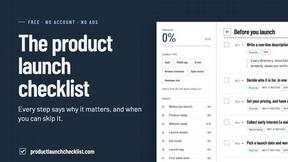
Product Launch Checklist
A free launch checklist for SaaS, apps, AI tools and more. Every step says why it matters and when you can skip it.

HomeAnswerBook
Practical, independent guides to home repairs, maintenance, costs, troubleshooting, and everyday fixes.
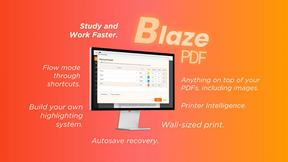
BlazePDF
Highlight faster. Study in flow with custom shortcuts and a workflow built around you. Print smarter, or turn any page into a tiled poster.
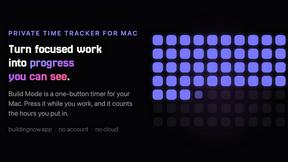
Build Mode for Mac
Build Mode is a Mac app that turns focused sessions into visible progress, so you can see the work adding up before the results arrive.



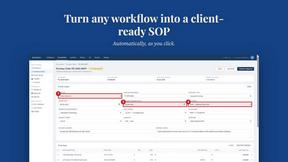
MySOP.guru
Capture any workflow in your browser and export a branded, step-by-step SOP with screenshots. €5 per document, no subscription.